


Extract minimal, referentially-intact database subsets for local development and debugging.
The Problem
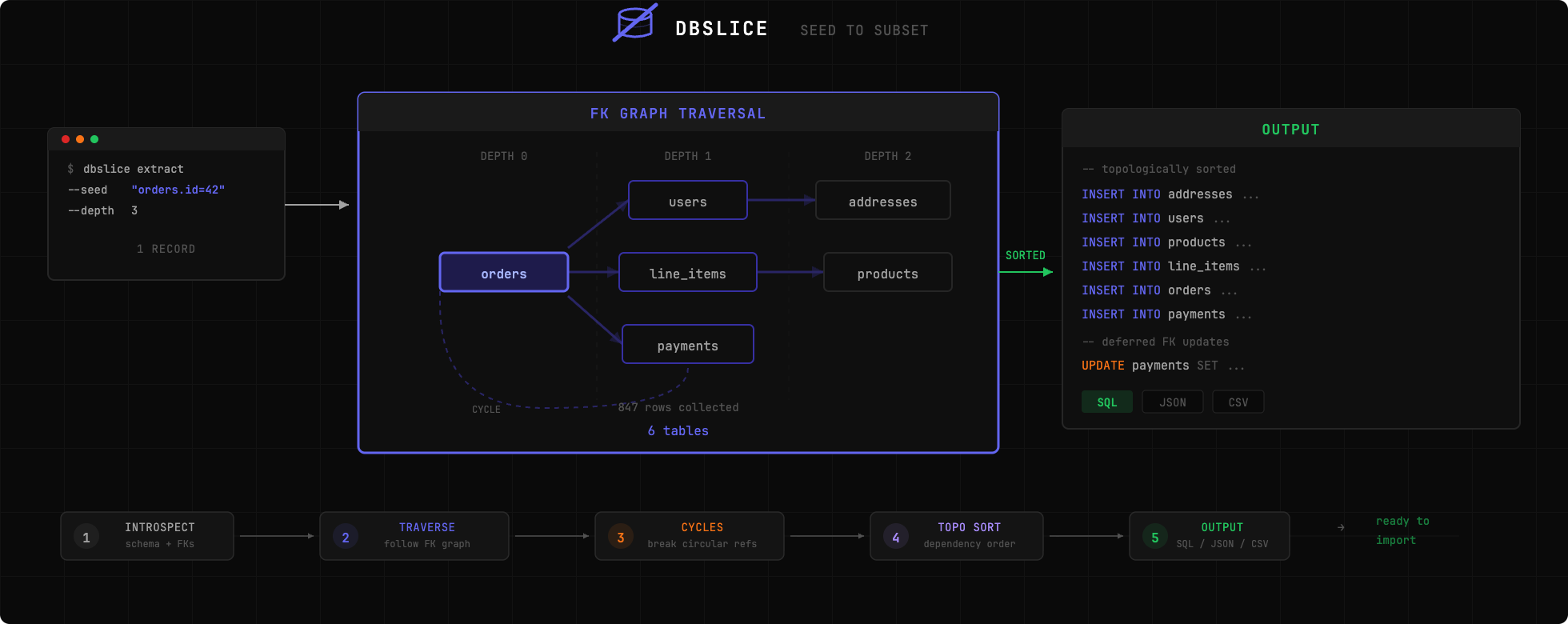
Copying an entire production database to your machine is infeasible. But reproducing a bug often requires having the exact data that caused it. dbslice solves this by extracting only the records you need, following foreign key relationships to ensure referential integrity.
Quick Start
# Install globally
uv tool install dbslice   # or: pip install dbslice

# Extract an order and all related records
dbslice extract postgres://localhost/myapp --seed "orders.id=12345" > subset.sql

# Import into local database
psql -d localdb < subset.sql
Features
- Zero-config start -- Introspects schema automatically, no data model file required
- Single command -- Extract complete data subsets with one CLI invocation
- Safe by default -- Auto-detects and anonymizes sensitive fields (emails, phones, SSNs, etc.)
- Multiple output formats -- SQL, JSON, and CSV
- Streaming -- Memory-efficient extraction for large datasets (100K+ rows)
- Virtual foreign keys -- Support for Django GenericForeignKeys and implicit relationships via config
- Config files -- YAML-based configuration for repeatable extractions
- Validation -- Checks referential integrity of extracted data
Database Support
| Database | Status |
|---|---|
| PostgreSQL | Fully supported |
| MySQL | Planned (not yet implemented) |
| SQLite | Planned (not yet implemented) |
Installation
# Install with uv (recommended)
uv add dbslice

# Try without installing
uvx dbslice --help

# Or with pip
pip install dbslice
Usage
Basic Extraction
# Extract by primary key
dbslice extract postgres://user:pass@host:5432/db --seed "orders.id=12345"

# Extract with WHERE clause
dbslice extract postgres://localhost/db --seed "orders:status='failed' AND created_at > '2024-01-01'"

# Multiple seeds
dbslice extract postgres://localhost/db \
  --seed "orders.id=100" \
  --seed "orders.id=101"
Control Traversal
# Limit depth (default: 3)
dbslice extract postgres://... --seed "orders.id=1" --depth 2

# Direction: up (parents only), down (children only), both (default)
dbslice extract postgres://... --seed "orders.id=1" --direction up
Anonymization
# Auto-anonymize detected sensitive fields
dbslice extract postgres://... --seed "users.id=1" --anonymize

# Redact additional fields
dbslice extract postgres://... --seed "users.id=1" --anonymize --redact "audit_logs.ip_address"
Output Formats
# SQL (default)
dbslice extract postgres://... --seed "orders.id=1" --output sql

# JSON fixtures
dbslice extract postgres://... --seed "orders.id=1" --output json --out-file fixtures/

# CSV
dbslice extract postgres://... --seed "orders.id=1" --output csv --out-file data/
Virtual Foreign Keys
For relationships not defined in the database schema (Django GenericForeignKeys, implicit relationships):
# dbslice.yaml
database:
  url: postgres://localhost:5432/myapp

virtual_foreign_keys:
  - source_table: notifications
    source_columns: [object_id]
    target_table: orders
    description: "Generic FK to orders via ContentType"

  - source_table: audit_log
    source_columns: [user_id]
    target_table: users
    description: "Implicit FK without DB constraint"
dbslice extract --config dbslice.yaml --seed "users.id=1"Inspect Schema
dbslice inspect postgres://localhost/myapp
Configuration File
# Generate config from database
dbslice init postgres://localhost/myapp --out-file dbslice.yaml

# Use config
dbslice extract --config dbslice.yaml --seed "orders.id=12345"
How It Works
- Introspect -- Reads database schema to discover tables and foreign key relationships
- Traverse -- Starting from seed record(s), follows FK relationships via BFS
- Extract -- Fetches all identified records
- Sort -- Topologically sorts tables for correct INSERT order
- Output -- Generates SQL/JSON/CSV with proper escaping
Comparison
| Feature | dbslice | Jailer | Greenmask | slice-db |
|---|---|---|---|---|
| Language | Python | Java | Go | Ruby |
| Configuration | Zero-config | Requires model file | Config required | Manual YAML |
| Setup time | Seconds | Hours | Medium | Medium |
| Anonymization | Built-in (Faker) | Plugin-based | Advanced transformers | Not available |
| Subsetting | FK traversal | FK traversal | Limited | FK traversal |
| Output formats | SQL, JSON, CSV | SQL, XML, CSV | SQL | SQL only |
| Cycle handling | Automatic | Manual config | N/A | Manual |
| Streaming | Built-in | Configurable | Built-in | Not available |
| Maintenance | Active | Active | Active | Unmaintained |
dbslice is the lightweight, zero-config Python option: install and extract in under a minute.
Development
git clone https://github.com/nabroleonx/dbslice.git
cd dbslice
uv sync --dev
uv run pytest
License
MIT