Skip to content


Log
- Update May 2025: I removed pH probe (3rd broke in 2 years) in December and have been running on just ORP measurements (ORP probe has been much more reliable). Once ORP measurement goes outside the 'green' table range, perform manual pH & alkalinity measurement, balance, then balance ORP with sanitizer. I think pH probe is not worth the cost/hassle in replacement - convenience it adds is marginal, since you still need to measure alkalinity manually.
- Update Dec 2024: Replaced worn-out ORP probe and added SMA Panel adapter. Decreased sampling rate to 1/hour to help battery last when there is little sunshine.
Hardware
Solar Panel Components
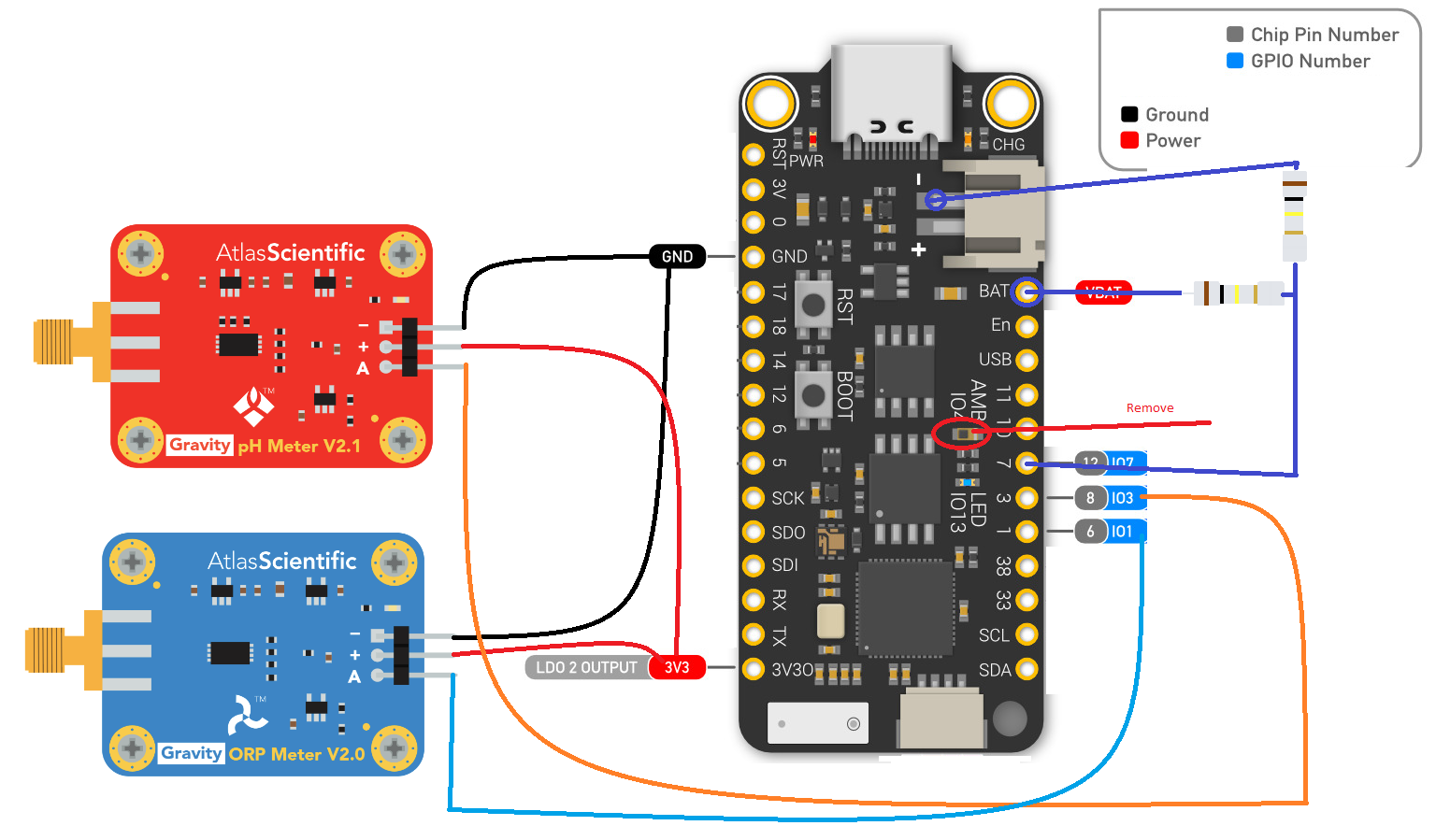
Wiring
- Diagram
- NOTE: You can skip the ambient sensor removal step
- Install Python (Tested 3.13.3)
- Open Command Prompt
pip install esphome==2024.12.4- copy
wifi_example.yaml to wifi.yaml and edit the new file
- Connect the board via USB and enter
esphome run tubby.yaml on the command line. This will build and upload firmware to the board.
- In Home Assistant, create a helper switch
input_boolean.ota. Enable this switch, it will prevent device Deep sleep.
- Power cycle the board, Device then enters
Light sleep for 15 minutes before it shows up in Home Assistant
- Once your esphome device is added to Home Assistant, Use Device's page, Diagnostics section to calibrate the probes:
ORP Cal : mV ORP calibration offset from raw ADC value. Note: ORP mV Sensor value has calibration appliedpH 10 Cal: mV reading from pH Raw sensor while submerged in pH 10 calibration solutionpH 7 Cal: mV reading from pH Raw sensor while submerged in pH 7 calibration solutionpH 4 Cal: mV reading from pH Raw sensor while submerged in pH 4 calibration solutionppm Factor: 1 - Chlorine, 3 - Bromine
- Turn off
input_boolean.ota to allow the device to save some power.
- Place the probes in the water, and enjoy!
Sanitizer ppm Model