
Multi-passphrase multi-content in a single encrypted file.
⚠️ Warning
This tool is just a proof of concept, almost a joke, I made it only to satisfy my curiosity and learn more about the Rust programming language.
Using this will result in serious data loss. See "problems" at the bottom of this README (I did this in two days, heh).
If you are really worried about protecting crypto assets, nmemonics in your hardware wallet are a superset of this.
🌱 Demo
Peek.2023-02-14.09-45.mp4
🔧 How does it work?
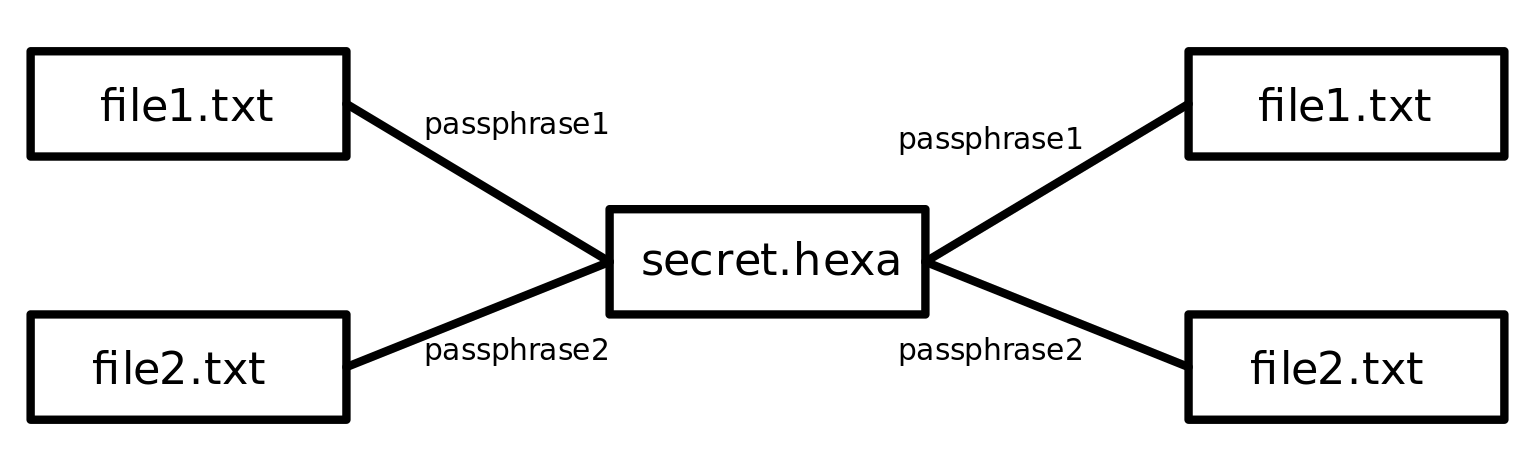
Each file gets encrypted on its own using the gpg command, then a separator string of bytes is added at the end, and appended to the .hexa file.
When decrypting, the program parses the binary to partition it by this separator string of bytes, then writes each chunk to a file (restoring the encrypted file). Once all encrypted files are created, it tried to decrypt them one by one, as soon as it finds one it can decrypt, then that's the one it generates.
🔍 QR Code
The program also creates a QR code that contains the binary data of the file encoded in hexadecimal. Hexaguard can also decrypt from that .png file it generates.
This was inspired by PaperAge.
You can try it out by downloading the following QR code file:
Requirements
- GPG (to actually encrypt/decrypt)
- xxd (to transform to hexadecimal)
Optionals:
- qrencode (to generate qr) (
apt install qrencode) - zbar (to decode qr) (
apt install zbar-tools) - convert (to get PDF from qr)
How to run?
Read the warnings mentioned above, but if you still want to play with this, you can run it by:
- Clone the repo
- Do
cargo build --release - Copy
target/release/hexaguardto the folder where the files you want to encrypt are (make sure the folder only contains those files to avoid problems with overwriting, always have back ups) - Then run it
./hexaguard
Problems:
This list is a vastly incomplete list of problems:
- The separator string could appear as part of the output of the encryption algorithm, this would effectively break the program.
- There's no support for using the same passphrase for multiple files, one would get "lost".
- Encrypting with this program is only lost-access-to-the-code away from forever losing whatever was encrypted.
- To the eyes of someone who knows, it would be trivial that there are actually two encrypted files stored next to each other.