· 239 comments · 357 replies
Windows Feature Exploration: Default CLI Text Editor
Please Provide Feedback!
Please let us know what you think about this feature by commenting on this issue! We’d love to hear your ideas and feedback!
Let us know:
• Do you want to see a default CLI editor in Windows? How would it improve your experience?
• Do you use a CLI editor today? If so, which do you use and why?
• Are there alternative solutions or CLI editor-related features you’d like to see?
Overview
This issue is suggesting that Windows should once again ship with a CLI editor installed inbox by default. 32-bit versions of Windows ship with edit, but 64-bit versions of the OS have no CLI editor installed inbox. A CLI editor is a core tool for system admins, developers, and power users – providing an immediate viable option here is an important quality-of-life improvement.
Solution
There are countless available CLI editor options across operating systems today, each with their own sets of advantages and disadvantages. The goal would be to install the selected editor(s) by default such that their commands work out-of-the-box. Example editors include but are not limited to:
• Edit
• Pico
• Nano
• Vim
• Emacs
• etc.
Installing one or more of these editors by default will offer immediate CLI text editor capabilities on all Windows machines, preventing the need for additional installs or workarounds when operating on local machines, remote connections, or Windows containers.
Alternative
Improve error handling such that the shell will recognize editor commands that fail due to missing package and recommend the proper install solution. See below for an example using Vim.
Actual:

Alternative Solution:

It’s a pity that Windows doesn’t have edlin or edit or any other console editor out of the box. I think this needs to be fixed.
On Windows I usually use the internal Far editor, much less often the micro editor.
For Linux, respectively, mcedit and also micro (works better than its Windows version)
10 replies

I would much rather see a modernized version of Edit, rather than bringing it back. This is 2023, almost 2024! A modal take on Nano (similar to vim) would be lovely, but with extensibility in mind (perhaps by supporting PowerShell language for scripting).

including exposing API's for community extension/plugin support, available via win-get
total nonsense; ship a basic editor first. It's indeed completely stupid that you can install windows server in a CLI-only configuration and not have the ability to edit a text file on the system.
It wouldn't be very microsoft-y to ship a 3rd party program as their default though that is the obvious fast turn solution. If they end up doing something from scratch, my suggestion would be for them to adapt notepad.exe to have a CLI mode.

I think that top bar might be improved. Ie. there might be a switch-mode button on the top left (as well as an keyboard shortcut), that switches what the bar does.
It might provide the [file/edit/search/...] mode, but also switch to an open file tabs mode, an "build and run" mode for development, an version control mode, an search bar mode, and maybe an hidden menu mode, providing more screen estate for the open file(s).

I think it is absolutely great that people want a console mode IDE like Turbo Pascal or Microsoft Programmer's Workbench from the 1990s. However the topic is really about a replacement for "edit.com" that was removed. We are in the situation where we can't even edit a ten line configuration file using the console in an emergency. All the features regarding emojis, syntax highlight, auto-complete, multiple files, split-windowing, plugins, git integration, build environments can all be supported by non-default software accessible by downloads or WinGet.

Well said, rhubarb-geek-nz - you are spot on!!
The aim of the current project is not to design the most wonderful, feature-packed programmers' text editor imaginable. People can use VSCode, or their own preferred editor, for that.
The aim of the current project is to give the operating system a basic text editor facility, replacing the old edit.com feature which was lost in the move to 64 bit Windows. This would allow administrators to edit configuration files, etc, enough to resurrect a disabled server, or configure a headless server over ssh.
I would really like it if we could have an equivalent of nano built-in to Windows. Maybe call it nanopad as an alternative to notepad ;)
9 replies

Micro would be perfect for this. It's like nano but uses Windows shortcuts.

If Microsoft can't directly ship nano with Windows, I think Microsoft ought to recreate a program that looks and works suspiciously similar to it and call it edit.exe.
Sidenote: I know this wasn't asked, but I wish this editor could be the start of a bigger project making all the CLI commands/programs in Windows more robust and consistent in behavior.


Nano can't take care of windows line break characters: CR LF
And can't display CJK characters correctly on Windows:


1 reply

For ages I've also use micro-emacs. There was a time I used VMS and Unix on a daily basis, and learned to compile micro-emacs. It also compiled on DOS. Right now Linus Torvalds keeps one in https://github.com/torvalds/uemacs - which is my fallback when I wind up on a system where emacs isn't installed.
Having a VIM port would make all the Linux geeks happy and not constantly lay it on thick to Windows folks.
7 replies

Vim works just well on Windows.

It sure does; I think some opposition to it would come from its esoteric keyboard controls. It's not very familiar to anyone who grew up only using GUIs.

I use nvim all the time on windows, fine as a daily drive. Bugs get fixed.

Huge neovim lover, but I would like Vim as default terminal editor for Windows.
Too many neovim plugins requires nightly version of neovim these days, making hard to have stable neovim version.
Having Vim as default will be fine. It will gain quite of Windows users in vim community, and they will hopefully contribute to Neovim’s compatibility problems.
+1 for nano. The easiest to use IMO.
4 replies


Nano with LSP support and more conventional keybindings would be ideal

nano is GPL.
How about pico by U of Washington
Add vim, nano and emacs. they are the top 3 and their file sizes are not too big for that to be an issue. (I did not check if all three have working Windows ports).
Anything else, like only adding one of the three would spark endless discussions on why you picked on over the other.
0 replies
2 replies

QB64 just hit my nostalgia hard and idk, now incorporating a text editor like that would be really cool.
For the time being, I just have cygwin installed and I have nano.

There should be definitely something that's a nano equivalent, to make sure anyone can use it. But it'd be also nice to have something more advanced and standard, e.g. vim
0 replies
Honestly, I'm a big fan of Malcolm Smith (@malxau)'s modernized port of edit. It's quick, it uses a familiar TUI design for Windows users, and by gods is it small.
3 replies

I like a lot of the lightweight editors. But I think perception and tooling is important. I personally have always preferred nano on Linux. But I'm an outlier and a Windows guy. The Linux first folks I know are more vim/emacs oriented. With at least in my circles vim being way more popular.
I think vi/vim is included by default on nearly every Unix distribution. I think it's a good idea to keep with history in these interactive shell scenarios. Even if I'd personally think nano would work for 90% of the issues (same with edit, for that matter).

modernized port of edit
Could you share its github url? I could not find.
PS. I found it, Yedit, on this page

haha, just posted it on X too, take Edit and apply some charm.sh for some nice modernized TUI components
Having any command line text editor reliably available out of the box on every windows system would be appreciated. But the right answer is vim.
4 replies
The "right" answer?
Anyone who uses vim already has enough knowledge to handle installing and configuring it on their own. For the remaining 90% of the population it would be useless.
Things like nano or especially micro would be much better because there's zero learning curve.

Agreed. vi, vim, and their derivatives are extremely painful to use.

some effort to learn and understand:
Effort well spent if you're a programmer, but very inefficient if you're a non-programmer user just trying to edit a simple .conf file every now and then.
I think vi/vim is the defacto default that you even find on the CLI of appliances with a proprietary OS and most "IT pros" are familiar with it, even if it's not their default editor of choice.
So I think you should consider shipping at least vim. In an ideal world I'd wish for nano, vim, emacs to be available.
Regarding vim, it would be nice if it came preconfigured with some sane defaults for windows, i.e. yanking to the windows clipboard, etc.
3 replies
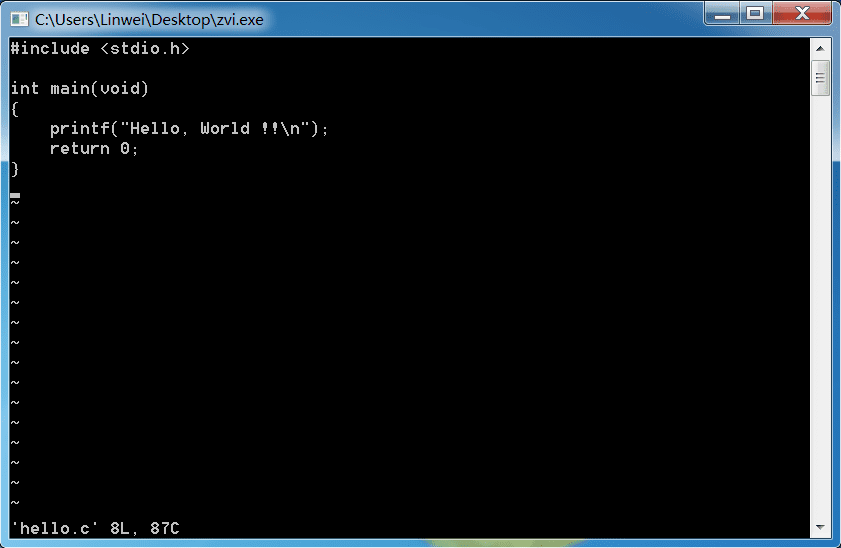
I have made a vi-clone for Windows CLI, it is only 62KB and can run in a local terminal or via a ssh session:
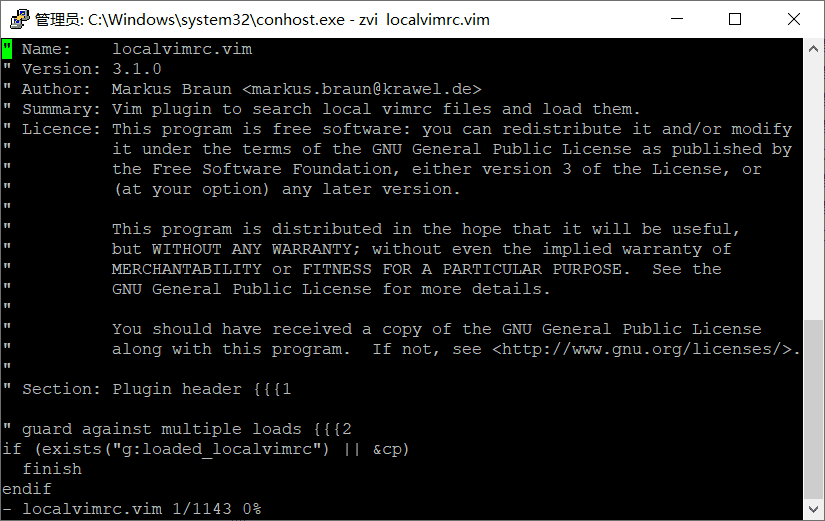
even on windows7 and xp:
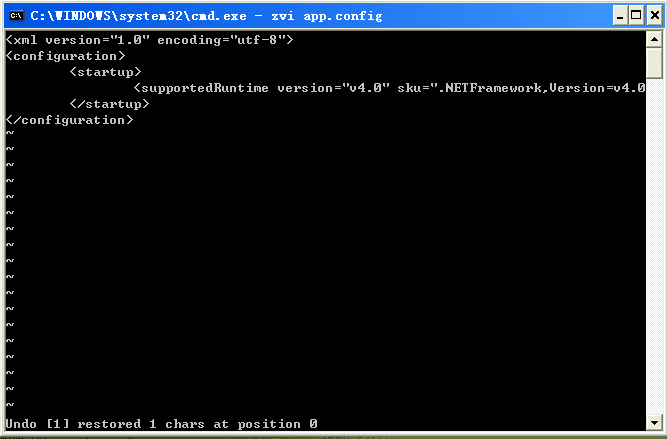
repo:

Based on BusyBox, yes? Then it's GPL'ed and not UTF-8 compatible...

thanks. I have been using the official vim windows version for years and it is very mature. Even though it is a lot larger compared to your busybox approach. I think there would be massive benefits from vim (or some other CLI editor) being preinstalled ootb. Especially because ssh'ing or powershell remoting into windows boxes has become a common thing.
The Micro editor seems like a good candidate: It feels more modern than nano, with hi-color support and the same basic keyboard shortcuts as Windows does (such as Ctrl-C to copy or Ctrl-S to save, unlike nano's arcane hotkeys)... and, well, also the name.
Either way, it should be a relatively basic notepad-clone, not just because Editor Wars but also because of the update schedule – bundling Vim wouldn't just annoy Emacs users, it'd also annoy Vim users who will want a more up-to-date version of Vim because the inbox one will inevitably end up being two years old...
3 replies
Sure. But that bundling problem can be solved with oneget. So as long as the port is maintained.

I end up installing some version of micro on all the windows boxes I should time on. It's simple and light and exactly what I need from a CLI editor
Sure. But that bundling problem can be solved with oneget. So as long as the port is maintained.
Oneget is no longer maintained.
Which editor most closely matches Windows’ native keyboard shortcuts for text editing? Whichever one that is has my vote.
1 reply
The more I look at the comments and ponder, I have to ask: Who is the target audience for this feature? Windows users? Or Linux users?
1 reply
I'd say the target use case is remote ssh access to windows. This is a very big gap right now on Windows Server and results in either having to remotely map a cifs share, upload a pre-edited file via copy-item -ToPSSession, or remotely RDPing into the box and firing up notepad.
I'm merely saying that for most use cases this is already solved. I personally use nano, but there are great many folks that reflexively use vi/vim and call it a day. Those tools won the "default" war ages ago on *nix platforms. vi, for example, is on my ubiquiti edgerouter and not nano. (I did install nano later).
Nonetheless, the only real problem is maintenance of the releases. And if the maintenance of OpenSSH is any indication, Microsoft doesn't have a good track record here. (Perpetual beta release ftw).
0 replies
Yedit is nice, I guess it depends if Malcolm Smith wants to hand over his code to Microsoft. Since Malcolm is ex-Microsoft himself, there could be all kinds of, uh, emotional issues there .
Whoa. For the record:
- As far as I know, I still work for Microsoft. Please let me know if you have any news I should be aware of. I am on the opposite side of the company though, so what's happening here doesn't really relate to my day job.
- I don't have any emotional involvement about which editor to include. I'm reading all of the comments here daily, thinking about all of them, and trying to not push the discussion in any direction. I do passionately believe Windows should include a TUI text editor, and will actively work with and support anyone trying to make that happen, regardless of the editor or editors chosen. (For context, I use vim as a programmer's editor, including at work, have used Microsoft's matching funds to donate to Bram's requested charity, and have contributed to the Windows port of elvis. Yedit's source code includes vim footer tags to define indentation.)
- My tools are licensed under MIT because when I started, Microsoft had a policy that employee open source projects should be. I always assumed this was done specifically to ensure Microsoft could use employee open source code, even if employees leave with, uh, emotional issues. That always seemed logical and ethical to me.
2 replies
10,000 apologies, Malcolm! I stupidly misunderstood a comment from a while ago on the Old Timers group. I'm very glad you haven't been RIF'ed :-) Unlike myself.
Yedit is close to a perfect solution, here. I guess it would depend on whether MS want to leverage your code, or develop new code, in-house, from scratch. Obviously I don't have any visibility of that any more, since MS and I parted ways.
As I remarked above in this thread, I used vim for several years, sent money multiple times to ICCF, and I received a couple of nice emails form Bram, thanking me for my donations. So in general terms, I'm quite a vim fanboi. But I don't think any vi-like editor would be a good solution as the default text-mode system editor in Windows. Such an editor should be "Windows-like", not drawn from other UI paradigms.
If yedit can fix CJK characters display errors, it will be perfect:

Thank you so much to everyone for engaging with this feature exploration! Your passion has generated a ton of excitement in our own team, and I’m happy to share our proposed direction, which is that we will work with Malcolm Smith (malxau), the maintainer of Yedit, to ship Edit in Windows! We plan to do this by forking the Yedit code to a new OSS repo on GitHub, under Microsoft (like terminal or powertoys).
Why this direction?
- We do not want to interfere with Yori / Yedit and the platforms and users it supports, and there are certain changes we need to implement before a version can be shipped in Windows including:
- CJK + Emoji support.
- Localization support.
- Top pieces of feedback that helped shape our decision:
- The editor should have intuitive and “Windows-like” feel.
- The editor should be lightweight.
- And honestly, the surprising but welcome amount of love for Edit!
What about your favorite editor such as Vim or Emacs?
- We will continue to investigate ways to get users their favorite tools without additional download/install actions, but at this time we wanted to prioritize a lightweight and simple solution to satisfy basic use cases across Windows.
- The PowerToys team has shipped Command Not Found as part of PowerToys as an example of improved error handling to help developers get the tools they need faster – check it out here! Releases · microsoft/PowerToys (github.com)

We will continue to update this thread with more info, including timelines once they are ironed out, but I promised more info early in the new year so we’re doing our best to get it to you 😊. Again, I cannot thank everyone enough for the feedback and energy around this feature.
19 replies


Please, add support for Windows spell-checking. It would help immensely when editing git commit messages, for example.

any update? roadmap? Connor Plante (@plante-msft) , could you please share more information about it?
There is approximately zero chance that anyone will update with any juicy information. Half of us will misunderstand what they say, even after rereading multiple times, and the subsequent conversations will mislead the rest of us into thinking that they said something that wasn't said.
Please, add support for Windows spell-checking. It would help immensely when editing git commit messages, for example.
#include <there-are-already-many-console-programming-editors-available.h>
#include <this-is-supposed-to-be-dead-simple-editor.h>
#include <this-conversation-has-been-going-on-for-a-year-already-adding-spell-checking-wont-deliver-it-sooner.h>
Please, add support for Windows spell-checking. It would help immensely when editing git commit messages, for example.
You might want to read the whole thread and see why this is not a good idea (in fact it's a terrible idea).
The aim of the project is to replace the 16-bit edit.com which was available in 32-bit Windows, which obviously can't run on 64-bit Windows. Hence, current Windows does not have a default, built-in character-mode system editor that a system administrator, etc can use to perform basic but essential maintenance tasks, without a GUI, possibly over SSH, possibly without any Internet connection, possibly standing up in a dark and freezing data centre in the middle of the night.
A non-goal for the project is to provide a programmer's code editor, which a developer might use to write code and prepare commits for Github, etc. For that scenario, there are already a thousand free, open source editors which you can download and install, to match all your preferred preferences.
Why not ship with multiple? There's no reason you can't have a terminal version of notepad (maybe nano?) and something more advanced like Neovim and something that wants to be everything and not extensible like the Amp editor written in Rust.
1 reply
'Something more advanced' is fine, if the user wants it. But there's no reason to include it in the base Windows installation.
Among other problems, the basic Windows image is already bloated with a tonne of semi-superfluous stuff which (a) increases the attack surface and (b) takes up disk space. We don't want to compound that, with even more unnecessary stuff. That's okay for a user running Windows on their own laptop, but it's a pain in the bum for spinning up VMs and containers, in the data centre.
If you want neovim or amp, just download and install them, same as today.
The requirement here was for a character text editor to replace the missing edit.com, which existed in 32-bit Windows. Edit.com was a very basic editor, but it was ALWAYS available, even when there was not GUI and no Internet connectivity.
The requirement wasn't to provide a general purpose programmers editor, for people who happened to prefer editing in a terminal window. That requirement is already well-catered for, with many existing and easily-installed options.
There's no reason you can't have a terminal version of notepad (maybe nano?)
That is what the Yedit fork will provide.
and something more advanced like Neovim
WinGet for anything else.
0 replies
I use
bash -c "nano file.txt"
Missing a built-in text editor, or even a bunch of them with an ability to choose the default one, like vi, vim, nano and launch them by "edit" command.
0 replies
Menus are terminal dependant. You can not expect a remote terminal to support an extensive set of control codes. Even cursor positioning can be difficult under these circumstances.
…On Tue, Jan 2, 2024, 5:42 PM Andrew McLaren ***@***.***> wrote: which is a CUA editor sans menu You might need to go back and re-read the CUA specification (IBM document SC26-4351) because menus are an integral part of CUA. Just having CUA style key bindings doesn't make it a CUA app. And why should we settle for a Windows system editor which doesn't have menus? Menus are one of the most common elements in the 'Windows, Icons, Menus, Pointer' (WIMP) design pattern. A system editor in Windows should be immediately familiar and usable for anyone whose dominant experience is in using Windows. — Reply to this email directly, view it on GitHub <#16440 (reply in thread)>, or unsubscribe <https://github.com/notifications/unsubscribe-auth/AFIUKNGBYFJDAFWC7IVZCODYMSELXAVCNFSM6AAAAABALVNE4KVHI2DSMVQWIX3LMV43SRDJONRXK43TNFXW4Q3PNVWWK3TUHM3TSOJXGQ3TI> . You are receiving this because you commented.Message ID: ***@***.***>
2 replies

This is what termcap, terminfo, and libraries like curses are for, allowing developers to write TUI applications without hardcoding a specific terminal. Obviously it shouldn't depend on any features not available in Windows Terminal, but Windows Terminal supports enough for an Edit clone.
I personally use a win64 build of Neovim from the windows terminal and love it! Thinking about it, I would definitely not mind having a terminal version of vscode but, anything less powerful than those would not be used at all by me.
0 replies
0 replies
I'm really not keen on the idea of shipping a "recreation of the MS-DOS 5 editor" with modern Windows.
The current details about It would be fine as an "easter egg" for those that want a nostalgia feel to reminisce on the past, but it is a terrible proposal. Trying to even find information about the editor leads me to a non-SSL site from the 90s, and then mentions it is part of Yori on GitHub, where the author complains about GitHub enforcing 2FA. Why on earth would users want to use a MS-DOS editor in this time and age? I seriously doubt Microsoft can fork, modernize and maintain their own text editor to compete with the likes of those that users actually want to use like Neovim, Helix, Kakoune,
Why not just pick one of those, Helix being my favorite, and do what normal people and companies do and include attribution/disclosures with Windows?
6 replies

The use case here isn't to provide a programmers' editor, which people might like to use to edit code or other complex text-processing tasks.
The use case is to provide a minimally viable character mode editor which system administrators etc can use to edit configuration files, perform maintenance tasks, or resurrect a damaged server. Possibly while working in very onerous conditions, like standing up in front of a rack in a darkened data centre at 2:00am on a Sunday morning, while the customer is losing thousands of dollars a minute. In other words, the use case is exactly to replace the 16-bit editor which was available in 32-bit Windows, but is not in 64-bit Windows. For this role, it's important the editor uses mainstream Windows UI idioms, like CUA-style drop down menus and key bindings, modeless operation, etc, so it can immediately be used by anyone. Straight away, that precludes anything in the vi tradition.
For users who really like Vim, or Micro, or Helix, or any other editor, that's fine: you are able to download and install any editor you like. There is no reason for <insert your favourite editor here> to be included in the universal base image of Windows.
The use case here isn't to provide a programmers' editor, which people might like to use to edit code or other complex text-processing tasks.
The use case is to provide a minimally viable character mode editor which system administrators etc can use to edit configuration files, perform maintenance tasks, or resurrect a damaged server. Possibly while working in very onerous conditions, like standing up in front of a rack in a darkened data centre at 2:00am on a Sunday morning, while the customer is losing thousands of dollars a minute. In other words, the use case is exactly to replace the 16-bit editor which was available in 32-bit Windows, but is not in 64-bit Windows. For this role, it's important the editor uses mainstream Windows UI idioms, like CUA-style drop down menus and key bindings, modeless operation, etc, so it can immediately be used by anyone. Straight away, that precludes anything in the vi tradition.
For users who really like Vim, or Micro, or Helix, or any other editor, that's fine: you are able to download and install any editor you like. There is no reason for <insert your favourite editor here> to be included in the universal base image of Windows.
Appreciate you explaining this for like the 100th time. Amazing people claim to have "read" the thread and then hop in suggesting Helix 🤡

so... when will we have one? 🙊👼
I've read this thread and it is pointless to include a "recreation of the MS-DOS 5 editor" in modern Windows then. The whole point was to have an editor that users actually want to use.
No! It isn't! The point is to have an editor that you can use when you need a console text editor and you don't already have something else installed. Like with a Windows container.
If you want [your favorite editor] then install it. This is for people who are fine with "terminal notepad" and they don't want to worry about keeping their favorite editor updated. Microsoft will maintain this and you won't need to worry about it.
This is not anyone wanting to crap on your favorite editor, this is Microsoft wanting people to be able to edit files in the console/terminal without needing to install a 3rd party editor first.
You say you read the thread, but I'm not sure you did. To be fair there are many distinct threads here and many people seem to be missing an understanding of what was asked.
As a feature request, can we make sure the editor can read from stdin as a file? Something like this would be good: PS C:\> appcmd list site | ConvertFrom-XML | filtering_step_goes_here | edit.exe - I know for IIS users in particular the ability to have a proper editor to wrangle config files would help avoid the need for enabling the full Desktop Experience on Windows Server, which can help pack cloud instances a little tighter to save money.
…6 replies
Yep - editing config files on a headless IIS server is exactly the kind of use case they are looking at, for this project.
I kind of like the idea of the editor accepting input from stdin. But rhubarb-geek-nz is correct: this could be a bit difficult to get right, in PowerShell. The PowerShell pipeline passes objects, not a raw byte stream like the pipeline in CMD.exe. For maximum versatility the editor would want to accept a byte stream from stdin; and PowerShell users might have to add some kind of RedirectStdInput operator to caste the PowerShell pipeline output into a byte stream, not an object. Sorry, I haven't checked what the exact syntax would be in PowerShell; would have to futz around with it for a while.
This is one of those features where it increases complexity for a very minor use case that never existed in the original edit.com. Both the keyboard input and the file come from stdin. So when does the file end and the human input begin? So now you have to change to using the "controlling terminal" for keyboard input rather than stdin, in the case of Windows using the special device "CON:" or /dev/tty on UNIX based systems. If you want to do this, use some existing vi port. I hope the editor we are talking about keeps to the basics and stays simple. I hope the priority would be for an editor that works well over an SSH session rather than trying to get it to work in a powershell pipeline.
Yep, agree ... probably why I said "I kind of like the idea" :-)
It Would Be Nice™ ... but as you correctly note, simplicity and speed of actually delivering the solution are the top priorities.
So when does the file end and the human input begin?
The whole file is read, the pipe is closed, stdin goes away and then reattaches to CON, and then window drawing starts? This doesn't seem that hard, at least for a proper terminal. If cmd/conhost has some bug that prevents this from working it should be fixed.
This doesn't seem that hard, at least for a proper terminal.
It isn't so much as a "can it be done" as a "should it be done". Yes it could be implemented there are no technical barriers except effort, increasing complexity and additional maintenance. But adding such a feature goes against the goals of "like for like replacement", "keep it simple", "do one thing well", "stick with CUA UI principles" and "not having modes".
Tidux, can you explain more about when you’d want to read from stdin? Is this to modify the output, or is this to browse and search the output? Personally I think there’s an interesting observation here. The version of `more` in Windows is…uhh, minimal. If there was a version of more that added capabilities for searching, navigating, copying, saving, etc, would it make sense to use CUA? If it did make sense to CUA, is it really a distinct tool? There’s a whole lot of secondary observations too. As others have been saying, Powershell objects are not text. If the goal was to interactively navigate Powershell output, and output consisted of objects with reflection, maybe the best tool isn’t a text tool at all. Also, there may be good reasons for an editor to load files asynchronously anyway (to ensure a responsive UI), but if they did that, they’d be well on the way to being a substitute for `more`.
13 replies
To demonstrate the principle of "doing one thing well", here is a simple example of doing less in a Visual Basic Script that can be run with cscript.exe. The advantage of that is that you can use less with any editor you want by using an environment variable, just like git.
Dim StdIn, oShell, fso, FileName, TmpFolder, oFile, TmpPath, Command, Editor

Set StdIn = WScript.StdIn
Set oShell = CreateObject("WScript.Shell")
Set fso = CreateObject("Scripting.FileSystemObject")

FileName = fso.GetTempName()
Set TmpFolder = fso.GetSpecialFolder(2)
Set oFile = TmpFolder.CreateTextFile(FileName)
TmpPath = fso.GetAbsolutePathName(TmpFolder)
Set TmpFolder = Nothing
FileName = TmpPath & "\" & FileName

Do While Not StdIn.AtEndOfStream
	str = StdIn.ReadLine
	oFile.WriteLine str
Loop

oFile.Close
Set oFile = Nothing

Editor = oShell.ExpandEnvironmentStrings("%EDITOR%")
Command = Editor & " " & FileName

oShell.Run Command,1,true
Set oShell = Nothing
fso.DeleteFile FileName
Set fso = Nothing
And wrapped with a batch file
@echo off
cscript /nologo "%~dp0less.vbs"
Then you can happily do
C:\Users\foo>set EDITOR=notepad.exe
C:\Users\foo>dir | less
It would take more to support console editors by opening the special "CONIN$" device, but the point is; do that once in 'less' and then let any editor be used, rather than every editor having to have a special 'less' mode.

For bonus points, put the VBS script inside the batch file as a polyglot.
For sadness points, Microsoft is removing VBS/WSH soon.
This is a cheap and cheerful less that uses simple Win32 console API, happily works over SSH, even on Window 10 IoT and can be used with any console or GUI editor.

Tidux, can you explain more about when you’d want to read from stdin? Is this to modify the output, or is this to browse and search the output? Personally I think there’s an interesting observation here. The version of
morein Windows is…uhh, minimal. [...]
After finally adding sudo and a simple text editor (hopefully soon?), more should be the next candidate for a refresh together with an improved man command for old commands (similar to what PowerShell has done but for legacy commands as well as others).
Easter Egg time - this is not the FreeDOS edlin, it was built win32 first. Can be used over SSHD.
Hey all. Long story short, we did a thing 🙂 https://github.com/microsoft/edit
In the name of the terminal team, I'd like to thank you all for the discussion here, which shaped how we built the editor. We really hope you like it! If you find issues, have any feedback, or other ideas please file an issue. Thank you so much!
3 replies

I'm so very happy to hear you have a first release of the new editor! I can't wait to try it! Though... it looks like Defender is unhappy with it...

Can we get MS to stop blocking the binary?

Outstanding! This is beyond awesome. Exactly what I was hoping for in a text-mode editor. Well done, guys - this is perfection.
(Nice to see a Linux version, too - very cool!)
0 replies
200kb, no AI slop, and lightning fast. Perfection.
4 replies
We'll need to add some AI next! :)
No tool is safe! This is Clippy's revenge!!!
On November 6, 2024, Microsoft announced that rewriting tools powered by LLMs will be added to Notepad.
Chris Pollitt (@chrispollitt) I would ask that you please leave your feelings about Microsoft's investment in AI at the door and not bring them into this place.
Guess what is my new favorite IDE now.
Yep, its wt edit.exe ; sp -s 0.3 -H cmd.exe

1 reply
For the uninitiated, what is sp?