)
)


places-env: secure version control of environment files
Note:
places-env is currently a proof of concept (PoC) and is not ready for use in public projects or production environments. Use it cautiously and only with private repositories.
If you appreciate the ideas behind places-env, consider contributing by submitting pull requests!
Motivation / The heck is places-env?
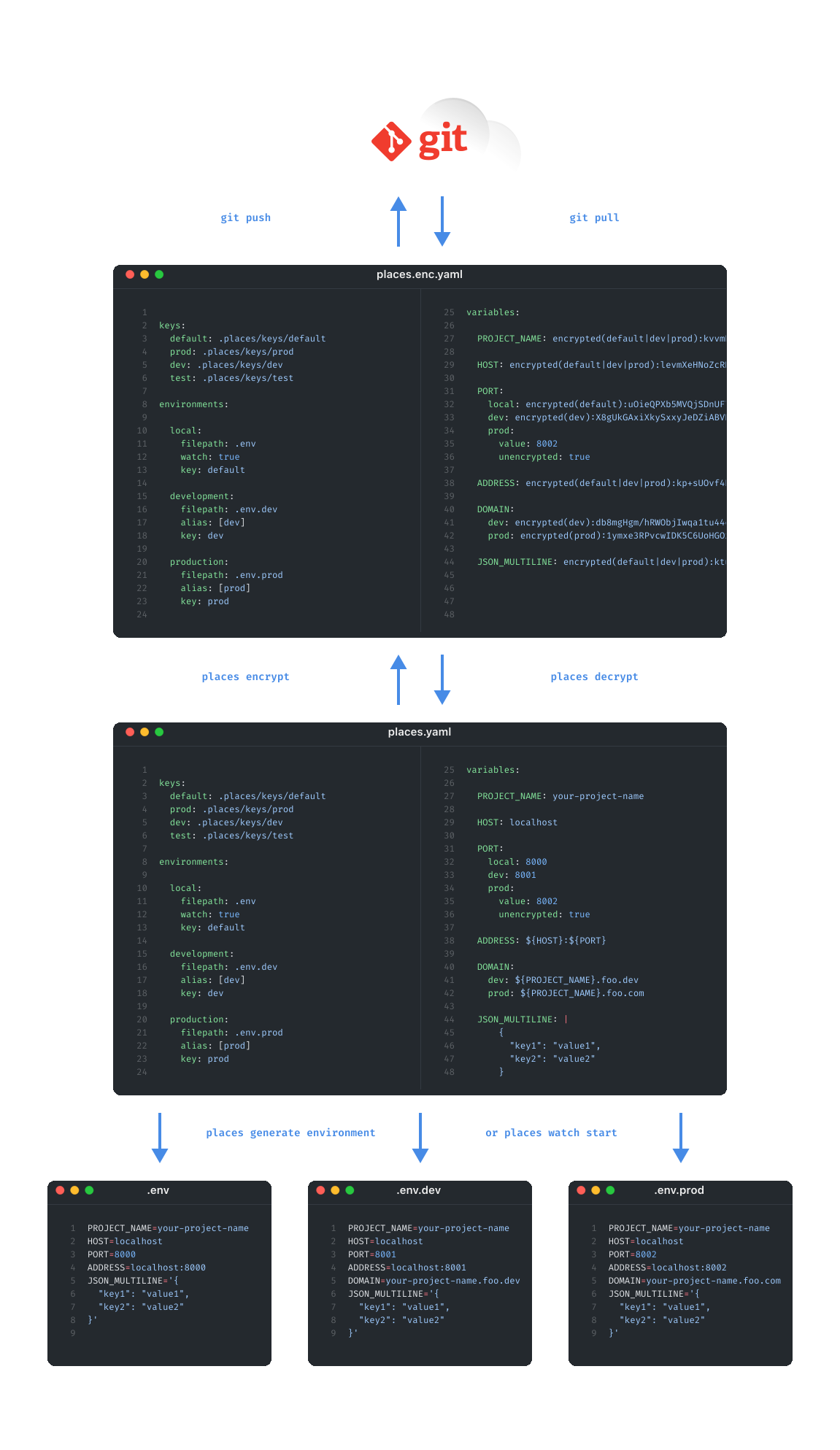
- places-env is a self-contained, completely free open-source (FOSS) alternative to HashiCorp Vault, Infisical, dotenv-vault and sops.
- Leverages a single source of truth (SSOT)
places.yamlfor deriving multiple environment files. - Similar to sops, places-env encrypts only the values in
places.yaml, resulting inplaces.enc.yaml, which can be securely checked into git:- Congrats, your SSOT is now version-controlled 🎉
- Always synchronized with collaborators
- Fully in-sync with the rest of your code, branches and tags (try doing that with Infisical & co. 😉)
- Changes remain 'human-trackable' — even when values are encrypted
- Contrary to sops, encryption keys can be assigned either per environment or on a per-value basis
- Provides a straightforward setup with no dependency on external services or libraries.
places watch start(persistently) tracks changes inplaces.yaml/places.enc.yamland automatically handles encryption, decryption, keeps.gitignoreup-to-date, and auto-updates environment files. So it's essentially set and forget.
Fallback Image (for Github Mobile users)

Getting started
- Install places-env:
-
via pypi:
pip install places-env
- Init project: In terminal
cdinto your project- Run one of the following commands:
places init: Creates an emptyplaces.yaml, generates a default crypto key at.places/keys/defaultplaces init --template min: Initializes with a minimal template (view content).places init --tutorial: Initializes with a tutorial template (view content).
- Modify
places.yaml:
- Use your preferred text editor
- Or modify it using the places-env CLI
- Track changes:
- Use
places watch start (optionally: --daemon, --service)(recommended) - Alternatively, use
places encryptandplaces sync gitignore. This will automatically add all necessary entries to.gitignore.
- Generate environment files:
- If
places watch startis already running, environments with propertywatch: truewill be (re)generated wheneverplaces.yamlis updated. - Or use
places generate environment --allto manually regenerate all environment files.
-
Commit
places.enc.yaml -
Decrypt after switching to another branch:
- If
places watch startis already running,places.enc.yamlwill automatically be decrypted intoplaces.yamlafter switching branches. - Otherwise, run
places decryptto manually deriveplaces.yamlfromplaces.enc.yaml.
- Key exchange:
- If you're working with collaborators, securely share your crypto keys located in
.places/keyswith them. - Recommended methods include shared password managers like Bitwarden, secure one-time sharing services, or dedicated tools such as Amazon KMS.
- Collaborators without the necessary decryption keys can still add and edit new secrets but are restricted from reading existing ones.
Example / Demo
A "live" example / demo project can be found here.
CI/CD
places-env has a companion GitHub Action you can find on the GitHub Marketplace here. It installs places-env, injects crypto keys and generates environment files so that they can be used downstream in your CI/CD workflow.
Documentation
places.yaml
Examples
key: .places/keys/default

environments:
  local:
    filepath: .env
    watch: true

variables:
  PROJECT_NAME: your-project-name
places generate environment local or places watch start will generate this .env for environment local:
PROJECT_NAME=your-project-name
- Closer-to-live example based on the tutorial template:
keys:
  default: .places/keys/default
  prod: .places/keys/prod
  dev: .places/keys/dev
  test: .places/keys/test

environments:

  local:
    filepath: .env
    watch: true
    key: default

  development:
    filepath: .env.dev
    alias: [dev]
    key: dev

  production:
    filepath: .env.prod
    alias: [prod]
    key: prod

variables:

  PROJECT_NAME: your-project-name

  HOST: localhost

  PORT:
    local: 8000
    dev: 8001
    prod:
      value: 8002
      unencrypted: true

  ADDRESS: ${HOST}:${PORT}

  DOMAIN:
    dev: ${PROJECT_NAME}.foo.dev
    prod: ${PROJECT_NAME}.foo.com

  JSON_MULTILINE: |
    {
      "key1": "value1",
      "key2": "value2"
    }
places generate environment --all or places watch start will generate
- this
.envfor environmentlocal:
PROJECT_NAME=your-project-name
HOST=localhost
PORT=8000
ADDRESS=localhost:8000
JSON_MULTILINE='{
  "key1": "value1",
  "key2": "value2"
}'
- this
.env.devfor environmentdevelopment:
PROJECT_NAME=your-project-name
HOST=localhost
PORT=8001
ADDRESS=localhost:8001
DOMAIN=your-project-name.foo.dev
JSON_MULTILINE='{
  "key1": "value1",
  "key2": "value2"
}'
- and this
.env.prodfor environmentproduction:
PROJECT_NAME=your-project-name
HOST=localhost
PORT=8002
ADDRESS=localhost:8002
DOMAIN=your-project-name.foo.com
JSON_MULTILINE='{
  "key1": "value1",
  "key2": "value2"
}'
CLI commands:
-
Encrypt the values in
places.yamland saves the encrypted data to.places/places.enc.yaml:
Sections
All sections are case-sensitive!
Required sections:
Optional section:
key / keys
Encryption/decryption key or keys that can be referenced in environments.
The default key is required as it serves as a fallback when no other key is specified.
Examples:
key: .places/keys/default # shorthand for keys: default: .places/keys/default
keys:
  default: .places/keys/default
  dev: .places/keys/dev
  prod: .places/keys/prod
  topsecret: .places/keys/topsecret
CLI commands:
-
Generate key, add it to
.places/keys/and optionally add key toplaces.yaml: -
Add a key from string to
.places/keys/and optionally add the key toplaces.yaml: -
Add existing key to
places.yaml:
environments
environments define what environment file(s) should be generated.
Example:
environments:
  local:
    filepath: .env
    watch: true
  development:
    filepath: .env.dev
    watch: true
    alias: [dev, stage]
    key: dev
  production:
    filepath: .env.prod
    watch: true
    alias: [prod]
    key: prod
Options:
| Option | Type | Default | Required | Description |
|---|---|---|---|---|
filepath |
String |
None |
✅ | filepath of environment file to generate relative to root |
key |
Bool |
default |
❌ | Key to encrypt / decrypt variables of this environment. Refers to keys defined in keys |
alias |
[String] |
None |
❌ | Alias(es) that can be used for this environment |
watch |
Bool |
false |
❌ | If true and places watch start is running, this environment will be auto-(re)generated on filechange of places.yaml |
CLI commands:
- Add or modify environment in [`places.yaml`](#placesyaml):[`places add environment`](#add-environment)
variables
Key-value pairs to save to environment file(s). Keys should contain only uppercase alphanumerics and underscores; otherwise, a warning is printed.
Example:
variables:

  PROJECT_NAME: your-project-name

  HOST: localhost

  PORT:
    local: 8000
    dev: 8001
    prod:
      value: 8002
      unencrypted: true

  ADDRESS: ${HOST}:${PORT}

  DOMAIN:
    dev: ${PROJECT_NAME}.foo.dev
    prod: ${PROJECT_NAME}.foo.com

  JSON: |
    {
      'key1': 'value1',
      'key2': 'value2'
    }
Syntax:
-
Shorthand: Set a key-value for all environments. Note: This will encrypt the value separately with the keys of all environments. Any of these keys will be able to decrypt it!
-
Set specific value per environment
PORT:
    local: 8000
    dev: 8001
    prod: 8002
-
Set specific encryption key per value environment
SECRET:
    local:
        value: This won't be encrypted # in places.enc.yaml
        unencrypted: true
    prod:
        value: Dirty secret # will be encrypted with 'topsecret' key
        key: topsecret # must be defined in keys section
-
Multiline strings (must start with
|):JSON: | { 'key1': 'value1', 'key2': 'value2' }
-
Single-line dicts must be explicitly wrapped into quotes:
JSON: "{'key1': 'value1', 'key2': 'value2'}"
-
Value interpolation:
HOST: localhost

PORT:
    local: 8000
    dev: 8001
    prod: 8002

ADDRESS: ${HOST}:${PORT} # .env = localhost:8000, .env.dev = localhost:8001, etc.
-
Lists/arrays with square brackets (Note: yaml-multiline arrays are currently NOT supported, see Known Issues!)
-
Combination of all syntaxes above.
Options:
| Option | Type | Default | Required | Description |
|---|---|---|---|---|
value |
Any |
None |
✅ | value of Key |
key |
String |
key set in environments > default key |
❌ | encryption / decryption key used for this particular value |
unencrypted |
Bool |
False |
❌ | If true explicitly not encrypt value |
CLI commands:
-
Add variable to
places.yaml:
settings
Allows for configuration of project parameters, primarily related to cryptography.
Examples:
settings:
    sync-gitingore: false
    cryptography:
        hash-function: sha265
        iterations: 120000
        dklen: 32
        salt:
            mode: from-file
            filepath: version.txt
Options:
| Option | Type | Default | Required | Description |
|---|---|---|---|---|
sync-gitignore |
Bool |
True |
❌ | If true makes sure that all .envs, places.yaml and .places are in .gitignore |
cryptography:hash-function |
String |
sha512 |
❌ | Hash function to encrypt / decrypt (sha256 or sha512) |
cryptography:iterations |
Int |
600000 (sha265), 210000 (sha512) |
❌ | Hash function to encrypt / decrypt (sha256 or sha512) |
cryptography:dklen |
Int |
32 |
❌ | Derived key length |
cryptography:salt:mode |
String |
deterministic |
❌ | Available modes: deterministic1, custom2, from-file3, git-project4, git-branch5, git-project-branch6 |
CLI commands:
-
Add settings to
places.yaml:
places.enc.yaml
The encrypted version of places.yaml, which is safe to check into Git.
Example:
keys:
  default: .places/keys/default
  prod: .places/keys/prod
  dev: .places/keys/dev
  test: .places/keys/test

environments:

  local:
    filepath: .env
    watch: true
    key: default

  development:
    filepath: .env.dev
    alias: [dev]
    key: dev

  production:
    filepath: .env.prod
    alias: [prod]
    key: prod

variables:

  PROJECT_NAME: encrypted(default|dev|prod):kvvmBtvz6I8QadAG5hoDyEZ8kzbfJ2IrGwpNlqD70CWIpWfSlzR6TA==|ddts1k4JhTNmP9f9zrfCyfM6dcth5eP86y9UoCQwGvqmrCW02Y4jwg==|1037LUJgxus4CsF35VtwZ/FjFuioG/PGwzaMuJwGI4GRdKA+eiH0gQ==

  HOST: encrypted(default|dev|prod):levmXeHNoZcRN6dHdvE5GZTG8TpBCqD8IxpjtA==|cstsjXQ3zCtnYaC8IPmbMqGVIeONE5EA4QIVyw==|0F37dnhej/M5VLY2xqHJWGrwGUBGg9KWVYPSXA==

  PORT:
    local: encrypted(default):uOieQPXb5MVQjSDnUF7EXkVfEKHRC2aJ
    dev: encrypted(dev):X8gUkGAxiXkySxxyJeDZiABVBFr7JbGD
    prod:
      value: 8002
      unencrypted: true

  ADDRESS: encrypted(default|dev|prod):kp+sUOvf4KwlR6tO2hk9z29S5A/pQX1DgBN1LLeFNKwB2DNSnVulEsGPSuE=|db8mgH4ljRBTEay18rT8ztoUAvJXg/yU2hEhXMxD1DlIKFauN2tO6uCKsNU=|1ymxe3JMzsgNJLo/2VhOYNhNYdGefeyuzEl4GkNBfe4rss/5PfZpdaUCf9Y=

  DOMAIN:
    dev: encrypted(dev):db8mgHgm/hRWObjIwqa1tu44ceVK+of43zRKE0pthsnU3U7da7gqjvX5ZbqKjOdHZHPAfA==
    prod: encrypted(prod):1ymxe3RPvcwIDK5C6UoHGOxhEsaDBJfCyWwTVUA1GneBv+DzLbWmIphZPaAPZOd8xM6yYg==

  JSON_MULTILINE: encrypted(default|dev|prod):ktuwUPHZk4opXIIP9Scin0NF/DbfOGF6hAgNZjOVzfH5hckrOvVBaL80vB6mdBXPrfFFDYAbk7NXLdeQzHBuv9+lqoi4qetM|dfs6gGQj/jZfCoX03YrjnvYDGsth+uCt3gpZFmt98sXH6GOMmolif4Wj2Zz3KyUGhEiioMYmbHKq2o77duYEKxY+woyWEKFA|122te2hKve4BP5N+9mZRMPRaeeioBPCXyFIAUGElbnqq4KSiQIxsoqc6ZQpj1FexDm9Ya7iPKKkjOcl8JqtuUEtYmQWfu9uX
CLI commands:
-
Decrypts and derives
places.yamlfromplaces.enc.yaml:
FAQ
-
The hell is this? Do you have any idea what you're doing?
No. Consider this a toy, a conversation starter. If this gains traction, those who truly know how things should be done will need to take over.
This is my first public Python project/package, and it's full of firsts for me, so please keep that in mind. Also, I don't consider myself a professional programmer and have no formal education in this domain. -
Why?
This started as a Hackathon project, and I felt the urge to complete and release something for once. Additionally, I'm preparing a tech stack I’d like to work with, and I wasn’t satisfied with the existing workflows for managing and syncing secrets (see below).
-
Is this for me/my project?
Again, consider this a toy. For now, use it only for private repositories and only with people you trust.
-
What happens if a collaborator doesn't have all the crypto keys defined in
places.yaml?- For per-environment values (e.g.,
PORT: local: 8000):
If a collaborator lacks the required keys,places decryptwill fail to decrypt the encrypted value. In this case, the unencrypted value will remain inplaces.yamlas-is. When re-encrypting withplaces encrypt, the existing encrypted value will be written toplaces.enc.yamlunchanged.
- For shorthand/compound values (e.g.,
PROJECT_NAME: your-project-name) that use multi/compound keys:
If the user possesses any of the required keys (e.g.defaultanddevout ofencrypted(default|dev|prod):kvvmBt…),places decryptwill successfully decrypt the value. When encrypting withplaces encrypt, all keys (e.g.defaultanddev) available to the user will be used to encrypt the value.
- Important Consideration:
Compound values should only be used for non-sensitive information. For sensitive values, define them explicitly per environment.
- For per-environment values (e.g.,
-
Is places-env secure?
Arguably, yes—especially when used in private repositories and among trusted collaborators. In general, places-env exposes encrypted data to others (collaborators or the public), meaning that with enough time, effort and ressources, encrypted values could eventually be cracked. However, places-env was designed to make this unlikely within reasonable boundaries. For instance:
places sync gitignoreis executed automatically by default, which should help prevent unencrypted data from being committed.places generate keygenerates cryptographic keys with appropriate length and entropy.- Per default
AES-512-GCMwith 210,000 iterations (per OWASP recommendations) is used for cryptographic opersions (see settings options for more details).
That said, some design decisions have been made that may weaken security:
- By default, a deterministic salt is used to allow for deterministic tracking of changes, which introduces some potential attack vectors. If security is critical, you can choose alternative salting strategies in settings options.
- The cryptographic key exchange between collaborators is manual, so it’s your responsibility to ensure it happens securely.
- When using the shorthand to define a variable for multiple environment files, any encryption key can decrypt the encrypted value.
- If you identify any inherent security flaws in places-env, please let me know ASAP. Thank you!
-
Instead of places-env why not just use …
- … sops?
To be honest, I was overwhelmed at first glance and didn’t even try it. It’s almost certainly better and more secure in every regard than places-env, but at the same time, it looks cumbersome to set up.
Additionally, I didn’t like how it seems to require (or strongly encourage) the use of another (potentially overkill) service for key management. Also, it appears to focus on file-based encryption rather than allowing for easy value-based encryption. - … dotenv-vault?
Similar to sops, it looks great and might be a better solution for your use case. It’s also the closest alternative to places-env, so you may want to check it out. What I prefer about places-env is that it doesn't lock you into the dotenv.org-ecosystem and that multiple environment files are derived from a single source of truth (
places.yaml). Additionally,places watch startpersistently tracks changes inplaces.yamland automatically manages encryption, decryption, andauto-updatesfor your environment files. - … Infisical?
I genuinely wanted to like it, but their documentation is currently a mess. It took me over half an hour to locate their current Python library, which wasn’t even referenced in the documentation. I ultimately gave up, frustrated, when attempting to align secrets with my version tags.
- … HashiCorp Vault?
Yeah, no.
- … git hooks?
Glad you asked! This project actually started as Git hooks, and you can find a very basic MVP in places-mini. It uses a single key to encrypt local environment files but lacks many of the convenient features of places-env. For example, you’ll need to manually ensure that all the appropriate entries are added to
.gitignore, among other things. Also, it uses a naughty hack to track changes and force encryption. Don't use it.
- … sops?
-
Why is the code so bad?
As I mentioned above, I’m neither a professional coder nor experienced with the Python ecosystem. Additionally, I’ve made some questionable decisions along the way.
-
Why can’t the generated environment files be styled, structured, or annotated?
It's on the roadmap below.
Roadmap (unordered)
- Hombrew: Distribute places-env also via Homebrew
- Comments in environment files: Add
commentproperty to variables - Layouting in environment files: Add "meta-variables" (eg.
places.section) that add sections and linebreaks at gen-time.
Known issues / Limitations
- places-env does not adhere to the YAML specifications.
- Only arrays/lists in square brackets are supported, block style arrays aren't (yet).
- Single-line KV/JSON needs to be wrapped in quotes.
places CLI Documentation
add environment
Add a new environment configuration.
places add environment NAME [OPTIONS]
Details
Options & Arguments
Options
| Short | Long Option | Description |
|---|---|---|
-f |
--filepath <String> |
Path to environment file. |
-w |
--watch <Bool> |
Enable file watching. |
-a |
--alias <String> |
Environment aliases. |
-k |
--key <String> |
Key to use for encryption. |
Arguments
| Argument | Required |
|---|---|
NAME |
❌ |
add key
Add an existing key file reference to places.yaml
places add key NAME [OPTIONS]
Details
Options & Arguments
Options
| Short | Long Option | Description |
|---|---|---|
-a |
--add |
Add key reference to places.yaml |
Arguments
| Argument | Required |
|---|---|
NAME |
❌ |
add key_from_string
Add a key from a provided string with the specified name.
places add key_from_string NAME KEY_STRING [OPTIONS]
Details
Options & Arguments
Options
| Short | Long Option | Description |
|---|---|---|
-a |
--add |
Add key to places.yaml |
-f |
--force-overwrite |
Force overwrite without safety checks. |
Arguments
| Argument | Required |
|---|---|
NAME |
❌ |
KEY_STRING |
❌ |
add setting
Add or update settings configuration.
places add setting [OPTIONS]
Details
Options
Options
| Short | Long Option | Description |
|---|---|---|
-sg |
--sync-gitignore <Bool> |
Enable/disable .gitignore sync. |
-i |
--iterations <Int> |
Number of iterations for cryptography. |
-hf |
--hash-function <String> |
Hash function for cryptography. |
-sm |
--salt-mode <String> |
Salt mode for cryptography. |
-sf |
--salt-filepath <String> |
Salt filepath for cryptography. |
-sv |
--salt-value <String> |
Salt value for cryptography. |
add variable
Add a new variable configuration.
places add variable NAME [OPTIONS]
Details
Options & Arguments
Options
| Short | Long Option | Description |
|---|---|---|
-v |
--value <Any> |
Value of variable / secret. |
-k |
--key <String> |
Key to use for encryption. |
-u |
--unencrypt <Bool> |
Mark value as unencrypted. |
-e |
--environment <String> |
Target environment(s). |
Arguments
| Argument | Required |
|---|---|
NAME |
❌ |
decrypt
Decrypts .places/places.enc.yaml into places.yaml file.
encrypt
Encrypts places.yaml into .places/places.enc.yaml file.
generate environment
Generate .env files for specified environments or all environments defined in places.yaml
This generally follows https://dotenv-linter.github.io/ rules, with the exception of alphabetical ordering.
places generate environment [ENVIRONMENT]... [OPTIONS]
Details
Options & Arguments
Options
| Short | Long Option | Description |
|---|---|---|
-a |
--all |
Generate .env files for all environments. |
Arguments
| Argument | Required |
|---|---|
ENVIRONMENT |
❌ |
generate key
Generate a new encryption key with the specified name.
places generate key [NAME] [OPTIONS]
Details
Options & Arguments
Options
| Short | Long Option | Description |
|---|---|---|
-l |
--length <Int> |
Custom length for generated key in bytes. |
-a |
--add |
Add key to places.yaml |
Arguments
| Argument | Required |
|---|---|
NAME |
❌ |
init
Initialize a new places project.
Also generates a new default encryption key and adds it to .places/keys/.
Details
Options
Options
| Short | Long Option | Description |
|---|---|---|
-t |
--template <String> |
Template to use for initialization |
--list-templates |
--list-templates |
List available templates |
run test
Run tests.
Currently supported tests: e2e, cli.
Specify test names or use –all flag.
places run test [TESTS]... [OPTIONS]Details
Options & Arguments
Options
| Short | Long Option | Description |
|---|---|---|
-a |
--all |
Run all tests. |
Arguments
| Argument | Required |
|---|---|
TESTS |
❌ |
sync gitignore
Sync .gitignore with Places entries.
places sync gitignore [OPTIONS]
watch start
Start watching for changes.
places watch start [OPTIONS]
Details
Options
Options
| Short | Long Option | Description |
|---|---|---|
-s |
--service |
Run watcher as a persistent system service. |
-d |
--daemon |
Run watcher as a background daemon. |
watch stop
Stop watching for changes.
places watch stop [OPTIONS]
Details
Options
Options
| Short | Long Option | Description |
|---|---|---|
-s |
--service |
Stop and remove persistent system service. |
-d |
--daemon |
Stop daemon process. |
-
By default, places-env intentionally uses a deterministic salt. While this allows for some statistical attacks, it enables tracking of value changes. ↩
-
Set a custom salt using
cryptography:salt:value. ↩ -
Use the content of
cryptography:salt:filepathas the salt (e.g., salting withversion.txt). ↩ -
Use the Git project name as the salt. ↩
-
Use the Git branch as the salt (encrypted values will differ for each branch). ↩
-
Combine the Git project name and branch as the salt. ↩