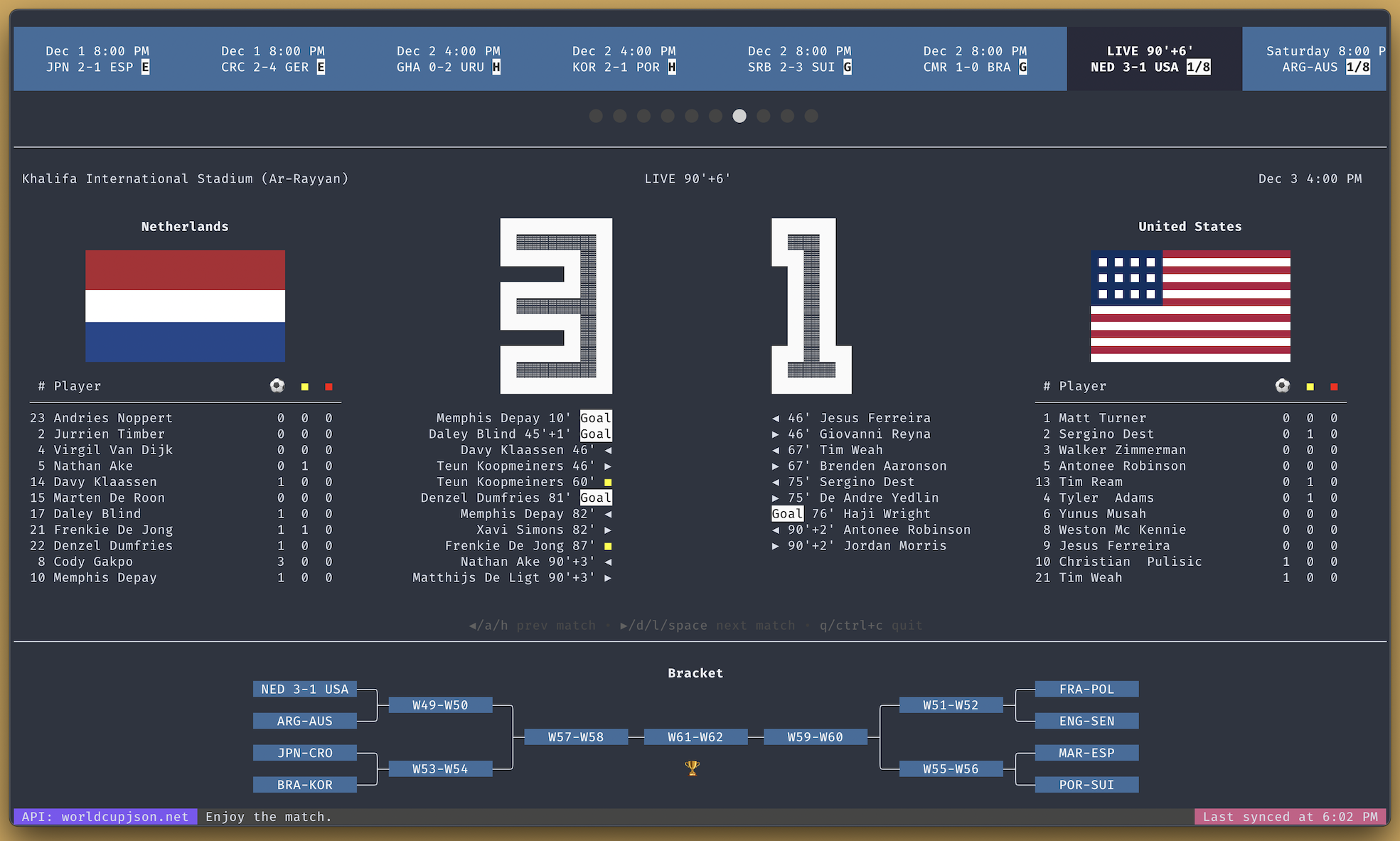



Fork notice: this repository is maintained at github.com/mansueli/world-cup-2026-cli-dashboard as a fork of the original project by Cédric Blondeau for the 2022 World Cup edition.
Features
- ⚽ Live matches from https://worldcup26.ir/api-docs/
- 🗒️ Team lineups
- 📅 Scheduled and past matches
- 📒 Standings & bracket
- 📊 Player stats (goals, yellow cards, red cards)
- 🔔 Match events (goals, yellow cards, red cards, substitutions)
- 🔁 Adaptive auto refresh: polls Supabase every 3s while a match is live or starting soon, and backs off when idle (
rto refresh instantly)
Install
Method 1: Homebrew 🍺
Install:
brew tap mansueli/homebrew-world-cup-2026-cli-dashboard
brew install world-cup-2026-cli-dashboard
Run:
world-cup-2026-cli-dashboard
Runtime Configuration
The dashboard reads live data directly from the Supabase wc schema by default, polling the games table (and related tables) on a timer. It uses wc.sync_state.is_live_or_soon to decide how often to poll: fast during a live window, slow when idle. There is no realtime websocket subscription on the client.
WC_REFRESH_SECONDS: live polling interval in seconds while a match is live or starting soon, clamped to1..15(default3)WC_IDLE_REFRESH_SECONDS: idle polling interval in seconds when no match is live or soon, clamped to10..300(default30)WC_DATA_SOURCE: data source selector. Defaults tosupabase. Set toliveto fetch directly fromworldcup26.ir, orlocalto use bundled static data.WC_SUPABASE_URL: Supabase project URL (base URL or/rest/v1URL)WC_SUPABASE_ANON_KEY: Supabase publishable key
Default public Supabase settings used when env vars are not set:
WC_SUPABASE_URL=https://worldcup.mansueli.comWC_SUPABASE_ANON_KEY=sb_publishable_ZB3uMP-a-C5b8hNQIsxNYA_R0-tn6wr
Example:
# Default: Supabase, 3s live / 30s idle
world-cup-2026-cli-dashboard

# Poll every 2s when live, 60s when idle
WC_REFRESH_SECONDS=2 WC_IDLE_REFRESH_SECONDS=60 world-cup-2026-cli-dashboard

# Point at a custom Supabase project
WC_SUPABASE_URL=https://your-project.supabase.co \
WC_SUPABASE_ANON_KEY=sb_publishable_xxx \
world-cup-2026-cli-dashboard

# Bypass Supabase and read directly from worldcup26.ir
WC_DATA_SOURCE=live world-cup-2026-cli-dashboard
Supabase Sync Architecture
This repository includes Supabase scaffolding that keeps a cached copy of the tournament data in the wc schema:
- Migration:
supabase/migrations/20260609_worldcup_sync.sql - Automation migration:
supabase/migrations/20260609_worldcup_cron_automation.sql - Edge Function:
supabase/functions/worldcup-sync/index.ts
How it works:
- Edge function fetches
teams,groups, andgamesfromworldcup26.ir. - It computes
is_live_or_soonwhere "soon" means kickoff within 15 minutes. - It updates
wc.sync_statewithis_live_or_soonandnext_kickoff. - Data is upserted into
wc.teams,wc.games, andwc.groups.
Client behavior:
- The CLI polls the
wctables directly over PostgREST; it does not open a realtime websocket. - Before each refresh it reads
wc.sync_state.is_live_or_soonto choose the polling cadence: the fastWC_REFRESH_SECONDSinterval (default 3s) when a game is live or starting within 15 minutes, and the slowerWC_IDLE_REFRESH_SECONDSinterval (default 30s) otherwise.
This keeps load low when nothing is happening while still surfacing live score and event changes within a few seconds. The database broadcast trigger remains available for other realtime consumers, but it is not required by this CLI.
For fully automated server-side syncing, use the pg_net + pg_cron setup in supabase/README.md.
Homebrew Release Setup
The release workflow in .github/workflows/release.yml publishes binaries and updates a Homebrew tap through GoReleaser.
Required repository secrets:
HOMEBREW_TAP_OWNERHOMEBREW_TAP_REPOHOMEBREW_TAP_GITHUB_TOKENHOMEBREW_COMMIT_AUTHOR_NAMEHOMEBREW_COMMIT_AUTHOR_EMAIL
Create a tag to publish:
git tag v0.1.0
git push origin v0.1.0
Method 2: Docker 🐳
Build from the main branch:
docker build --no-cache https://github.com/mansueli/world-cup-2026-cli-dashboard.git#main -t world-cup-2026-cli-dashboard
Run it:
docker run -ti -e TZ=America/Toronto world-cup-2026-cli-dashboard
Replace America/Toronto with the desired timezone.
Method 3: Go package
Requirements:
- Go 1.19+ (with
$PATHproperly set up) - Git
go install github.com/mansueli/world-cup-2026-cli-dashboard@latest
world-cup-2026-cli-dashboard
Method 4: Pre-compiled binaries
Pre-compiled binaries are available on the releases page.
UI
UI is powered by bubbletea and lipgloss.
For optimal results, it's recommended to use a terminal with:
- True Color (24-bit) support;
- at least 160 columns and 50 rows.
LICENSE
MIT