pandaJS v0.1a

Notice: It's still a work in progress.
Details
pandaJS has three components:
- A Server - which acts as a proxy and store for client logs
- Clients - send debug data to the server
- The Admin Interface - where you can view the received data
-
Client
small footprint(only 73kb)extensible via pluginszero configuration setup
-
Server
preserve logs(timeout:5 min) - must be enabled in the clientpreserves disconnected clients(timeout:1 min)
-
Admin Interface
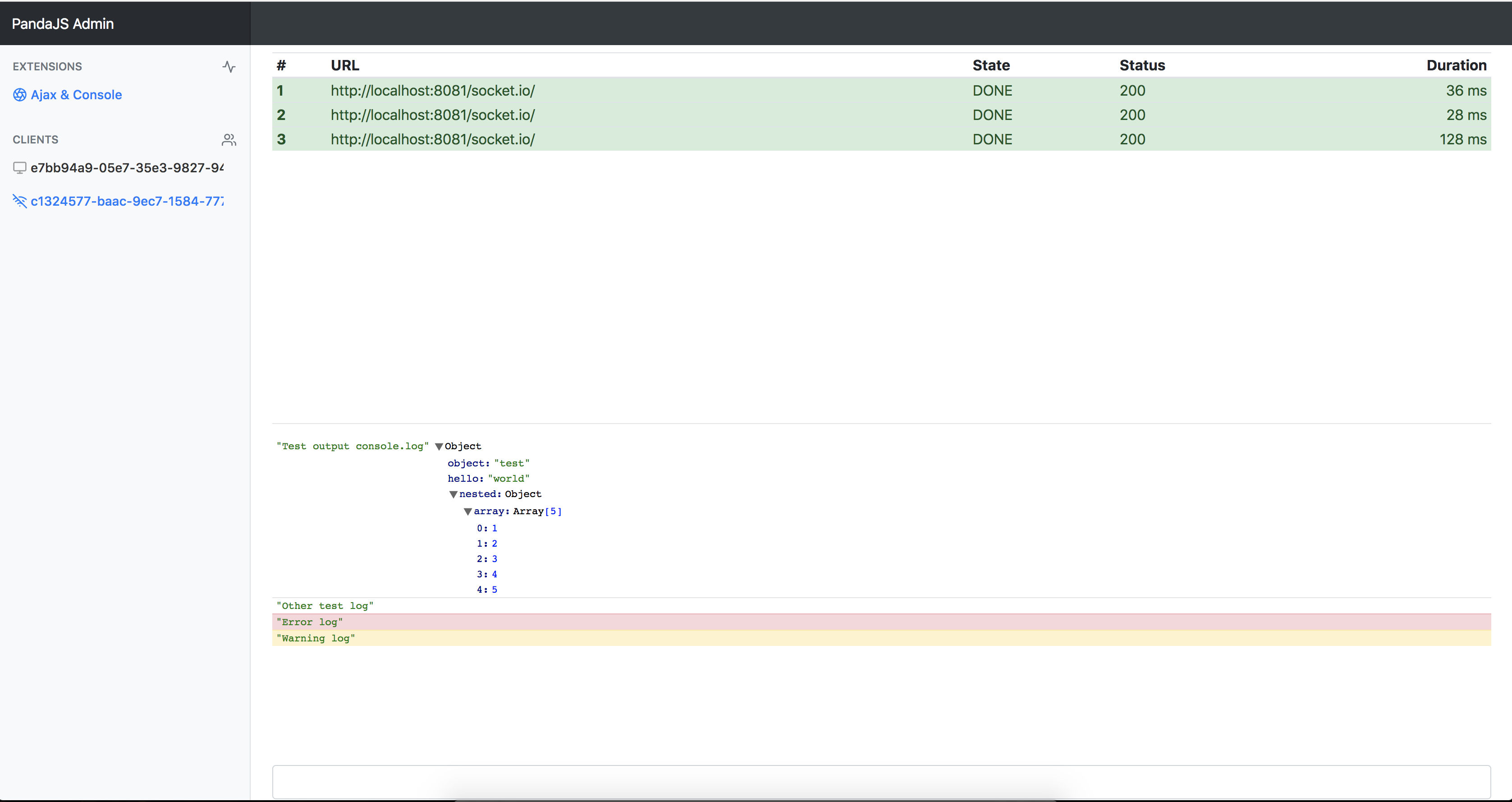
visualizer for the client logsextensible via plugins
Plugins:
Client & Admin Interface
- AjaxProxy (javascript)
- Everything that happens from the start of an ajax call to the end is logged
- Extends XMLHttpRequest object
- ConsoleProxy (javascript)
- Each
console.log,info,error,warning,debugis logged - Extends console object
- Each
- CommandExecutor (javascript)
- A plugin that evaulates JS code sent from the Admin interface
- Executes code using eval function
Install
Client
<script src="client/dist/pandajs.min.js"></script>
<script>
  PandaJS.Utils.onReady(function(){
      new PandaJS.Client("http://localhost:8081");
  });
</script>
Server
node server/index.js [PORT=8081]Admin Interface
http://localhost:8081/
Building
cd client/build
node build.js && echo "Exported to ../dist/"
Docs
PandaJS uses a modified version of Class.js (adds static properties support)
Class.js quick docs
BaseClass.init() // constructor
var Hello = BaseClass.extend({
    _static: {
      static_property: "value" // usage: Hello.static_property
    },
    init: function() {
        this.text = "Hello";
    },
    print: function(){
        console.log(this.text);
    }
});
var World = Hello.extend({
    init: function(text){
        this._super(); // executes the Hello.init() function
        // this._super.apply(this, arguments); // execute the Hello.init() function with all arguments received
        this.text += " World";
    },
    // overwrite the print function
    print: function(name){
        console.log(this.text + ",", name);
	// or
	// this._super();
	// console.log(name);
    }
});
Client
Defaults
var PandaRemoteDebugger;
PandaJS.Utils.onReady(function(){
    PandaRemoteDebugger = new PandaJS.Client("http://localhost:80181", {
        tick: 100, // minimum data flush interval, so we don't spam
        autoStart: true, // automatically connect to the server
        preserveLogs: false, // server side preserve logs on new session
        id: false // client identifier, if false it will auto generated a UUIDv4
    });
});
Public functions
PandaRemoteDebugger.setID("custom-id-here"); // id can be set at any time and it will update in the admin interface instantly
PandaRemoteDebugger.enable(); // enables data sending to the server
PandaRemoteDebugger.disables(); // disables data sending to the server
                                // note that plugins will still fill the in memory buffers with data,
                                // but they will never flush to the server
Client Plugins
Examples: client/libs/plugins folder
Basic Plugin
PandaJS.Plugins.Session = PandaJS.PluginBase.extend({
  enable: function(){
    this.pushData({});
  }
});
Plugins Base
/**
 * Base class for all the plugins
 */
PandaJS.PluginBase = PandaJS.BaseClass.extend({
  init: function(buffer, logger){},
  /**
   * Executed when the plugin is enabled
   * NOTE: atm plugins are enabled on PandaJS.Client init()
   **/
  enable: function(){},
  /**
   * Executed when the plugin is disabled
   * NOTE: plugin disabling is not yet implemented
   **/
  disable: function(){},
  /**
   * Data received from server (from admin interface)
   **/
  onRecv: function(data){},
  /**
   * Pushes the data into the local buffer
   **/
  pushData: function(data){}
});
Admin Plugins
Examples: admin/assets/js/plugins folder
Admin Plugins Base
/**
 * Base class for all the admin plugins
 */
PandaJS.AdminPluginBase = PandaJS.BaseClass.extend({
  data: [],
  init: function(client, logger){},
  /**
   * Data received from client
   * @param data
   */
  onRecv: function(data){},
  /**
   * Injecting plugin into main app
   * By default it injects the plugin in the extension menu
   */
  inject: function(){},
  /**
   * Name of the plugin, for auto injecting in the extension menu
   */
  getName: function(){},
  /**
   * Feather icon of the plugin, for auto injecting in the extension menu
   */
  getIcon: function(){},
  /**
   * Executed on extension item click / when plugin is enabled
   */
  onShow: function(){},
  /**
   * Executed when leaving this plugin / plugin is disabled
   */
  onHide: function(){},
  /**
   * Executed when the Client has changed
   */
  onReset: function(){},
  /**
   * Executed when a new session has started
   */
  onNewSession: function(){}
});
Creating a client (master)
pandaJS can actually talk with any client that connects via socket.io and speaks it's language.
1. Connect to socket.io server
2. Send /master/setup {
    guid: YOUR_UNIQUE_ID,
		preserveLogs: true/false
}
3. Listen on /recv - this is where the data will come through
4. Send data via /master/data with an array of
{
  "plugin": "PLUGIN_NAME_HERE",
  "data": PLUGIN_DATA_HERE
}
5. That's it!
TODO:
It's still a work in progress.
- Ajax plugin should show XHR type (GET, POST, etc.) and params
- Server could use more configuration params
- Better plugin management
- Better documentation