Luxury Yacht is a cross-platform GUI desktop app for managing Kubernetes clusters and resources.
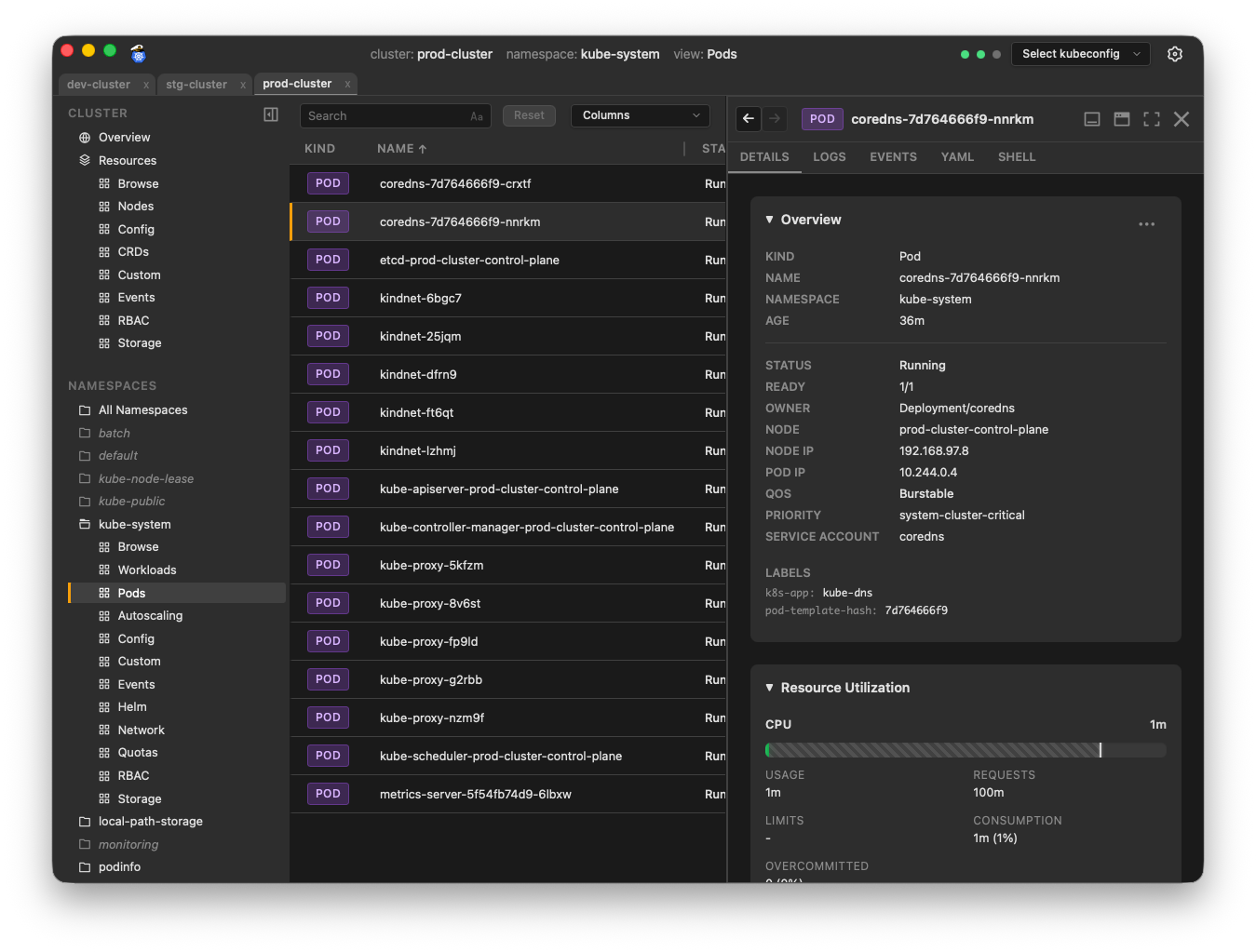 New to Luxury Yacht? Check out the Features page!
Luxury Yacht is open source and free for personal and commercial use. No fees, no subscriptions, no strings attached.
Why Luxury Yacht?
I'm a Kubernetes admin. I've tried most of the other apps in this space. None of them worked quite the way I wanted. I created Luxury Yacht to close those gaps, and make my life (and hopefully yours) a little easier.
Luxury Yacht has all the standard features of a Kubernetes management app. If you've used k9s, Lens, Headlamp, or similar apps, you know what to expect: cluster summary data, real-time metrics, workload status, detailed drilldown info, pod logs, etc.
Highlights
Here are some of the things that Luxury Yacht offers that you might not find in other apps.
-
Maybe the best log viewer you've ever used. Highlight your search text. Invert to only show lines without the search text. Use regular expressions. Show system timestamps for logs without their own timestamps, or logs that have indecipherable formats like unix epoch time. Customize the timestamp format. Show times in UTC or your local time zone. Toggle support for ASCII color codes. Make JSON logs readable in pretty-print format, or even as a table.
-
Flexible panel layouts. Organize your info however you like. Dock info panels to the right, bottom, or float them as a resizable window. Open multiple object tabs in each panel. Drag tabs between panels, or drag out to create a new floating panel.
-
Object Diff. Can't understand why a deployment is working correctly in one cluster, but not the other? Open both deployments in the Diff Objects panel to see exactly what the differences are.
-
Command Palette. Instant access to nearly everything in the app. Open clusters, toggle settings, select a namespace, go straight to a specific object's details, change themes, and much more.
-
Favorites. Save a filtered view as a favorite for quick access. Favorites can be cluster-specific, or create a generic favorite that works in any cluster.
-
Themes per cluster. The flexible theme system allows you to assign colors to specific clusters or patterns in cluster names. Assign your dev clusters a blue theme, and your prod clusters a red theme, so you can instantly know when you're working in production. And, of course, you can have light and dark versions of your themes.
-
Zero-touch setup. Luxury Yacht uses your existing kubeconfig files. It reads
~/.kubeand loads your clusters into a dropdown menu. Select a cluster from the dropdown to get started. Open Settings to add or change which directories Luxury Yacht scans for kubeconfig files. -
Node maintenance. Cordon, drain, and delete nodes with ease. Simply open a node's panel and select the Maintenance tab.
-
Simple port forwarding. Right-click on a workload, pod, or service and click Port Forward. Select a port and click Start. That's it. Run multiple port forwards simultaneously, and easily track them in a centralized status console.
-
Shell support with debug containers. Of course you expect to be able to get a shell in a container, but what if the container doesn't support shell access? Luxury Yacht gives you a simple way to start an ephemeral debug container in that pod, attached to the container.
Installation
Direct Downloads
Visit Downloads on the web site, or go to the Releases page if you know exactly what you need.
Package Managers
Package manager support is currently limited, but more will be added.
Homebrew (macOS only)
brew install luxury-yacht
If you previously used the custom tap, you can remove it, as Luxury Yacht is now in the public Casks repo.
untap luxury-yacht/tap
brew update
Building from Source
If you prefer to build the app from source, see the Development section.
Troubleshooting
The app won't start on Linux
Luxury Yacht requires webkit2 4.1. Some distros don't include it, or don't install it by default. Installation will vary depending on your distro.
| Distro | Installation |
|---|---|
| Ubuntu 20.04 | Unsupported |
| Ubuntu 22.04 | sudo apt install libwebkit2gtk-4.1-0 |
If your distro isn't on this (admittedly short) list, you'll have to search your package manager to determine the exact package name. If you have info you'd like to add to this list, email admin@luxury-yacht.app or open an issue.
Development
Prerequisites
- Go 1.26
- Node 25
- Wails
- Mage
- Staticcheck
Wails
Luxury Yacht is built with Wails, a framework for building cross-platform apps in Go.
To install Wails:
go install github.com/wailsapp/wails/v2/cmd/wails@v2.12.0
Once Wails is installed, run wails doctor to see what other dependencies you'll need to install.
📝 If wails is not found, make sure your go bin path (typically $HOME/go/bin) is in your PATH.
Staticcheck
Staticcheck is a static analysis linter for Go.
To install Staticcheck:
go install honnef.co/go/tools/cmd/staticcheck@latest
Mage
For scripting builds, testing, releases, etc., Luxury Yacht uses Mage for cross-platform compatibilty. Makefiles and bash scripts are fine for Linux and macOS, but they don't work in Windows. The magefile is written in Go, so should work the same in any OS.
To install Mage:
go install github.com/magefile/mage@latest
To see what mage targets are available, run mage -l in the repo root.
Development Mode
The fastest way to get the app up and running for development is to run in Wails development mode. This gives you hot-reloads and access to the browser console for debugging.
Note that hot-reload of the Go backend will cause the app to restart, while changes to frontend code will be reflected immediately without an app restart.
Storybook
Storybook is available for developing and previewing UI components in isolation.
NOTE: you may need to run
nvm installin the repo root to install the correct version of node from.nvmrc
This starts the Storybook dev server at http://localhost:6006.
Build
Install
To install the app locally:
Versions
When updating versions in the app, these are the canonical sources. All scripts/workflows should get app and toolset versions from these sources and these sources only.
App Version
App version is derived from info.productVersion in wails.json
APP_VERSION=$(jq -r '.info.productVersion' wails.json)Go Version
Go version is derived from go.mod
GO_VERSION=$(grep '^go ' go.mod | awk '{print $2}')Wails Version
Wails version is derived from go.mod
WAILS_VERSION=$(grep 'github.com/wailsapp/wails/v2' go.mod | awk '{print $2}')Node Version
Node version is derived from .nvmrc
NODE_VERSION=$(cat .nvmrc | tr -d 'v')Publishing Releases
Run the prerelease checks. This should surface any problems that could cause the release to fail.
-
Update the version in wails.json
-
Commit and push the change.
-
Create and push a tag. The
releaseworkflow will do the rest.
git tag $(jq -r '.info.productVersion' wails.json)
git push origin main --tags