Important
Hacker News Companion - Chrome Extension
🚀 Quick Start Guide
- Install from Chrome Web Store or Firefox Addon store
- Navigate to Hacker News
- Press '?' to view keyboard shortcuts
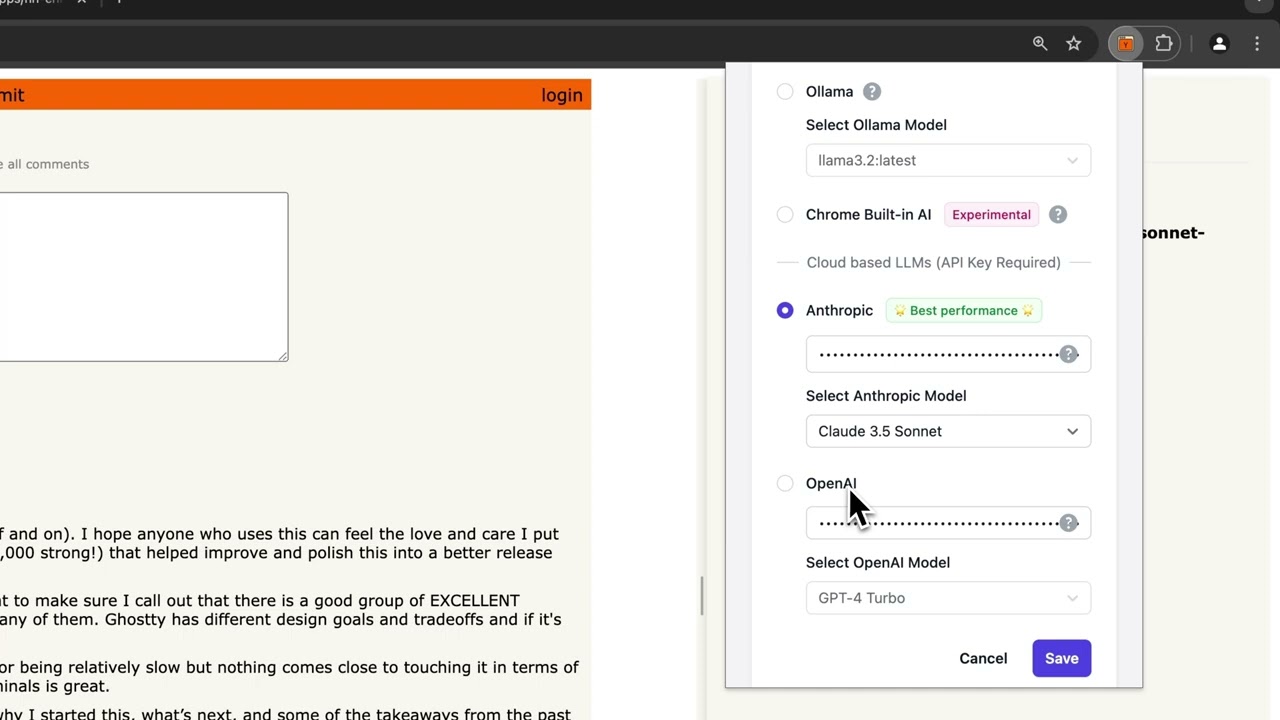
- Choose your preferred AI provider in extension settings
Overview
Transform your Hacker News experience with intelligent navigation, AI-powered summaries, and enhanced user interaction. This extension streamlines how you read and navigate through discussions, making it easier than ever to engage with rich conversations.
🌟 Key Features
-
Smart Keyboard Navigation
- Vim-inspired shortcuts (
h,j,k,l) for intuitive movement - Quick-jump between comments by the same author
- Collapsible comment threads
- Press '?' to view all shortcuts
- Vim-inspired shortcuts (
-
AI-Powered Thread Summarization
- Multiple AI provider options
- Summarize entire threads or specific comment branches
- Connect to cloud-hosted models - OpenAI, Anthropic, or OpenRouter for advanced summaries
- Use local models hosted on Ollama
- Use Chrome's built-in AI for local processing on Chrome browser
-
Enhanced Comment Navigation
- Quick-jump between comments by the same author
- Visual indicators for post authors and comment counts
- Comment count display
-
Rich User Interactions
- User profile previews on hover
- Resizable summary panel
- Comment path tracking and navigation
🤖 AI Provider Setup Guide
Ollama
-
Requirements:
- Ollama installed on your system
- CORS configuration for the extension
-
Setup Steps:
# Mac OS
launchctl setenv OLLAMA_ORIGINS "chrome-extension://*,https://news.ycombinator.com"

# Windows
setx OLLAMA_ORIGINS "chrome-extension://*,https://news.ycombinator.com"
-
Model Setup:
# Pull your preferred model
ollama run llama3.2
# Or other models like mistral, mixtral, etc.
-
Best Practices:
- Keep Ollama running in the background
- Restart Ollama after CORS configuration
- Set CORS environment variable to persist across restarts
Chrome Built-in AI
-
Requirements:
- Chrome version 131 or higher
- One-time model download
-
Setup Steps:
- To verify that you have chrome version higher than 131, navigate to 'About Chrome'
chrome://settings/helpand check the version. - To trigger the model download, go to Chrome Dev Summarization API Playground and try some text.
- To verify that the model download is complete, navigate to 'Chrome components' -
chrome://components/and you should see 'Optimization Guide On Device Model'. Make sure the version is2024.9.25.2033or higher.
- To verify that you have chrome version higher than 131, navigate to 'About Chrome'
- Best Practices:
- Ideal for individual comments or brief threads
- May have limitations with very long discussions
- No API key required
OpenAI
-
Requirements:
- OpenAI API key
- Active OpenAI account
-
Setup Steps:
- Generate API key at OpenAI Platform
- Enter API key in extension settings (click on the extension icon)
- Choose preferred model:
- GPT-4 Turbo (Recommended for best quality)
- GPT-3.5 Turbo (Faster, more economical)
-
Best Practices:
- Monitor API usage
- Consider token limits and costs (bigger discussion threads are truncated to fit into context window)
- Set up usage alerts in OpenAI dashboard
Anthropic (Recommended for Best Performance)
-
Requirements:
- Anthropic API key
- Active Anthropic account
-
Setup Steps:
- Generate API key at Anthropic Console
- Enter API key in extension settings
- Select model:
- Claude 3 Opus (Highest capability)
- Claude 3.5 Sonnet (Balanced performance)
- Claude 3.5 Haiku (Fastest)
-
Best Practices:
- Monitor API usage
- Set up billing alerts
OpenRouter
OpenRouter is a service that provides unified access to multiple large language models (LLMs) through a single API. This platform simplifies the integration and management of different AI models, such as GPT, Claude, and Grok, allowing developers to switch between them without dealing with separate APIs.
-
Requirements:
- OpenRouter API key
- Active OpenRouter account with credits
-
Setup Steps:
- Generate an API key at OpenRouter
- Enter API key in extension settings (click on the extension icon)
- Enter your preferred model
- A list of available models can be found at OpenRouter models
anthropic/claude-3.5-sonnetis our default and a great model to start with
⌨️ Keyboard Shortcuts
Global
?//- Toggle help panelo- Open post in new window
Home Page
j/k- Next/previous postc- Open comments page
Comments Page
j/k- Next/previous commentl/h- Next child/parent comment[/]- Previous/next comment by authors- Toggle summary panelr- Go to root commentgg- First commentz- Scroll to currentc- Collapse/expand comment
🛠️ Development Setup
-
Clone the repository:
git clone https://github.com/levelup-apps/hn-enhancer.git cd hn-enhancer -
Load in Chrome:
- Open
chrome://extensions/ - Enable Developer mode
- Click "Load unpacked"
- Select the extension directory
- Open
-
Build the project:
- Install dependencies:
- Build the project using Vite:
-
Development build:
- To start a development build with watch mode:
-
Release build:
- To create a release build for both Chrome and Firefox:
Running the download script
If you want to run the script that downloads the HN comments for fine-tuning, follow these steps:
cd scripts
pnpm install

# build better-sqlite3 from source in order to fix the node bindings for ARM64 on macOS
cd node_modules/better-sqlite3
pnpm rebuild
cd ../..
🔧 Troubleshooting
Common Issues
-
AI Summarization Not Working
- Check API key configuration
- Verify network connectivity
- Ensure selected AI provider is running (for Ollama)
- Check Chrome version for Built-in AI
-
CORS Issues with Ollama
- Verify CORS environment variable
- Restart Ollama after configuration
- Check Ollama logs for errors
-
Performance Issues
- Try different AI providers
- Collapse long comment threads
- Clear browser cache
Support
- GitHub Issues: Report bugs
📜 License
MIT Licensed - free to use, modify, and distribute
🙏 Acknowledgments
- Hacker News community
- AI provider partners
- Open source contributors
- Valuable feedback from Liza George
Note
Note: This extension is not endorsed by, affiliated with, or sponsored by Y Combinator or Hacker News.