sudoagent

A Python library that guards function calls at runtime with policy evaluation, optional human approval, and audit logging.
Version: 0.1.1
What it does
SudoAgent wraps a function call and enforces one of three outcomes:
- allow: execute immediately
- deny: block the call, raise
ApprovalDenied - require_approval: request approval; executes only if approved
Every decision is recorded to an audit log (sudo_audit.jsonl by default).
How it works
- You create a
SudoEnginewith a required policy. - You decorate functions with
@sudo.guard()or callsudo.execute(func, ...). - The engine evaluates the policy, optionally invokes the approver, writes the decision to the audit log, and then executes (or denies).
Key behavior:
- Decision logging happens before execution and is fail-closed. If logging fails, execution is blocked and
AuditLogErroris raised. - Outcome logging happens after execution and is best-effort. Logging failures do not affect the return value.
- Approved actions produce two audit entries (decision + outcome). Denied actions produce one (decision only).
- Entries for the same call are linked by
request_id(UUID4). - Audit entries include timestamp, action, decision, reason, and safe representations of args/kwargs.
See docs/architecture.md for the full execution flow and audit semantics.
Install
Dev install:
python -m venv .venv
source .venv/bin/activate  # Linux/macOS
# PowerShell: .\.venv\Scripts\Activate.ps1
pip install -e ".[dev]"
Quickstart
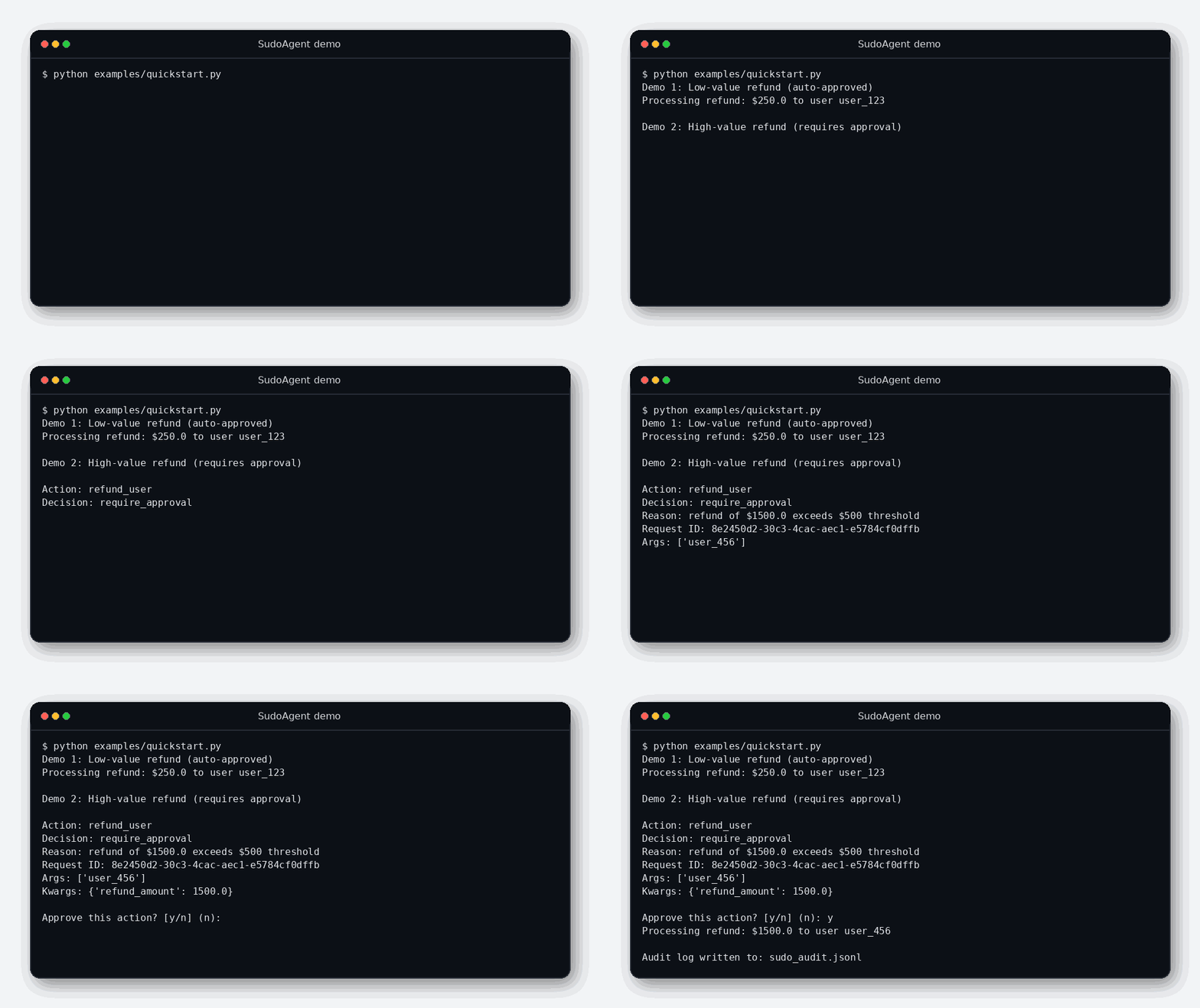
Run the demo:
python examples/quickstart.py
What happens:
- A low-value refund is allowed automatically.
- A high-value refund triggers an interactive approval prompt.
- Decisions are written to
sudo_audit.jsonl.
To run non-interactively (CI/demo):
SUDOAGENT_AUTO_APPROVE=1 python examples/quickstart.py
On Windows PowerShell:
$env:SUDOAGENT_AUTO_APPROVE="1"; python examples/quickstart.py
Basic usage
from sudoagent import ApprovalDenied, Context, Decision, PolicyResult, SudoEngine

class HighValueRefundPolicy:
    def evaluate(self, ctx: Context) -> PolicyResult:
        refund_amount = ctx.kwargs.get("refund_amount", 0)
        if refund_amount <= 500:
            return PolicyResult(decision=Decision.ALLOW, reason="within limit")
        return PolicyResult(decision=Decision.REQUIRE_APPROVAL, reason="over limit")

policy = HighValueRefundPolicy()
sudo = SudoEngine(policy=policy)

@sudo.guard()
def refund_user(user_id: str, refund_amount: float) -> None:
    print(f"Refunding {refund_amount} to {user_id}")

refund_user("user_1", refund_amount=10.0)

try:
    refund_user("user_2", refund_amount=1500.0)
except ApprovalDenied as e:
    print(f"Denied: {e}")
Core concepts
- Context: captures the function call (action name, args, kwargs, metadata).
- Policy: returns
ALLOW,DENY, orREQUIRE_APPROVALwith a reason. - Approver: handles the approval step. Default is
InteractiveApprover(terminal y/n). - AuditLogger: writes audit entries. Default is
JsonlAuditLogger. - Fail-closed: if policy, approval, or decision logging fails, execution is blocked.
Security notes
- Rich markup in approval prompts is escaped to prevent terminal injection.
- Audit logging redacts sensitive key names (
api_key,token,password, etc.) and values (JWT-like strings,sk-prefixes, PEM blocks). - Decision logging failures raise
AuditLogErrorand block execution. Outcome logging failures do not block. - Denied actions log the decision only. Approved actions log decision and outcome, linked by
request_id.
Example audit entries:
{"event":"decision","request_id":"...","action":"...","decision":"allow","reason":"within limit",...}
{"event":"outcome","request_id":"...","outcome":"success",...}
Limitations:
- This is not a sandbox. Side effects inside the guarded function are not prevented.
- The default JSONL logger is intended for single-process use (append-only by normal operation, not tamper-evident). For multi-process or multi-host deployments, implement a custom
AuditLogger.
Extending
v0.1 includes:
InteractiveApprover(terminal prompt)JsonlAuditLogger(append-only JSONL)
To use Slack, email, web UIs, or a database:
- Implement the
Approverprotocol. - Implement the
AuditLoggerprotocol. - Pass them to
SudoEngine(policy=..., approver=..., logger=...).
Notes:
- Policy is required at construction. Pass
AllowAllPolicy()explicitly for permissive mode. InteractiveApproveris intended for local development. For production, implement a custom approver.
Contributing
Small PRs are welcome. Include tests for new behavior.
pytest -q
ruff check .
mypy src
License
MIT License. See LICENSE.