





📬 Subscribe for release updates — new versions, no spam
Your clusters are talking. This assistant helps you listen.
An AI-powered Kubernetes troubleshooting assistant that lets teams investigate, diagnose, and resolve cluster issues through natural language — as a signed macOS app (brew install --cask kubeastra), a chat-based web UI deployed for a team, or directly inside your IDE (Cursor / Claude Desktop / VS Code via MCP).
Combines live kubectl access with pluggable LLM providers (Gemini, Claude, GPT, or a fully local Ollama model) for root-cause analysis that turns cryptic Kubernetes failures into clear answers and actionable fix commands.
See it in action
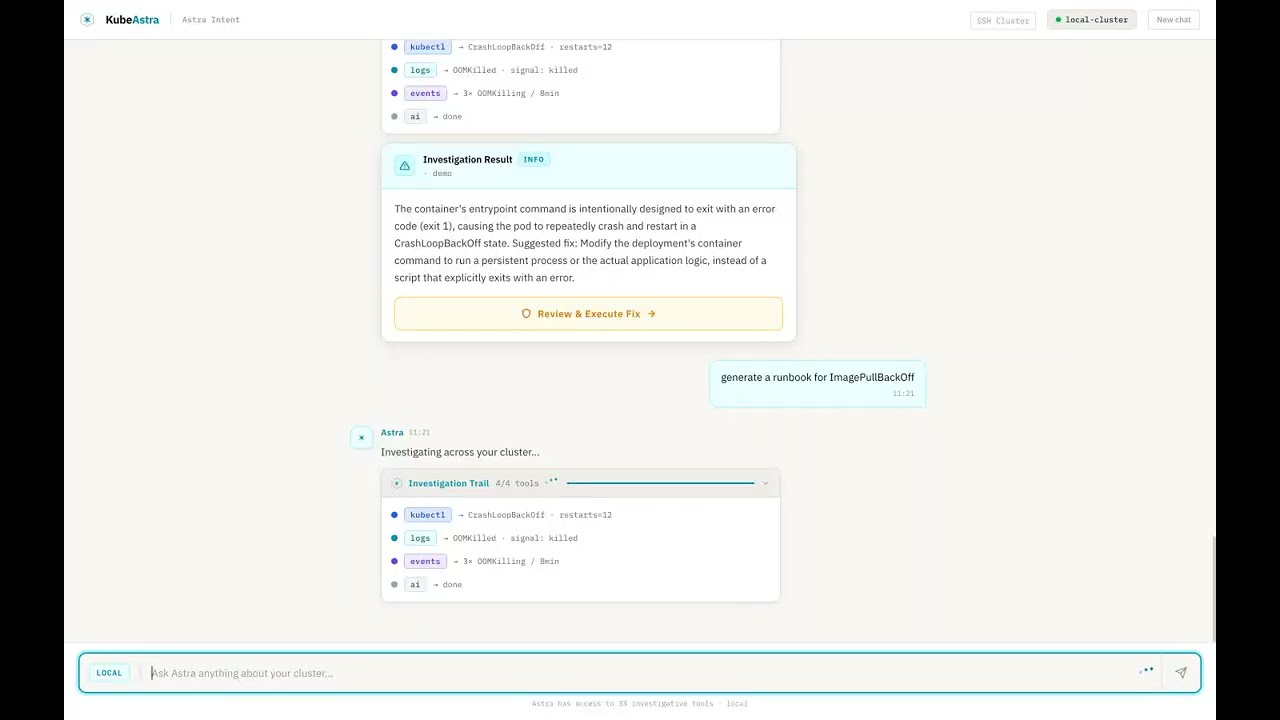
▶ Watch the 90-second demo — Kubeastra walking through 7 real Kubernetes failures (CrashLoopBackOff, OOMKilled, ImagePullBackOff, stuck PVC, unschedulable pod, namespace-wide health, runbook generation).
Want to reproduce it locally?
make demospins up a kind cluster pre-seeded with seven broken workloads. Seedemo/README.md.
Why this exists
Every DevOps engineer has been here: a pod is crashlooping at 2 AM, and you're mentally chaining together kubectl get, kubectl describe, kubectl logs, cross-referencing events, checking resource limits, and Googling error messages — all while half asleep.
This tool handles that investigation loop for you:
- Ask in plain English — "Why is payment-service crashing in production?"
- Get root-cause analysis — not just logs, but AI-synthesized explanations of what's wrong and why
- Receive fix commands — ready to run, with safety confirmations for write operations
- Generate runbooks — so your team doesn't debug the same issue twice
- Stay on your own infra — run entirely locally with Ollama, no data leaves your cluster
Key Features
🔗 Connect Any Cluster in Seconds
Four ways to connect — pick what fits your setup:
| Mode | How it works | Best for |
|---|---|---|
| Auto-detect | Reads your local ~/.kube/config and lists available contexts |
Local dev, minikube, kind, Docker Desktop |
| Kubeconfig upload | Paste or upload a kubeconfig file, pick a context | Remote clusters, CI-generated configs |
| SSH | Enter host/user/password — kubectl runs on the remote node over SSH | Air-gapped clusters, bare-metal kubeadm |
| In-cluster | Mounts the ServiceAccount token automatically | When deployed inside the cluster via Helm |
Switch between clusters without restarting. Each session tracks its own connection.
🔍 52 Built-in Kubernetes Tools
Live cluster tools (~30) — pod/deployment/service inspection, event streams, multi-namespace discovery, rollout status, kubeconfig context switching, log retrieval with previous-container support, resource-graph topology, deployment-level investigation, namespace-wide health analysis, and safe write operations (delete, scale, restart, patch — all gated behind dry_run + confirmation_token).
AI analysis tools (~9) — error analysis with RAG-backed similarity search, curated fix playbooks for 11 error categories, AI-generated runbooks, cluster health reports, post-incident summarization, k8sgpt-style pattern matching, RAG knowledge-base search (kb_search).
Helm tools (5) — release listing, revision diffing, release inspection, availability check, guided investigation.
Alerts + observability (2) — Alertmanager fan-in (get_recent_alerts), Prometheus range/instant queries (prom_query).
GitOps / deployment-repo (3) — fetch files, list paths, and grep the deployment repo directly from investigation.
Remediation plans (3) — propose_remediation_plan, get_plan, execute_plan_step (multi-step fixes with per-step confirmation).
🤖 Agentic ReAct Investigation
Unlike single-shot "ask → answer" tools, Kubeastra runs a multi-step ReAct loop — reasoning through complex failures autonomously:
You: Why is checkout-service down?

Agent reasoning:
  ✓ find_workload — searching across all namespaces
  ✓ investigate_pod — found CrashLoopBackOff in checkout-svc-7d4f9b
  ✓ get_pods — checking Redis dependency → ConnectionRefused
  ✓ describe_pod — Redis pod Pending: unbound PVC

Root cause: PersistentVolumeClaim redis-data is unbound,
preventing Redis from starting, which cascades to checkout-service.
Each reasoning step is visible in real-time via the Investigation Trail — no black box. The agent answers listing questions in a single step and complex debugging in 2-3 steps, with a 90-second wall-clock safety timeout.
🔧 One-Click Fix Execution
When the AI identifies a fix, you get a Review & Execute button with the exact commands:
- Only write operations are suggested (delete pod, rollout restart, scale, patch) — never diagnostic commands you've already seen
- Slide-to-confirm safety gate before any command runs
- Button disappears after execution — no accidental re-runs
- When no safe automated fix exists (e.g., "update your Helm values"), the card shows Manual Steps Required with numbered instructions instead
🔀 Propose Fixes as Pull Requests
When your cluster is driven by GitOps (Argo / Flux), applying a fix straight to the live cluster fights your source of truth. Connect a GitHub repo and KubeAstra opens the fix as a pull request instead — the same change, reviewed in Git before anything reaches the cluster:
- You review a real diff, not a promise — KubeAstra fetches the repo, finds the exact line for the change (
replicas, an image tag, a resource limit, an env value), edits only that line with comments and formatting preserved, and shows you the one-line diff before anything is pushed - A human always merges — it opens the PR, labels it, and writes the diagnosis + evidence into the description; it can never merge the PR itself (enforced by a CI test that fails the build if a merge call is ever added)
- Refuses rather than guesses — if it can't find exactly one place to make the change, it stops and says so instead of inventing a diff
- Deterministic — no LLM in the write path — the edit is a surgical text-span replacement, so the diff can't hallucinate; opening a PR is recorded as its own audit event, never as a cluster mutation (a PR changes nothing yet)
- Plain YAML + Kustomize repos on GitHub, via a fine-grained token (no GitHub App to install)
Off by default; enable with GITOPS_ENABLED=true and connect a repo in Settings.
👥 Collaborative Sessions
- Shareable URLs — click Share to copy a session link (
/chat/:sessionId). Anyone with the URL sees the full investigation history — including the root-cause card, fix commands, and evidence. - Investigation timeline — every ReAct step (tool call, thought, observation) renders as a real-time timeline, not simulated placeholders.
- Session not found — invalid or expired shared links show a clear message instead of a blank page.
- One-click post-mortems — generate a structured post-mortem (summary, timeline, root cause, impact, resolution, action items) from any investigation session via the API.
🗺️ Visual Debugging Canvas
The resource graph is an interactive investigation surface, not just a topology diagram:
- Health-aware nodes — pods, services, deployments, and ingresses colored by health status with pulsing red glow for degraded resources
- Click-to-inspect — click any node to see full metadata in a detail panel
- Hover tooltips — quick metadata preview (phase, restarts, IP, ports, replicas)
- Edge labels — see relationships at a glance: "routes →", "selects →", "manages →"
- MiniMap + zoom/pan — navigate large cluster topologies with ease
💬 Two Ways to Use It
| Web UI | IDE / MCP Integration |
|---|---|
| Chat-based Next.js interface for team-wide troubleshooting | Direct integration into Cursor, Claude Desktop, or any MCP client |
| Connect any cluster (auto-detect, kubeconfig upload, SSH) | Debug without leaving your editor |
| Shareable session URLs with persistent chat history (SQLite) | 52 tools available via stdio or HTTP MCP transport |
| Visual resource graph with click-to-inspect | Same ReAct agent powers both surfaces |
🚨 Alert-Driven Auto-Investigation
Point Alertmanager at KubeAstra and it auto-triages incoming alerts:
- Webhook receiver —
POST /api/v1/alerts/webhookaccepts standard Alertmanager payloads - Auto-investigation — each firing alert kicks off a scoped ReAct investigation (by namespace / workload from labels)
- Playbook-first routing — hits deterministic runbooks before consulting the LLM (faster, cheaper, more predictable)
- Ranked notification — findings post back to Slack / PagerDuty (or any webhook) with root cause + suggested fix
- Concurrency caps + LLM offload — burst-safe: alert storms don't exhaust the model quota
📚 RAG Runbook Cache — Cached / Grounded / Cold
Every investigation runs through a 3-tier retrieval router before touching the model:
| Tier | Trigger | Behavior |
|---|---|---|
| Cached | Verified runbook match ≥ 0.92 similarity | Return the runbook answer verbatim — sub-second, near-zero cost |
| Grounded | Any relevant chunk ≥ 0.70 similarity | Feed retrieved docs into the LLM prompt as context |
| Cold | No relevant match | Full ReAct investigation from scratch |
Backed by Qdrant (self-hosted, no external SaaS) with a nightly ingestion CronJob for internal docs + configurable Git sources (URL-allowlisted). Every answer shows its citations — no black-box RAG.
🧠 Multi-Step Remediation Plans
Complex fixes get proposed as atomic multi-step plans instead of one-shot commands:
- LLM proposes plan → user reviews steps → each step needs its own confirmation token
- Dry-run first — every destructive step exposes its
--dry-run=serveroutput before real execution - Atomic step state — steps are
pending / running / done / failedwith concurrency-safe CAS transitions - Fail-safe — if step 2 fails, step 3 doesn't fire; users see the failure and decide next action
- Cancellable — abandon a plan mid-execution without leaving orphaned state
💾 Per-User Conversation Memory
The assistant remembers your prior investigation context across turns:
- Auto-captured — last 24h of namespace / pod / cluster mentions inform the next prompt
- Prompt preamble — memory is stitched into the system message, not the user message (invisible but effective)
- Bounded — 10 items per category, 5 rendered per turn, 24h max age, tenant-scoped
- Redacted — secrets pattern-matched and stripped before persist
✂️ Tool Result Summarization
Massive kubectl logs outputs get compressed intelligently:
- Heuristic first — strip ANSI, dedupe, tag errors/warnings, keep head + tail + relevant context
- LLM polish (optional) — condense multi-hundred-line describes into 3-line summaries
- Preserved evidence — every summary keeps the raw underlying data as an expandable "show all" section
👍 Feedback → Runbook Promotion
Thumbs-up on any answer promotes it into the cached-runbook tier:
- Great answers become verified runbooks other users hit via the "cached" tier
- Thumbs-down quarantines low-quality captures so they don't feed grounding
- Auto-capture classifier (strict-JSON Gemini prompt) decides which answers qualify for consideration
- Redaction runs before persist — secrets never enter the KB
🔐 Remote Diagnostics (Air-Gapped Clusters)
For clusters where you can't ship the assistant into the cluster:
- SSH + Ansible — runs a hardened, scoped diagnostic playbook against a bastion + target nodes
- Read-only by default — no writes without confirmation tokens; no shell access, only structured facts
- Egress-controlled — Helm ConfigMap + NetworkPolicy pin which nodes/subnets the runner can reach
- Auditable — every remote command emitted to the audit log
🔌 Pluggable LLM Providers
Pick your LLM — Google Gemini (default, free tier available), Anthropic Claude (Opus / Sonnet / Haiku), OpenAI (GPT-4o, or any OpenAI-compatible endpoint like Azure OpenAI / vLLM / LiteLLM), or Ollama (fully local — your cluster data never leaves your network). Set LLM_PROVIDER to gemini, anthropic, openai, or ollama and provide the matching API key.
Running fully local with Ollama
Investigation memory embeds past investigations so new ones can recall them. That needs an embedding model, which is not the chat model — so pull it as well:
ollama pull llama3.1            # chat
ollama pull nomic-embed-text    # embeddings
Then point both at the local daemon:
LLM_PROVIDER=ollama
EMBEDDINGS_MODE=ollama
Without EMBEDDINGS_MODE=ollama, embeddings fall back to whatever the mode is set to — which for a hosted provider means investigation text leaves your machine even though chat does not. Setting it is what makes "nothing leaves the network" true end to end.
nomic-embed-text is the default; override it with EMBEDDINGS_MODEL if you prefer another. Whichever you choose has to be pulled — Ollama does not fetch it on first use, and an unpulled model surfaces as an embeddings error rather than as a missing-model message.
Note the two separate URLs:
OLLAMA_BASE_URLpoints the chat provider at a daemon,OLLAMA_URLpoints embeddings at one. Set both if your Ollama is not onlocalhost.
🛡️ Safety First
- Read-only by default — all
kubectlcommands are validated before execution - Explicit confirmation required for write operations (
delete,scale,restart,patch) via slide-to-confirm - Full audit logging of every command executed
- RBAC-aware — respects your existing Kubernetes permissions
- Input validation — namespace/name/label-selector safety checks prevent injection
- Session isolation — temp kubeconfig files are scoped per session with
0600permissions, sanitized session IDs prevent path traversal, cryptographic session tokens prevent URL guessing - Command allowlist — the execute endpoint only accepts specific kubectl write prefixes; everything else is rejected
🚀 Deploy Anywhere
- Local dev — docker-compose one-liner
- Kind demo cluster —
make demospins up a broken cluster so you can see the tool work in 60 seconds - Production Helm chart — deploy into the same clusters it monitors
- SSH multi-cluster — query any remote kubeadm cluster without copying kubeconfigs
Which feature is right for me?
Match your situation to the feature that solves it:
| If you… | The feature | Enable with |
|---|---|---|
Just want an AI copilot for kubectl diagnosis |
Agentic ReAct + 52 tools | Defaults — no flags needed |
| Get paged by Alertmanager at 2 AM | Alert-Driven Auto-Investigation | ALERTMANAGER_WEBHOOK_ENABLED=true + set ALERT_WEBHOOK_TOKEN |
| Investigate the same failure modes repeatedly | RAG Runbook Cache (Cached tier) | RAG_ROUTER_ENABLED=true + 👍 on great answers |
Read 500-line describe and 10K-line log outputs |
Tool Result Summarization | ENABLE_LOG_SUMMARIZATION=true |
| Perform multi-step fixes with strong safety gates | Multi-Step Remediation Plans | ENABLE_RECOVERY_OPERATIONS=true + REQUIRE_DESTRUCTIVE_CONFIRMATION=true (default) |
| Drive your cluster with GitOps and want fixes reviewed in Git, not applied live | Propose Fixes as Pull Requests | GITOPS_ENABLED=true + connect a GitHub repo in Settings |
| Have to repeat "the payments namespace" every prompt | Per-User Conversation Memory | On by default — persists 24 h per session |
| Want cluster investigation without shipping into the cluster | Remote Diagnostics (SSH + Ansible) | Configure remoteDiag block in Helm values |
| Have a team wiki that everyone should query first | Grounded RAG | Populate RAG_INGESTION_SOURCES and let the nightly CronJob index them |
| Need to see the AI's evidence before trusting an answer | Synthesis Critic + Citations | On by default whenever RAG is on |
| Run air-gapped and can't call Gemini | Ollama provider | LLM_PROVIDER=ollama — all inference stays local |
Quick Start
Option 1: Install the macOS app
brew tap astraverse-io/tap
brew install --cask kubeastra
Or download the DMG from the latest desktop release.
Signed and notarized by Apple, so it opens without a Gatekeeper warning.
Apple silicon and macOS 11+ — there is no Intel build. It uses the
kubectl and kubeconfig already on your machine; nothing is installed into
any cluster, and the app listens only on loopback.
Verify the download yourself if you like:
spctl -a -t open --context context:primary-signature KubeAstra_*.dmgaccepted / source=Notarized Developer ID is the answer you want.
On Linux and Windows, use
kubeastra open(Option 3) — the same app, run from a source checkout. A Windows installer needs a code-signing certificate and is not built yet.
Option 2: Try the demo (60 seconds, no cluster needed)
Prerequisites: Docker Desktop, kind, kubectl
git clone https://github.com/astraverse-io/KubeAstra.git
cd KubeAstra
make demo
Spins up a local kind cluster with pre-broken workloads (CrashLoop, OOM, ImagePull, stuck PVC) and launches the web UI.
Open http://localhost:3300 and ask "what's broken in the demo namespace?".
The demo generates its own kubeconfig automatically — it does not touch your host's current kubectl context. See
demo/README.mdfor full prerequisites and troubleshooting.
Option 3: Run it as a local app (no Docker)
Prerequisites: Python 3.11+, Node 20+, and a kubeconfig you already use.
git clone https://github.com/astraverse-io/KubeAstra.git
cd KubeAstra
npm run build:desktop --prefix ui/frontend   # once
pip install -e cli
kubeastra open
Starts a loopback-only backend, serves the UI from that same origin, and opens your browser. It reads the kubeconfig already on this machine — nothing is installed into any cluster, and nothing listens on an external interface.
Add --no-browser to start it and print the URL instead.
Option 4: Run locally against your own cluster
Prerequisites: a running Kubernetes cluster with kubectl access, and a Google Gemini API key (free tier) or Ollama running locally.
# 1. Configure the backend
cp ui/backend/.env.example ui/backend/.env
#    → set GEMINI_API_KEY (or LLM_PROVIDER=ollama) in .env

# 2. Start via docker-compose (kubeconfig mounted read-only)
cd ui
docker compose up --build

# 3. Open http://localhost:3300
Option 5: Use via MCP (Cursor / Claude Desktop)
cd mcp
./setup.sh        # creates venv, installs deps, writes MCP config entry
Edit mcp/.env:
GEMINI_API_KEY=your-key-here          # or LLM_PROVIDER=ollama
ALLOWED_NAMESPACES=prod,staging,default
Restart your IDE — all 52 tools appear as MCP tools.
Option 6: Use the CLI
For terminal-first workflows: a thin HTTP + SSE client for the backend, published as a standalone Python package.
pipx install kubeastra                # or: cd cli && pip install -e .

# assuming the backend from Option 3 is running on localhost:8000
kubeastra ask "why is checkout-service crashlooping in production?"
kubeastra investigate --pod api-gateway --ns production
kubeastra doctor                      # health-check CLI + backend + kubeconfig
Config lives at ~/.config/kubeastra/config.toml. Point at a remote backend with:
kubeastra config set backend-url https://kubeastra.mycompany.comFull command reference in cli/README.md.
Option 7: Deploy to Kubernetes via Helm
The chart pulls public images from ghcr.io/astraverse-io/kubeastra-{backend,frontend},
so there is nothing to build. It defaults to latest; pin 0.2.0 for a fixed
version, or main to track every merge.
Baseline install — chat UI + backend, no advanced features:
helm upgrade --install kubeastra helm/kubeastra \
  --namespace kubeastra --create-namespace \
  --set secrets.geminiApiKey="YOUR_KEY" \
  --set secrets.kubeconfig="$(cat ~/.kube/config | base64 | tr -d '\n')"
Opt into every Phase 1 feature (RAG runbook cache, Qdrant, ingestion CronJob, Alertmanager webhook, remediation plans) with the bundled overlay:
helm upgrade --install kubeastra helm/kubeastra \
  --namespace kubeastra --create-namespace \
  -f helm/kubeastra/values-production.yaml \
  --set secrets.geminiApiKey="YOUR_KEY" \
  --set secrets.kubeconfig="$(cat ~/.kube/config | base64 | tr -d '\n')"
Never commit secrets. Put
geminiApiKey,kubeconfig,alertWebhookToken, andqdrantApiKeyin a gitignoredvalues-secrets.yamland pass it via a second-fflag — seedocs/BEST_FEATURES_QUICKSTART.mdfor the full pattern.
How It Works
Every request flows through a fixed routing order — cheapest, most predictable paths first, LLM reasoning last:
- Connect your cluster — auto-detect your local kubeconfig, upload one, or enter SSH credentials. The connection is scoped to your session.
- Ask a question — "Why are pods in checkout-service not starting?"
- Memory injection — the last 24 h of your investigation context (namespaces, pods, cluster) is stitched into the prompt preamble so the assistant doesn't ask you to repeat yourself.
- Playbook-first check — if the question matches a deterministic runbook pattern (e.g.
OOMKilled recovery), the runbook answers directly. No LLM call. Sub-second. - RAG router — if no playbook matches, embed the query and search Qdrant across
runbook,devops_doc, andsession_memorycollections:- Cached (verified runbook, similarity ≥ 0.92) → return verbatim, sub-second, near-zero cost
- Grounded (any doc, similarity ≥ 0.70) → feed retrieved chunks into the LLM prompt as context
- Cold (no relevant match) → full ReAct from scratch
- ReAct investigation — the LLM reasons step-by-step: picks a tool → executes it → observes the result → decides the next action. Runs up to 6 iterations with a 90-second wall-clock timeout. Auto-discovery via
find_workloadhandles missing namespaces; large clusters use text-format parsing instead of JSON. - Tool result summarization — 500-line describes and 10K-line log dumps get compressed via heuristic (ANSI strip, dedupe, error tagging, head+tail+context) with optional LLM polish before entering the LLM's context.
- Synthesis critic — a hallucination auditor cross-checks the final answer against the raw tool evidence. Claims not backed by evidence are flagged or removed.
- AI synthesis — returns a severity-rated root-cause card with metrics, evidence, and either one-click fix commands or manual steps. Destructive ops require a dry-run first, then a single-use confirmation token.
- Persistence — every message, tool call, and result saved to SQLite so you can pick up where you left off. Session ID lets teammates load the full investigation.
- Auto-capture + promotion — a strict-JSON classifier decides which answers qualify for the cached-runbook tier. Thumbs-up promotes; thumbs-down quarantines. Secrets are redacted before persist.
- Alertmanager fan-in (optional) — POST to
/api/v1/alerts/webhookand every firing alert kicks off its own scoped investigation via steps 3–10 above, posting the finding back to Slack / PagerDuty.
Example Interactions
Quick listing — answered in one tool call, ~5 seconds:
You: what pods are in the jenkins namespace?
Astra: Here are the pods in the jenkins namespace.
       ┌─────────────────────────┬──────────┬───────┬──────────┐
       │ Name                    │ Status   │ Ready │ Restarts │
       ├─────────────────────────┼──────────┼───────┼──────────┤
       │ jenkins-0               │ Running  │ 2/2   │ 1        │
       │ avatar-agent-1s7k7      │ Pending  │ 0/0   │ 0        │
       └─────────────────────────┴──────────┴───────┴──────────┘
Deep investigation — multi-step ReAct, ~15 seconds:
You: why is mongo arbiter pod in crashloop?

Investigation Trail: 3/3 tools
  ✓ kubectl → pod status retrieved
  ✓ events  → events scanned
  ✓ ai      → analysis complete

┌─ CrashLoopBackOff ─────────────────────── CRITICAL ─┐
│ mongodb-arbiter-0 · infrastructure                   │
│                                                      │
│ The MongoDB arbiter pod is failing to start because  │
│ the designated primary host (mongodb-0) is not       │
│ available. The arbiter's setup process times out.    │
│                                                      │
│ ┌──────────┐ ┌──────────────────┐ ┌───────┐        │
│ │   360    │ │ CrashLoopBackOff │ │ False │        │
│ │ RESTARTS │ │      STATUS      │ │ READY │        │
│ └──────────┘ └──────────────────┘ └───────┘        │
│                                                      │
│ [Review & Execute Fix]                               │
└──────────────────────────────────────────────────────┘

Fix command: kubectl delete pod mongodb-arbiter-0 -n infrastructure
Cached runbook hit — sub-second, near-zero cost:
You: how do I recover from OOMKilled after a memory limit bump?

KB Router: cached (similarity 0.94 → runbook#412 "OOMKilled recovery")

Answer: Increase the memory limit on the Deployment and redeploy — the
        pod will be recreated with the new limit. If the workload is
        still OOMing after the bump, capture heap or profile before
        increasing further.

Citations: docs/runbooks/oom-recovery.md
Alert-driven auto-investigation — Alertmanager → root cause in under a minute:
[Alertmanager]  KubePodCrashLooping  →  POST /api/v1/alerts/webhook
                    ↓
KubeAstra opens an investigation session for {namespace, workload}:
  ✓ playbook-first hit: "CrashLoop w/ ImagePullBackOff" pattern matches
  ✓ investigate_pod → confirms ErrImagePull on payments-api:v42
  ✓ search_deployment_repo → v42 tag doesn't exist in registry
  ✓ synthesis critic → high-confidence finding

[Slack]  Root cause: image tag `v42` was never pushed. Rollback to
         `v41` or push the missing tag. (fix command staged for review)
Multi-step remediation plan — dry-run gate + per-step confirmation:
You: unstick the stuck Redis PVC blocking checkout-service

Plan proposed (3 steps):
  1. scale_deployment redis --replicas 0     [dry_run OK]
  2. delete_pvc redis-data --wait            [needs confirmation]
  3. scale_deployment redis --replicas 1     [chained to step 2]

You: confirm step 1
KubeAstra: ✓ scaled redis to 0/0 (ready in 4s)

You: confirm step 2
KubeAstra: ✓ deleted redis-data PVC (finalizer removed cleanly)

You: confirm step 3
KubeAstra: ✓ redis 1/1 running, checkout-service reconnected
Memory reuse across turns — the assistant carries context forward:
You: what's broken in the payments namespace?
Astra: 3 pods CrashLoopBackOff in payments — checkout-api, ledger,
       webhook-worker. Root cause: shared Redis dependency Pending.

You: fix it                                    ← no need to re-specify
Astra: [memory recalled: payments ns · redis PVC issue]
       Proposing plan to unstick Redis PVC (see previous investigation).
Configuration
All settings are read from environment variables (or .env):
| Variable | Default | Description |
|---|---|---|
LLM_PROVIDER |
gemini |
gemini, anthropic, openai, or ollama |
GEMINI_API_KEY |
— | Required when LLM_PROVIDER=gemini. Get one free |
GEMINI_MODEL |
gemini-2.5-flash |
Gemini model to use |
ANTHROPIC_API_KEY |
— | Required when LLM_PROVIDER=anthropic. Get one at console.anthropic.com |
ANTHROPIC_MODEL |
claude-opus-4-8 |
Claude model to use (claude-opus-4-8, claude-sonnet-5, claude-haiku-4-5-20251001, ...) |
OPENAI_API_KEY |
— | Required when LLM_PROVIDER=openai |
OPENAI_MODEL |
gpt-4o |
OpenAI model to use |
OPENAI_BASE_URL |
https://api.openai.com/v1 |
Override for OpenAI-compatible endpoints (Azure OpenAI, vLLM, LiteLLM, ...) |
OLLAMA_BASE_URL |
http://localhost:11434 |
Ollama server for chat |
OLLAMA_MODEL |
llama3.1 |
Ollama model name (must be pulled first) |
EMBEDDINGS_MODE |
local |
local (sentence-transformers, in-process), api (a provider's embeddings endpoint), or ollama |
EMBEDDINGS_PROVIDER |
— | voyage, openai, or gemini. Only read when EMBEDDINGS_MODE=api |
EMBEDDINGS_API_KEY |
— | Key for EMBEDDINGS_PROVIDER. Without one, memory degrades to keyword-only rather than failing |
EMBEDDINGS_MODEL |
provider default | Override the embedding model. nomic-embed-text for Ollama |
EMBEDDINGS_TIMEOUT_SECONDS |
30 |
Per-request timeout for embeddings |
OLLAMA_URL |
http://localhost:11434 |
Ollama server for embeddings — a separate setting from OLLAMA_BASE_URL |
ALLOWED_NAMESPACES |
* |
Comma-separated list, or * for all |
KUBECTL_TIMEOUT_SECONDS |
15 |
Per-command timeout |
MAX_LOG_TAIL_LINES |
200 |
Max log lines per request |
ENABLE_RECOVERY_OPERATIONS |
false |
Enables delete_pod, rollout_restart, scale_deployment, apply_patch |
REQUIRE_DESTRUCTIVE_CONFIRMATION |
true |
When enabled, destructive tools require dry_run first then a confirmation_token |
QDRANT_URL |
http://localhost:6333 |
Vector DB for RAG (use :memory: for tests) |
QDRANT_API_KEY |
— | Optional — required when Qdrant runs with authentication enabled |
RAG_ROUTER_ENABLED |
false |
Turns on the cached/grounded/cold retrieval router |
RAG_ROUTER_CACHED_THRESHOLD |
0.92 |
Similarity ≥ this on a verified runbook returns the cached answer |
RAG_ROUTER_GROUNDED_THRESHOLD |
0.70 |
Similarity ≥ this on any doc returns a grounded (RAG-fed) answer |
ENABLE_LOG_SUMMARIZATION |
false |
Compress large kubectl logs / describe output via heuristic + LLM polish |
SESSION_CAPTURE_ENABLED |
false |
Auto-classify answers for promotion to the runbook cache |
ALERTMANAGER_WEBHOOK_ENABLED |
false |
Accept Alertmanager webhooks on /api/v1/alerts/webhook. The endpoint 404s until this is true |
ALERT_WEBHOOK_TOKEN |
— | Bearer token required on incoming Alertmanager webhook requests. Leave unset and the webhook is open to anything that can reach the backend |
PROMETHEUS_URL |
— | Prometheus endpoint for prom_query (leave unset to disable) |
Alert ingestion is two gates, not one.
/api/v1/alerts/webhookis exempt from interactive session auth, because Alertmanager has no user session.ALERTMANAGER_WEBHOOK_ENABLEDcontrols whether the route exists at all;ALERT_WEBHOOK_TOKENcontrols who may call it. Turning the first on without the second publishes a route that starts LLM-backed cluster investigations — the backend logs a warning on every unauthenticated call, but set the token.Upgrading: before this flag was implemented the endpoint was always on, regardless of what the environment said. If alert-driven investigation is already part of your setup, set
ALERTMANAGER_WEBHOOK_ENABLED=truewhen you upgrade or ingestion will stop.
Repository Layout
kubeastra/
├── ui/
│   ├── frontend/                # Next.js chat UI (Astra Intent Light theme)
│   │   ├── app/chat/            # Chat page + /chat/:sessionId share routes
│   │   └── components/          # ClusterConnect, ResourceGraph, InvestigationTrail,
│   │                            #   CostBreakdownOverlay, YamlProposer, ApprovalOverlay, etc.
│   ├── backend/                 # FastAPI app + SQLite persistence
│   │   ├── routers/
│   │   │   ├── chat.py          # Chat flow, tool dispatch, fix execution
│   │   │   ├── cluster.py       # Cluster connection management (4 modes)
│   │   │   ├── sessions.py      # History, SSH targets, post-mortem API
│   │   │   ├── feedback.py      # Thumbs-up/down → runbook promotion
│   │   │   └── alerts_router.py # Alertmanager webhook + investigation fanout
│   │   ├── react.py             # ReAct loop orchestrator
│   │   ├── memory.py            # Per-user conversation memory
│   │   └── db.py                # SQLite with cluster_connections, user_memory tables
│   └── docker-compose.yml
├── mcp/
│   ├── mcp_server/              # MCP server (stdio + HTTP transports)
│   ├── http_mcp/                # HTTP MCP transport service
│   ├── k8s/                     # kubectl wrappers, SSH runner, validators
│   ├── ai_tools/                # Error analysis, fix playbooks, runbooks
│   ├── alerts/                  # Alertmanager domain, orchestrator, notifications, playbooks
│   ├── playbooks/               # Deterministic runbook engine (playbook-first routing)
│   ├── services/
│   │   ├── llm/                 # Gemini + Ollama providers
│   │   ├── rag/                 # Chunking, ingestion, router, capture, promotion
│   │   ├── summarizer/          # Log / event / describe summarization
│   │   ├── plans.py             # Multi-step remediation plans
│   │   ├── confirmation.py      # Dry-run + single-use confirmation tokens
│   │   ├── synthesis_critic.py  # Hallucination auditor
│   │   ├── tool_envelope.py     # Structured tool-response format
│   │   ├── error_parser.py      # kubectl error classifier
│   │   ├── prometheus.py        # Prometheus query client
│   │   ├── embeddings.py        # sentence-transformers wrapper
│   │   └── vector_db.py         # Qdrant client
│   ├── tool_registry.py         # Single source of truth: 52 tools
│   └── config/settings.py
├── cli/                         # `kubeastra` CLI (PyPI) — ask, investigate,
│                                #   connect, doctor, config, and `open`
├── desktop/                     # Local-app packaging (macOS, in progress)
├── helm/kubeastra/              # Helm chart — backend, frontend, Qdrant StatefulSet,
│                                #   RAG ingestion CronJob, NetworkPolicies
├── evals/                       # DeepEval baselines + eval runner
├── demo/                        # Kind + broken workloads for `make demo`
└── docs/                        # Public documentation
Roadmap
- Gemini + Ollama (local) LLM support
- Demo mode with kind cluster
- Approval flow for write operations
- Deployment-level investigation (
investigate_workload) - Namespace-wide health analysis (
analyze_namespace) - Agentic ReAct investigation loop (multi-step tool calling)
- Shareable session URLs + investigation timeline
- Auto-generated post-mortems from investigation sessions
- Visual debugging canvas (interactive resource graph with health glow, click-to-inspect, tooltips, MiniMap)
- Multi-modal cluster connection (auto-detect, kubeconfig upload, SSH, in-cluster)
- One-click fix execution with safety guards and slide-to-confirm
- Manual steps fallback when no automated fix is available
- Large cluster support (text-format parsing for all-namespaces queries)
- Session security hardening (path traversal prevention, cryptographic session IDs, command allowlists)
- Team playbook engine — deterministic runbook execution ahead of the LLM
- Alert-driven auto-investigation — Alertmanager webhook + concurrency-safe fan-out
- Multi-step remediation plans — atomic steps with per-step confirmation tokens
- RAG runbook cache — cached / grounded / cold retrieval router backed by Qdrant
- Tool result summarization — heuristic + optional LLM polish for large logs / describes
- Per-user conversation memory — 24h scoped context injected into the prompt preamble
- Feedback → runbook promotion — thumbs-up ships great answers into the cached tier
- Prometheus integration —
prom_queryfor range/instant queries during investigations - Remote diagnostics — SSH + Ansible playbook for air-gapped clusters
- Eval harness — deterministic offline + nightly LIVE regression tests for LLM decisions
- OpenAI + Anthropic Claude adapters (plus any OpenAI-compatible endpoint — Azure OpenAI, vLLM, LiteLLM)
- Loki / Tempo observability integrations
- "What changed?" view — recent deployments, ConfigMap/Secret mutations
- Real-time collaborative sessions (WebSocket sync + presence indicators)
- Slack bot integration (alert → investigation → findings in channel)
- PagerDuty / OpsGenie native adapters (Alertmanager works today; these would skip the webhook hop)
- CNCF Sandbox submission
Contributing
Contributions are welcome — especially the items at the top of the roadmap. See CONTRIBUTING.md for local setup, project layout, and how to add a new tool, and CODE_OF_CONDUCT.md for community guidelines.
Looking for a starter task? Check the good first issue label.
Security
Found a vulnerability? Please don't open a public issue. Email security@astraverse.dev or use private reporting. SECURITY.md covers what's in scope, what isn't, and how long we'll take to answer.
License
Apache 2.0 — see LICENSE for details.