a simple slack polling slash command - because paying for polls is kind of stupid
User Guide
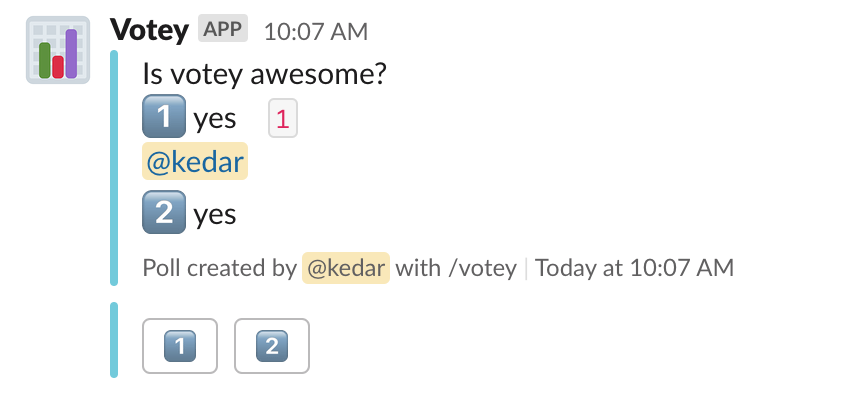
Votey is a surprisingly complex application because it has a variety of options that can allow you to customize how your poll looks and behaves. A Votey poll is composed of three components, a poll title, options, and voters. The first quoted string after the /votey command is used as the poll title, and following text is used to form "options" (ie. items that can be voted upon) and poll configuration options.
Run /votey with no arguments to open a creation modal with form fields for the question, options, per-option emoji, channel, vote limit, and anonymous/secret toggles. Use the Add option button to add up to 10 rows. The inline syntax below is still supported and posts the poll immediately.
Simple poll example:
/votey "some title" "some option A" "some option B"
Votey allows you to define "emoji vote icons" for each option. To enable this for a vote option, prepend the emoji you'd like to use:
/votey "some title" :thumbsup: "yes" :thumbsdown: "no"
To hide the names of voters, append --anonymous at the end of your poll creation text. To use an emoji other than the default :thumbsup: icon, use --anonymous=:emojiName:.
To hide the name of the poll creator and names of voters, append --secret at the end of your poll creation text.
To limit the number of votes per poll, append --limit=N at the end of your poll creation text. Note that N must be equal to lesser than the number of vote options provided.
Slack setup
Create a Slack app, add the chat:write and
commands bot scopes under OAuth & Permissions, and create a /votey
slash command. Enable Interactivity & Shortcuts so poll buttons and the
creation modal work.
Votey supports two connection modes. SLACK_MODE=http is the default and is
suited to a public deployment and multiple workspace installations.
SLACK_MODE=socket maintains an outbound WebSocket connection and needs no
public request URL.
HTTP webhooks
Configure these environment variables:
SLACK_MODE=http
CLIENT_ID=your-slack-client-id
CLIENT_SECRET=your-slack-client-secret
SIGNING_SECRET=your-slack-signing-secret
DATABASE_URL=postgresql://...
Use https://your-app.example/slack as both the slash command request URL and
the Interactivity & Shortcuts request URL. Add
https://your-app.example/oauth as an OAuth redirect URL, then install or
distribute the app through Slack. The OAuth callback stores each workspace's
bot token in the database.
HTTP mode runs under Gunicorn in the supplied Docker image.
Socket Mode
Enable Socket Mode in the Slack app settings. Create an app-level token
with the connections:write scope, then install the app to the workspace and
copy its bot token from OAuth & Permissions. Configure:
SLACK_MODE=socket
SLACK_APP_TOKEN=xapp-...
SLACK_BOT_TOKEN=xoxb-...
DATABASE_URL=postgresql://...
Do not configure request URLs for the slash command or interactivity. Start
Votey with make start, or run the supplied Docker image; its entrypoint
selects the socket process when SLACK_MODE=socket. On startup Votey validates
the bot token and registers that workspace in the same database used by HTTP
mode.
Socket Mode does not listen on an HTTP port. When deploying it to a platform such as Fly.io, remove HTTP services and TCP health checks from the deployment configuration for that process.
Development
Installation
Votey runs on Python 3.14. Install uv
Run the following in the source directory:
uv sync --all-groups
cp .env.example .env
Modify your .env file to look something like this:
SLACK_MODE=socket
SLACK_APP_TOKEN=xapp-your-app-token
SLACK_BOT_TOKEN=xoxb-your-bot-token
SQLite at data/votey.db is used when DATABASE_URL is omitted. To use HTTP
mode during development, configure the HTTP variables described above and use
a tunnel such as ngrok for the two Slack request URLs. Start either mode with
make start.
While developing, you can use make <lint|pre-commit> to run linters or run the whole pre-commit suite over all files (which will both format and lint).
Before committing, don't forget to run make install-hooks.
Happy Developing!