Colorpedia is a command-line tool for looking up colors, shades and palettes.
Supported color models: HEX, RGB, HSL, HSV, CMYK.






Requirements
- Modern terminal with true color and utf-8 support (e.g. Windows Terminal, PowerShell, iTerm2, Terminator)
- Python 3.6+
Installation
Install via pip:
For conda users:
conda install colorpedia -c conda-forge
You can then use the color command:
If you have a name collision on Windows, use colorpedia instead:
Usage
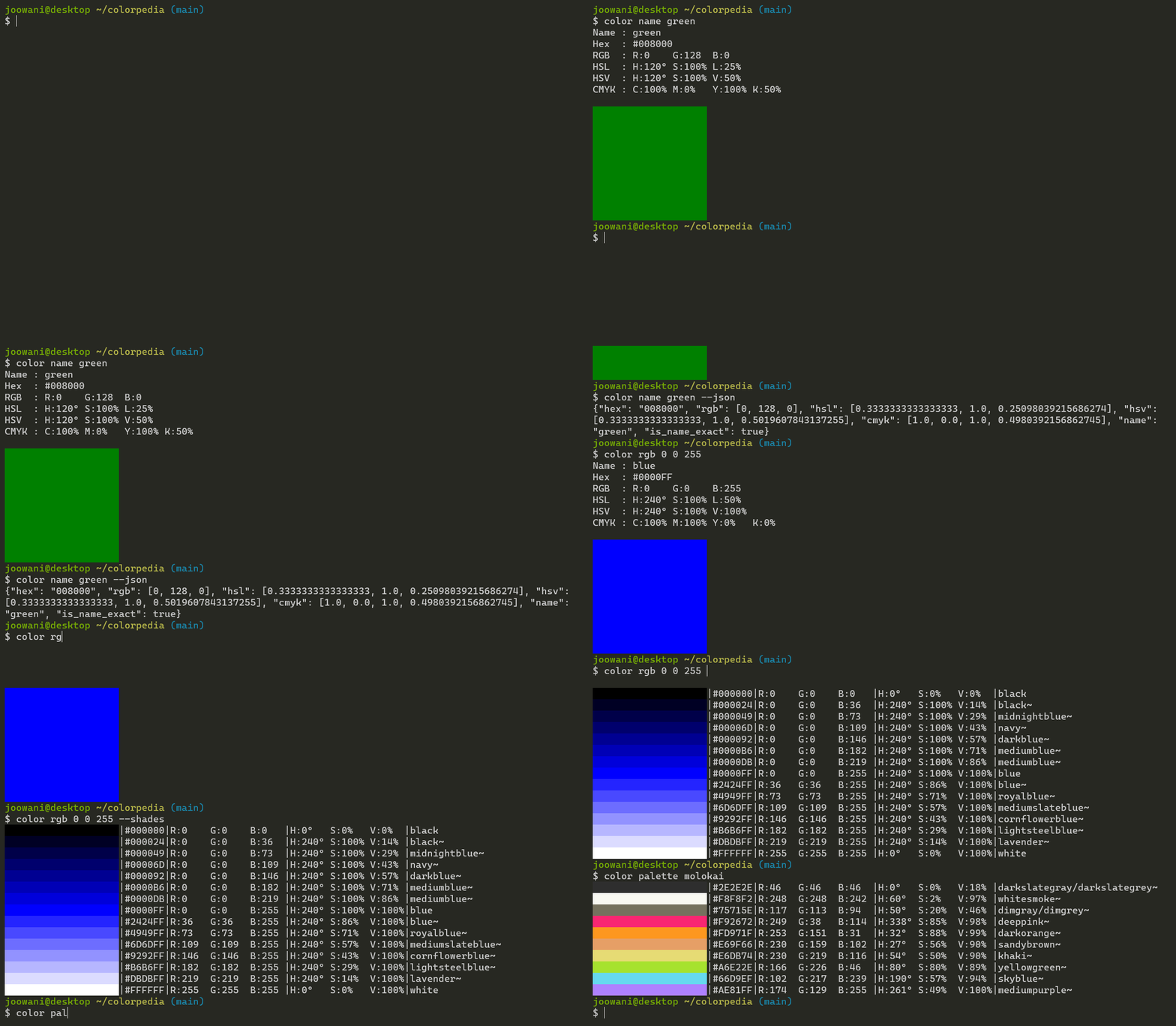
Look up colors using various color models:
color name green            # CSS3 color name
color hex FFFFFF            # hex code without the hash (#) prefix
color rgb 255 255 255       # RGB (Red Green Blue)
color hsl 360 100 100       # HSL (Hue Saturation Lightness)
color hsv 360 100 100       # HSV (Hue Saturation Brightness)
color cmyk 100 100 100 100  # CMYK (Cyan Magenta Yellow Black)
Use --shades to display shades of a color:
color name green --shades    # Display 15 colors by default
color hex FFFFFF --shades=5  # Display 5 shades
Look up color palettes:
color palette molokai
color palette facebook
color palette zenburn
Control the output with global flags:
color name yellow --all      # Display all details
color name yellow --json     # Display in JSON format
color name yellow --units    # Display unit symbols
color name yellow --nojson   # Do not display in JSON
color name yellow --nounits  # Do not display unit symbols
Combine with other command-line tools like jq:
color palette molokai | cut -d'|' -f 2,3,4
color name blue --range --json | jq .[0].name
Use --help to display more information on each subcommand:
color name --help
color rgb --help
color palette --help
Tab Completion
For Bash, add the following line in ~/.bashrc or ~/.bash_profile:
source <(color -- --completion)
For Zsh, add the following lines in ~/.zshrc:
autoload -U +X compinit && compinit
autoload -U +X bashcompinit && bashcompinit

source <(color -- --completion | sed "s/:/: /g")
Replace color with colorpedia if you are using the latter.
Configuration
Initialize the configuration file to customize CLI behavior:
The command above creates ~/.config/colorpedia/config.json with default settings:
{
  // Always display in JSON format. Use with --nojson global flag.
  "always_output_json": false,

  // Suffix for approximate color names (e.g. "green~").
  "approx_name_suffix": "~",

  // Default number of shades displayed when --shades is used without a count.
  "default_shades_count": 15,

  // Display degrees angle (°) symbol. Use with --nounits global flag.
  "display_degree_symbol": false,

  // Display percentage (%) symbol. Use with --nounits global flag.
  "display_percent_symbol": false,

  // Height of the color box displayed in single-color (get) view.
  "get_view_color_height": 10,

  // Width of the color box displayed in single-color (get) view.
  "get_view_color_width": 20,

  // Keys displayed in single-color (get) view.
  "get_view_keys": ["name", "hex", "rgb", "color", "hsl", "hsv", "cmyk"],

  // Keys displayed in JSON view.
  "json_keys": ["name", "is_name_exact", "hex", "rgb", "hsl", "hsv", "cmyk"],

  // Width of the color box displayed in multi-color (list) view.
  "list_view_color_width": 20,

  // Keys displayed in multi-color (list) view.
  "list_view_keys": ["name", "hex", "rgb", "color", "hsl", "hsv", "cmyk"],

  // Always uppercase hex codes if set to true, lowercase if set to false.
  "uppercase_hex_codes": true
}
Display or edit the configuration file:
color config show  # Display configuration
color config edit  # Edit configuration via a text editor
Technical Notes
- Names of "unknown" colors are approximated using minimum RGB delta:
If there are ties, all names are included in the output.
delta = (R1 - R2) ^ 2 + (G1 - G2) ^ 2 + (B1 - B2) ^ 2 - Percentage values use 0 - 100 scale by default, 0 - 1 scale in JSON.
- Degree angles use 0 - 360 scale by default, 0 - 1 scale in JSON.
- Percent and degree unit symbols are omitted in JSON.
- If HSV/HSL/CMYK values do not map exactly to an RGB triplet, they are rounded to the nearest one.