pype
Curly bracket-indented python for command line oneliners.
Runs everywhere python runs - even on Windows! Only 1 file, and works on python 2.3 - 3.4.
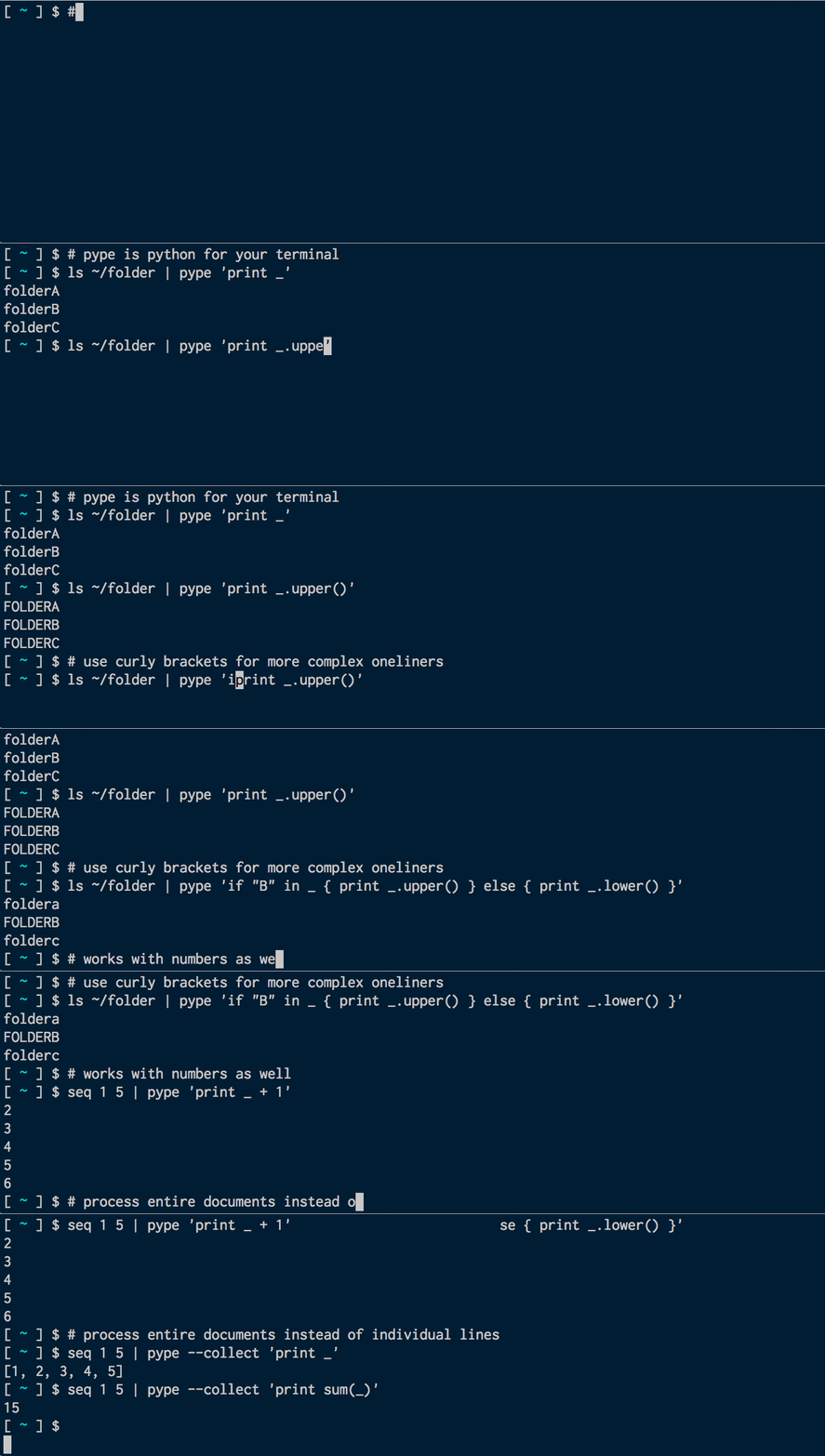
About
pype makes it easy to use python in a typical unix command line pipe. pype exposes
each line on stdin as the variable _, and lets you write a function to manipulate it:
$ echo "hello world" | pype 'print _.upper()'
HELLO WORLD
To make it easier to write one-liners, pype allows you to use curly brackets for indentation.
Additionally, pype will by default convert input to ints and floats if applicable. Let's calculate the square of the even numbers between 1 and 5:
$ seq 1 5 | pype 'if _%2 == 0 { print _*_ }'
4
16
Install
pype is a very short, hacky little script (and is defintely not suitable for production
environments at this point). It has very few dependencies, which are all available in
python 2.6, so hopefully, you can just download it and run it as-is!
Install with pip
Manual Install
Copy & paste-installer for the brave. Modify PYPE_INSTALL_PATH and PYPE_RC_FILE as required:
PYPE_INSTALL_PATH="$HOME/bin" && \
PYPE_RC_FILE="$HOME/.bashrc" && \
mkdir -p "$PYPE_INSTALL_PATH" && \
wget -O "$PYPE_INSTALL_PATH/pype" "https://raw.githubusercontent.com/ircflagship2/pype/master/pype" && \
echo "alias pype=\"python $PYPE_INSTALL_PATH/pype\"" >> $PYPE_RC_FILE && \
source $PYPE_RC_FILE
Install on Windows
Due to a known bug, it's not recommended to use python setup.py install on Windows. Download the pype file, rename it pype.py and add it to somewhere on your PATH. Then call it using pype.py instead of pype, e.g.:
c:\>dir | pype.py --collect "_.sort(); for l in _: print l"
Advanced Functionality and More Examples
Calling pype
List all files/folders in / in uppercase:
$ ls / | pype 'print _.upper()'
Pype is just a single python file, so you can the same by just pointing to the pype python file:
$ ls / | python ~/my_scripts/pype 'print _.upper()'
#### If...else statements
Print files/folders containing the character s in uppercase, the rest in lowercase:
$ ls / | pype "if 's' in _ { print _.upper() } else { print _.lower() }"
#### --before and --after
Do something cummulative using --before and --after. Let's count all
folders/files containing an s
$ ls / | pype --before "l = []" --after 'print len(l)' "if 's' in _: l.append(_)"
While pype auto-imports a handful of often-used imports, the --before argument is
useful if you need to include additional libraries:
$ ls / | pype --before "import json" "print json.dumps( { 'stdin' : _, 'upper' : _.upper() } )"
--collect
When doing something cummulative, it's often easier to use the --collect flag, to collect all input into an array (stored as _). Let's calculate the average of an input list of numbers:
$ seq 10 21 | pype -c "print sum(_) / float(len(_))"
--except
By default, pype will print a bunch of debug information to stderr when an unhandled exception is raised. You can define a custom, global exception handler with the --exception option. The exception is available as the variable e:
$ ls / | pype --except "err(e)" "_ + 1" # print error messages to stderr
$ ls / | pype --except pass "_ + 1" # quit silently on errors
#### --debug
Print the properly indented source code executed, together with verbose input
and output information using the --debug flag. Also useful to get an idea
of how pype works:
$ ls / | pype --before "l = []" --after 'print len(l)' "if 's' in _: l.append(_)" --debug
#### --no-convert
To make life easier, pype will convert input to integers and floats if possible. You can disable this behaviour, and ensure all input is strings by setting the --no-convert flag:
echo "1\n2.2\ntest" | pype -c --no-convert "print _"
--no-trim
pype trims _ using str.rstrip by default. This is generally easier to work with, as print,
out() and err() will add a newline character to output. You can disable this
behaviour if you need the stdin input unmodified. You'll likely want to use
sys.stdout.write() and sys.stderr.write() instead of print, out and err, as the
sys methods do not add an extra newline.
$ ls / | pype --no-trim "sys.stdout.write( _.upper() )"
Outputting to stdout and stderr
Instead of using print, you may use the included out(obj) (alias of print)
and err(obj) functions for outputting to respectively stdout and stderr.
If you prefer, these functions are also aliased as stdout(obj) and stderr(obj).
$ ls / | pype "if 's' in _ { out(_) } else { err(_) }" >stdout.log 2>stderr.log
Code reuse and defaults
Regularily used imports or functions can be added to ~/.pype . This is a
regular python file that will be included in all pype scripts. For instance, adding the
content below to ~/.pype will allow you to run
seq 1 5 | pype 'printtwice( math.sqrt( _ ) ) without errors:
import math

def printtwice(out):
	print out
	print out
Issues
Issues and pull requests are gladly accepted. The biggest known problem is that the conversion between curly-bracketed and whitespace-indented python is entirely untested, and likely to fail for anything more complex than very simple oneliners, like the ones in these examples.