











Pre-built easy to use reactive TurboBoost elements for Rails/Hotwire apps.
Table of Contents
Sponsors
Proudly sponsored by

Dependencies
- ruby
>= 3.0 - rails
>= 6.1 - turbo-rails
>= 1.1 - @hotwired/turbo-rails
>= 7.2 - turbo_boost-commands
>= 0.1.1 - @turbo-boost/commands
>= 0.1.1
Setup
Add TurboBoost Elements dependencies
# Gemfile
gem "turbo-rails", ">= 1.1", "< 2"
+gem "turbo_boost-elements", "~> VERSION"
# package.json
"dependencies": {
  "@hotwired/turbo-rails": ">=7.2",
+  "@turbo-boost/elements": "^VERSION"
# app/javascript/application.js
import '@hotwired/turbo-rails'
+import '@turbo-boost/elements'
Add TurboBoost to your Rails app
# app/views/layouts/application.html.erb
<html>
  <head>
+  <%= turbo_boost.meta_tag %>
  </head>
  <body>
  </body>
</html>
Elements
<toggle-trigger> and <toggle-target>
Toggle content via conditional rendering.
This example will re-render the post partial and toggle the form section.
<!-- app/views/posts/_post.html.erb -->
<%= tag.div id: dom_id(post) do %>
  <!-- content -->

  <%= toggle_trigger_tag renders: current_partial_path, morphs: dom_id(post),
    controls: dom_id(post, :form), locals: local_assigns, assigns: { post: @post } do %>
    <% if toggle_target_collapsed?  dom_id(post, :form) %>
      <%= link_to "Edit Post Inline", request.path %>
    <% else %>
      <%= link_to "Cancel Editing Post", request.path %>
    <% end %>
  <% end %>

  <%= toggle_target_tag dom_id(post, :form) do %>
    <%= render "posts/form", post: post %>
  <% end %>

  <!-- content -->
<% end %>
Tag Helpers
-
toggle_trigger_tagrenders- REQUIRED, the partial path to rendermorphs- REQUIRED,dom_idof the partial's outermost containing elementcontrols- REQUIRED,dom_idof the toggle targetassigns-{},assignsrequired to render the partial (i.e. instance variables)locals-{},local_assignsrequired to render the paritalcollapse_selector-nil, CSS selector for other matching targets to collapse when the target is expandedfocus_selector-nil, CSS selector for the element to focus when the target is expandedmethod-:toggle, method to inovke (:show, :hide, :toggle)disabled-false, disable the triggerremember-false, remember ephemeral UI state between requestskwargs- generic support for additional element attributes likeclassetc.&block- a Ruby block that emits this trigger's content
-
toggle_target_tagid- REQUIRED, thedom_idfor the elementcollapse_on-[], list of events that will collapse this targetcollapse_selector-nil, CSS selector for other matching targets to collapse when this target is expandedexpanded-false, override to force expansionfocus_selector-nil, CSS selector for the element to focus when this target is expandedkwargs- generic support for additional element attributes likeclassetc.&block- a Ruby block that emits this target's content
If a named keyword argument is shared by both the trigger and target,
the trigger value will take precendence because multiple triggers might control the same target.
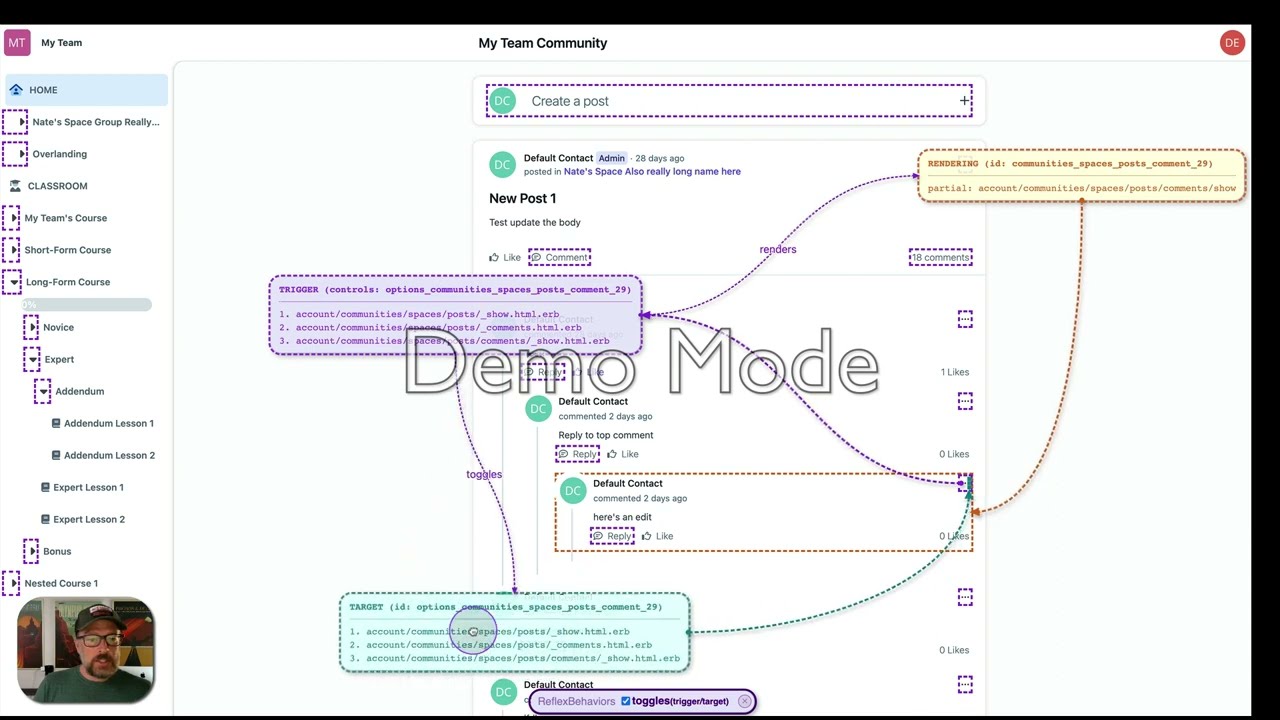
DevTools
TurboBoost ships with client/browser based devtools designed to improve the developer experience. You can enable the devtools with JavaScript like so.
TurboBoost.devtools.start()
Introductory Video
Releasing
- Run
npm installandbundleto pick up the latest - Update the version number consistently in the following files:
lib/turbo_boost/elements/version.rb- pre-release versions should use.preNapp/javascript/version.js- pre-release versions use-preNpackage.json- pre-release versions use-preN
- Run
bin/standardize - Run
rake buildandnpm run build - Commit and push changes to GitHub
- Run
rake release - Run
npm publish --access public - Commit and push changes to GitHub
- Create a new release on GitHub (here) and generate the changelog for the stable release for it
License
The gem is available as open source under the terms of the MIT License.