Latency-focused disk benchmarks for VPS environments.
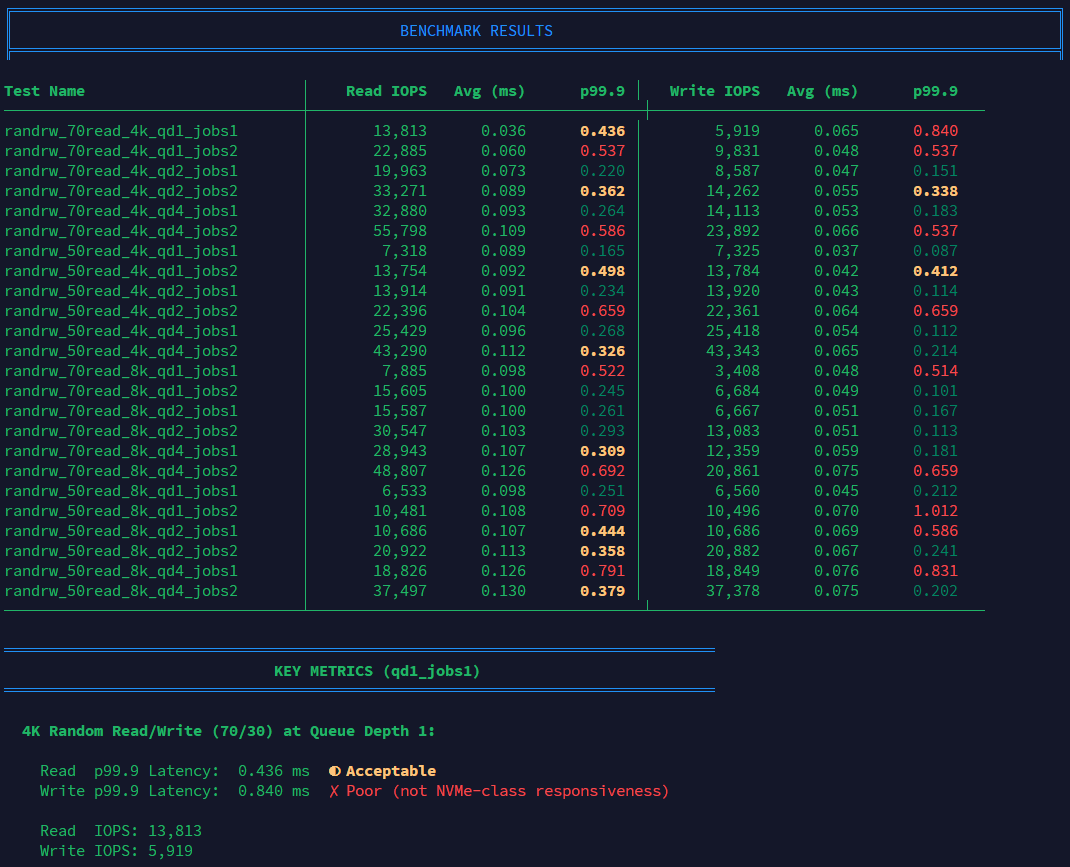
This script runs small-block mixed random I/O at low queue depths and light concurrency, then prints a formatted results table with color-coded latency assessments.
Why latency, not IOPS?
Most VPS workloads (web servers, databases, applications) operate at queue depth 1-2 with single-threaded I/O. High IOPS numbers from synthetic benchmarks at qd32+ don't reflect real-world performance.
Why VPS focused?
This script works on any Linux system: dedicated servers, cloud instances, homelab boxes, local workstations. The VPS framing is about audience, not technical scope. VPS buyers are the ones most often misled by inflated IOPS numbers from providers running synthetic qd32 benchmarks on marketing pages. But anyone evaluating storage latency under realistic workloads will find the results useful. It's just fio with sensible parameters.
This script tests what actually matters: p99.9 latency at low queue depth.
Read more: VPS IOPS vs. Latency: Why NVMe Benchmarks Lie
Features
- Formatted table output with aligned columns
- Color-coded p99.9 latency (green/yellow/red thresholds)
- Key metrics summary highlighting the most important qd1 results
- Pass/fail assessment against 0.3ms NVMe threshold
- Progress indicator during test execution
- JSON + TXT output for both human reading and scripting
Requirements
Required:
fio
Standard tools (present on most Linux systems):
dd,awk,sed,date,hostname
Optional:
bc(used for floating-point comparisons; falls back to awk)tput(for colorized output, if supported)jq(only needed if you want to manually inspect the raw JSON output)
Quick Start
# Download
curl -O https://raw.githubusercontent.com/haydenjames/VPS-Disk-Latency-Bench/main/bench-io.sh
chmod +x bench-io.sh
./bench-io.sh # Run with defaults (2GB file, 30s per test)
# Quick test (smaller file, shorter runtime)
FILE_SIZE_GB=1 RUNTIME_SEC=10 ./bench-io.sh
Sample Output
╔═══════════════════════════════════════════════════════════════════════════╗
║             VPS Disk Latency Benchmark - Latency-Focused Testing          ║
╚═══════════════════════════════════════════════════════════════════════════╝

Test Name                        │    Read IOPS   Avg (ms)      p99.9 │   Write IOPS   Avg (ms)      p99.9
─────────────────────────────────┼─────────────────────────────────────┼─────────────────────────────────────
randrw_70read_4k_qd1_jobs1       │        9,013      0.089      0.157 │        3,882      0.036      0.089
randrw_70read_4k_qd1_jobs2       │       17,238      0.091      0.214 │        7,397      0.041      0.098
...

═══════════════════════════════════════════════════════════════════════════════
                              KEY METRICS (qd1_jobs1)
═══════════════════════════════════════════════════════════════════════════════

  4K Random Read/Write (70/30) at Queue Depth 1:

    Read  p99.9 Latency:  0.157 ms  ✓ Excellent (NVMe-class)
    Write p99.9 Latency:  0.089 ms  ✓ Excellent (NVMe-class)

  Latency Thresholds:
    < 0.3ms  = Excellent (true NVMe-class performance)
    < 0.5ms  = Acceptable
    >= 0.5ms = Poor (likely throttled, shared, or not true NVMe)
Configuration
Override defaults via environment variables:
| Variable | Default | Description |
|---|---|---|
FILE_DIR |
/var/tmp |
Directory for test file |
FILE_SIZE_GB |
2 |
Test file size in GiB |
RUNTIME_SEC |
30 |
Runtime per test in seconds |
WARMUP_SEC |
5 |
Warmup time before each test |
IODEPTHS |
1 2 4 |
Queue depths to test |
BS_LIST |
4k 8k |
Block sizes to test |
MIX_LIST |
70 50 |
Read percentages (70 = 70% read, 30% write) |
JOBS_LIST |
1 2 |
Number of parallel jobs |
ENGINE |
libaio |
fio I/O engine |
OUTPUT_DIR |
./bench_out |
Output directory |
Examples
# Minimal test (fastest)
FILE_SIZE_GB=1 RUNTIME_SEC=5 IODEPTHS="1" BS_LIST="4k" MIX_LIST="70" JOBS_LIST="1" ./bench-io.sh

# Full test with larger file
FILE_SIZE_GB=4 RUNTIME_SEC=60 ./bench-io.sh

# Custom output directory
OUTPUT_DIR=/tmp/benchmarks ./bench-io.sh
Output Files
The script creates two files in ./bench_out/ (or $OUTPUT_DIR):
| File | Description |
|---|---|
fio-<hostname>-<timestamp>.txt |
Formatted summary with tables, key metrics, and raw data |
fio-<hostname>-<timestamp>.json |
Raw fio JSON output for programmatic analysis |
What to Look For
Focus on p99.9 latency in the 4k_qd1_jobs1 tests:
| p99.9 Latency | Assessment |
|---|---|
| < 0.3ms | ✅ Excellent - True NVMe-class performance |
| < 0.5ms | |
| ≥ 0.5ms | ❌ Poor - Likely throttled, noisy neighbors, or not true NVMe |
Warning signs:
- IOPS that flatline at round numbers (e.g., 20,000) suggest rate limiting
- High IOPS with high latency indicates oversubscribed storage
- Erratic latency across tests suggests noisy neighbors
Changelog
v2.0.0 (2026-02-03)
- New: Formatted table output with Unicode box drawing
- New: Color-coded p99.9 latency (green/yellow/red)
- New: Key metrics summary section
- New: Pass/fail assessment against thresholds
- New: Progress indicator during tests
- New: Improved TXT output with multiple sections
- Fixed: Compatibility with various fio versions
- Fixed: Robust JSON parsing
v1.0.0
- Initial release
License
MIT
Author
Hayden James - Linux systems analyst.