For the past few months, we've been working hard to improve the Pull Request experience. One of the features we're most excited about: Pull Request File Tree. The new tree:
- Jump between files more quickly
- Understand the size and scope of the change before you start reviewing
- Focus your review by filtering the tree on part of a file or folder name
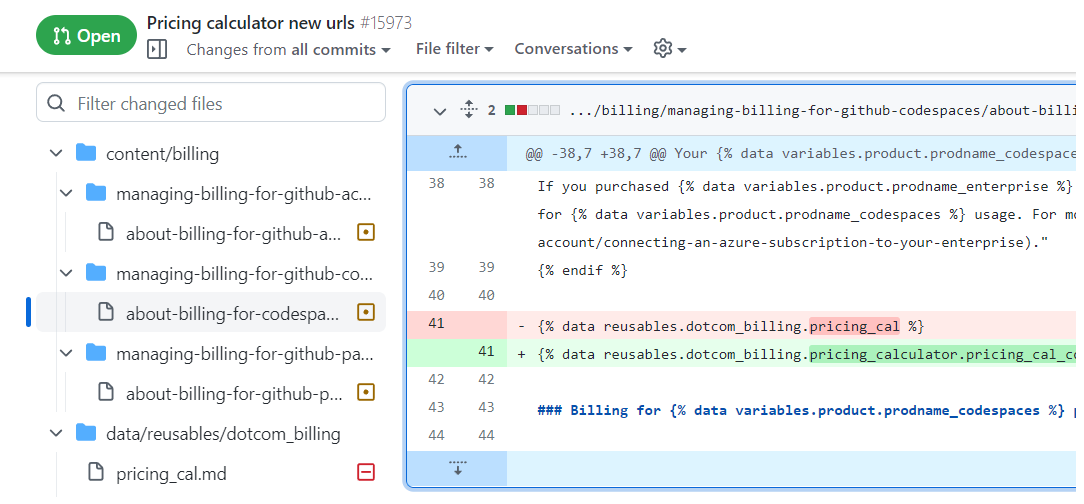
See the changelog for [a few more] details.
What you need to know
-
The file tree only appears if the pull request has at least 2 changed file and your browser window is sufficiently wide.
-
During the beta, you can disable the tree completely via the feature preview dialog. When disabled, you will no longer have the option to hide or show the tree from the pull request page. If you change your mind, you can re-enable the tree in the feature preview dialog.
Most common issues
The full list of issues we're tracking is longer than this, but the following are the most commonly reported:
- Ordering of files and folders under the same parent (including the root) is not always correct
- Accessibility-related issues (e.g. cannot navigate the tree using the keyboard)
- Tooltip missing on truncated file and folder names
- Tree does not resize properly in some cases
Tkeyboard shortcut not working
Feedback
Your feedback will help inform what's ultimately shipped in the GA release, so please let us know what you think below. We're excited to hear from you ✨ 
Great addition to PR reviews! This is a much easier way to navigate and visualize changes in a PR. If/when this hits public release please give the option to pin it to the right side instead of only the left!
47 replies

I like it over all as I can at least skip over pesky folders like migrations, I just wish I could make the project navigation panel wider or horizontal scroll in it, when you prefix all your file names the same way, you have no clue how to jump to a specific file.


Would be very helpful to be able to navigate between files with up and down arrow buttons.
Would make scanning through big PRs easier and faster.

Regarding the "hide" indicator @jgmuchiri screenshotted, if that could be included on the panel as you scroll down, so you can hide or show it while you're deep in reviewing the code without having to lose your place, that would be awesome.

Looks good! Even if really big PRs, I can finally filter using part of the filename, which was close to impossible before! 👏🏼
20 replies

Dance Madi
Let's Dance!!!
Great addition!
Very awesome feature to Github!

This is a great addition serves a great deal for reviewing in an organised fashion.

Now if only it flagged security issues in files by marking them in red for when someone tries to introduce a new security issue in pr.


Great addition! But I think, that a indicator should be added, at which File you are currently looking (because you can scroll like before, but the indicator itself does not update its location)
23 replies

Maybe a bold font for the file that you are currently seeing? Instead of that little vertical bar.

totally needed, it is confusing to scroll on the right while the tree not reflecting the currently reviewed file.

Agreed. Makes a lot of sense to somehow highlight (with enhanced font or foreground)

+1 for this. +several in fact.

Looks great so far 🎉 if I had some suggestions for improvements:
- Hiding/marking files after being marked as "viewed"
- Resizing of the left size panel, for those longer files and folders
And a single bug I've come across
- The top file or folder is hidden when stickied to the top after scrolling if you have a notification banner visible
69 replies

Fixed with is a pain. I have 4K screen with a bunch of space and I can't see full file names :-(


I think he meant to say the fixed width LHS is painful on a 4K screen because he has a bunch of space, yet can't expand the LHS to read the full file names without truncated text. I also share this pain.
This LHS panel for the code view is awesome. I wish the PR view was the same as the regular code view.
Screen.Recording.2023-03-14.at.8.31.06.AM.mov
@zsiswick exactly
@matuhinal I would love to be able to drag and change the width of the LHS. Easier to work with PR when you see full file names.

can't expand the LHS to read the full file names without truncated text. I also share this pain.
Don't know if this thread is still active but I find this immensely painful as well.
Great addition! 🌾
Found a possible bug:
- The first file/folder in the file tree is scrolled under the notification bar when scrolling.
7 replies

I'm seeing this too. If I dismiss the notification banner, it works as expected, but I think it should also show the first files even if I haven't dismissed the notification.

Yes, this happened to me too.

Strangely, now I'm seeing the opposite: the per-file top-bar is getting hidden under the PR top-bar:

To explain the image a bit more, the top-bar that has the "Viewed" check box is partially hidden by the PR top-bar and will continue to scroll out of view. At least for this "summary" view of all files*, I would expect the top-bars to remain unobscured until the entire file has scrolled out of view.
* On that note, with the folder view, why load all files? For large PRs, the file folders help go to a specific view, but page load and performance still suffers.

I noticed some odd behavior when all of the files are collapsed. If you click a filename, the page will try to infinitely scroll until you change focus by clicking anywhere else on the screen.

EDIT: Don't do this anymore, they added some weird JS that detects an "original top" and using this style adjustment creates excess padding
I came to report exactly this. The height of the sticky sidebar is getting updated correctly when there's a notification but it's top value is not respecting the extra height added by the notification.

Using something like Stylus you can add this CSS rule and it get's fixed perfectly.
.notification-shelf ~ .application-main .hx_Layout--sidebar {
  top: 128px;
}

Looks good. As a suggestion I would like to see which files have comments in the tree.
13 replies


Please incorporate this. Microsoft Azure DevOps has a nice visualization for this. Having used that as well. It makes a really measurable difference in productivity, especially on teams or commits with more than just a handful of files.. Comments become much more discoverable and the are shown in-context.
Simple Example below.


This suggestion is worth a comment to say "me too!". Especially looking for a "has comments" and a "has unresponded to" comments kind of indicator. Love the feature so far <3.

it is better to show how many comment in the file and how many have been resolved as follows


Yes, it would be good to be able to differentiate between files with comments and files with unread comments. Also, it would be great to have a way to page through comments groups rapidly.
Looks not so good on 4k resolution:

23 replies

On 4k+ resolutions, it would be great to be able to drag the tree container to make it bigger for accommodation of big file names

To all commenting about fixed width: browser window is resizable, so you can scale it down if 100% width is a problem. Achieving 100% width (which I wanted even though I work on a 27" QHD monitor) when there's a fixed (pixel!), on the other hand, is not possible without browser plugins & CSS hacking (which I did before 100% width was there).
As a user with an ultrawide monitor, I can't agree more with the suggestion to unlock the width. I built this bookmarklet to allow me to double the width of the column (which is okay as a fixed size for me), but something easily draggable with memory between reloads would obviously be much more valuable. Barring that, a config setting to say "my preferred fixed size is $x px" would be a big step in the right direction and probably much easy to code in.

@rafaelrenanpacheco This could be a case of user error. Why would you do code review that isn't side by side on a 4K screen? Would you read google search results like that? Last thing I would want is for them to artificially narrow the screen because of a comment like this.

You want to have the full path in general, in my experience, but there is no room for it if you stick it next to the diff.
Instead, can it be small bar at the left (eg for overview), and when you move the mouse to the left over it, a popup that covers say up to 1/2 the screen width? That would give you the space for everything
I like it but I wanted to disable it to test something but disabling it in feature preview does nothing and I still seeing file tree.
14 replies

In other code review tools I have used, I have been able to toggle the view of the file tree on or off based on a hotkey, for example "f".


The current icon is a bit too small for purpose (and also only shows at the top for me, not when scrolling no, wait, it's there). Better discoverability would be nice - maybe just make it a touch bigger? A highlight wouldn't hurt either, it gets lost in all the other graphical box borders.
An additional config option to auto-collapse would be a nice pair to a keyboard shortcut to show/hide.
Overall a nice improvement!

I do not have the ability to hide it. I don't find it useful for large commits. It's just noise.

UX: Struggled to find the icon to show/hide file tree.
On a 1450 px browser window, can't see 76 cols side by side with the file tree on.
Suggestion: reformat the default file tree with so you can still do 76 cols side by side diff?
Love the new feature.
I have a potential feature suggestion.
Could a shade of colour be added to the tree for all of the files that are marked as viewed?
So for argument's sake, if we mark a file as viewed, a light grey color gets set in the file tree.
Here is a mock up of how it could look if a file is marked as viewed

7 replies


Great idea! I think that a checkmark ✔️ with an eye 👁️ will be nice.
Something like this (which I'm not sure if is allowed to be embedded here)

I would love to be able to mark file as viewed directly in the tree as well.

It looks like adding this style does the trick
li[data-file-user-viewed] {
    opacity: .5;
}

Marking the folders as viewed when all files in that subtree are viewed would help continuing reviews quicker.
Also the comment markers with open/all count could appear on the collapsed folders if any file under that subtree has comments.
And when the folder is open the aggregated info should be hidden and the files and subfolders should show the relevant data instead.
This is a great feature!
I am already using an extension for PR tree, is in the road map to implement the features of the browser extension?
- diff stats next to file
- count of the changed lines
- icons
- indication that there are comments on the file

17 replies

+1 for diff stats. I agree that it would be helpful to easily find which files contain major changes.

Would also like for the search bar to be anchored like in the extension, so you won't have to scroll to the top of the file list to search it.
+1 for indication that there are comments on the file.

- indication that there are comments on the file
In addition to comments I would love to have an indicator for check annotations as well (or whatever they are called, see the picture for an example).

Nice addition. The feature does not seem to work in the commits tab of the PR. In our shop, we typically do commit-by-commit reviews and rarely use the files changed. It would be nice to have the file tree in commits as well.
5 replies

Second that! Commits tab and commits comparison as well! 👍


I'm seeing it in the commit by commit review but only when the commit contains more than 1 file.

Yes! I jumped here to add this exact feedback. Love this feature, and was hoping there would be some way to quickly reference or copy the commit SHA in the tree. But since there can be any number of commits to a file, it seems this could be offered as a file tree feature in the commits tab. Or via some way to cross-reference them in filtered files-changed to changes-from-commit.
A sweet version of that sync might be to have some detail in the file-info tab header that links the file to its commit history within the current PR.

This is such a great feature.
0 replies
First of all amazing feature, cheers!
In a long diff, clicking a file name for the first time correctly positions the view and highlights the file with blue marker but clicking a second time moves the view a bit down and obscures the highlight.
I would expect the second click do nothing -- maybe fold/unfold the file.
3 replies

Thanks for the feedback. We're looking into this.

Amazing feature indeed! I see that clicking a second time makes the page do a weird jumpy (to top of page and back) thing on my system. It keeps the highlight and stays positioned correctly though.
It's really useful but some minor points:
- It's eating lots of horizontal room, making side-by-side diffs a bit harder to read
- Maybe shrink the font size a bit?
- Maybe have a splitter that allows tree width to be reduced/increased?
- Tooltips on the glyphs at right hand side of tree (eg. denoting new file, changed file, etc) would help new users
- Maybe dim the folders + their names (unless they are added/removed) to make changed file names stand out more?
- Would changing colour/hue/whatever of
/slashes in folder paths help differentiate from the folder names? - Maybe file type icons, except for the most common filetype in a repo? (eg. in csharp repo, things like csproj and sln would get custom icons to make them stand out, but cs files would use default icon to reduce visual complexity)
- An option to view only file selected in the tree (eg. hide everything else so I can focus on that file)
- Some way to see in the tree whether file is marked viewed?
16 replies

Really want to be able to change the width of the file tree, we have large filenames that are cutoff, and so there may be half a dozen files that have the same leading characters that are cutoff and I can't tell which is which without clicking. Having full file name in tooltips is also desirable when it's truncated.

An option to view only file selected in the tree
I would like to have this feature as well 👍

Maybe have a splitter that allows tree width to be reduced/increased?
👍 + an option to hide id completely. My use case is portrait oriented monitors, 1080x1920 (WxH).
an option to hide id completely
the option is there, just a row higher than I expected it. maybe by the search entry?

The option to change the font size in the tree would be useful
I like the ability to navigate the file tree, but I wish it would remember whether the drawer/sidebar was open/closed. I often have GitHub in a narrow window (as GitHub is fits comfortably in a narrow window), but with the file tree defaulting to open the space for the diff is greatly reduced.
7 replies

@willsmythe I think support for narrow window and saving state should be separate features.
Currently when the diff is in "Split" view, the filetree hides only when width is under ~1000px. This makes it unreadable between 1000px - 1200px range. (I presume numbers may vary by browser or device 😄)
With Split diff view the filetree should probably hide when window width is around ~1200px.


It's beneficial to review code quickly and perfectly

Agree with nickvanw, default tree to hidden, or allow me to default it to hidden via a global setting.

+1 to this.
File Tree is an awesome feature 🎉, but I don't need it all the time (sometimes I need more space to view the code changes in split view). Ability to hide/unhide it with a simple toggle button and keeping the last setting in memory would help a lot.
Great addition! But I think, that a indicator should be added, at which File you are currently looking (because you can scroll like before, but the indicator itself does not update its location)
For those PRs with lots of files, it'd be great if the active file, or one that's the first file within the viewport, was highlighted in some way in the file tree. That way I could tell as I'm scrolling through where exactly the file I'm looking at exists relative to the other files I'm reviewing. It also gives me a sense of how far through the PR I am.
I don't know if this has been suggested elsewhere, but I'd really like a "File filter" option to filter files that have been renamed without changes. When moving large directories around, this can really slow down the UI and add a lot of noise to a review.
0 replies
Can you do something to make the full packages and file names visible? Currently is it not possible to see the full name in any way, because the file tree window is not re-sizable. Maybe there could be balloon popups?
1 reply

It's a disgrace that such a small change couldn't be fixed in two years.
This comment was marked as off-topic.
This comment was marked as off-topic.
0 replies
Would be very helpful to be able to navigate between files with up and down arrow buttons.
Would make scanning through big PRs easier and faster.
0 replies
I would like to report a defect. Please add mouse-overs/tooltips to the truncated items in the tree. Currently there is no way to
- resize the width of the tree, nor
- horizontally scroll the tree, nor
- see the name of items that are truncated by hovering or mousing over them
How can I distinguish the following 5 truncated folder names?

1 reply

Hi @chris6090 ,
I've removed your private information from [this post](link to discussion) as posting identifiable information is not allowed, per our Code of Conduct.
This comment was marked as off-topic.
This comment was marked as off-topic.
0 replies
0 replies
This comment was marked as off-topic.
This comment was marked as off-topic.
Tooltip missing on truncated file and folder names
Yes please!! I'm having to keep browser devtools open to inspect the full file name or folder name which isn't cool. Making the file structure expandable or resizable would be even better. <3
0 replies
This comment was marked as spam.
This comment was marked as spam.
This comment was marked as spam.
This comment was marked as spam.
This comment was marked as spam.
This comment was marked as spam.
0 replies