Why Foyer?
When using AI Agents for development, I often run into this problem where the wait time for LLMs to complete their work breaks my focus. This is a post from HackerNews completely resonated with me
For me the fatigue is a little different— it’s the constant switching between doing a little bit of work/coding/reviewing and then stopping to wait for the llm to generate something. The waits are unpredictable length, so you never know if you should wait or switch to a new task. So you just do something to kill a little time while the machine thinks. You never get into a flow state and you feel worn down from this constant vigilance of waiting for background jobs to finish. I dont feel more productive, I feel like a lazy babysitter that’s just doing enough to keep the kids from hurting themselves
What is Foyer?
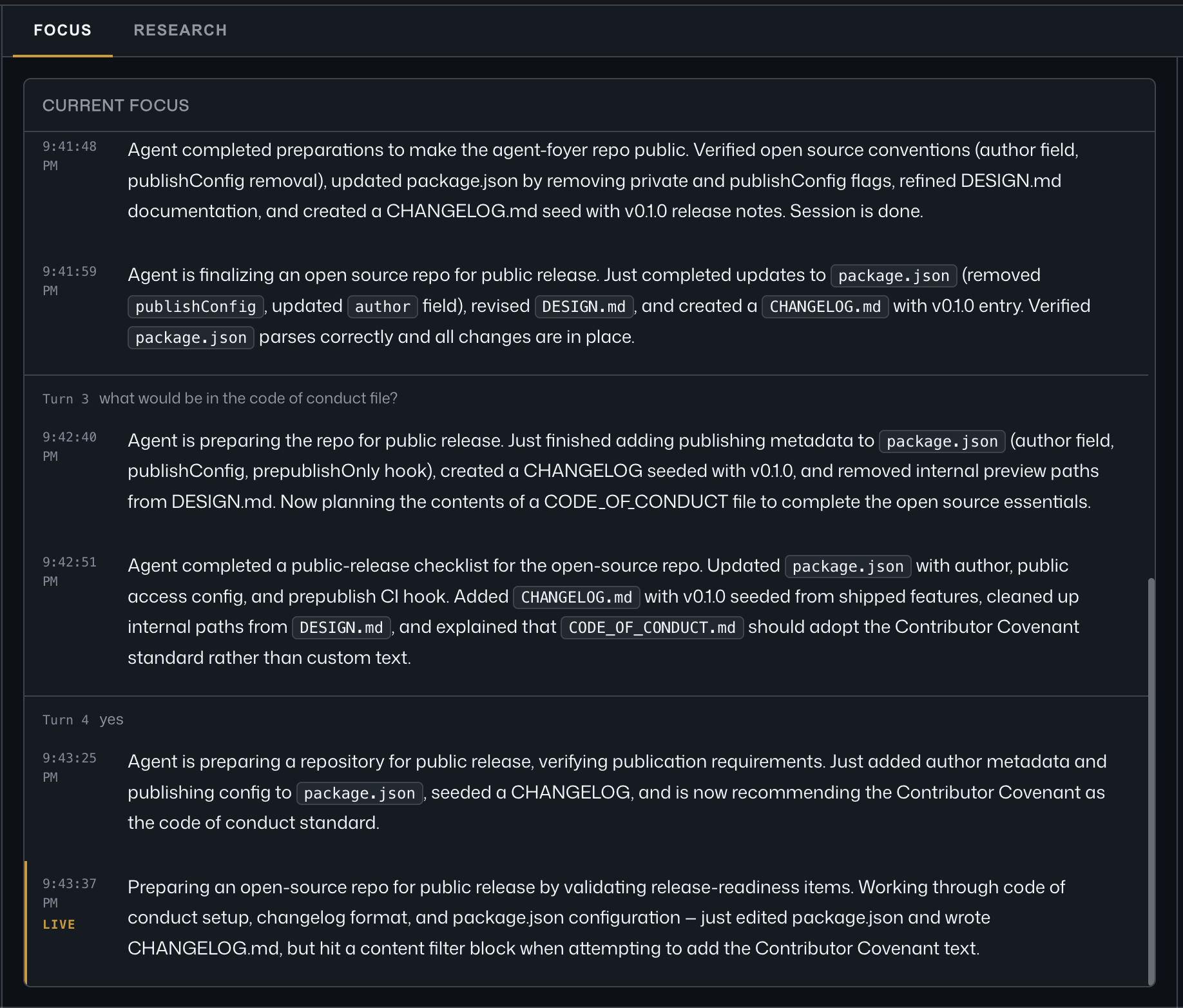
Turn the 3–5 minute "agent is working" wait into focused, in-context time.
When you prompt Claude Code or Codex, Foyer hooks into the session and renders a dashboard: a narrated "current focus" and a research panel for learning while you wait.
Core UX principle: every panel gives you something to think about in the same mental space as the current task — not just a progress bar.
| 🎯 Live focus — a narrated "current focus" as the agent works |
|---|
 |
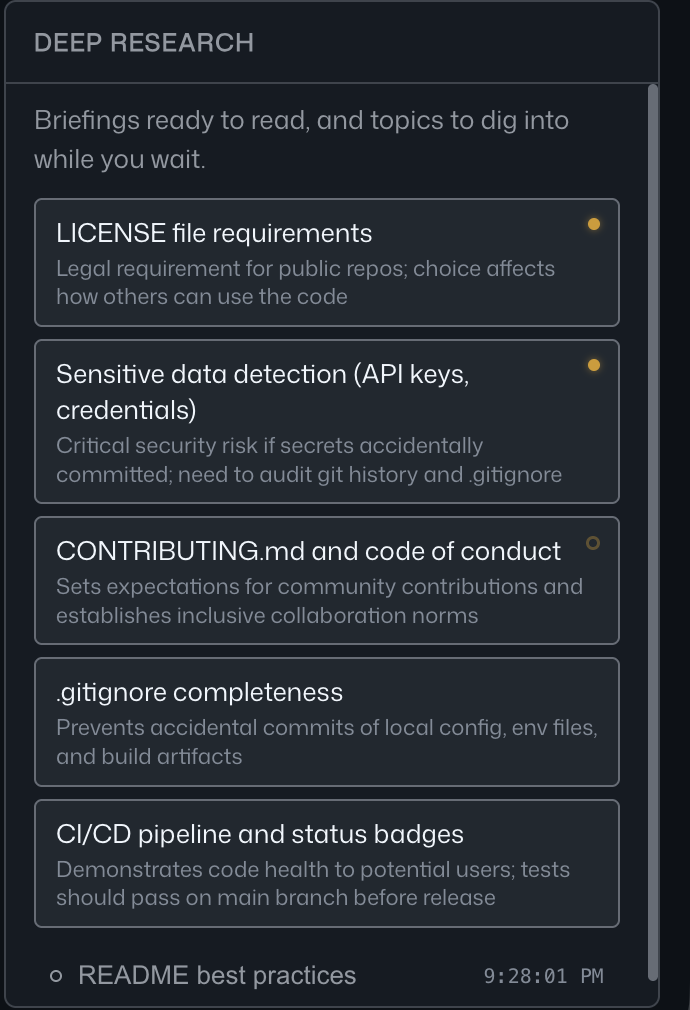
| 🔎 Deep research panel | 📖 Sourced briefings, in context |
|---|---|
 |
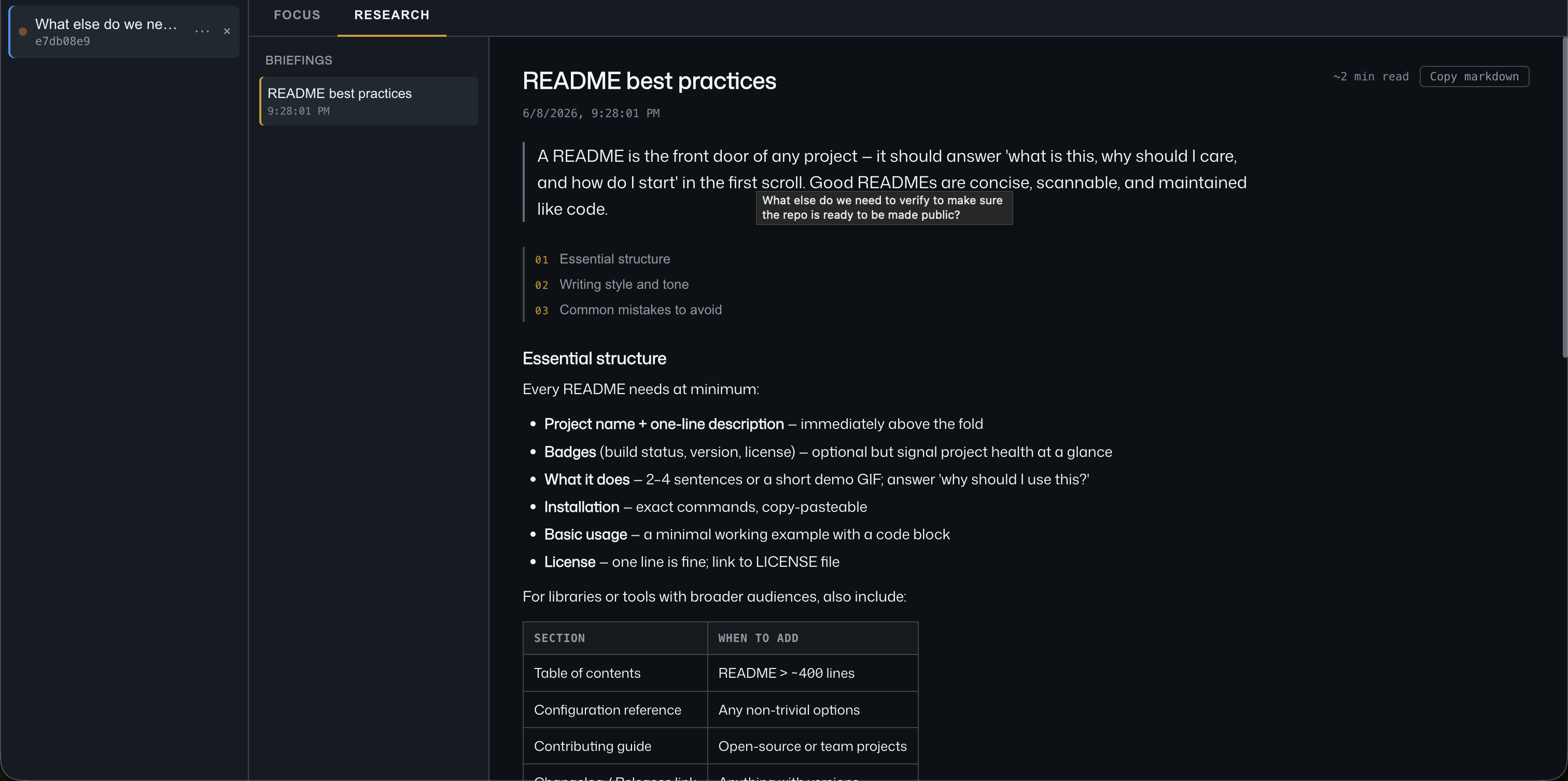 |
| Briefings ready to read + suggested topics to dig into | Read a cited briefing while the agent runs |
Features
- Current focus — a live, narrated summary of what the agent is doing right now, with a per-turn timeline
- Deep research — click suggested topics during the wait and get sourced briefings (some topics are pre-fetched to minimize waiting)
- Zero agent slowdown — all hooks return instantly; nothing blocks the agent
Prerequisites
- Node ≥ 18
- Claude Code installed and configured, or Codex CLI installed and logged in
- One of the following LLM backends (for activity summaries and research):
- Codex CLI (
npm i -g @openai/codex) — uses your ChatGPT Plus/Pro subscription - Claude CLI (already installed if you have Claude Code) — uses your Claude subscription
- Anthropic API key — pay-per-token via
anthropic.com
- Codex CLI (
Quick start
npx @getfoyer/foyer setup      # pick backend, install hooks
npx @getfoyer/foyer start      # dashboard at http://localhost:4317
Then in another terminal window, start Claude Code or Codex in a hooked repo. The dashboard populates as the agent works.
For repeated use, install the CLI globally:
npm i -g @getfoyer/foyer
foyer setup
foyer start
LLM backend options
The setup wizard auto-detects what's available and asks which to use.
| Backend | Auth | Web search | Cost |
|---|---|---|---|
| Codex CLI | ChatGPT subscription | ✅ --search |
Usage against your plan |
| Claude CLI | Claude subscription | ✅ WebSearch | Usage against your plan† |
| Anthropic API | API key (BYOK) | ✅ web_search | ~$0.01/search + tokens |
† From 2026-06-15, Claude subscription headless usage (via claude -p) draws from a separate monthly "Agent SDK credit" pool, distinct from your interactive limits. The setup wizard warns you before choosing this option.
⚠ ToS note: Using the Codex or Claude CLI to automate calls from a local server is in a gray area of each provider's terms of service. Foyer is intended for personal, local developer use only. For production or team use, use the Anthropic API (BYOK).
Local security model
Foyer is designed to run on your own machine, for your own agent sessions. The Express server binds to 127.0.0.1 only, and the installed hooks call http://localhost:<port>/hook.
The local API routes are not authenticated. That is intentional for a localhost developer tool, but it means any process running as your user can talk to the dashboard while it is open. Do not expose the Foyer port with a reverse proxy, tunnel, public bind address, or shared network listener. If you change the server to listen on anything other than loopback, add authentication and firewall rules first.
Provider config is stored in ~/.config/foyer/config.env by default and may contain credentials when you use the Anthropic API backend.
How it works
foyer setupinstalls HTTP hooks into your Claude Codesettings.json(global or project-local, your choice), and can optionally install Codex lifecycle hooks in~/.codex/config.toml- When you run Claude Code or Codex, these hooks POST small JSON payloads to the dashboard server at
http://localhost:4317/hook - The server holds session state in memory, broadcasts updates to the browser via SSE, and fires async LLM calls for activity summaries and research
Hook events
| Event | Purpose |
|---|---|
UserPromptSubmit |
New task started |
PreToolUse (ExitPlanMode) |
Approved plan captured |
PreToolUse / PostToolUse (AskUserQuestion) |
Needs-you state |
PostToolUse |
Refresh current focus |
Notification |
Permission / idle prompts |
Stop |
Task complete |
All hooks have a 2-second timeout — if the server is not running, the hook fails fast and the agent continues unaffected.
Development
git clone https://github.com/getfoyer/foyer
cd foyer
pnpm install
pnpm setup      # optional: configure your local dev install
pnpm build
pnpm start      # production server from dist/
pnpm dev # Vite + Express in watch mode (frontend on :5173, API on :4317)The Vite dev server proxies /hook, /events, /research, /activity, /prefetch, /close, /pin, and /api to the Express server.
pnpm typecheck  # type-check all source files
pnpm lint       # ESLint
pnpm test       # Vitest (node + jsdom projects)
pnpm build      # Vite frontend + compiled Node CLI/server
pnpm package:smoke  # verify npm package contents
pnpm run ci     # typecheck + lint + test + build + package smoke
See CONTRIBUTING.md for architecture details and conventions.
Uninstall
foyer uninstall # strips only Foyer hooks; all other hooks are preservedConfiguration
User config lives in ~/.config/foyer/config.env by default (created by foyer setup). Set FOYER_CONFIG_DIR or FOYER_CONFIG_PATH to override that location. Environment variables still take precedence over file config.
FOYER_PORT=4317                 # dashboard port
FOYER_PROVIDER=codex            # codex | claude-cli | anthropic-api
ANTHROPIC_API_KEY=sk-ant-...    # only for anthropic-api provider
FOYER_ANTHROPIC_MODEL=claude-haiku-4-5
Session data is stored in ~/.foyer by default. Set FOYER_DATA_DIR to override it.
License
MIT — see LICENSE.