
FormKiQ Core is the open-source backend for FormKiQ: an API-first document management platform that runs in your AWS account or locally with Docker. It provides document storage, metadata, tagging, search, versioning, events, and access control using AWS-native services.
Who it’s for
- Teams building secure file workflows that must remain in their AWS accounts.
- Regulated workloads needing auditability, retention, and least-privilege access.
- SaaS platforms delivering per-tenant document storage with isolation and signed links.
- Ops/support teams needing fast search over PDFs and images without custom pipelines.
Capabilities at a glance
- Ingest via API Gateway, S3, or email; optional OCR pipeline for images/PDFs.
- Metadata and tagging for every document plus custom attributes.
- Full-text/OCR search and filters; show only what each user/tenant should see.
- Versioning, retention, and audit trails built-in; lifecycle controls via policies.
- Event hooks via Lambda/SNS/SQS/EventBridge to enrich, classify, notify.
- SDKs for Java and Python, plus OpenAPI for other languages.
Why teams choose FormKiQ
- Data and keys stay in your AWS account; IAM-first access control and audit trails.
- Built-in metadata/tagging, OCR search, versioning, and retention—no custom boilerplate.
- Serverless stack that auto-scales; no servers to patch or capacity to size.
- Multi-tenant ready and SOC 2–aligned design for regulated workloads.
Common use cases
- Records and retention vaults for HR, legal, and finance with audit trails and versioning.
- Intelligent ingestion: drop into S3/email/API, OCR + metadata tagging, and route via events.
- Compliance-focused file storage where data must remain in your AWS account with IAM-scoped access.
- Customer/partner file portals with per-tenant isolation and signed access links.
- Workflow enrichment: trigger Lambdas on uploads to classify, enrich metadata, notify via SNS/SQS/EventBridge.
- Searchable knowledge stores over PDFs/images for support and operations teams.
Deployment options
- Deploy to your AWS account with the AWS SAM CLI or CloudFormation links from the Quickstart Guide.
- Run locally with Docker using the Netty server package.
- Evaluate in the hosted demo environment (read-only).
- Inquire about managed workspaces if you prefer a turnkey setup.
Quick Start
- Run locally with Docker: build and run the local FormKiQ stack on your machine.
- AWS deploy: use the AWS SAM CLI or CloudFormation launch links from the Quickstart Guide.
- Hosted demo: Explore — Email:
demo@formkiq.com, Password:tryformkiq. - API walkthrough: Step-by-step to integrate quickly.
Run locally with Docker
The apps/netty-server module mimics the AWS API Gateway + Lambda runtime so FormKiQ Core can run as a Docker Compose stack.
Requirements:
- Docker
- Java 25
- Gradle wrapper from this repository
The local stack uses separate S3 endpoints for browser-facing presigned URLs and
container-side document actions. API responses use S3_PRESIGNER_URL=http://localhost:9000,
while local action processing uses API_URL=http://api:8080 and
S3_ACTIONS_PRESIGNER_URL=http://minio:9000 so containers can reach the API and MinIO
through Docker DNS.
Build the local Docker package:
./gradlew assembleNettyServer
Unpack and start FormKiQ:
cd build/distributions
unzip formkiq-core-netty-server-*.zip
cd formkiq-core-netty-server-*
docker compose up --build
Open:
- Console: http://localhost
- API: http://localhost:8080
- Keycloak: http://localhost:8081
- MinIO: http://localhost:9000
- DynamoDB Local: http://localhost:8000
- Typesense: http://localhost:8108
Default local login:
- Username:
admin@me.com - Password:
password
Common API flow
- Log in with
POST /login. - Upload or create a document with
POST /documents. - Read document content or metadata with
GET /documents/{documentId}. - Search, tag, update, or route documents through events as needed.
Architecture
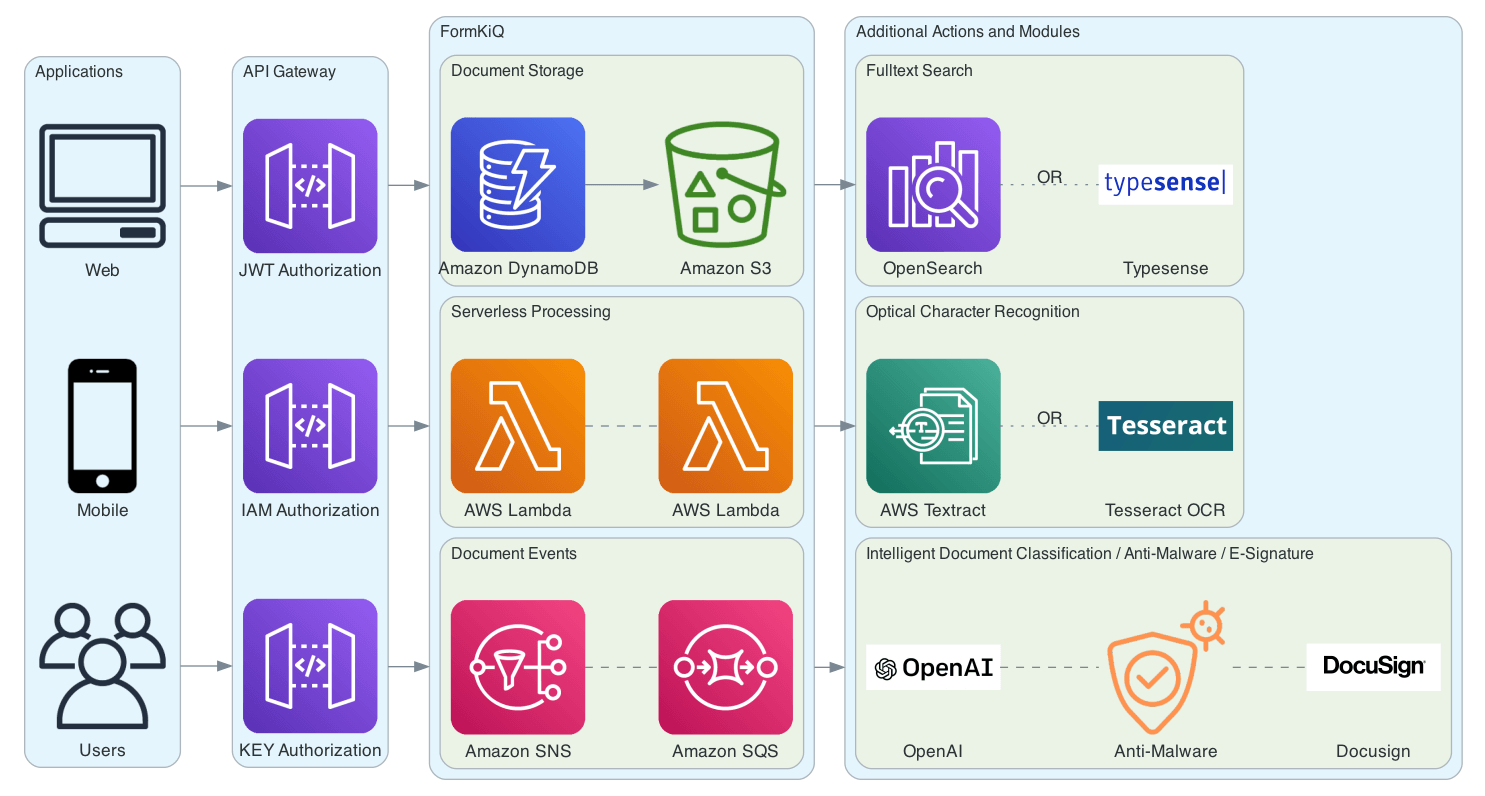
Serverless on AWS: Lambda + API Gateway + S3 + DynamoDB + OpenSearch, with optional modules for OCR, Typesense, and event handling.
Project structure & commands
apps/: Lambda apps, console, and the local Netty server.domain/: document, event, action, OCR, and plugin domain modules.adapters/aws/: AWS service adapters.libs/: shared libraries.packaging/: AWS Cloud, CloudFormation, and OpenAPI packaging.- Templates/assets:
src/main/resources/cloudformation,docs/,images/,docker/.
Common commands:
./gradlew assembleAwsCloud       # Build the AWS distribution ZIP
./gradlew assembleNettyServer    # Build the local Docker distribution ZIP
./gradlew integrationtests       # Run Docker-based Netty integration tests
./gradlew test                   # Run unit tests
./gradlew spotlessCheck          # Verify formatting
./gradlew licenseReport          # Regenerate license inventory
Security, compliance, and scale
- Data, encryption keys, and access policies remain in your AWS account; IAM secures every interaction.
- Versioning and audit trails support retention and evidence needs for SOC 2/HIPAA-style controls.
- Serverless footprint scales with demand; designed for thousands of concurrent requests.
Client SDKs
- Java SDK — best for JVM backends.
- Python SDK — scripting/data workflows.
- TypeScript SDK — web and Node.js apps.
- Other languages via OpenAPI Generator using the published spec.
Client Tutorials
- Python SDK Tutorial — Python SDK Document API walkthrough
- TypeScript SDK Tutorial — TypeScript SDK Document API walkthrough
Resources & support
- Docs: Complete Documentation, API Reference, Tutorials, How-To Guides
- Updates: Blog
- Issues/questions: GitHub Issues
- Enterprise inquiries: Contact or formkiq.com
License
MIT License - © 2020-2025 FormKiQ, Inc. See LICENSE for full details.