




Community tool — not affiliated with or endorsed by Anthropic.
Claude Code sessions are great for development, but hard to share. Screen recordings are bulky and transcripts are hard to navigate.
claude-replay turns Claude Code session logs into interactive, shareable HTML replays. The generated replay is a single self-contained HTML file with no external dependencies — you can email it, host it anywhere, or embed it in documentation.
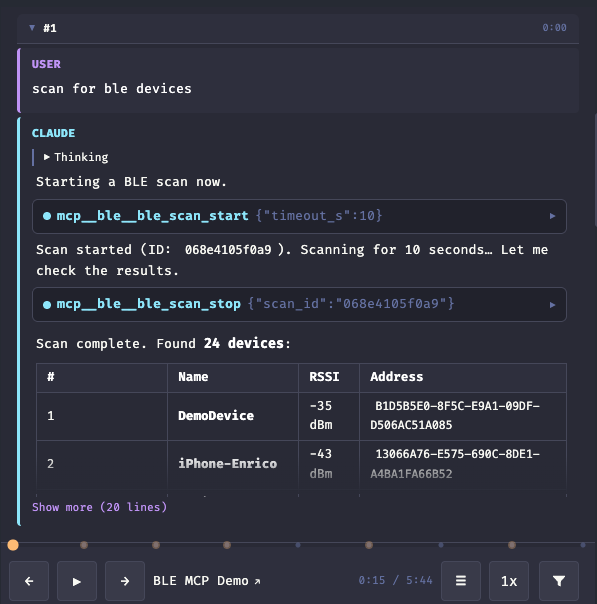
Claude Code stores full conversation transcripts as JSONL files on disk in ~/.claude/projects/. These contain every user message, assistant response, tool call, tool result, and thinking block — with timestamps. claude-replay converts them into visual replays that look like a Claude Code terminal session, suitable for blog posts, demos, and documentation.
Features
- Self-contained HTML output (no dependencies)
- Interactive playback with speed control
- Collapse/expand tool calls and thinking blocks (Claude's internal reasoning traces)
- Bookmarks / chapters
- Secret redaction before export
- Multiple color themes
- Terminal-style bottom-to-top scroll
- Embeddable via iframe
Use cases
claude-replay is useful for:
- Blog posts — show AI-assisted development sessions interactively
- Documentation — embed AI debugging sessions or code walkthroughs
- Demos — share reproducible sessions without video
- Bug reports — attach a replay instead of long logs
- Teaching — step through AI reasoning and tool usage
Installation
npm install -g claude-replay
Or run directly with npx (zero install):
npx claude-replay session.jsonl -o replay.html
Quick start
# Find your session transcripts
ls ~/.claude/projects/*/

# Generate a replay
claude-replay ~/.claude/projects/-Users-me-myproject/session-id.jsonl -o replay.html

# Open it
open replay.html
Usage
claude-replay <input.jsonl> [options]
Options
| Flag | Description |
|---|---|
-o, --output FILE |
Output HTML file (default: stdout) |
--turns N-M |
Only include turns N through M |
--from TIMESTAMP |
Start time filter (ISO 8601) |
--to TIMESTAMP |
End time filter (ISO 8601) |
--speed N |
Initial playback speed, e.g. 2.0 (default: 1.0) |
--no-thinking |
Hide thinking blocks by default |
--no-tool-calls |
Hide tool call blocks by default |
--mark "N:Label" |
Add a bookmark/chapter at turn N (repeatable) |
--bookmarks FILE |
JSON file with bookmarks [{turn, label}] |
--no-redact |
Disable automatic secret redaction |
--title TEXT |
Page title (default: derived from input path) |
--user-label NAME |
Label for user messages (default: User) |
--assistant-label NAME |
Label for assistant messages (default: Claude) |
--theme NAME |
Built-in theme (default: tokyo-night) |
--theme-file FILE |
Custom theme JSON file (overrides --theme) |
--no-minify |
Use unminified template (default: minified if available) |
--no-compress |
Embed raw JSON instead of compressed data (for older browsers) |
--list-themes |
List available built-in themes and exit |
Examples
# Replay turns 5 through 15 at 2x speed
claude-replay session.jsonl --turns 5-15 --speed 2.0 -o replay.html

# Filter by time range
claude-replay session.jsonl --from "2026-02-26T02:00" --to "2026-02-26T03:00" -o replay.html

# Clean output: no thinking, no tools
claude-replay session.jsonl --no-thinking --no-tool-calls -o replay.html

# Use a different theme
claude-replay session.jsonl --theme dracula -o replay.html

# Pipe to stdout for further processing
claude-replay session.jsonl --turns 1-5 > snippet.html
Player controls
The generated HTML file is a fully self-contained interactive player:
- Play/Pause — auto-advances through turns with block-by-block animation
- Step forward/back — navigate one block at a time within turns
- Progress bar — click to jump to any point; session timer shows elapsed/total time
- Speed control — 0.5x to 5x playback speed
- Toggle checkboxes — show/hide thinking blocks and tool calls
Keyboard shortcuts
| Key | Action |
|---|---|
Space / K |
Play / Pause |
→ / L |
Step forward |
← / H |
Step back |
Themes
Built-in themes
claude-replay --list-themes
Available themes: tokyo-night (default), monokai, solarized-dark, github-light, dracula, bubbles.
Custom themes
Create a JSON file with CSS color values:
{
  "bg": "#0d1117",
  "bg-surface": "#161b22",
  "bg-hover": "#1c2128",
  "text": "#e6edf3",
  "text-dim": "#7d8590",
  "text-bright": "#ffffff",
  "accent": "#ff7b72",
  "accent-dim": "#c9514a",
  "green": "#3fb950",
  "blue": "#58a6ff",
  "orange": "#d29922",
  "red": "#f85149",
  "cyan": "#39d2c0",
  "border": "#30363d",
  "tool-bg": "#0d1117",
  "thinking-bg": "#0b0f14"
}
claude-replay session.jsonl --theme-file my-theme.json -o replay.html
Any missing keys are filled from the tokyo-night defaults, so you only need to specify the colors you want to change.
For advanced customization, add an extraCss key with arbitrary CSS rules to override layout, fonts, or any other styles:
{
  "bg": "#ffffff",
  "text": "#1c1e21",
  "extraCss": ".assistant-text { border-radius: 12px; border: 1px solid #ddd; }"
}
See the built-in bubbles theme for an example of a fully custom layout using extraCss.
Theme variables reference
| Variable | Used for |
|---|---|
bg |
Main background |
bg-surface |
Controls bar, elevated surfaces |
bg-hover |
Hover states |
text |
Primary text |
text-dim |
Secondary text, timestamps, labels |
text-bright |
User input, emphasized text |
accent |
Prompt symbol, progress bar, active states |
accent-dim |
Active button backgrounds |
green |
Tool results |
blue |
Tool call indicators |
orange |
(reserved for warnings) |
red |
(reserved for errors) |
cyan |
Tool names |
border |
Borders and separators |
tool-bg |
Tool call block background |
thinking-bg |
Thinking block background |
Embedding
The output is a single HTML file with no external dependencies. Embed it in blog posts or docs with an iframe:
<iframe src="replay.html" width="100%" height="600" style="border: 1px solid #333; border-radius: 8px;"></iframe>
How it works
- Parser reads the JSONL transcript line by line, handling Claude Code's streaming format (where a single assistant message appears as multiple lines with incremental content blocks)
- Turns are grouped as: user message + assistant response (text, tool calls, thinking blocks) + tool results
- Renderer compresses the parsed turns (deflate + base64) and injects them into the HTML template
- The player is vanilla JS — no frameworks, no external requests. Data is decompressed at load time using the browser-native
DecompressionStreamAPI
Output optimization
Generated HTML files use two layers of optimization (zero external dependencies):
- Minified CSS/JS — the player template is minified with esbuild (mangled variable names, whitespace removed). Use
--no-minifyfor readable output. - Compressed data — transcript JSON is deflate-compressed and base64-encoded, typically reducing output size by ~60-70%. The browser decompresses it natively at load time using
DecompressionStream(Chrome 80+, Firefox 113+, Safari 16.4+). For older browsers, use--no-compressto embed raw JSON.
Development
To rebuild the minified template after editing template/player.html:
npm install    # installs esbuild (devDependency)
npm run build  # generates template/player.min.html
The minified template is built in CI and included in npm releases. Without it, the CLI falls back to the unminified template automatically.
Secret redaction
By default, claude-replay scans all embedded text for common secret patterns and replaces them with [REDACTED] before they are written into the output HTML. This means secrets from your session (API keys, tokens, connection strings, etc.) never end up in the generated file.
Detected patterns include:
- API keys (
sk-...,sk-ant-...,key-...) - AWS access key IDs (
AKIA...) - Bearer and JWT tokens
- Database connection strings (
postgres://...,mongodb://..., etc.) - Private key blocks (
-----BEGIN ... PRIVATE KEY-----) - Generic key/value secrets (
api_key=...,auth_token: ...) - Environment variable secrets (
PASSWORD=...,TOKEN=...) - Long hex tokens (40+ characters)
Important: Pattern-based redaction is a best-effort safety net — it cannot catch every possible secret format. Always review the generated HTML before sharing publicly.
To disable redaction (e.g. for internal/private replays):
claude-replay session.jsonl --no-redact -o replay.html
JSONL transcript format
Claude Code transcripts use one JSON object per line with a type field:
| Type | Content |
|---|---|
user |
User messages (plain text or tool result arrays) |
assistant |
Assistant responses (text, tool_use, thinking blocks) |
system |
System metadata (skipped) |
progress |
Progress updates (skipped) |
file-history-snapshot |
File state snapshots (skipped) |
Requirements
- Node.js 18+
- Zero runtime dependencies (esbuild is a dev-only dependency for building the minified template)