Terminai is a transparent terminal wrapper that puts a real AI CLI in an on-demand overlay. Use your shell normally, then press Ctrl+Space to open Codex, Claude Code, OpenCode, or a custom agent with live terminal context and approval-gated access to suggested shell input.
Website: terminai.app
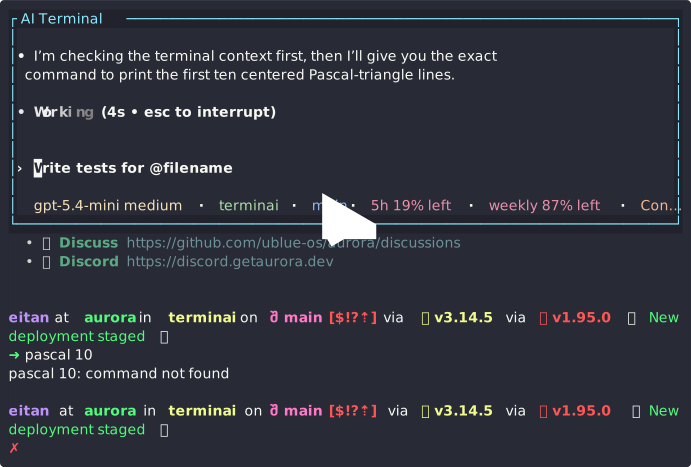
Terminai is in alpha. I use it as my daily driver, but you should always keep an ordinary shell profile available as a fallback.
What Terminai does
Terminai starts one shell (or a command you provide) inside a PTY and renders it with VT100 emulation while preserving the host terminal's native scrollback and copy behavior. The wrapped terminal remains the primary interface; Terminai stays out of the way until the overlay is activated.
The overlay is another PTY-backed terminal running the agent's actual CLI. Terminai does not implement a model client, choose a provider, or hold model API keys. Authentication, model selection, conversation state, and network access remain the responsibility of the selected agent CLI.
Terminai gives compatible agents controlled access to the shell through a local MCP server:
- Read the visible terminal and recent scrollback, after configurable pattern-based privacy filtering.
- Inspect session context such as the working directory, shell, OS, dimensions, mouse mode, and bracketed-paste state.
- Receive context updates as the wrapped session changes.
- Queue exact shell input for the user to review and approve or deny.
- Check the state of the most recent suggestion.
Suggested input is never written to the wrapped shell without user approval.
Installation
Terminai supports macOS and Linux and has been minimally shown to work on Windows.
Homebrew
brew install emosenkis/tap/terminai
The formula installs a prebuilt release binary, so Rust is not required.
GitHub release
Download the archive for your platform from GitHub Releases, unpack it, and place terminai somewhere on your PATH.
Build from source
The repository uses Git submodules for its patched Ratatui and rat-salsa dependencies.
git clone --recurse-submodules https://github.com/emosenkis/terminai.git
cd terminai
cargo install --path src
Quick start
First install and authenticate at least one supported agent CLI, for example:
codex login
# or authenticate with Claude Code using its CLI
Then launch Terminai:
With no command, Terminai resolves the configured shell (or the invoking shell on Windows). To wrap a specific command and its arguments instead:
Use the terminal normally and press Ctrl+Space when you want the agent. Press Ctrl+Space or Esc to return to the shell. When an agent queues input, review it and press y to approve or n to deny; these bindings are configurable.
While the agent overlay is open, press F10 for Terminai Controls, F11 to
toggle fullscreen, or F9 for Layout Mode. In Layout Mode, +/- changes
AI height, p toggles top/bottom, g cycles the guest display, and f
toggles fullscreen. Approval mode, agent switching, history clearing, and all
layout settings are also available through the menus.
For a terminal-emulator workflow, create a separate profile whose command is terminai and keep the emulator's normal shell profile as a fallback.
Configuration
Terminai loads YAML from $XDG_CONFIG_HOME/terminai/terminai.yaml, or
~/.config/terminai/terminai.yaml when XDG_CONFIG_HOME is unset. On Windows
it uses %APPDATA%\\terminai\\terminai.yaml (with logs/cache in
%LOCALAPPDATA%\\terminai). Generate the default configuration and prompt
template with:
On Windows, use a current Windows Terminal with pwsh.exe, powershell.exe,
or cmd.exe; see Windows support for the qualified
environment and shell-selection precedence.
The default agent is Codex. A minimal explicit configuration is:
interface:
  terminal-sync: true
  chat-position: bottom
  chat-height-percent: 50
  guest-display: resize
  key_bindings:
    activate-overlay: Ctrl-Space
    deactivate-overlay: Ctrl-Space
    approve: y
    deny: n
    layout-mode: F9
    control-panel: F10
    toggle-fullscreen: F11
    request-completion: [Tab, Tab]

approval-mode: always-ask
auto-completion: false
auto-completion-delay-ms: 750
agent:
  preset: codex
approval-mode can be always-ask or auto-approval. Auto-approval sends
every agent suggestion directly to the shell without consulting the command
risk classifier. Terminai marks this mode with ⚠ AUTO-APPROVE; enabling it
in-app requires confirmation. In-app mode and agent changes last for the
current session only.
terminal-sync defaults to true and brackets each frame with synchronized
terminal updates to reduce tearing and flicker when the host reports support
for DEC mode 2026. Set it to false to disable the capability.
chat-position accepts top, bottom, or fullscreen.
chat-height-percent controls split layouts and is clamped to 20–80%.
guest-display accepts resize (reflow the guest into the remaining space),
overlay (draw AI over the unchanged guest), or move (shift/crop the
unchanged guest away from AI). Runtime layout changes last for the session.
auto-completion defaults to false. When enabled, Terminai waits until typed
shell input has been idle for auto-completion-delay-ms (750 by default), then
shows the best completion as gray ghost text at the shell cursor. It never
inserts or runs the suggestion automatically. Press Right or End to accept,
Esc to dismiss, Tab/Down for the next result, or Shift-Tab/Up for the previous
one. Typing matching characters shortens the ghost text; other input dismisses
it. The configured request-completion key sequence works even when automatic
completion is off and defaults to [Tab, Tab].
Semantic prompt markers
Terminai uses the standard OSC 133 or OSC 633 A/B markers to distinguish
prompt text from editable shell input; C/D markers are also recognized. It
does not add visible sentinel text to the guest shell.
- Fish 4.0 and newer emits OSC 133 markers itself.
- For Bash or Zsh, source one terminal shell-integration script from the shell's
rc file so the guest shell spawned by Terminai loads it. Ghostty documents the
exact Bash/Zsh paths under
$GHOSTTY_RESOURCES_DIR; WezTerm provides a portable Bash/Zsh script, and iTerm2's normal shell-integration install also adds an rc-file hook. Enable only one to avoid duplicate hooks. - Starship does not currently add OSC 133 by itself.
Load one of those shell-integration hooks, then keep the normal Starship
initialization; the two are compatible because prompt marking belongs to the
shell integration layer, not
starship.toml.
For example, Ghostty plus Starship in Bash uses this order:
[[ -n ${GHOSTTY_RESOURCES_DIR:-} ]] && \
  source "$GHOSTTY_RESOURCES_DIR/shell-integration/bash/ghostty.bash"
eval "$(starship init bash)"
For Zsh, source
$GHOSTTY_RESOURCES_DIR/shell-integration/zsh/ghostty-integration before
eval "$(starship init zsh)".
For a shell without built-in or terminal-provided integration, use an existing
OSC 133 shell-integration script (for example WezTerm's Bash/Zsh script) rather
than adding prompt text. The required boundary sequences are invisible:
OSC 133;A ST before the prompt and OSC 133;B ST immediately after it.
The same session settings can override terminai.yaml at startup:
terminai --approval-mode always-ask --agent claude \
  --chat-position top --chat-height-percent 60 --guest-display move
Switch to another bundled preset by changing agent.preset:
agent:
  preset: claude # codex, claude, or opencode
The Codex and Claude presets enable Terminai's local MCP server and inject the rendered context prompt automatically. OpenCode receives the context prompt; custom agent support can opt into MCP, the tool CLI, or both.
Presets and custom agents
Built-in presets are compiled from config/codex.yaml, config/claude.yaml, and config/opencode.yaml. User presets can extend a built-in preset and append arguments:
agent:
  preset: codex-fast

agent-presets:
  codex-fast:
    extends: codex
    show-in-switcher: true
    extra-args:
      - --model
      - gpt-5
A fully custom agent configuration can render runtime values into its command-line arguments:
agent:
  kind: custom
  command: my-agent
  uses-mcp: true
  uses-tool-cli: false
  args:
    - --mcp-url
    - "{{ mcp_url }}"
    - --context
    - "{{ context_prompt }}"
    - expr: '["--cwd", cwd] if cwd else []'
String arguments are rendered as Minijinja templates. An expr entry must evaluate to an array of strings and can therefore emit zero, one, or multiple CLI arguments. Available values include cwd, context_prompt, uses_mcp, uses_tool_cli, mcp_url, mcp_command, mcp_port, and tool_command; the json and toml filters provide safe serialization for nested CLI configuration. The MCP bearer token is passed to the agent process in TERMINAI_MCP_AUTH_TOKEN rather than embedded in arguments.
auto-completer is selected independently from agent. Its args support the
same templates as agent arguments plus prompt:
agent:
  preset: claude
auto-completer:
  preset: codex-fast
auto-completers:
  codex-fast:
    extends: codex
    extra-args: [--model, gpt-5-mini]
Bundled Codex, Claude, and OpenCode auto-completers provide their native
non-interactive invocations. Custom entries use the same shape as
agent-presets; define their command and include {{ prompt }} in args.
Prompt customization
The bundled prompt is config/default.jinja. A default.jinja in the Terminai config directory shadows it. You can also set agent.prompt-template to another template in that directory.
Custom templates can extend the bundled prompt and override individual blocks:
{% extends "builtin/default.jinja" %}
{% block introduction %}Your customized introduction.{% endblock %}
The generated configuration reference documents every field, and versioned JSON Schemas are published at https://terminai.app/schema-v<version>.json.
The agent picker includes bundled presets and user presets unless a user
preset sets show-in-switcher: false. Switching terminates the current agent
session after confirmation and launches a fresh one. “Clear AI-readable
history” removes only Terminai's internal shell scrollback: the current screen
and terminal emulator's native scrollback remain intact.
MCP interface and safety boundary
Terminai serves an authenticated, local Streamable HTTP MCP endpoint to agent presets that enable it. The endpoint exposes:
| Tool | Purpose |
|---|---|
check_for_updates |
Return pending context changes before the agent handles a new request. |
read_terminal |
Return visible output and recent scrollback after configurable pattern-based privacy filtering. |
get_terminal_context |
Return shell, cwd, OS, dimensions, and terminal mode state. |
suggest_input |
Queue exact text for approval; it does not execute the text. |
get_suggestion_status |
Report the latest queued suggestion and its disposition. |
The security boundary is deliberately narrow:
- The selected agent CLI owns credentials, provider traffic, and model behavior.
- Terminai itself does not upload terminal data or make model requests.
- Terminal contents returned through MCP pass through configurable, pattern-based filtering; it is not a guarantee that secrets or private information are removed. By default it redacts credentials and strong personal identifiers but retains URLs, IP addresses, dates, postal codes, and technical diagnostics. Configure
privacy.patternswithdefault, a category (credentials,financial,identity,medical,crypto, orgitleaks), or an entity type such asbtc-address; prefix an entry with-to remove it, for example[default, -btc-address].privacy.strategysupportsreplace,mask,hash,encrypt, andredact. - Agent-suggested input enters an approval flow before reaching the shell PTY.
- Suggestions are classified as safe, caution, or dangerous to help the user review them; classification does not replace explicit approval.
Zero-install MCP setup depends on the agent supporting MCP configuration through CLI flags or environment variables.
Architecture
host terminal
└── Terminai process
    ├── wrapped shell/command PTY
    │   └── VT100 state, native scrollback, input forwarding
    ├── authenticated local MCP server
    │   ├── terminal/context reads → privacy filter
    │   └── input suggestions → classification → approval queue
    └── agent CLI PTY
        └── Codex, Claude Code, OpenCode, or custom command
Important implementation areas:
src/bin/terminai.rs: application entry point, event loop, rendering, and overlay coordination.src/agent_launcher.rs: preset resolution, Minijinja rendering, and agent launch plans.src/agent_terminal.rs: PTY lifecycle and rendering for the agent CLI.src/mcp_host/: authenticated MCP server built withrmcpand Streamable HTTP transport.src/agent_tools.rs: suggestion state passed from MCP into the UI approval flow.src/command/: parsing and safety classification for suggested shell input.src/privacy/: minimal, best-effort filtering of sensitive terminal content.src/vt100/,src/proc/, andsrc/term/: terminal emulation and PTY foundations initially derived from mprocs.
See the architecture note for a compact runtime diagram.
Development
Use a recent stable Rust toolchain and initialize the submodules before building.
git submodule update --init --recursive
cargo build -p termin
cargo test -p termin
cargo fmt --all -- --check
The workspace patches crates.io dependencies to the local ratatui, rat-salsa, and Crossterm facade directories. Ratatui and rat-salsa contain changes required to preserve native terminal scrolling and copy behavior, so a source checkout without its submodules is incomplete.
Contributions, bug reports, and documentation improvements are welcome. Read CLAUDE.md for repository guidance used by coding agents.
Acknowledgements
Terminai uses terminal-emulation, host/guest terminal, and PTY-management code from mprocs. It also uses project-specific forks of Ratatui and rat-salsa for native scrolling and copy support.
License
Terminai is licensed under the MIT License.