
Speak text aloud from the terminal. Built so LLM agents can talk to you — and so you can talk back.




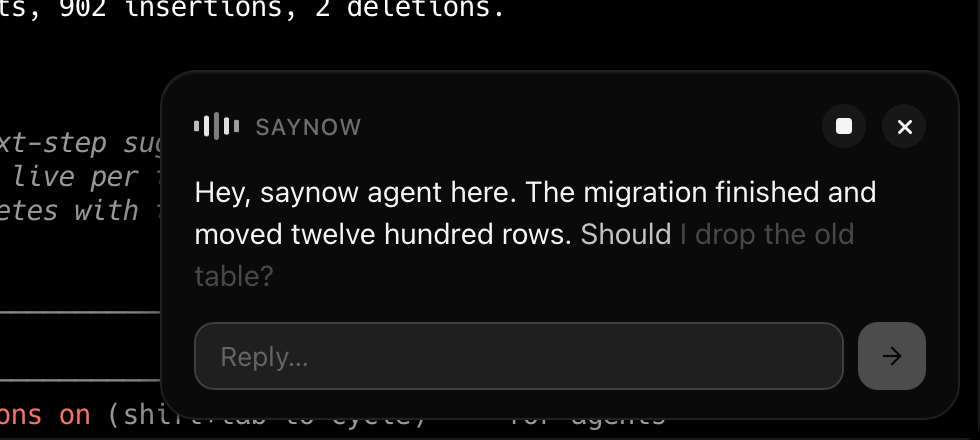
saynow "the build finished, 42 tests passed"It speaks, and shows a bubble in the corner with the transcript lit word by word — so a sentence you half-heard is still readable. Pause it, or click any word to hear it again from there. Works with no configuration, falling back to your OS's built-in voice: offline, free, no key.
Install
npm install -g saynow     # Node >= 18
pip install saynow        # Python >= 3.9
Same CLI, same config file, zero dependencies either way. On macOS the
settings app builds in the background afterwards and appears a
few seconds later — the install itself never waits for it. SAYNOW_NO_APP=1
skips it. To try saynow without installing: npx saynow "hello".
Ask, and wait for the answer
answer=$(saynow --ask "Should I drop the old table?")Speaks, shows a reply box, and blocks. The reply goes to stdout. Exit 0 means
they answered, exit 2 means nobody was there — so an agent can tell "they said
no" from "they were away from the desk".
Usage
saynow "text to speak"                    # speak an argument
echo "text" | saynow                      # speak stdin
npm test 2>&1 | tail -1 | saynow          # speak a command's last line
saynow --from "ci · deploy" "shipped"     # name the sender in the header
saynow --file report.md "numbers are up"  # show a document, say one line
saynow -p openrouter -v Kore "hi"         # pick a provider and voice
saynow --no-ui "hello"                    # speak without the bubble
saynow --save note.mp3 "hello"            # write a file instead of playing
saynow --help lists every flag, and man saynow is the same as a man page.
| Provider | Quality | Needs |
|---|---|---|
system |
Fair | Nothing — built into the OS |
openai |
Good | OPENAI_API_KEY |
elevenlabs |
Best | ELEVENLABS_API_KEY |
openrouter |
Best | OPENROUTER_API_KEY — 15 speech models, 245 voices |
Long text is rendered a sentence at a time, so a full article starts speaking in about three seconds rather than after the whole thing is synthesised.
If a provider is configured but its key is missing, saynow warns on stderr and
speaks with the system voice anyway: an agent reporting "done" to someone who
heard nothing is worse than a robotic voice. --strict opts out. Concurrent
calls are serialized machine-wide, so three agents produce three sentences
rather than one muddle.
Show a document
saynow --file report.md --ask "Weekly numbers are up. Anything look wrong?"--file renders Markdown in the bubble — headings, lists, tables, quotes,
code, links and images, local or remote. The text argument becomes the only
thing spoken, which is what a long report usually wants.
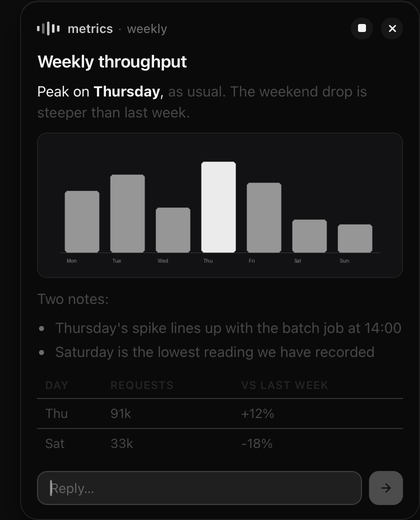
Relative image paths resolve against the document's own directory, so a folder holding the report and its charts works as-is. The bubble stays open for as long as the pointer is on it or you are typing in it, so a document is read at your pace rather than a timer's.
Documents are escaped before rendering and only tags saynow builds itself are emitted, so one cannot script the bubble.
Keep what you synthesised
Reading a long article costs money and seconds, so every cloud synthesis is archived with its duration and what it cost:
saynow history            # newest first
saynow history open 3     # play one back
saynow history path       # to share a file from it
The newest 50 are kept — saynow config set historyLimit <n>, or 0 for none.
Settings app
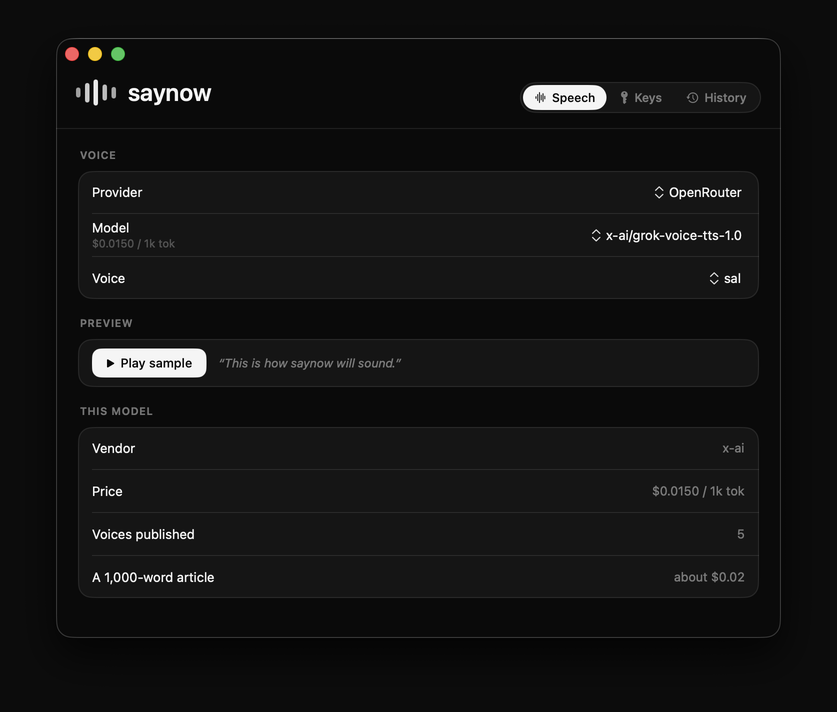
macOS only, installed alongside the CLI. Picks a model from the live catalogue
with prices, stores keys, and browses, plays and prices the archive. It compiles
from source during install, so it needs the Xcode command line tools
(xcode-select --install); without them the install skips it and says so, and
saynow app install adds it later.
It is a separate process from the CLI — they meet only at
~/.config/saynow/config.json, so either works without the other.
Use it from an agent
For Claude Code, install the plugin — it ships a skill that teaches Claude when to speak, so you do not have to explain it in every project:
/plugin marketplace add dhruvyad/saynow
/plugin install saynow@saynow
Otherwise add this to your CLAUDE.md, AGENTS.md, or equivalent:
Speak to the user with `saynow --from "<who> · <task>" --ask "<text>"`. It
shows a reply box and prints their answer to stdout; exit 2 means they were
away, which is never consent. Default to `--ask` — almost anything worth
saying invites a reply. Use `--file report.md` when the answer is a table or a
chart. Keep it to one short sentence: it is heard, not read, and `--from`
means you never have to introduce yourself. Do not narrate routine progress.
How the bubble works
The header button pauses and resumes, and space does the same when you are not typing a reply. Clicking a word in the transcript speaks from that word, so a sentence that went past while you were reading something else is one click away rather than gone — and once the voice has finished, the button plays the whole thing again. A paused bubble stays put; the countdown starts again when the speech reaches its end. Drag the top edge to give a long document more room: the bubble is pinned to the corner, so it grows upwards.
On macOS it is a borderless NSPanel hosting a WKWebView: no Dock icon, no
entry in the app switcher, and it never steals focus. It compiles from
shell/SaynowPanel.swift on first use and caches the
binary — about 84 KB, because it borrows the system WebKit instead of
shipping a browser. Elsewhere it falls back to a Chromium app window loading the
identical page, and with neither available saynow just speaks.
All of the bubble is one file, ui/bubble.html.
Reference
saynow --help    # every flag, setting and exit code
man saynow       # the same, as a man page
Both render from a single help.txt shared by the npm and pip
builds, and CI fails if they ever disagree.
License
MIT