Your AI doesn't know your architecture. Depwire does.
What makes Depwire different

Depwire builds a DETERMINISTIC, NOT PROBABILISTIC dependency graph of your codebase. This is not RAG. There are no embeddings, no similarity scores, no vector databases, no guesses. Depwire uses tree-sitter — the same parser powering GitHub's code intelligence — to extract exact symbol-level facts from every file: every function, every class, every interface, every import and export relationship, across 17 programming languages. When you ask "what breaks if I delete encodeToken in auth/token.ts?", Depwire does not search for similar-looking code and estimate an answer. It traverses the exact dependency graph and returns the precise list of 14 files that import that symbol, which import chains break, and what your health score drops by. This is compiler-level precision applied to AI-assisted development — not a language model's best guess about your code.
Not a build graph either. Tools like Nx, Turborepo, and Grapher track package-level dependencies for build caching. Depwire tracks symbol-level dependencies — every function, class, and import relationship — which is what makes What If simulation, graph-aware security scanning, and exact blast radius analysis possible.
Contents
- What makes Depwire different
- Start here
- The infrastructure layer
- What If simulation
- Security scanner
- Pre-action verification
- Structural diff between commits
- MCP server — AI integration
- Cross-language edge detection
- Architecture health score
- Language support
- SDK
- Cloud dashboard
- GitHub Action — PR Impact Analysis
- Depwire Action Token (DAT)
- Roadmap
Depwire is the infrastructure layer between your AI coding assistant and your codebase. Before your AI touches a single file, Depwire has already mapped every connection, scored every risk, and simulated every change.

⭐ If Depwire saves you from a broken build, star the repo — it helps this project grow.
Performance evidence
The previously published agent benchmark has been withdrawn after an audit found that the task prompt exposed its answer key, the scored file set was narrower than the change required by the monorepo, and one arm started in a different working directory. A corrected three-arm experiment is being prepared. No performance or correctness conclusion from the earlier runs should be cited.
The problem
AI coding tools are getting smarter. But they still have a fundamental blind spot: they don't know your architecture before they touch it.
You ask Claude to delete a utility file. It deletes it cleanly. Confident. No warnings.
Then you run the build. 30 files broken.
Claude had no idea. It saw one file. It didn't see the 30 downstream consumers.
This isn't a model problem. It's a context problem. The AI is flying blind.
The infrastructure layer
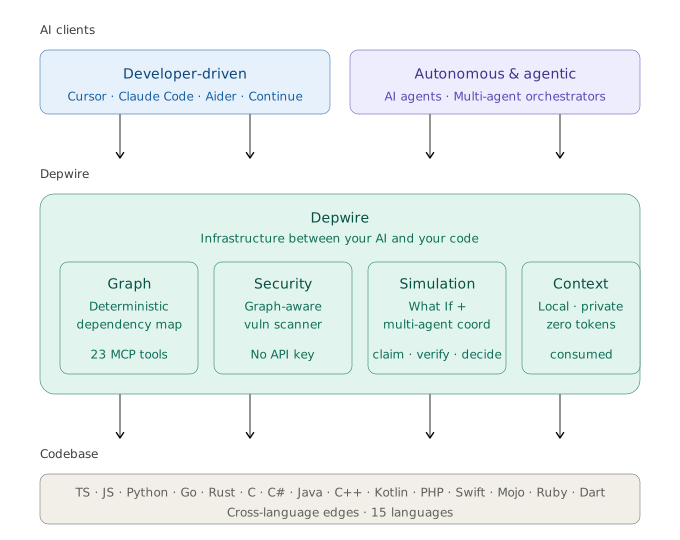

Depwire is the context and safety layer for AI-generated code.
Depwire sits between your AI and your codebase. It builds a complete dependency graph using tree-sitter — deterministic, not probabilistic — and serves it to your AI through 24 MCP tools.
Four guarantees:
- Local — everything runs on your machine. No cloud parsing. No data sent anywhere.
- Secure — your code never leaves your machine. The security scanner requires no API key.
- Token-efficient — Depwire serves pre-computed graph data so agents can request focused dependency context instead of broad file dumps.
- Deterministic — tree-sitter provides consistent structural parsing without relying on model inference.
Start here
npm install -g depwire-cli
Three commands to understand any codebase:
depwire whatif     # know what breaks before you change anything
depwire security   # catch vulnerabilities before AI ships them
depwire viz        # see your entire architecture instantly
Tested on real-world projects
| Project | Language | Files | Symbols | Edges | Health |
|---|---|---|---|---|---|
| google/guice | Java (multi-module, 13 modules) | 647 | 30,592 | 10,081 | 31/100 |
| honojs/hono | TypeScript | 352 | 6,462 | 2,194 | 41/100 |
| apache/commons-lang | Java (single-module) | 624 | 29,723 | 9,037 | — |
| pallets/flask | Python | 79 | 2,005 | 851 | — |
| dart-lang/shelf | Dart | 108 | 1,639 | 219 | — |
| rstudio/plumber | R | 197 | 1,194 | 219 | — |
| payloadcms/payload | TypeScript | 645 | 9,292 | 3,511 | — |
Numbers from real
depwire parseruns on public repositories. Last validated: v1.8.2 (June 2026).Pre-1.9.0 measurement. v1.9.0 fixed parser bugs (double-emitted symbols in the TypeScript/Python/C#/C++/Java parsers, dropped type-only-import edges, false orphans) that directly affect symbol counts, edge counts, and health scores. These numbers were captured before that fix and have not been re-measured — they are directionally useful but not exact under v1.9.0+.
What If simulation
Know the blast radius before you touch anything.
depwire whatif . --simulate delete --target src/utils/encode.tsReal output on honojs/hono — 352 files, 6,245 symbols:
Health Score:    41 → 41  (+0 → unchanged)
Affected Nodes:  29
Broken Imports:  30
• src/utils/jwt/jwt.ts imports decodeBase64Url
• src/adapter/aws-lambda/handler.ts imports encodeBase64
• src/utils/basic-auth.ts imports decodeBase64
[27 more...]
Removed Edges:   32
Pre-1.9.0 measurement — captured before the v1.9.0 parser fixes; not re-measured.
Before touching a single file. Zero file I/O. Pure in-memory simulation.
Five operations:
depwire whatif . --simulate delete --target src/utils/encode.ts
depwire whatif . --simulate move --target src/utils/encode.ts --destination src/core/encode.ts
depwire whatif . --simulate rename --target src/utils/encode.ts --destination src/utils/encoder.ts
depwire whatif . --simulate split --target src/services/auth.ts --symbols "validateToken,refreshToken"
depwire whatif . --simulate merge --target src/utils/helpers.ts --merge-target src/utils/formatters.ts
Run without --simulate to open the browser UI — side-by-side arc diagrams showing current vs simulated state.
Cross-module dependency intelligence
For multi-module Maven and Gradle projects, Depwire resolves imports across module boundaries — not just within a single module.
Example: simulating deletion of Injector.java in google/guice (a 13-module Java DI framework):
$ depwire whatif . --simulate delete --target core/src/com/google/inject/Injector.java

Action:          DELETE core/src/com/google/inject/Injector.java
Affected Nodes:  128
Broken Imports:  124  (cross-module: 106 across 10 extension modules)
Pre-1.9.0 measurement — google/guice is a Java project; the Java parser's double-emission bug (fixed in v1.9.0) affects this figure. Not re-measured.
Without this, your AI agent has no visibility into cross-module blast radius. With it, dangerous changes are caught before they happen.
Supported build systems:
- Maven (
pom.xmlwith<modules>declarations, recursive nested modules) - Gradle (
settings.gradle/settings.gradle.ktswithinclude()declarations)
Both standard (src/main/java) and non-standard (src/) source layouts are supported.
Security scanner
AI will confidently ship vulnerable code. Depwire stops it before production.
depwire security .                        # full repo scan
depwire security . --target src/auth.ts   # single file
depwire security . --format sarif         # GitHub Security tab integration
depwire security . --fail-on high         # CI gate — exit 1 if HIGH or above
depwire security . --class secrets         # specific check only
Real output on honojs/hono:
6 Critical 19 High 14 Medium 1 Low
10 check categories — dependency CVEs, process safety, credential management, path safety, authentication safety, input validation, information disclosure, cryptography weaknesses, output encoding safety, and architecture-level risks.
Graph-aware severity: a medium-severity finding reachable from an MCP tool or HTTP route is automatically elevated to critical. This is what no generic SAST tool can replicate — Depwire knows your architecture, so it knows what's actually reachable.
Available as MCP tool security_scan and via depwire-cli/sdk.
Pre-action verification
Verify a proposed change is safe before applying it. Checks broken imports, new circular dependencies, health score regression, and security findings in one pass.
depwire verify-change --file src/auth.ts --content-from new-auth.ts
depwire verify-change --diff changes.patch
depwire verify-change --file src/auth.ts --content-from new-auth.ts --json
cat new-auth.ts | depwire verify-change --file src/auth.ts
Example output:
Verify Change Report
──────────────────────────────────────────────────
✗ UNSAFE — risk: high
──────────────────────────────────────────────────
Health Score:  62 → 59  (-3)
Broken Imports: 2
  • src/index.ts — missing trackCommand
  • src/server.ts — missing handleAuth
New Circular Deps: 0
Security Findings: 1
  • [HIGH] Hardcoded secret detected (src/auth.ts:14)
Blast Radius:    8 files affected
──────────────────────────────────────────────────
CI integration:
depwire verify-change --diff pr.patch --fail-on-warnings --quiet
# exits 1 for medium risk, 2 for high risk
Available as MCP tool verify_change and CLI command depwire verify-change.
Structural diff between commits
Compare the dependency graph between any two git refs — branches, tags, commit hashes, HEAD~N.
depwire diff main feature/auth-refactor
depwire diff HEAD~5 HEAD --verbose
depwire diff v1.5.0 v1.6.0 --json | jq
Example output:
Depwire diff: v1.5.0..v1.6.0
━━━━━━━━━━━━━━━━━━━━━━━━━━━━━━━━━━━━━━━━━━━━━━━
Symbols
  + 114 added      VerifyChangeOptions, verifyChangeCommand, input ...
  - 66 removed    VerifyChangeInput, BrokenImportEntry, CircularDepEntry ...
  ~ 47 modified   __filename, __dirname, packageJsonPath ...
Edges
  + 31 added
  - 9 removed
Files
  152 → 154  (+2 / -0)
Blast radius:    4 files affected
Health score:    67 → 67  (+0)  [D → D]
Security:        1 new / 1 fixed
━━━━━━━━━━━━━━━━━━━━━━━━━━━━━━━━━━━━━━━━━━━━━━━
Deterministic. No LLM. Safe — uncommitted changes are stashed and restored even if the command errors.
Options: --json (machine-readable), --verbose (every symbol/edge by name), --no-security / --no-health (faster runs).
Visualization

Interactive arc diagram of your entire codebase. Every file, every connection, every dependency visible at once. Hover to inspect. Click to filter. Export as PNG or SVG.
Temporal graph

Watch your architecture evolve over git history. Timeline slider scrubs through commits — the arc diagram morphs as your codebase grew, coupled, and refactored. Nobody else does this.
All commands
| Command | Description |
|---|---|
depwire viz |
Interactive arc diagram in browser |
depwire whatif |
Simulate changes before touching code |
depwire verify-change |
Verify a proposed change is safe — broken imports, health delta, security |
depwire security |
Scan for vulnerabilities — graph-aware severity |
depwire health |
0-100 architecture health score across 6 dimensions |
depwire dead-code |
Find unused symbols with confidence scoring |
depwire docs |
Generate 13 architecture documents |
depwire temporal |
Visualize architecture evolution over git history |
depwire parse |
Parse and export dependency graph as JSON |
depwire prompt |
Get a graph-first workflow prompt for your AI agent |
depwire diff |
Structural diff between two git commits — symbols, edges, health, security |
depwire mcp |
Start MCP server for AI coding assistants |
All commands auto-detect your project root. No path configuration needed.
depwire prompt — graph-first workflow for AI agents
# Get the graph-first workflow prompt for your agent
depwire prompt                    # generic
depwire prompt --tool claude      # Claude Code optimized
depwire prompt --tool cline       # Cline optimized
depwire prompt --tool codex       # Codex optimized
Paste the output as your agent's system context before starting a complex task.
MCP server — AI integration
Connect Depwire to any MCP-compatible AI tool. Your AI gets 24 tools it can call autonomously.
Claude Desktop — add to ~/Library/Application Support/Claude/claude_desktop_config.json:
{
  "mcpServers": {
    "depwire": {
      "command": "npx",
      "args": ["-y", "depwire-cli", "mcp"]
    }
  }
}
For large projects — instant MCP startup:
# Parse once (writes depwire-output.json)
depwire parse .

# MCP starts instantly from cached graph (<100ms)
depwire mcp .

# Flags:
depwire mcp . --from-cache   # error if no cache found
depwire mcp . --no-cache     # force full re-parse
Cursor — Settings → Features → Experimental → Enable MCP → Add Server:
- Command:
npx - Args:
-y depwire-cli mcp
Auto-generated project context
After running depwire parse ., Depwire generates .depwire/AGENTS.md — a project-specific context file containing module structure, key files, health summary, and MCP quick-start commands.
Claude Code reads AGENTS.md automatically when present. Add it to your CLAUDE.md:
# In your project root CLAUDE.md:
echo "## Depwire Context" >> CLAUDE.md
echo "Read .depwire/AGENTS.md for codebase architecture." >> CLAUDE.md
This gives every Claude Code session project-specific orientation without an MCP tool call.

24 MCP tools
| Tool | Description |
|---|---|
connect_repo |
Connect to any local project or GitHub repo |
get_architecture_summary |
High-level project overview |
get_file_context |
Full context — imports, exports, dependents. Includes cross-language connections. |
get_dependencies |
What does a symbol depend on? |
get_dependents |
What depends on this symbol? |
get_symbol_info |
Look up any symbol's details |
search_symbols |
Find symbols by name across the codebase |
list_files |
List all files with stats |
impact_analysis |
What breaks if you change a symbol? Cross-language edges included. |
visualize_graph |
Generate interactive arc diagram |
get_health_score |
0-100 health score with recommendations |
find_dead_code |
Symbols defined but never referenced |
get_project_docs |
Retrieve auto-generated codebase documentation |
update_project_docs |
Regenerate documentation on demand |
get_temporal_graph |
Architecture evolution over git history |
simulate_change |
Simulate move/delete/rename/split/merge before touching code. Returns health delta, broken imports, affected nodes. Cross-language edges included. |
security_scan |
Scan for vulnerabilities with graph-aware severity elevation. No API key required. |
verify_change |
Safety report before applying code changes. Returns broken imports, circular deps, health delta, affected files. Also available as depwire verify-change CLI. |
claim_files |
Multi-agent coordination: declare intent to modify files so other clients avoid conflicts. |
release_files |
Release a previously made file claim. |
get_active_claims |
Query who is currently working on what. |
record_decision |
Save a structured decision for future sessions to reference. |
get_decisions |
Retrieve past decisions by query, session, file, or tag. |
affected_files |
Find files and tests affected by changing a file or symbol. |
.depwire/ runtime state
The coordination tools (claim_files, release_files, get_active_claims, record_decision, get_decisions) write runtime state to .depwire/claims.jsonl and .depwire/decisions.jsonl. Add these to your project's .gitignore:
.depwire/claims.jsonl
.depwire/decisions.jsonl
Cross-language edge detection
Depwire detects connections between files written in different languages.
A TypeScript fetch('/api/users') call matched to a Python @app.get('/api/users') route definition — that's a cross-language edge. Delete the Python route and Depwire shows the TypeScript callers as broken.
Supported patterns:
- REST API edges — fetch/axios calls matched to Express, FastAPI, Flask, Gin route definitions
- Subprocess edges — execSync/subprocess.run calls matched to target files in the graph
These edges flow through every existing feature: What If simulation, impact analysis, security scanner, and arc diagram visualization.
Architecture health score
Overall: 68/100 (Grade: D)
Coupling              70   C
Cohesion              80   B
Circular Dependencies 100  A
God Files             40   F
Orphans & Dead Code   20   F
Dependency Depth      60   D
6 dimensions. Letter grades. Actionable recommendations. Trend tracking across runs.
Note on v1.6.1 scoring change: The dead code scoring methodology was corrected in v1.6.1 to only count exported symbols with zero dependents as candidates for dead code. Previously, local variables and class internals were incorrectly included, inflating dead code ratios for codebases with internally-complex modules. Health scores from v1.6.1+ are not directly comparable to scores from earlier versions.
SDK
Depwire exposes a stable public API for programmatic use and CI pipelines:
import {
  parseProject,
  buildGraph,
  calculateHealthScore,
  analyzeDeadCode,
  generateDocs,
  scanSecurity,
  SimulationEngine,
  detectCrossLanguageEdges,
  searchSymbols,
  getImpact,
  getArchitectureSummary,
  DepwireSDKVersion
} from 'depwire-cli/sdk';
The SDK is the stable public API surface. All integrations should import from depwire-cli/sdk — never from internal paths.
Why Depwire
| Depwire | RAG-based tools | LLM scanning | |
|---|---|---|---|
| Approach | AST-derived dependency graph | Vector similarity | Direct file inspection |
| Refactor context | Call and import relationships | Semantically retrieved chunks | Model-selected files |
| Context shape | Focused graph queries | Retrieved text chunks | Variable |
| Cross-language | REST + subprocess edges | Implementation-dependent | Model-dependent |
| Security scanner | Graph-aware severity | Implementation-dependent | Model-dependent |
| What If simulation | Available | Implementation-dependent | Model-dependent |
| Multi-module JVM support | Cross-module resolution | Implementation-dependent | Model-dependent |
| Local operation | Supported | Implementation-dependent | Implementation-dependent |
Language support
TypeScript, JavaScript, Python, Go, Rust, C, C#, Java, C++, Kotlin, PHP, Swift, Mojo, Ruby, Dart, R — with cross-language edge detection between all supported languages.
Java / JVM — classes, interfaces, enums, records, annotations, inner classes, anonymous classes, lambda expressions, Maven pom.xml and Gradle build file dependency edges, Spring Boot cross-language edges (@GetMapping, @PostMapping, @RequestMapping), JAX-RS / Jakarta EE route detection, Spring WebFlux RouterFunction support.
C# / .NET — classes, interfaces, records, structs, enums, delegates, file-scoped namespaces, primary constructors, global usings, .csproj ProjectReference and PackageReference edges, ASP.NET Core cross-language edges (attribute routing + Minimal API).
C++ / Systems — classes, structs, unions, enums, namespaces, concepts, coroutines, C++20 modules, template support with parameter stripping. CMakeLists.txt, Conan, and vcpkg dependency edge parsing. Crow, Drogon, Pistache, and cpp-httplib cross-language route detection. Dead code detection with vtable and template exclusions. Health score checks: circular includes, missing header guards, god classes, raw pointer fields, missing virtual destructors. Security scanner: memory safety patterns, format string issues, memory management patterns, process execution safety patterns.
Kotlin / JVM — classes, data classes, sealed classes, objects, companion objects, value classes, type aliases, extension functions, enum classes, annotation classes. Coroutine awareness: suspend functions, GlobalScope detection, structured concurrency checks. build.gradle.kts, build.gradle, and settings.gradle.kts dependency parsing. Spring Boot, Ktor, Http4k, and Ktor Resources cross-language route detection. Android Retrofit outgoing edge detection. Dead code detection with Android lifecycle and Spring annotation exclusions. Security scanner: query safety patterns, credential management patterns, random number generation safety, not-null assertion abuse, Ktor missing auth blocks.
PHP / Web — functions, classes, methods, interfaces, traits, enums, namespaces, use statements, require/include dependency edges. Both procedural and OOP styles. Laravel (Route::get/post/put/delete/patch, middleware), Symfony (#[Route(...)]), Slim Framework, and WordPress REST API (register_rest_route) cross-language route detection. Guzzle and file_get_contents HTTP client edge detection. Dead code detection with WordPress hooks, Laravel service providers, Symfony controllers, and magic method exclusions (__construct, __get, __set, __call). Security scanner: query safety patterns, runtime evaluation safety patterns, process execution safety patterns, regex modifier vulnerabilities, serialization safety patterns, variable handling safety patterns, password hashing safety patterns, deprecated crypto libraries, weak PRNG in security contexts, credential management patterns.
Swift / Apple — functions, methods, initializers (init), deinitializers (deinit), classes, structs, enums, protocols, extensions, actors (Swift concurrency), properties (var, let), computed properties, type aliases, associated types. Package.swift (SPM) dependency parsing. Vapor, Hummingbird, and Perfect cross-language route detection. URLSession and Alamofire HTTP client edge detection. Dead code detection with AppDelegate/SceneDelegate lifecycle, SwiftUI View body, @IBAction/@IBOutlet, @objc, protocol conformance, Codable synthesis, XCTestCase, and @main entry point exclusions. Security scanner: query string safety via string interpolation, Process() execution safety, memory pointer safety patterns, UserDefaults storing sensitive data, CC_MD5/CC_SHA1 weak hashing, Insecure.MD5/SHA1 from CryptoKit, arc4random in crypto contexts, App Transport Security patterns, credential management patterns, hardcoded HTTP URLs.
Mojo / AI-native (strategic support) — fn (typed functions), def (Python-compatible functions), structs (value types), classes, traits (interfaces), alias (type aliases and compile-time constants), var/let declarations, import and from...import statements. Pattern-based parser (no tree-sitter-mojo available). Supports @value, @register_passable, @staticmethod decorators, inout/owned/borrowed parameter modifiers, SIMD/Tensor/DType type references. mojoproject.toml dependency parsing. Python interop detection (from python import). Cross-language route detection via Python framework interop (FastAPI/Starlette). Dead code detection with init/copyinit/moveinit lifecycle, trait implementations, MLIR dialect operations, and @export exclusions. Security scanner: Pointer[T] and DTypePointer memory safety, Python interop evaluation safety, uninitialized memory patterns, SIMD bounds safety, weak random via Python random module, hardcoded keys in alias declarations, hashlib via Python interop in crypto contexts. Mojo is the first AI-native language supported by Depwire.
Ruby / Web — method definitions (def, def self.), classes, modules, instance variables (@var), class variables (@@var), constants, attr_accessor/attr_reader/attr_writer, require/require_relative dependency edges, include/extend/prepend mixin edges, blocks, procs, lambdas, Struct and OpenStruct definitions, ActiveSupport::Concern support. Gemfile dependency parsing. Rails (get/post/put/patch/delete/resources/namespace in routes.rb), Sinatra (route + do blocks), Rack (map/run/use in config.ru), and Grape API cross-language route detection. Faraday, Net::HTTP, and HTTParty HTTP client edge detection. Dead code detection with Rails controller callbacks, ActiveRecord lifecycle callbacks, rake tasks, RSpec/Minitest methods, concerns (included/class_methods blocks), initialize, method_missing/respond_to_missing?, Pundit policy methods, and Devise strategy exclusions. Security scanner: string interpolation in database query methods, command execution safety patterns, runtime evaluation safety patterns, dynamic dispatch safety patterns, file operation safety patterns, YAML deserialization safety, Marshal deserialization safety, template rendering safety patterns, weak hash algorithms (Digest::MD5/SHA1), weak random (rand vs SecureRandom), credential management patterns, SSL verification patterns, weak cipher algorithms.
Dart / Flutter — classes, abstract classes, sealed classes (Dart 3.0+), mixins, extensions, enhanced enums, typedefs, records, top-level functions and variables, constructors (named and factory), methods, getters/setters, fields. import/export/part/part of/library directives with relative path resolution. pubspec.yaml dependency parsing. Flutter widget tree awareness: StatelessWidget, StatefulWidget, State subclass detection, build() method composition tracking. Shelf router, Aqueduct/Conduit, Angel framework, and Serverpod endpoint cross-language route detection. Dio, http package, Chopper (@Get/@Post), and Retrofit Dart (@GET/@POST) HTTP client edge detection. Dead code detection with Flutter widget lifecycle (initState, dispose, build, didChangeDependencies, didUpdateWidget), framework override methods, serialization methods (fromJson/toJson/copyWith), Riverpod providers, Bloc/Cubit event handlers, GetX controller lifecycle, test methods, and mock class exclusions. Security scanner: string interpolation in database queries, process execution safety, runtime reflection patterns, file path safety, JSON decoding validation, WebView JavaScript channel safety, platform channel validation, unencrypted local storage patterns, weak hashing for credentials, insecure random generation, credential management patterns, SSL certificate validation, insecure HTTP connections, and SharedPreferences vs FlutterSecureStorage patterns. Pattern-based parser (no tree-sitter-dart WASM available).
R / Statistics & Data Science — functions (including anonymous functions and closures), S3/S4/R5/R6 class definitions, methods, variable assignments (both <- and = forms), library/require/source dependency edges, NAMESPACE import/export directives, DESCRIPTION file dependency parsing. Pattern-based parser (tree-sitter-r unavailable on npm). Cross-language edge detection: plumber HTTP API route definitions (@get, @post, @put, @delete, @patch decorators) matched to client callers; Shiny reactive graph edges (server/UI function wiring, observe, reactive, eventReactive, renderXxx output bindings); outgoing HTTP client edges via httr (GET, POST, PUT, DELETE) and httr2 (request + req_perform); DBI database connection edges (dbConnect, dbGetQuery, dbExecute); reticulate Python interop edges (import_from_path, source_python, py_run_file). Dead code detection with S3/S4 generic registration exclusions, Shiny module server/UI functions, and testthat/RUnit test block exclusions. Security scanner: string interpolation in database query calls, system/system2/shell execution safety patterns, eval/parse runtime evaluation safety, file path handling safety, credential management patterns, weak PRNG in statistical-security contexts (sample/runif vs openssl for key material), and unvalidated input in plumber route handlers.
HTML / Angular templates — Angular component template parsing (*.component.html). Pairs each template with its sibling *.component.ts component automatically. Extracts component selectors (custom element tags), structural directives, attribute directives, event bindings, and pipe references from Angular template syntax. Emits uses edges from the template to the components and pipes it references. External/library components (Angular built-ins, PrimeNG, ngx-translate etc.) resolve to external:: markers and are excluded from the graph to avoid phantom nodes. Pattern-based parser (regex extraction of Angular template syntax).
GitHub Action — PR Impact Analysis
Depwire integrates into your CI/CD pipeline via the depwire-action GitHub Action.
On every pull request it automatically posts a dependency impact report — which symbols changed, what breaks, health score before and after. Code reviewers see the architectural blast radius before merging.
Add to .github/workflows/depwire.yml:
name: Depwire PR Impact
on:
  pull_request:
    branches: [main]

permissions:
  contents: read
  pull-requests: write

jobs:
  depwire:
    runs-on: ubuntu-latest
    steps:
      - uses: actions/checkout@v4
        with:
          fetch-depth: 0
      - uses: actions/setup-node@v4
        with:
          node-version: '20'
      - uses: depwire/depwire-action@v1
        with:
          github-token: ${{ secrets.GITHUB_TOKEN }}
Block PRs that hurt your architecture:
- uses: depwire/depwire-action@v1
  with:
    github-token: ${{ secrets.GITHUB_TOKEN }}
    fail-on-score-drop: 5
GitHub Marketplace — depwire-action repo
Cloud dashboard
app.depwire.dev — full dependency graph, health score, dead code report, and AI codebase chat in the browser. No local setup required.
- Free for public repos
- Pro ($9.99/month) — unlimited repos, private repo support, AI codebase chat
VSCode Extension
Search Depwire in the VSCode Extensions panel or:
ext install depwire.depwire-vscode
Working on Mac and Windows. Free to install.
Free features:
- Interactive dependency arc diagram
- File and symbol counts
- Architecture health score
Pro features ($9.99/month):
- Health dimension breakdown (6 metrics)
- Security scanner with graph-aware severity
- Dead code detection
- What If simulation
- Verify Change — safety checks before committing
- Structural diff between git commits
- File context and dependency mapping
- Temporal graph
- Multi-agent coordination
- Decision log
Subscribe at app.depwire.dev/subscribe.
Your license key works in both the VSCode extension and the Cloud app — one subscription, both surfaces.
Roadmap
Shipped
- Arc diagram visualization
- 24 MCP tools
- Multi-language support (TypeScript, JavaScript, Python, Go, Rust, C, C#, Java, C++, Kotlin, PHP, Swift, Mojo, Ruby, Dart, R, HTML/Angular)
- Architecture health score
- Dead code detection
- Temporal graph
- What If simulation — CLI + browser UI
- Security scanner — graph-aware severity elevation
- Cross-language edge detection — REST API + subprocess
- Structural diff between commits —
depwire diff - Public SDK —
depwire-cli/sdk - Cloud dashboard — app.depwire.dev
- PR Impact GitHub Action
- VSCode extension — v1.0.13, Mac + Windows, marketplace
- HTML/Angular template parsing
- Constructor/field dependency injection parsing (Angular services,
injectsedge kind) - Windows path normalization for all MCP tools
verify_changediff-based (no more false positives)- SQLite graph cache for faster warm parses
- Fast MCP startup from persisted
depwire-output.json depwire prompt— workflow prompt for AI agents- Auto-generated
.depwire/AGENTS.mdproject context afterdepwire parse
Coming next
- AI-suggested refactors
- Natural language architecture queries
Security posture
Depwire is read-only. It never writes to, modifies, or executes your code.
- Parses with tree-sitter — the same parser used by VS Code and Zed
- Visualization server binds to localhost only
- No data leaves your machine
- Blocks access to sensitive system directories
- npm packages published with provenance verification
See SECURITY.md for full details.
Contributing
- Fork the repository
- Create a feature branch
- Add tests for new functionality
- Submit a pull request
- Sign the CLA (handled automatically on your first PR)
Author
Atef Ataya — AI architect, author, and creator of Depwire.
- YouTube — 650K+ subscribers covering AI agents, MCP, and LLMs
- The Architect's Playbook: 5 Pillars
Depwire Action Token (DAT)
Depwire is the reference implementation of the Depwire Action Token (DAT) — an open standard for cryptographically signing AI agent actions. DAT provides tamper-proof audit trails for every tool call, file change, and agent delegation.
License
Business Source License 1.1 — free for personal and internal company use. Converts to Apache 2.0 on February 25, 2029.
Commercial licensing: atef@depwire.dev
Built with tree-sitter, graphology, D3.js, and the Model Context Protocol.