Watn? ¯\_(ツ)_/¯


__      __ __ _ | |_  _ __   ___
\ \ /\ / // _` || __|| '_ \ |__ \
 \ V  V /| (_| || |_ | | | |  / /
  \_/\_/  \__,_| \__||_| |_| |_|
                              (_)

watn sends a plain-language question to a configured OpenAI-compatible endpoint and prints the answer: a shell command for command requests, text otherwise. In an interactive terminal, generated commands open in the review surface before anything reaches stdout; nothing is executed without confirmation.
Demo
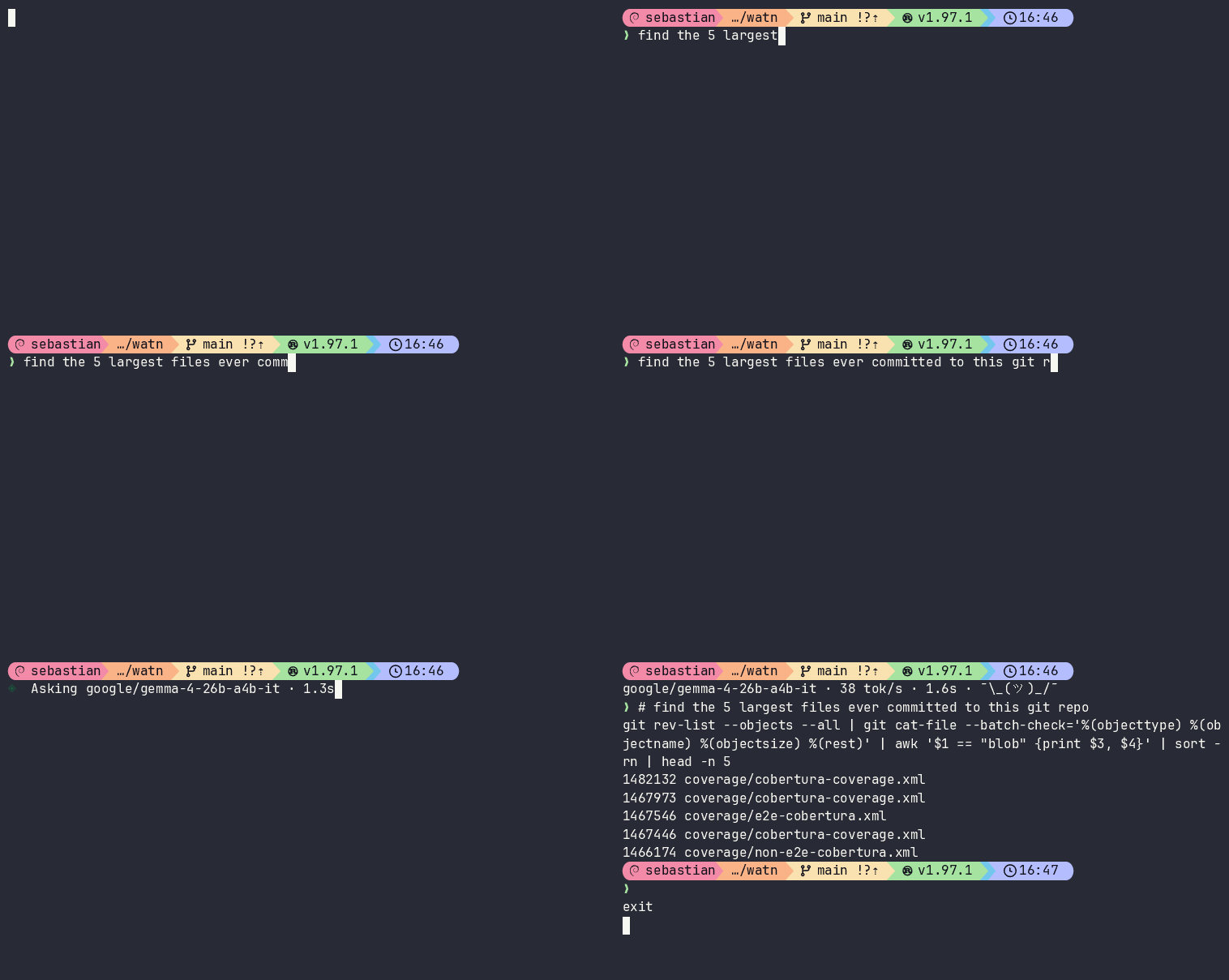
Ctrl-W with the review surface disabled: the current prompt is sent to watn, and the generated command replaces the shell buffer without executing it.
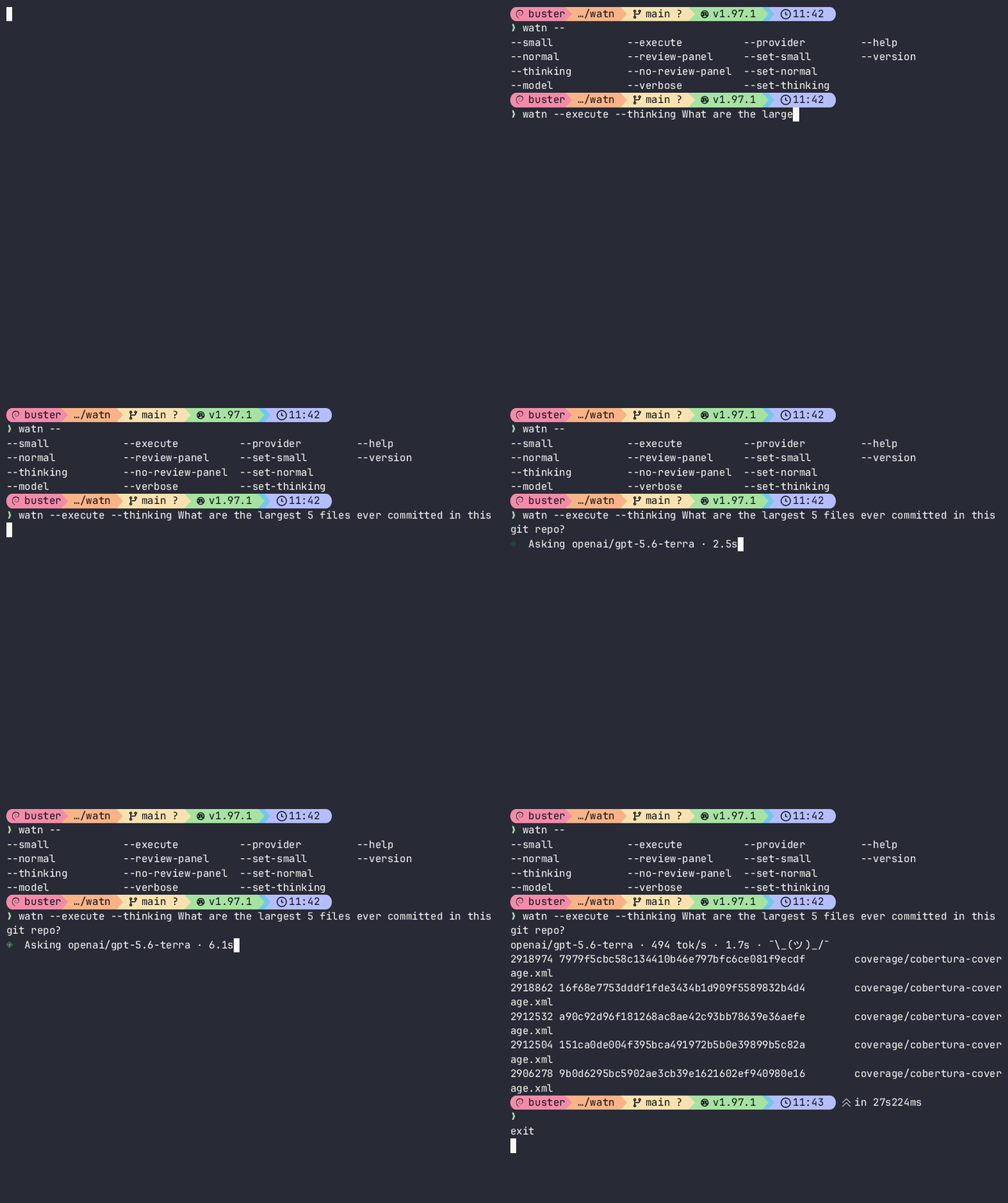
watn "query" with the review surface: the command flow and model-written stage
purposes; accepting prints the command.
Installation
Requires a Rust toolchain and an OpenAI-compatible endpoint with a usable API key. Releases are source-only: the crate is published to crates.io and a GitHub release is created with the changelog; no prebuilt executables are attached.
Quick setup
watn quicksetup --url https://openrouter.ai/api/v1 --key '${OPENROUTER_API_KEY}' --model '~anthropic/claude-haiku-latest:nitro'
watn "find the 5 largest files in the commit history"
On first use without a configuration file, watn starts quick setup. Parameters
are optional and prefill the questions: --url the completion endpoint,
--key the credential (a single-quoted ${ENV_VAR} value is stored as an
environment reference), --model the small, normal, and thinking tiers, and
--model-small, --model-normal, or --model-thinking one tier each. Every
question is still asked, an empty answer accepts the suggestion shown, and the
shell-integration choice always runs. Without parameters the flow is unchanged:
it asks for the endpoint, the credential, one model per tier, and which shell
integrations to install. Everything is validated locally; no network request is
made. Ctrl-C leaves an existing configuration unchanged; completing an explicit
quick setup overwrites it.
watn quicksetup --url https://openrouter.ai/api/v1 --key 'sk-abc123' --model-small 'google/gemini-3.7-flash'
A literal key in --key is visible in shell history and process listings; keep
the single-quoted ${ENV_VAR} form for regular use.
Setup
The full wizard covers provider choice, endpoint, credential source (literal
value or ${ENV_VAR} reference), the provider's model catalog, the model and
reasoning value for each tier, and shell integration, then shows a final review.
Configuration is written only at final confirmation. When the catalog publishes
prices, each chosen model's price is recorded per million tokens, so responses
show a cost estimate afterwards.
The focused commands watn provider, watn models, and watn shell configure
one area each; watn completions <SHELL> prints a completion script for bash,
elvish, fish, powershell, or zsh.
Usage
watn "find all files modified in the last day"
printf "find all rust source files" | watn
watn -x "remove all .bak files"
watn explain 'git log --oneline | head -5'
$ watn --help
Ask in plain language. Get one command.

Usage: watn [OPTIONS] [QUESTION]... [COMMAND]

Commands:
  setup        Configure provider, models, reasoning, and shell integrations interactively
  models       Configure model tiers and reasoning settings interactively
  provider     Configure a provider endpoint and credential
  shell        Configure shell completion and Ctrl-W integrations
  quicksetup   Configure provider, models, and shell integrations with a minimal question flow
  completions  Generate a shell completion script on stdout for the caller to install or source
  explain      Explain an existing shell command in the review card
  help         Print this message or the help of the given subcommand(s)

Arguments:
  [QUESTION]...  Natural-language question to turn into a command

Options:
  -1, --small                 Use the small/fast model tier
  -2, --normal                Use the balanced model tier
  -3, --thinking              Use the thinking/reasoning model tier
      --model <MODEL>         Use an explicit model instead of a tier
  -x, --execute               Prompt before executing the generated command
      --review-panel          Force the explanatory review surface on for this invocation
      --no-review-panel       Disable the explanatory review surface for this invocation
  -v, --verbose               Print provider reasoning to stderr when available
      --provider <PROVIDER>   Select a configured provider
      --set-small <MODEL>     Set the small-tier model non-interactively
      --set-normal <MODEL>    Set the normal-tier model non-interactively
      --set-thinking <MODEL>  Set the thinking-tier model non-interactively
  -h, --help                  Print help
  -V, --version               Print version
Response content goes to stdout; model, tokens/second, elapsed time, and cost
(when the model's price is known, including prices captured during model setup)
go to stderr. -x executes with sh -c after
confirmation; when the review surface is active, final acceptance is that
confirmation.
Review surface
The review surface opens on the controlling terminal after a complete candidate
in a simple default view: the model name with the amount the provider billed for
the request, the command flow as a stage stack with
every part on its own row and its separator shown at the end of the preceding
row, and the selected stage's short description. Arrow keys move the selected
stage; Enter accepts, d or ? switches to the detailed view, and Escape
cancels. The detailed view adds the intent, the command editor (e), the model
chooser (r), and the full decision hints. D disables the surface
permanently: watn ends, prints the current command, and shows an amber
⚠ review panel disabled hint naming watn --review-panel on stderr. --review-panel and --no-review-panel
persist the choice they set; without a question they only persist and exit.
Direct edits commit with Enter, discard with Escape, and still require final
acceptance.
The amount is in cents with one significant digit, never more than four decimal
places (0.1, 0.02, 0.0009), and whole cents from one cent on; it is
computed from the tokens the provider reported for that request and the recorded
price that applies to it — the price of the model the provider reports, or, when
that model has no recorded price, the price of the model the request was sent
with. It is replaced when a rejected candidate is regenerated with another
model. When neither model has a recorded price, the model name stands alone and
nothing replaces the amount; the post-request stderr line keeps its existing
$0.0000 behaviour. When the header cannot hold both, the model name is
shortened first.
A provider response that is not valid JSON, is cut off, or has mismatched
stages is never shown as the command: watn recovers the provider-written
command when it can and shows purpose-unavailable with the reason in the
card. The raw response is saved to
$XDG_STATE_HOME/watn/last-unusable-response.txt (normally
~/.local/state/watn/last-unusable-response.txt) and the path is named on
stderr after the surface closes, so a bug report can attach what the provider
actually sent. -v/--verbose prints the raw provider response to stderr
after the surface closes.
Explain an existing command
watn explain '<command>' opens the explanation card for a command you already
have; the card names the model and the amount the explanation request was
billed, like the review surface. The command reaches watn verbatim as exactly one argument; watn never
joins, re-splits, evaluates, or executes it. Use -- before a command that
begins with a dash, and a quoted heredoc or - for commands that contain both
quote kinds, $, backticks, or line breaks:
watn explain 'git log --format=%H | xargs -n1 git show --stat && printf done'
watn explain -- '--version'
watn explain - <<'EOF'
printf '%s\n' "$HOME" && echo `date`
EOF
Arrow keys move through the stages so every model-written purpose can be read;
Enter or Escape closes the card without releasing the command. When no
usable model is configured, watn explain starts quick setup or the setup
wizard (or prints setup guidance when the command arrives through a pipe)
instead of opening the card. A failed explanation request is reported on
stderr, and the card still opens with the command's stages and
purpose-unavailable. An unusable response names the reason in the card and is
saved for a bug report the same way as a review response; watn explain -v
prints the raw provider response to stderr after the card closes.
Shell shortcut
Setup can install an optional Ctrl-W widget for Bash, Zsh, and Fish. The shell
completion and Ctrl-W pages list the shells directly: every shell whose binary
is on PATH (and every shell that already has a watn block) is preselected,
Space toggles the highlighted shell, and Enter applies the shown selection. It
reads the current shell buffer, calls watn -- "$question", records the
question in shell history as a # comment, and replaces the buffer with the
accepted command without evaluating it.
Configuration
$XDG_CONFIG_HOME/watn/config.toml, normally ~/.config/watn/config.toml.
Per setting, the leftmost source wins: CLI flag, environment variable, config
value, built-in default. Credentials can be stored literally or as
${ENV_NAME}; the file is created as a commented template and saved with mode
0600 on Unix.
Development
./run-tests.sh          # not @e2e
./run-tests.sh --e2e    # @e2e
The pinned Rust toolchain plus Bash, Fish, and Zsh are required for all checks.
The runner uses mocks and loopback services, so no provider or API key is
needed. Coverage additionally requires cargo-llvm-cov and Python 3.
License
GPL-3.0-or-later. See LICENSE.
Coverage
Merged report: coverage/cobertura-coverage.xml
Line coverage: 93% (21188/22812) Branch coverage: n/a (0/0)
Reproduce the result:
./measure-coverage.sh
./merge-coverages.sh