
A modern, feature-rich web-based SSH terminal with SFTP file manager
Features • Quick Start • Installation • Configuration • Themes • Security




Overview
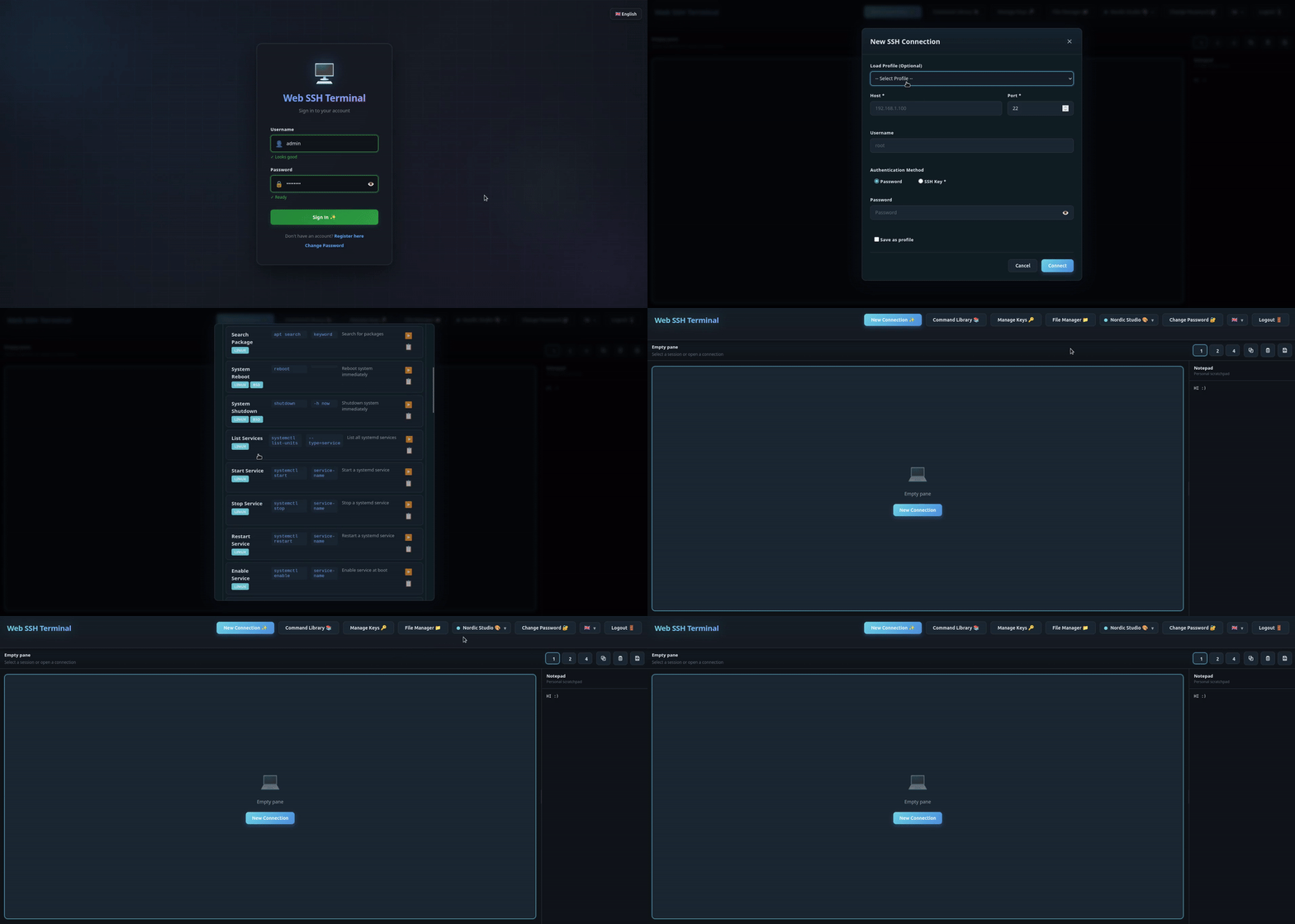
Web SSH Terminal is a self-hosted web application that provides secure SSH access to your servers directly from your browser. Perfect for homelabs, server management, and teams that need browser-based terminal access. It is multi-user from the ground up, with individual accounts and per-user profiles, keys, and settings.
Features
Terminal
- Multi-Session Support - Up to 10 concurrent SSH sessions with tabs
- Split Panes - 2x2 grid layout for monitoring multiple servers
- Session Persistence - Sessions survive page refreshes
- Copy/Paste - Full clipboard support
- Keyboard Shortcuts - Vim-style navigation supported
- Terminal Search - Regex or plain-text in-terminal search (Ctrl+F) with match counter
- Save Transcript - Download the session output as a text file
- Recent Connections - Quick reconnect from your connection history
- Session Notes - Per-session notes, auto-saved as you type
- Command Palette - Fuzzy command launcher (Ctrl+K)
File Manager (SFTP)
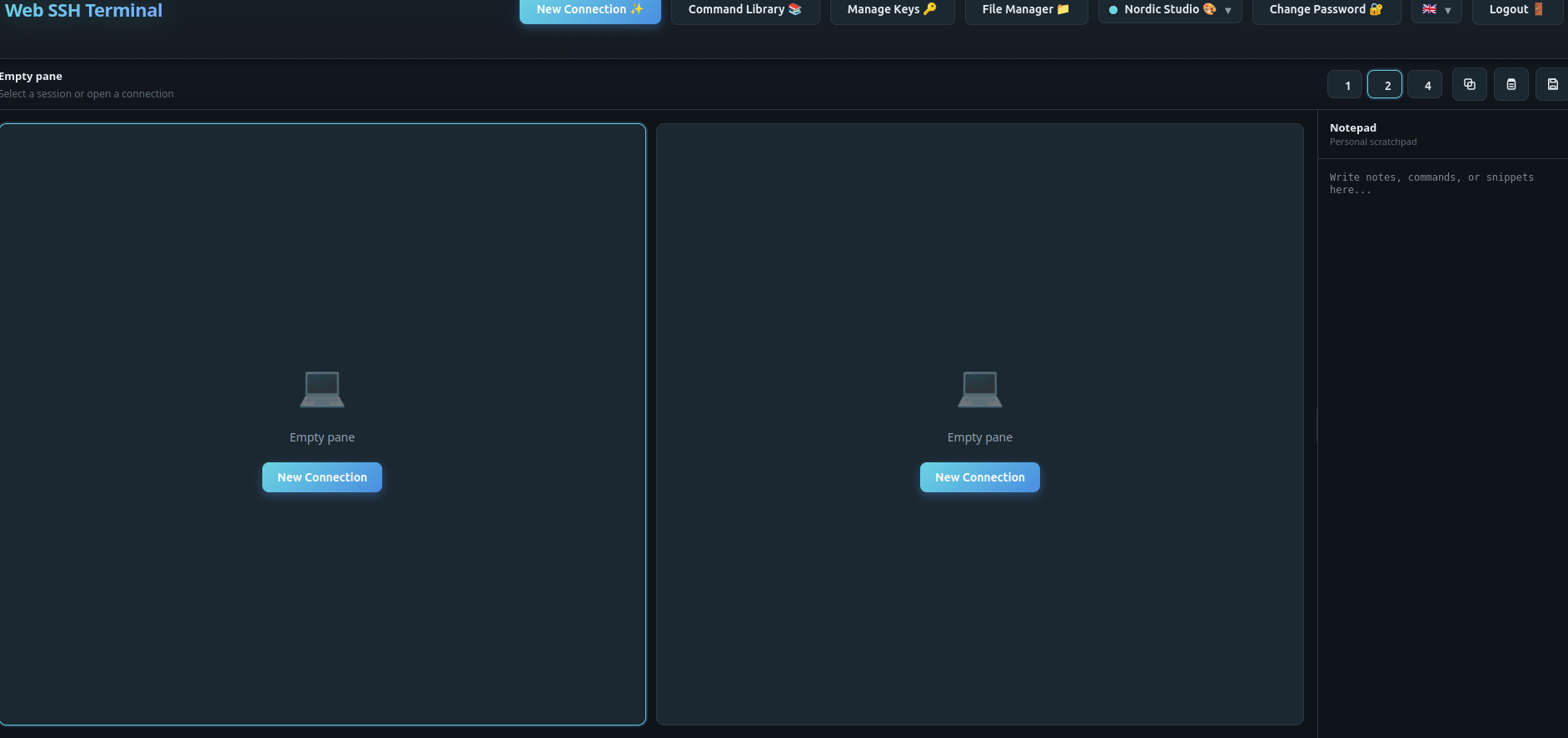
- Dual-Pane Browser - Side-by-side file browsing
- Drag & Drop - Transfer files between local and remote
- Server-to-Server - Direct transfer between SSH hosts
- Batch Operations - Multi-select for bulk actions
- Context Menu - Right-click for quick actions
- File Preview - Inline preview for images and code (syntax-highlighted), with log tail mode
- Folder Download as ZIP - Download entire directories as a ZIP archive
- Quick Connect - Browse files over SFTP without opening a terminal session
- Local Filesystem Source - Use your browser's local files as a transfer source
- Transfer Queue - Progress tracking with conflict resolution (skip / overwrite / apply to all)
- Efficient Binary Transfer - Raw binary streaming (~33% smaller than base64)
Security
- Encrypted Key Storage - SSH keys encrypted at rest (Fernet / AES-128-CBC + HMAC)
- Per-User Key Encryption - Encryption key derived per user (
SECRET_KEY+ user id) - Secure Authentication - bcrypt password hashing
- CSRF Protection - Token-based request validation
- Rate Limiting - Brute-force protection
- Security Headers - HSTS, CSP, X-Frame-Options
- SSRF Protection - Optionally block SSH to internal/loopback addresses (
BLOCK_INTERNAL_SSH) - Host Key Auditing - Persistent
known_hostspolicy with change detection - Audit Logging - Structured JSON logs for auth, SSH, and file events
- Session Ownership Checks - Guards against cross-user session hijacking
Customization
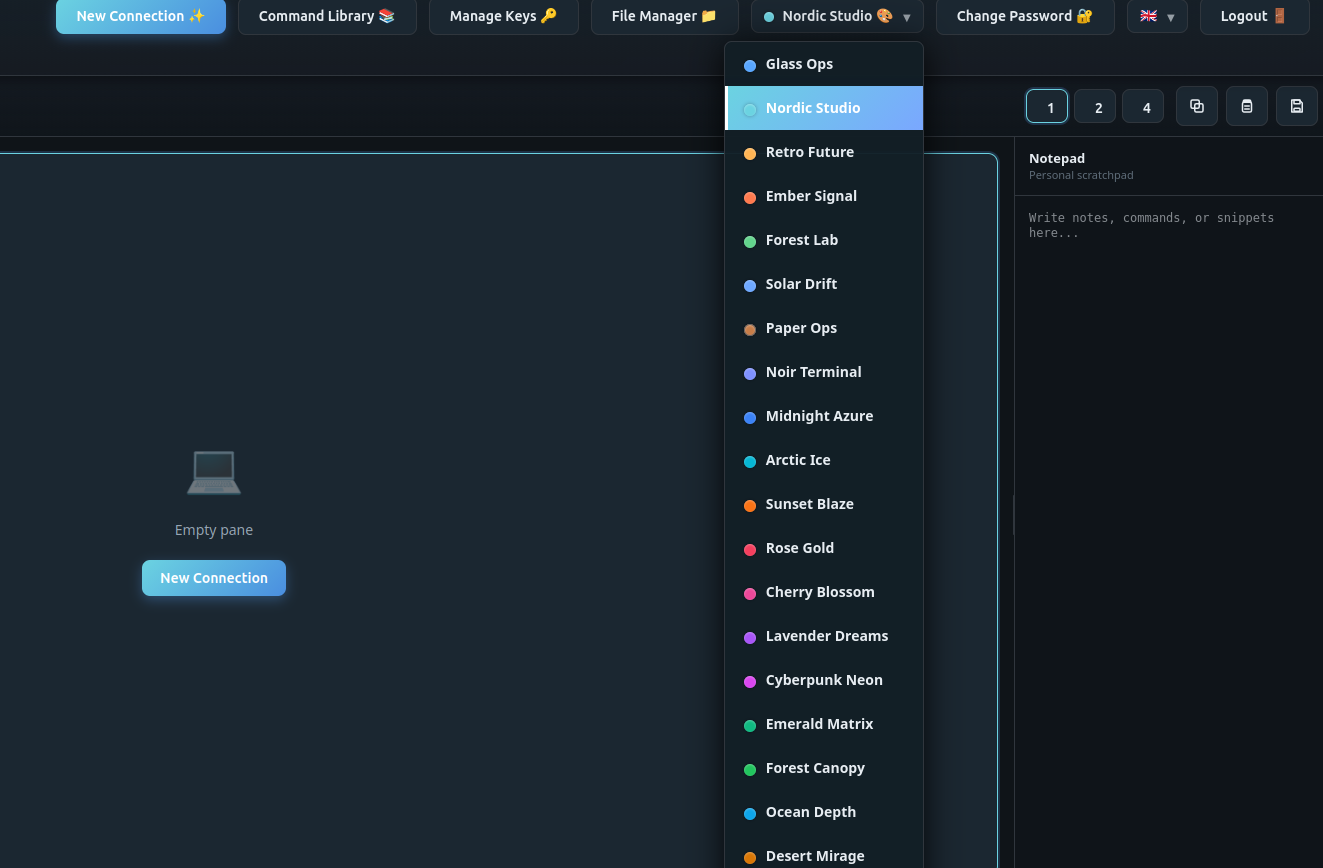
- 10 Themes - Dark, light, and colorful options
- 5 Languages - English, German, French, Spanish, Chinese
- Connection Profiles - Save server configurations
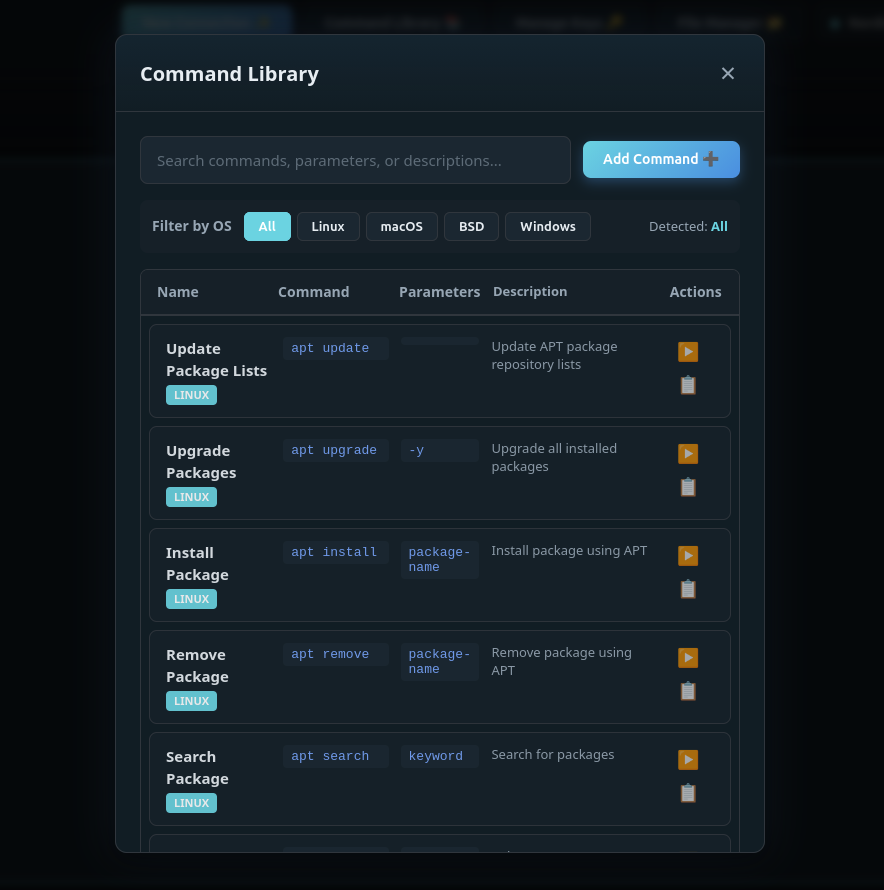
- Command Library - Store frequently used commands
- OS-Aware Command Library - Filter commands by detected OS (Linux / macOS / BSD / Windows)
- SSH Key Management - Import keys (RSA, Ed25519, ECDSA, DSS), encrypted at rest
- Notepad - Persistent scratchpad for notes, commands, and snippets
Deployment
- Docker & Docker Compose - Single-command deployment with healthcheck
- Reverse Proxy Ready - Traefik, nginx, and Caddy examples included
- Subfolder Deployment - Host under a URL subpath like
/webssh(see Subfolder Deployment) - Homelab Friendly - Wildcard CORS mode for internal networks
Quick Start
Docker (Recommended)
# Generate a secure secret key
export SECRET_KEY=$(openssl rand -hex 32)

# Run with Docker
docker run -d \
  --name webssh \
  -p 5000:5000 \
  -e SECRET_KEY=$SECRET_KEY \
  -e CORS_ORIGINS=http://localhost:5000 \
  -v webssh_data:/app/data \
  --restart unless-stopped \
  ghcr.io/bifrost0x/webssh:latest
Open http://localhost:5000 and create your first account.
Docker Compose
# Download docker-compose.yml
curl -O https://raw.githubusercontent.com/bifrost0x/webssh/main/docker-compose.yml

# Generate and insert your secret key
SECRET=$(openssl rand -hex 32)
sed -i "s/<YOUR-SECRET-KEY>/$SECRET/" docker-compose.yml

# Start the service
docker compose up -d
Open http://localhost:5000 and create your first account.
Tip: Edit
docker-compose.ymldirectly to change settings. No.envfile needed!
Installation
From Source
# Clone the repository
git clone https://github.com/bifrost0x/webssh.git
cd webssh

# Create virtual environment
python -m venv venv
source venv/bin/activate  # Linux/macOS
# or: venv\Scripts\activate  # Windows

# Install dependencies
pip install -r requirements.txt

# Set required environment variable
export SECRET_KEY=$(openssl rand -hex 32)

# Run the application
python start.py
Building Docker Image
docker build -t webssh:local .Configuration
Environment Variables
Core
| Variable | Required | Default | Description |
|---|---|---|---|
SECRET_KEY |
Yes | - | Session encryption key. Generate with openssl rand -hex 32 |
DEBUG |
No | False |
Enable debug mode (development only) |
DATA_DIR |
No | /app/data |
Persistent data directory |
Server
| Variable | Required | Default | Description |
|---|---|---|---|
HOST |
No | 127.0.0.1 |
Bind address (0.0.0.0 in Docker) |
PORT |
No | 5000 |
Listen port |
APPLICATION_ROOT |
No | - | URL subpath when deploying under a prefix (e.g. /webssh). See Subfolder Deployment |
TRUSTED_PROXIES |
No | 0 |
Set 1 when behind a reverse proxy |
CORS & Security Headers
| Variable | Required | Default | Description |
|---|---|---|---|
CORS_ORIGINS |
No | localhost:5000 |
Allowed origins for CORS (comma-separated) |
ALLOW_CORS_WILDCARD |
No | false |
Set true to allow * as CORS origin (homelab use only) |
SESSION_COOKIE_SECURE |
No | Auto | Set true/false to explicitly control secure cookies (auto-enabled in production) |
Features
| Variable | Required | Default | Description |
|---|---|---|---|
REGISTRATION_ENABLED |
No | True |
Allow new user registration (true or false) |
SESSION_TIMEOUT |
No | 1800 |
Session timeout in seconds (30 minutes) |
BLOCK_INTERNAL_SSH |
No | false |
Block SSH connections to internal/loopback addresses (true or false) |
MAX_DOWNLOAD_SIZE |
No | 104857600 |
Maximum file download size in bytes (100 MB) |
MAX_ZIP_DOWNLOAD_SIZE |
No | 524288000 |
Maximum ZIP download size in bytes (500 MB) |
Rate Limiting
| Variable | Required | Default | Description |
|---|---|---|---|
RATELIMIT_ENABLED |
No | True |
Enable rate limiting (true or false) |
RATELIMIT_LOGIN_LIMIT |
No | 5 per minute |
Login rate limit (format: N per {second|minute|hour}) |
RATELIMIT_DEFAULT |
No | 200 per hour |
Default rate limit for endpoints (format: N per {second|minute|hour}) |
RATELIMIT_STORAGE_URL |
No | memory:// |
Rate limit storage backend (in-memory only, for single-worker deployments) |
Configuration via .env file
Instead of exporting every variable, you can place them in a .env file in the
project root. It is loaded automatically on startup. Copy the provided template
to get started:
cp .env.example .env
# edit .env and set at least SECRET_KEY
python start.py
Real environment variables (set via the shell, Docker, or systemd) always take
precedence over values in .env, so the file works safely alongside existing
deployments. .env is git-ignored — never commit your real secrets.
Reverse Proxy Setup
Traefik
labels:
  - "traefik.enable=true"
  - "traefik.http.routers.webssh.rule=Host(`ssh.example.com`)"
  - "traefik.http.routers.webssh.tls.certresolver=letsencrypt"
  - "traefik.http.services.webssh.loadbalancer.server.port=5000"
Nginx
location / {
    proxy_pass http://webssh:5000;
    proxy_http_version 1.1;
    proxy_set_header Upgrade $http_upgrade;
    proxy_set_header Connection "upgrade";
    proxy_set_header Host $host;
    proxy_set_header X-Real-IP $remote_addr;
    proxy_set_header X-Forwarded-For $proxy_add_x_forwarded_for;
    proxy_set_header X-Forwarded-Proto $scheme;
}
Caddy
ssh.example.com {
    reverse_proxy webssh:5000
}
Subfolder Deployment
To serve the app under a URL subpath like https://server.local/webssh, set:
APPLICATION_ROOT=/webssh
TRUSTED_PROXIES=1
Then configure your reverse proxy to strip the prefix and forward it via X-Forwarded-Prefix.
Nginx (subfolder)
location /webssh/ {
    proxy_pass http://webssh:5000/;
    proxy_http_version 1.1;
    proxy_set_header Upgrade $http_upgrade;
    proxy_set_header Connection "upgrade";
    proxy_set_header Host $host;
    proxy_set_header X-Real-IP $remote_addr;
    proxy_set_header X-Forwarded-For $proxy_add_x_forwarded_for;
    proxy_set_header X-Forwarded-Proto $scheme;
    proxy_set_header X-Forwarded-Prefix /webssh;
}
Traefik (subfolder)
labels:
  - "traefik.enable=true"
  - "traefik.http.routers.webssh.rule=Host(`server.local`) && PathPrefix(`/webssh`)"
  - "traefik.http.middlewares.webssh-strip.stripprefix.prefixes=/webssh"
  - "traefik.http.middlewares.webssh-prefix.headers.customrequestheaders.X-Forwarded-Prefix=/webssh"
  - "traefik.http.routers.webssh.middlewares=webssh-strip,webssh-prefix"
  - "traefik.http.services.webssh.loadbalancer.server.port=5000"
Caddy (subfolder)
server.local {
    handle_path /webssh/* {
        reverse_proxy webssh:5000 {
            header_up X-Forwarded-Prefix /webssh
        }
    }
}
Homelab Configuration
For homelab use where you access the service from various internal IPs:
CORS_ORIGINS=*
ALLOW_CORS_WILDCARD=true
TRUSTED_PROXIES=1
Note: Only use wildcard CORS in trusted network environments.
Themes
Web SSH Terminal includes 10 themes:
| Theme | Style | Theme | Style |
|---|---|---|---|
| Glass Ops | Dark Blue | Paper Ops | Light |
| Retro Future | Amber | Noir Terminal | Purple |
| Solar Drift | Blue/Gold | Arctic Ice | Cyan |
| Rose Gold | Rose | Cyberpunk Neon | Magenta |
| Emerald Matrix | Matrix Green | Obsidian | Pure Black |
Security
Best Practices
- Always use HTTPS in production (terminate TLS at reverse proxy)
- Generate unique SECRET_KEY for each deployment
- Set specific CORS_ORIGINS instead of wildcard
- Enable TRUSTED_PROXIES only when behind a proxy
- Use strong passwords (minimum 8 characters enforced)
Security Features
- Password Hashing: bcrypt with automatic salt
- Key Encryption: Fernet (AES-128-CBC + HMAC) for SSH keys at rest
- Rate Limiting: 5 login attempts per minute per IP
- CSRF Tokens: All forms protected
- Secure Cookies: HttpOnly, SameSite=Lax, Secure (in production)
- Security Headers: HSTS, CSP, X-Content-Type-Options, X-Frame-Options
Reporting Security Issues
Please report security vulnerabilities by opening a GitHub issue or contacting the maintainers directly. Do not disclose security issues publicly until they have been addressed.
API
Web SSH Terminal uses WebSocket (Socket.IO) for real-time communication. HTTP routes handle authentication, the main UI is served over WebSocket.
| Endpoint | Method | Description |
|---|---|---|
/ |
GET | Main application |
/login |
GET/POST | Authentication |
/register |
GET/POST | User registration |
/logout |
POST | End session |
/change-password |
GET/POST | Password change |
/api/upload |
POST | File upload (multipart) |
/socket.io/ |
WS | Terminal, SFTP, profiles, keys, commands |
Development
Running Tests
Code Style
# Format code
black .

# Lint
flake8 .
Frontend Assets
Browser libraries (xterm.js, socket.io-client, highlight.js, Material Icons) are
vendored into static/vendor/ and served locally — no CDN requests, so the
app works fully offline/air-gapped. Versions are pinned in package.json; the
committed files under static/vendor/ are what runs in production.
Node is only needed to update these assets, never at runtime:
npm install            # fetch pinned versions into node_modules/
npm run vendor         # copy them into static/vendor/
# commit the changed static/vendor/ files
To bump a library, change its version in package.json, then re-run the two
commands above. Dependabot keeps package.json up to date.
Project Structure
webssh/
├── app/                    # Flask application (15 modules)
│   ├── __init__.py        # App factory, routes, security headers
│   ├── auth.py            # Authentication + rate limiting
│   ├── models.py          # SQLAlchemy models
│   ├── socket_events.py   # WebSocket event handlers
│   ├── ssh_manager.py     # SSH connection management
│   ├── sftp_handler.py    # SFTP file operations
│   ├── connection_pool.py # SSH connection pooling
│   ├── key_manager.py     # SSH key storage
│   ├── key_encryption.py  # SSH key encryption at rest
│   ├── profile_manager.py # Connection profiles
│   ├── command_manager.py # Command library
│   ├── binary_transfer.py # Binary file transfer protocol
│   ├── user_settings.py   # User preferences
│   ├── audit_logger.py    # Security audit logging
│   └── decorators.py      # Shared decorators
├── static/
│   ├── css/               # Stylesheets (3 files)
│   ├── js/                # Frontend JavaScript (12 modules)
│   └── vendor/            # Vendored browser libs (see Frontend Assets)
├── templates/             # Jinja2 templates (4 files)
├── config.py              # Central configuration
├── start.py               # Entry point
├── Dockerfile             # Container definition
└── docker-compose.yml     # Compose file
Contributing
Contributions are welcome! Please feel free to submit a Pull Request.
- Fork the repository
- Create your feature branch (
git checkout -b feature/amazing-feature) - Commit your changes (
git commit -m 'Add amazing feature') - Push to the branch (
git push origin feature/amazing-feature) - Open a Pull Request
License
This project is licensed under the MIT License - see the LICENSE file for details.
Acknowledgments
- xterm.js - Terminal emulator
- Paramiko - SSH implementation
- Flask-SocketIO - WebSocket support
- SQLAlchemy - Database ORM
Made with ❤️ for the homelab community