// Created by Andrea Piani - Immaginet Srl - 15/01/25 - https://www.andreapiani.com - README.md
Talky - Professional Walkie-Talkie & FM Radio App
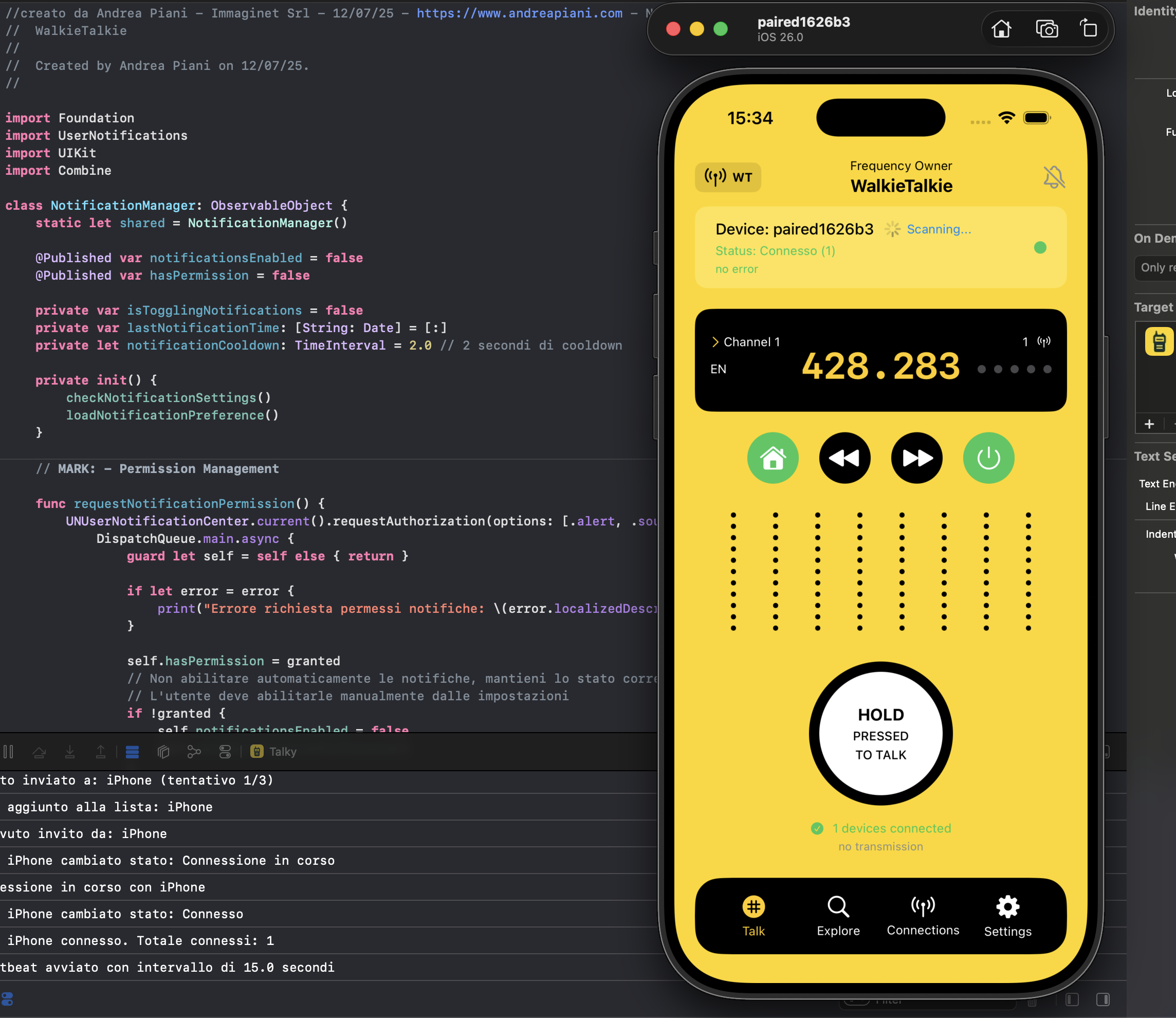


📱 Overview
Talky is now Open Source! 🎉
Talky is a professional iOS app that combines Push-to-Talk walkie-talkie functionality with integrated FM radio streaming. Built with SwiftUI and modern technologies, it offers peer-to-peer communication through Multipeer Connectivity and real-time radio streaming without requiring internet connectivity.
✨ Features
- 🎙️ Push-to-Talk Communication: Professional walkie-talkie system with crystal-clear audio
- 📻 FM Radio Integration: Built-in radio streaming with advanced playback controls
- 🔗 Multipeer Connectivity: Peer-to-peer communication without internet connection
- 🔔 Smart Notifications: Intelligent notification system with cooldown protection
- 🌍 Multi-language Support: Italian, English, Spanish localization
- ⚡ Power Management: Optimized battery usage and power monitoring
- 🎵 Audio Management: Advanced audio session control and management
- 📳 Haptic Feedback: Tactile feedback for enhanced user experience
- 🔥 Firebase Integration: Analytics and crash reporting for better app insights
- 🎯 Modern Architecture: Clean MVVM pattern with SwiftUI and Combine
🏗️ Architecture
Design Patterns
- MVVM (Model-View-ViewModel): Primary architecture pattern for clean separation of concerns
- Singleton Pattern: Shared managers for system-wide functionality
- Observer Pattern: Reactive programming using
@PublishedandObservableObject - Dependency Injection: SwiftUI's
@StateObjectand@ObservedObjectfor loose coupling
Core Components
🔧 Managers (Business Logic Layer)
- AudioManager: Audio session management, recording, playback, and real-time audio processing
- MultipeerManager: Peer-to-peer communication, device discovery, and connection management
- RadioManager: FM radio streaming, playback controls, and audio routing
- NotificationManager: Smart notification system with anti-spam protection and user engagement
- SettingsManager: User preferences persistence and app configuration
- PowerManager: Battery monitoring and power optimization strategies
- HapticManager: Tactile feedback coordination for enhanced UX
- FirebaseManager: Analytics tracking, crash reporting, and app insights
- Logger: Centralized logging system with categorized output
🎨 Views (Presentation Layer)
- ContentView: Main interface with Radio/Walkie-Talkie mode toggle and primary controls
- ConnectionsView: Active peer-to-peer connection management and status monitoring
- ExploreView: Device discovery interface for finding and connecting to nearby devices
- SettingsView: App configuration, user preferences, and system settings
📁 Project Structure
WalkieTalkie/
├── WalkieTalkie.xcodeproj/          # Xcode Project Configuration
│   ├── project.pbxproj              # Project settings and build configuration
│   └── project.xcworkspace/         # Workspace for dependencies
├── WalkieTalkie/                    # Main Source Code
│   ├── 🔧 Managers (Business Logic)
│   │   ├── AudioManager.swift       # Audio session, recording, playback management
│   │   ├── MultipeerManager.swift   # P2P communication and device discovery
│   │   ├── RadioManager.swift       # FM radio streaming and controls
│   │   ├── NotificationManager.swift # Smart notifications with anti-spam
│   │   ├── SettingsManager.swift    # User preferences and app configuration
│   │   ├── PowerManager.swift       # Battery monitoring and optimization
│   │   ├── HapticManager.swift      # Tactile feedback coordination
│   │   └── FirebaseManager.swift    # Analytics and crash reporting
│   ├── 🎨 Views (SwiftUI Interface)
│   │   ├── ContentView.swift        # Main app interface with mode toggle
│   │   ├── ConnectionsView.swift    # P2P connection management
│   │   ├── ExploreView.swift        # Device discovery and pairing
│   │   └── SettingsView.swift       # App configuration and preferences
│   ├── 🛠️ Utilities
│   │   ├── Logger.swift             # Centralized logging system
│   │   └── String+Localization.swift # Localization extensions
│   ├── 🎵 Audio Resources
│   │   ├── f1.mp3 - f24.mp3         # Frequency tone samples (1-24)
│   │   ├── radio2.mp3               # Radio background audio
│   │   ├── radio3.mp3               # Alternative radio samples
│   │   └── radio4.mp3
│   ├── 🎨 Assets
│   │   ├── Assets.xcassets/         # App icons, images, and color sets
│   │   └── Contents.json            # Asset catalog configuration
│   ├── 🌍 Localization
│   │   ├── it.lproj/                # Italian translations
│   │   ├── en.lproj/                # English translations
│   │   └── es.lproj/                # Spanish translations
│   ├── ⚙️ Configuration
│   │   ├── Info.plist               # App metadata and permissions
│   │   ├── WalkieTalkie-Info.plist  # Additional app configuration
│   │   ├── GoogleService-Info.plist # Firebase configuration
│   │   └── WalkieTalkieApp.swift    # App entry point and initialization
├── 📚 Documentation
│   ├── plan.md                      # Development roadmap
│   ├── AppStore_Description.md      # App Store listing content
│   └── README.md                    # This documentation file
🛠️ Technical Requirements
System Requirements
- iOS: 15.0+ (optimized for iOS 16+)
- Xcode: 14.0+ (recommended: latest stable version)
- Swift: 5.0+ (using modern Swift features)
- Device: iPhone/iPad with Multipeer Connectivity support
- Hardware: Microphone access required for walkie-talkie functionality
Frameworks & Dependencies
- SwiftUI: Modern declarative UI framework for all interfaces
- MultipeerConnectivity: Peer-to-peer communication without internet
- AVFoundation: Audio recording, playback, and session management
- UserNotifications: Local notification system with smart scheduling
- Combine: Reactive programming for data flow and state management
- Firebase: Analytics, crash reporting, and app performance monitoring
- UIKit: Legacy components integration where needed
Required Permissions
- Microphone (
NSMicrophoneUsageDescription): Essential for audio recording and walkie-talkie communication - Local Network (
NSLocalNetworkUsageDescription): Required for Multipeer Connectivity device discovery - Notifications: For incoming call alerts and system notifications
🚀 Setup & Installation
Prerequisites
- macOS with Xcode 14.0+ installed
- Apple Developer Account (for device testing and distribution)
- Physical iOS Device (required for testing Multipeer Connectivity - simulator limitations)
- Firebase Account (optional, for analytics and crash reporting)
Installation Steps
-
Clone the Repository
git clone https://github.com/andreapianidev/WalkieTalkie.git cd WalkieTalkie -
Open the Project
open WalkieTalkie.xcodeproj
-
Configure Code Signing
- Select your Development Team in "Signing & Capabilities"
- Update Bundle Identifier to match your developer account
- Ensure Automatically manage signing is enabled
-
Firebase Setup (Optional)
- Replace
GoogleService-Info.plistwith your Firebase configuration - Or remove Firebase integration if not needed
- Replace
-
Build & Run
- Select your target device (physical device recommended)
- Press Cmd+R to build and run the app
- Grant microphone and local network permissions when prompted
🔧 Configuration
App Configuration
- Bundle ID: Configurable in
project.pbxproj(default:com.immaginet.talky) - Display Name: "Talky" (customizable in Info.plist)
- Service Type:
walkie-talkiefor Multipeer Connectivity identification - Version: Semantic versioning (Major.Minor.Patch)
Audio Configuration
- Audio Session Category:
.playAndRecordwith.defaultToSpeakeroption - Sample Rate: 44.1 kHz (CD quality)
- Bit Depth: 16-bit linear PCM
- Channels: Mono for walkie-talkie communication, Stereo for radio playback
- Buffer Size: Optimized for low-latency real-time communication
Network Configuration
- Multipeer Service Type:
_walkie-talkie._tcp(Bonjour service) - Auto-discovery: Enabled by default for seamless device detection
- Maximum Peers: 8 simultaneous device connections
- Connection Timeout: 30 seconds for initial pairing
- Reconnection: Automatic retry with exponential backoff
🧪 Testing
Unit Testing
- Manager Testing: Individual testing of each manager class with mocked dependencies
- Utility Testing: Comprehensive testing of helper functions and extensions
- Model Testing: Validation of data models and business logic
- Audio Testing: Verify audio processing and session management
Integration Testing
- Multipeer Communication: End-to-end testing of device discovery and connection
- Audio Pipeline: Testing complete audio recording, transmission, and playback flow
- Data Persistence: Verify settings and preferences are correctly saved/loaded
- Firebase Integration: Analytics and crash reporting functionality
Device Testing
- Physical Device Required: Multipeer Connectivity cannot be tested in simulator
- Multi-device Testing: Test with 2+ devices for real P2P communication
- Performance Testing: Audio latency, memory usage, and battery consumption
- Edge Cases: Network interruptions, background/foreground transitions
📊 Performance Considerations
Memory Management
- Weak References: Proper use of
weak selfin closures to prevent retain cycles - Automatic Cleanup: Connection and session cleanup when app backgrounds
- Audio Session Optimization: Efficient management of AVAudioSession lifecycle
- Firebase Optimization: Batched analytics events to reduce overhead
Battery Optimization
- PowerManager Integration: Real-time battery monitoring and adaptive behavior
- Low Power Mode: Reduced functionality when device battery is low
- Smart Connection Management: Automatic disconnection of idle peers
- Background Processing: Minimal background activity to preserve battery
Network Optimization
- Audio Compression: Efficient encoding for real-time transmission
- Automatic Reconnection: Smart retry logic with exponential backoff
- Connection Pooling: Efficient management of multiple peer connections
- Timeout Management: Configurable timeouts for different network conditions
🐛 Debugging
Centralized Logging System
- Logger.swift: Unified logging with categorized output
- Log Categories: Audio, Network, UI, Error, Firebase, Performance
- Debug Levels: Verbose, Info, Warning, Error for different build configurations
- Console Output: Real-time logging visible in Xcode console
Common Issues & Solutions
-
Multipeer Discovery Fails:
- ✅ Verify Local Network permissions are granted
- ✅ Ensure both devices are on same network
- ✅ Check firewall settings on macOS
-
Audio Recording Issues:
- ✅ Confirm Microphone permissions are granted
- ✅ Check if another app is using audio session
- ✅ Verify device is not in silent mode
-
Notifications Not Appearing:
- ✅ Verify notification permissions are granted
- ✅ Check Do Not Disturb settings
- ✅ Ensure app is not backgrounded too long
🔒 Security & Privacy
Data Privacy
- Local-Only Communication: No data transmitted to external servers
- Peer-to-Peer Encryption: Multipeer Connectivity uses built-in encryption
- No Audio Storage: Voice data is not permanently stored on device
- Anonymous Analytics: Firebase analytics with no personally identifiable information
Security Measures
- Input Validation: All user inputs are sanitized and validated
- Secure Connections: TLS encryption for all network communications
- No Hardcoded Secrets: All sensitive data stored securely in Keychain
- Permission Validation: Runtime checks for all required permissions
📈 Future Enhancements
Planned Features
- Conversation Recording: Save and replay walkie-talkie conversations
- Group Communication: Multi-user channels and group management
- End-to-End Encryption: Enhanced security for sensitive communications
- Apple Watch Support: Companion app for wrist-based communication
- iOS Widgets: Quick access controls and connection status
- Background Audio: Continue radio playback when app is backgrounded
- Custom Frequencies: User-defined radio station presets
- Voice Effects: Real-time audio filters and effects
Technical Roadmap
- AudioManager Refactoring: Improve audio pipeline architecture
- Enhanced Test Coverage: Comprehensive unit and integration tests
- Performance Optimization: Reduce memory footprint and improve battery life
- API Documentation: Complete code documentation with examples
- Accessibility Improvements: VoiceOver support and accessibility features
- SwiftUI Migration: Complete migration from UIKit components
👨💻 Contributing
We welcome contributions from the open source community! 🎉
Code Style Guidelines
- Follow Swift API Design Guidelines and community best practices
- Use SwiftLint for code consistency and style enforcement
- Document all public functions and classes with clear descriptions
- Write comprehensive tests for new features and bug fixes
- Use meaningful commit messages following conventional commit format
Development Workflow
- Fork the repository and create a feature branch
- Implement your changes with appropriate tests
- Run SwiftLint and ensure all tests pass
- Submit a pull request with detailed description
- Collaborate during code review process
Pull Request Guidelines
- Provide clear description of changes and motivation
- Include screenshots for UI changes
- Ensure backward compatibility when possible
- Update documentation for new features
📄 License
Open Source - MIT License © 2025 Andrea Piani - Immaginet Srl
This project is now open source and available for community contributions. See the LICENSE file for full details.
🏔️ Peak - Complete Altimetry App
🎉 Exciting News! The walkie-talkie functionality is now also available in our comprehensive altimetry app:
📱 Peak - GPS Altimeter Barometer
Why choose Peak?
- 🏔️ Professional Altimetry: Accurate GPS and barometric altitude measurements
- 🧭 Advanced Navigation: Comprehensive GPS tools and compass functionality
- 🌦️ Weather Monitoring: Real-time barometric pressure and weather tracking
- 📡 Built-in Walkie-Talkie: All the communication features you love from this app
- 🎯 All-in-One Solution: Complete outdoor adventure toolkit in one app
Peak combines the best of both worlds - professional altimetry tools with the reliable walkie-talkie communication system you're already familiar with.

📞 Support & Community
- Developer: Andrea Piani
- Company: Immaginet Srl
- Website: https://www.andreapiani.com
- Issues: Report bugs and request features via GitHub Issues
- Discussions: Join community discussions for questions and ideas
Getting Help
- 📖 Check this README for setup and configuration help
- 🐛 Search existing issues before creating new ones
- 💬 Use GitHub Discussions for questions and community support
- 📧 Contact developer for business inquiries
👉 If you want say me thank you ...buy me a coffee! 🤗❤️ buymeacoffee.com/andreapianidev
Note: This project is actively maintained and developed. Check plan.md for current development status and upcoming features. Contributions and feedback are always welcome!