Frida UI


A modern, lightweight, web-based user interface for Frida, designed for Android application penetration testing. It allows you to interact with devices, processes, and scripts directly from your browser.
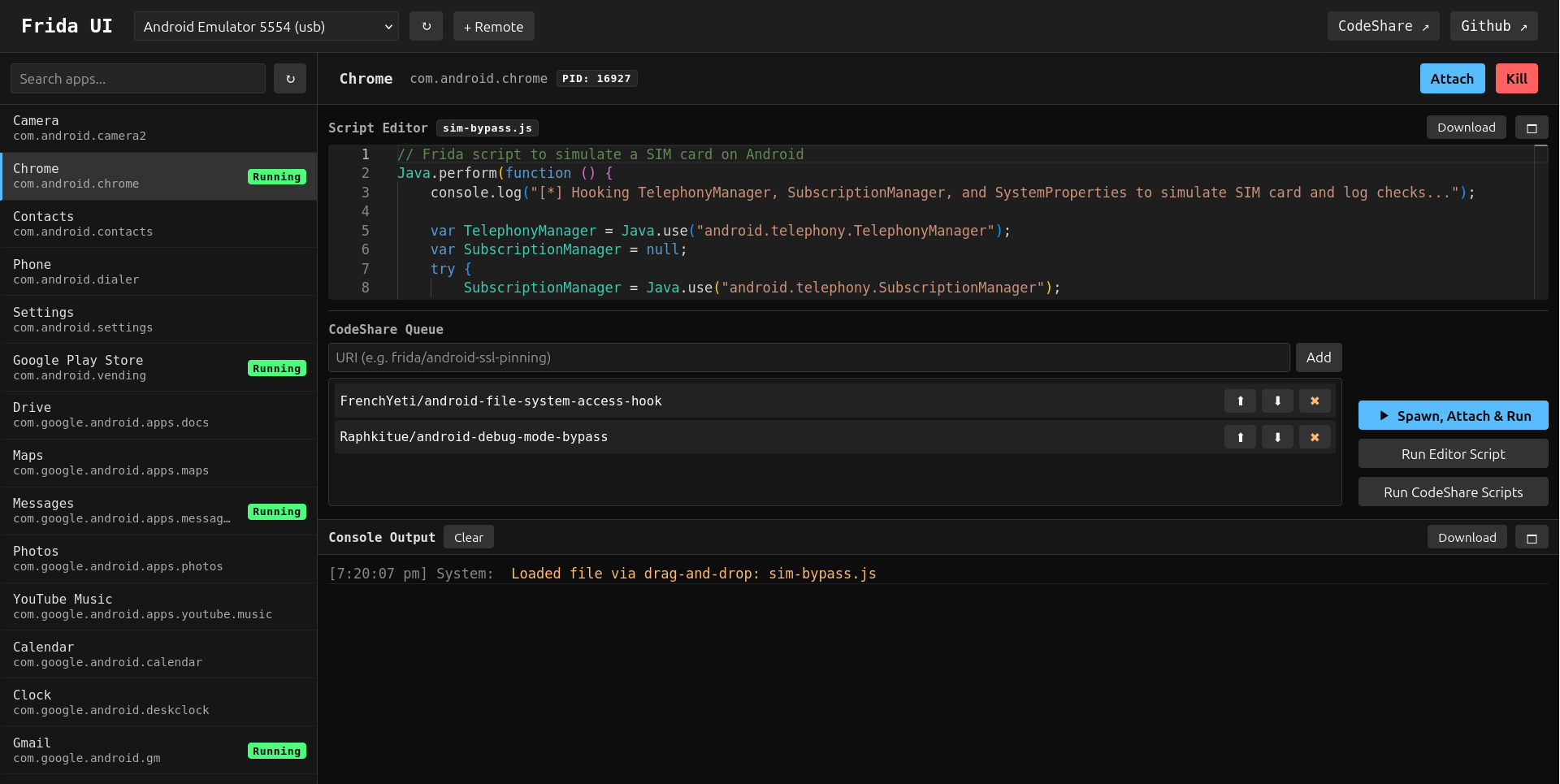
Quick Start
# Install using uv (recommended) or pipx/pip
uv tool install frida-ui
# Or: pipx install frida-ui
# Or: pip install frida-ui

# Start the server
frida-ui
Open your browser and navigate to: http://localhost:8000
Features
📱 Device Management
- Auto-discovery: Automatically detects connected USB and local devices.
- Remote Devices: Easily add and manage remote Frida servers (e.g.,
192.168.1.x:27042). - Device Info: View detailed system parameters (OS, Arch, API Level) and visual type indicators for selected devices.
🚀 Process & App Control
- Application List: View installed applications and running processes.
- Search: Real-time filtering of applications by name or identifier.
- Session Management:
- Attach: Connect to running processes.
- Spawn: Launch installed applications.
- Spawn & Run: Launch an app and immediately inject the editor script along with any queued CodeShare scripts (early instrumentation).
- Kill/Detach: Terminate processes or gracefully disconnect.
💻 Scripting & Instrumentation
- Script Editor: Built-in editor for writing Frida scripts. Includes an optional Monaco editor for richer editing (syntax highlighting and automatic layout) with a graceful fallback to a plain textarea.
- File Loading: Load scripts from local files or drag-and-drop
.jsfiles into the editor. - Download script: Export the current editor content as a
.jsfile (frida-ui_<app id>_<timestamp>.js) directly from the editor header. - CodeShare Integration:
- Import scripts directly from Frida CodeShare.
- CodeShare Queue: Queue multiple CodeShare scripts to be loaded and executed automatically during Spawn & Run or manually via the "Run CodeShare Scripts" button.
📊 Console & Logging
- Real-time Output: View
console.log,send(), and error messages from your scripts. - Log History: Persistent logs per application session.
- Export: Download console logs as
.txtfiles for analysis.
🎨 UI/UX
- Dark Theme: Clean, consistent dark mode interface.
- Persistence: Remembers your selected device, application, and pane sizes across sessions.
- Responsive: Adjustable panes for sidebar, editor, and console.
- Focus Modes: Toggle Editor-only or Console-only views to hide other panes for a distraction-free workflow.
- Accessibility: Keyboard shortcuts (e.g.,
Escapeto reset view or close overlays) and ARIA support.
Getting Started
Prerequisites
Installation
Option 1: Install from PyPI (Recommended)
You can also customize the Frida version:
uv tool install frida-ui --with frida==16.7.19
Option 2: Install from Source (Bleeding Edge)
uv tool install git+https://github.com/adityatelange/frida-ui
You can customize the Frida version:
uv tool install git+https://github.com/adityatelange/frida-ui --with frida==16.7.19
Important
The Frida version you install must match the frida-server version on your Android device to ensure compatibility.
Running
Start the server using the default configuration:
Or with custom options:
frida-ui --host 127.0.0.1 --port 8000 --reload
--host: Specify the host (default: 127.0.0.1)--port: Specify the port (default: 8000)--reload: Enable auto-reload for development
Open http://localhost:8000 in your browser.
Android Device Setup
Before using frida-ui, you must have frida-server running on your Android device. The version of frida-server must match the Frida version you installed in the previous step.
Option 1: USB Connection
If you have ADB installed and want to connect via USB:
-
Download frida-server: Visit Frida releases and download the
frida-serverbinary for Android matching your device's architecture/abi (e.g.,frida-server-x.x.x-android-arm64.xz). -
Extract and Push to Device:
unxz frida-server-x.x.x-android-arm64.xz
mv frida-server-x.x.x-android-arm64 frida-server
adb push frida-server /data/local/tmp/
-
Run frida-server:
adb shell "chmod 755 /data/local/tmp/frida-server"
adb shell "/data/local/tmp/frida-server -D"
-
Verify Connection: Ensure your device is connected via USB and visible via
adb devices.frida-uiwill automatically detect it when running.
Option 2: Remote Connection (Network)
Alternatively, you can run frida-server with a network listener and connect remotely:
-
Download and run frida-server on your Android device (using any method - ADB, custom script, etc.):
./frida-server -l 0.0.0.0:27042 -D
-
Add Remote Device in frida-ui: In the frida-ui interface, add a remote device with the IP address and port where frida-server is listening (e.g.,
192.168.1.x:27042).No ADB installation is required for this method.
Usage Guide
- Select a Device: Choose a device from the dropdown in the top header.
- Select an App: Click on an application in the sidebar.
- Write/Load Script:
- Type JS in the editor.
- Or drag & drop a file.
- Or add scripts URL from CodeShare.
- Action:
- Click Attach to inject into a running process.
- Click Spawn to start the app.
- Click Spawn & Run to start the app with your script injected immediately.
- Monitor: Watch the console for output.
💡 Example Script
Try this simple script to hook a method (replace with your target):
// Simple method hook example
Java.perform(() => {
  const MainActivity = Java.use("com.example.app.MainActivity");
  MainActivity.checkPassword.implementation = function (password) {
    console.log("[*] checkPassword called with: " + password);
    return true; // Bypass check
  };
});
Notes
Note
This tool is an independent project and is not part of the official Frida toolset and is not sponsored by the Frida project. It is a third-party user interface built to interact with Frida's core functionality.
Warning
This tool allows executing arbitrary JavaScript in target processes. Only expose frida-ui to trusted networks and users. Executing untrusted scripts can compromise your system and data. The web server runs locally by default but exposes powerful instrumentation capabilities.
Credits
- Frida Project - https://frida.re/.
- Monaco Editor - https://microsoft.github.io/monaco-editor/.
- Thanks to Github Coplilot for code suggestions and improvements.
