The agent-first PostHog CLI.
PostHog power, right in your prompt.








Raw data → dashboard → live survey. One prompt.
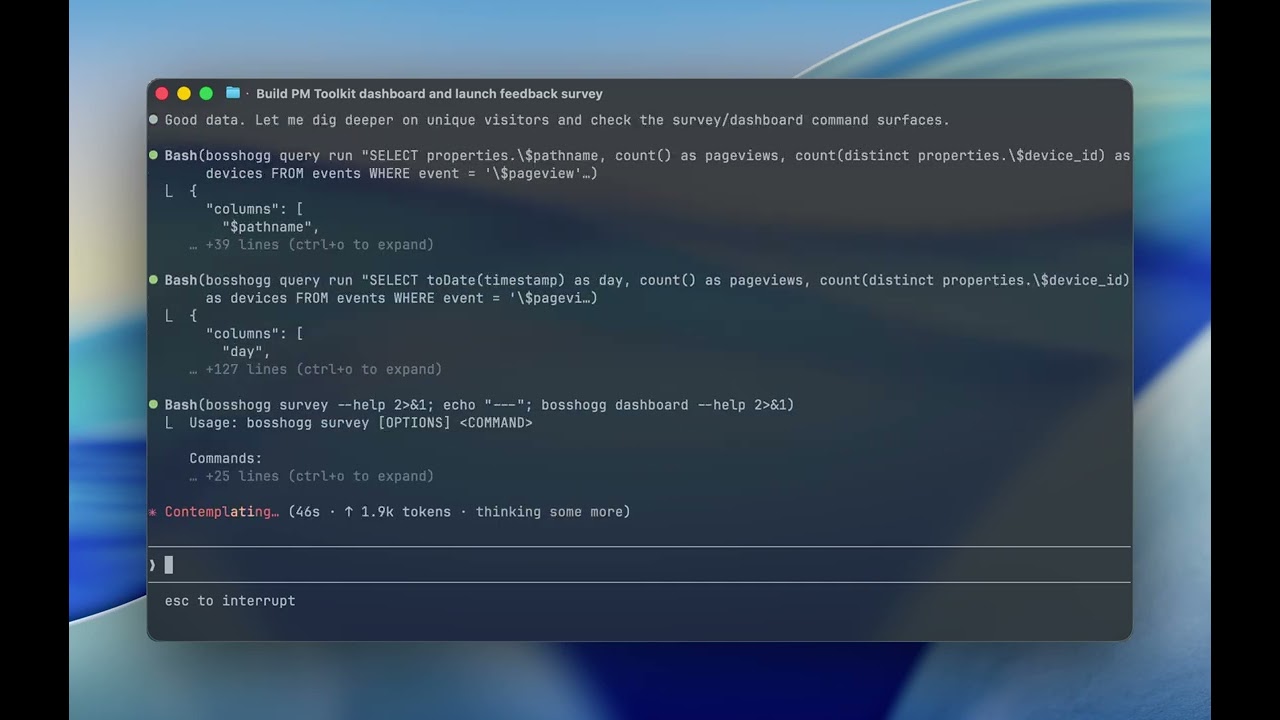
Query events with HogQL, manage feature flags, inspect persons and cohorts, debug insights, and operate 31 PostHog resources from your terminal — or from Claude Code, Cursor, and other coding agents. Ships a Claude Code skill that loads at ~200 idle tokens instead of the ~44,000 tokens the PostHog MCP server costs every agent session.
Table of contents
Quickstart
brew install aaronkwhite/tap/bosshogg   # or: cargo install bosshogg
bosshogg configure                       # interactive: host, API key, default project
bosshogg doctor                          # verify setup — all checks green?
bosshogg flag list --active --json | jq '.[0]'
Output:
{
  "id": 12345,
  "key": "checkout-redesign",
  "active": true,
  "rollout_percentage": 25,
  "filters": { "groups": [] }
}
Tip — add a bh shortcut. Symlink is friendliest to subshells and agent loops (which often don't load your shell config):
ln -s "$(command -v bosshogg)" /usr/local/bin/bh   # or anywhere on PATH
# alternative (shells only): echo 'alias bh=bosshogg' >> ~/.zshrc
Then bh flag list, bh query run "SELECT …", etc.
Why BossHogg over the PostHog MCP server?
The PostHog MCP server is excellent for wizard-driven flows and chart rendering in the web UI. For agent loops, the token overhead is the tradeoff:
| PostHog MCP | BossHogg skill | |
|---|---|---|
| Idle context size | ~44,000 tokens | ~200 tokens (frontmatter only) |
| Full surface loaded | Always | On-demand (references loaded per task) |
| Design target ratio | 1x | ~220x cheaper at idle |
| Chart rendering | Yes | No — use MCP or web UI |
| Terminal / CI use | No | Yes |
| Multi-context | No | Yes (kubectl-style use <context>) |
The idle-token figure for the PostHog MCP server comes from independent benchmarks (including the Scalekit gh-vs-GitHub-MCP 32x benchmark for equivalent surfaces). BossHogg's ~200-token target is based on the skill frontmatter size; actual measurement should be performed before each release.
Built for coding agents
BossHogg ships with a Claude Code skill at .claude/skills/bosshogg/. Instead of loading a 44,000-token tool surface into every session, your agent loads ~200 tokens of frontmatter and pulls reference docs on demand.
> Use bosshogg to find the top 5 events by volume in the last 7 days
The agent calls:
bh query run "SELECT event, count() FROM events WHERE timestamp > now() - INTERVAL 7 DAY GROUP BY event ORDER BY count() DESC LIMIT 5" --jsonAnd returns the structured result. No web UI hop. No browser. No idle context tax.
MCPs and CLIs are not competitors — they serve different jobs. MCP is great for rich, hosted, chart-rendering workflows. BossHogg is for terminal ops, CI scripts, and the tight agent loops where you want a small, predictable command surface.
What BossHogg does
All 31 GA PostHog resources + 1 nested group (Personal API Key-accessible):
M1 — Core (v2026.4.0)
- HogQL first.
bosshogg query run "SELECT ..."— sync or async, auto-LIMIT 100for safety, file/stdin input, table or JSON output. - Feature flag management, CRUD-deep.
bosshogg flag list / get / create / update / delete— list, toggle, rollout, inspect filters & payloads. - Agent utilities.
bosshogg doctor(preflight health check),bosshogg schema hogql(grounds models on your schema),bosshogg auth token(escape hatch forcurl). - Multi-project, multi-region contexts. US, EU, and self-hosted in one kubectl-style config.
Full resource catalog (M2–M10)
M2 — Org & project (v2026.4.1)
bosshogg org— list, get, current, switch.bosshogg project— list, get, current, switch, reset-token.
M3 — Analytics backbone (v2026.4.2)
bosshogg insight— list, get, refresh, create, update, delete (soft), tag, activity, share.bosshogg dashboard— list, get, refresh, create, update, delete (soft), share, plustiles addandtiles remove.bosshogg cohort— list, get, create, update, delete (soft), members, add-person, remove-person, calculation-history, activity.
M4 — People & events (v2026.4.3)
bosshogg person— list, get, delete (hard/GDPR), update-property, delete-property, activity, split.bosshogg group— list, find, property-definitions, property-values, related, activity, update-property, delete-property.bosshogg event— list (HogQL), get, values, tail (5s-poll loop).bosshogg action— list, get, create, update, delete (soft), references, tag.bosshogg annotation— list, get, create, update, delete (soft).
M5 — Taxonomy (v2026.4.4)
bosshogg event-definition— list, get, update, delete, by-name, tag.bosshogg property-definition— list, get, update, delete, seen-together, tag.bosshogg endpoint— list, get, create, update, delete, run, materialize-preview, materialize-status, openapi.
M6 — Growth primitives (v2026.4.5)
bosshogg experiment— list, get, create, update, delete, archive, duplicate, copy-to-project, create-exposure-cohort, launch, end, pause, resume, reset, ship-variant, recalculate-timeseries, results.bosshogg survey— list, get, create, update, delete, activity, duplicate, archive-response, stats, project-stats, responses-count, project-activity, summarize.bosshogg early-access— list, get, create, update, delete.bosshogg query ai-costs— per-model LLM cost aggregate from$ai_generationevents (default 30d window).
M7 — CDP pipeline (v2026.4.6)
bosshogg hog-function— list, get, create, update, delete (soft), enable, disable, invoke, logs, metrics, enable-backfills.bosshogg batch-export— list, get, create, update, delete, pause, unpause, plus nestedbackfillsandruns.
M8 — Ops & debug (v2026.4.7)
bosshogg session-recording— list, get (snapshot blob written to--outfile, never stdout), update, delete.bosshogg error-tracking— nestedfingerprints,assignment-rules,grouping-rules,issues(list, get, activity, activity-list, assign, cohort, merge, split, bulk),releases(list, get, by-hash),symbol-sets(list, get, download, start-upload, finish-upload, bulk-delete, bulk-start-upload, bulk-finish-upload), plus resolve-github / resolve-gitlab.bosshogg role— Enterprise RBAC, list/get/create/update/delete, plus member management.bosshogg capture— event / batch / identify via the public ingest endpoint (uses project token, gated on--yes).
M9 — v1.x candidates (v2026.4.6)
bosshogg alert— list, get, create, update, delete. Insight-threshold monitors.bosshogg dashboard-template— list, get, create, use (instantiate a dashboard from a template).bosshogg session-recording-playlist— list, get, create, update, delete, recordings, add-recording, remove-recording.bosshogg insight-variable— list, get, create, update, delete. Templated HogQL variables.
M10 — Deep LLM analytics (v2026.4.8)
bosshogg dataset— list, get, create, update, delete. Eval datasets at/api/projects/{proj}/datasets/.bosshogg dataset-item— list (with optional--datasetfilter), get, create, update, delete. Input/output pairs for evaluation datasets.bosshogg evaluation— list, get, test-hog.test-hogruns Hog evaluation code against recent$ai_generationevents and returns pass/fail results synchronously.bosshogg llm-analytics— nested group with 5 sub-resources:models list— available LLM models for the configured provider.evaluation-summary— AI-powered summary of evaluation results (pass/fail patterns + recommendations).evaluation-reports— CRUD +generate(async trigger) +runs(history). 7 verbs.provider-keys—list,get,validate(read + validate only; write paths deferred).review-queue list— LLM analytics review queue items.
Agent-native output throughout. --json everywhere, stable schemas validated in CI, structured errors {error, code, message, hint, retry_with}, deterministic exit codes (10 auth / 20 not-found / 30 bad-request / 40 rate-limit / 50 upstream / 60 schema-drift / 61 feature-not-available / 70 internal / 71 config).
Cloud and self-hosted. Works against PostHog Cloud (US, EU) out of the box. Self-hosted PostHog is a first-class target: arbitrary host URLs, optional plaintext http:// for internal networks (per-context opt-in via --allow-http or BOSSHOGG_ALLOW_HTTP=1), subpath-aware routing, and bosshogg doctor probes the instance version so you know up front when a Cloud-only paid feature will error cleanly with 61 FEATURE_NOT_AVAILABLE. Self-hosted contexts auto-disable the anonymous self-tracking telemetry — privacy is the whole point.
Safety
Security and data-safety properties baked in from day one:
- HTTPS-only by default.
reqwestis configured with.https_only(true)for every Cloud context. Self-hosted users opt into plaintexthttp://per-context via--allow-http, theBOSSHOGG_ALLOW_HTTP=1env var, or by confirming the prompt inbosshogg configure. Every plaintext request emits atracing::warn!so unsafe deployments are visible in logs. - Auth redaction.
Authorization:headers are stripped from--debugoutput. Error bodies are truncated to 200 chars. No tokens or PII leak to logs. - Soft-delete routing. Resources that PostHog soft-deletes (flags, insights, dashboards, cohorts, actions, annotations, hog-functions) are routed through the correct soft-delete path. Hard-delete resources (persons, event-definitions, etc.) are routed correctly and gated on
--yesor interactive TTY confirmation. - HogQL auto-LIMIT.
bosshogg query runauto-injectsLIMIT 100when the query has no LIMIT clause. Bypass with--no-limitintentionally. Injection is logged in--debug. - Snapshot never-stdout. Session recording snapshot blobs are suppressed from stdout by default; use
--out <file>to write the full blob. --yesgating on destructive ops. Hard deletes andbosshogg capture(which writes to real production data) require--yesor interactive confirmation. No accidental bulk deletions.- Config file at
0600.~/.config/bosshogg/config.tomlis written withmode(0o600). Theconfigurecommand probes/api/users/@me/before persisting the key — failed auth never writes secrets to disk.
Install
Homebrew (macOS / Linux, from v2026.4.0):
brew install aaronkwhite/tap/bosshogg
crates.io:
GitHub Releases — prebuilt tarballs for x86_64-unknown-linux-gnu, aarch64-unknown-linux-gnu, x86_64-apple-darwin, aarch64-apple-darwin are attached to each tag.
From source:
git clone https://github.com/aaronkwhite/bosshogg-cli && cd bosshogg
cargo install --path .
Self-hosted PostHog
bosshogg works against PostHog Cloud (US, EU) and self-hosted instances. Pick the line that matches your setup:
# PostHog Cloud (US is the default — drop --host for US)
bosshogg login --host https://eu.posthog.com

# Self-hosted on https
bosshogg login --host https://posthog.your-domain.com

# Self-hosted on plaintext http (lab / intranet / behind a corp VPN)
bosshogg login --host http://posthog.internal --allow-http
bosshogg login runs PostHog's browser device-flow. If your instance predates /api/cli-auth/device-code/, it'll bail out and tell you to use bosshogg configure to paste a personal API key instead.
A few things to know about self-hosted mode:
bosshogg doctorruns aninstance_versionprobe (/api/environments/?limit=1, added in PostHog 1.43, mid-2024). Older instances get a warning rather than a hard fail.- Reverse proxies at a subpath work — pass
--host https://analytics.mycorp.com/posthog/and requests land at/posthog/api/.... - Cloud-only paid features (subscriptions, advanced paths, SSO/RBAC, some batch-export specifics) return exit code
61 FEATURE_NOT_AVAILABLEinstead of a confusing 404, with a hint pointing atbosshogg doctor. - The anonymous usage telemetry that's on by default for Cloud users auto-disables on self-hosted contexts — nothing leaves your network. Confirm with
bosshogg config analytics status. BOSSHOGG_ALLOW_HTTP=1is the env-var equivalent of--allow-httpif you're scripting in CI. Cloud contexts always require https regardless.
Full setup notes (CI env vars, scope-by-error troubleshooting, region tagging) are in the skill reference.
Positioning
BossHogg is complementary to, not a replacement for, PostHog's first-party tools:
| Tool | Purpose | When to reach for it |
|---|---|---|
@posthog/cli |
Official — source maps, dSYM/ProGuard, release tracking, HogQL | Crash symbolication, release pipelines |
posthog-rs |
Official SDK — event capture, remote/local flag eval | Embed analytics in your Rust app |
| PostHog MCP | Official — 100+ tools, hosted server, full web-UI parity | Chart rendering, wizard-driven flows, Max AI |
| BossHogg | Community — broad admin/query surface, agent-native, multi-context (~200 idle tokens via skill) | Terminal ops, CI scripts, agent loops, flag management, HogQL |
Status & roadmap
v2026.4.10 — 31 GA PostHog resources covered (+ llm-analytics nested group).
v1.0 (v2026.4.0) — M1 through M10 complete.
- 31 GA PostHog resources + 1 nested group (llm-analytics) implemented across milestones M1–M10 (Personal API Key-accessible only).
- ~508 tests (unit + integration via wiremock, JSON contract validation, HogQL smoke tests).
- Claude Code skill with eval set (≥90% pass rate gate on Opus for release).
- Homebrew tap formula. crates.io publication. Prebuilt tarballs for 4 targets.
- Cross-product playbooks: safe rollout, debug a user, conversion drop, ship an event, LLM debug, incident notebook, GDPR deletion.
v1.1 (planned):
bosshogg auth login— browser-based OAuth token flow.bosshogg mcp --stdio— same binary, stdio MCP transport, exposing everybosshoggsubcommand as an MCP tool.- Persistent name→ID cache (XDG cache dir) — in-memory only in v1.
- Keyring integration — plaintext TOML at
0600is v1; OS keychain v1.1. - Typed HogQL result rendering — date-column formatting, right-aligned numbers.
hog-functionHog source editing via$EDITOR.
Documentation
Start with docs/README.md.
- Vision & positioning
- V1 scope
- Capability surface
- Architecture
- JSON & error conventions
- Agent-first design
- Naming decisions
- PostHog API notes
- Glossary
- Development
- Ecosystem integration
Raw research artifacts (API catalog, competitive landscape, schema drafts) live in research/.
Credits
Modeled after the lin CLI playbook — a Rust CLI for Linear's GraphQL API. Thanks to PostHog for an API that's genuinely pleasant to wrap.
License
MIT
PostHog is a registered trademark of PostHog, Inc. BossHogg is an independent community tool and is not affiliated with, endorsed by, or sponsored by PostHog, Inc.