Video Demo: https://www.youtube.com/watch?v=cnaHX0fJ-OM
A modern, high-performance web UI for browsing and managing RQLite distributed SQLite databases. Built with Vue 3, Quasar Framework, and TypeScript.
Features
Core Features
- Multi-Database Support - Connect to and manage multiple RQLite database instances from a single interface
- Tabbed Data Browser - Open multiple tables simultaneously in separate tabs for easy comparison and navigation
- SQL Console - Execute raw SQL queries with Ctrl+Enter shortcut
- Inline Cell Editing - Click any cell to edit values directly in the data grid using Quasar's popup edit
- Row Deletion - Delete individual rows with hover-activated delete button (requires primary key)
- Pagination - Efficiently browse large tables with server-side pagination (100, 250, 500, 1000 rows per page)
- Column Order Preservation - Displays columns in the exact order returned by the database (not alphabetically sorted)
- Query Timing - Shows execution time for all queries in milliseconds
- Connection Persistence - Database connections are saved to localStorage and restored on app reload
Table Management
- Create Table - Visual table builder with column definitions (name, type, primary key, nullable) or raw SQL mode
- DDL Import - Upload .sql files with CREATE TABLE statements directly in the SQL tab
- Comment Support - Handles both single-line (
--) and multi-line (/* */) SQL comments
- Truncate Table - Delete all rows from a table with confirmation dialog
- Delete Table - Drop table entirely with confirmation dialog
- Test Data Generator - Included script (
testdata/generate-test-data.js) to generate SQL INSERT statements from DDL files- Usage:
bun testdata/generate-test-data.js <ddl-file> <num-rows> [output-file] - Generates appropriate test data based on column types (INTEGER, TEXT, REAL, BLOB)
- Usage:
Large-Scale Data Import (1M+ rows supported)
-
Web Worker-Based Processing - All parsing runs in a separate thread to keep UI responsive
-
Chunked CSV Import - Stream-based file processing that handles massive CSV files without browser memory issues
- Uses
ReadableStreamAPI to process files in chunks - Batches of 1,000 rows per RQLite request
- Real-time progress dialog showing imported row count
- Proper RFC 4180 CSV parsing (handles quoted fields, escaped quotes, commas in values)
- Cancel support - Abort long-running imports at any time
- Uses
-
SQL File Import - Import
.sqlfiles containing INSERT statements- Stream-based parsing for large SQL dumps
- Batches of 500 INSERT statements per request
- Filters and executes only INSERT statements (ignores comments, DDL)
- Improved Comment Handling - Properly strips both single-line and multi-line comments before processing
- Progress tracking with statement count
- Cancel support - Abort long-running imports at any time
Data Export (1M+ rows supported)
-
Web Worker-Based Formatting - CSV/SQL formatting runs in a separate thread
-
Concurrent Data Fetching - Fetches multiple pages simultaneously (3 concurrent requests)
-
CSV Export - Paginated export that fetches data in batches of 5,000 rows
- Progress dialog showing export progress
- Proper RFC 4180 CSV formatting with escaped quotes and newlines
- Cancel support - Abort long-running exports at any time
-
SQL Export - Export table as INSERT INTO statements
- Paginated fetching for large tables
- Proper SQL escaping (single quotes, NULL handling)
- Includes header comments with table name and timestamp
- Progress tracking with row count
- Cancel support - Abort long-running exports at any time
-
DDL Export - Export table structure only
- Downloads CREATE TABLE statement from sqlite_master
- Useful for recreating table schema in another database
SQL Console
- Read Consistency Levels - Selectable consistency for queries:
- None - Fastest, reads local SQLite directly (may be stale)
- Weak - Default RQLite behavior, checks leadership
- Linearizable - Guaranteed fresh reads, contacts quorum
- Strong - Slowest, for testing scenarios
Performance Optimizations
- RQLite API Best Practices - Uses optimized endpoints and parameters:
associativeformat for direct q-table compatibilitylevel=nonefor fastest reads (bypasses Raft consensus)redirectparameter for automatic leader routing on writestransactionbatching for bulk operations
- SQL Injection Protection - All write operations use parameterized statements
[sql, ...params]
How It Works
Homepage - Database Connections
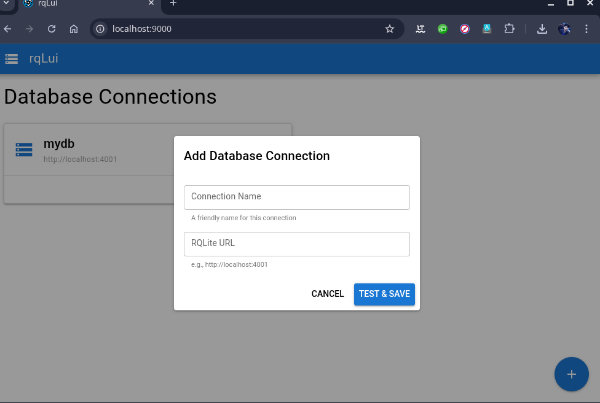
When you open the app, you'll see a list of your saved database connections. Click the + button in the bottom-right corner to add a new connection:
- Enter a friendly name for the connection
- Enter the RQLite URL (e.g.,
http://localhost:4001) - The app will test the connection before saving
Click any connection card to open the Data Browser.
Data Browser
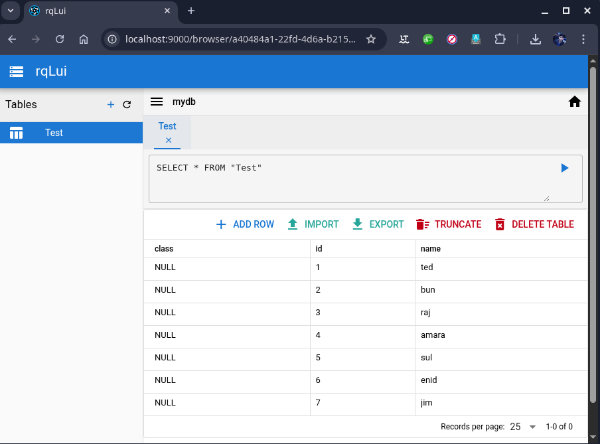
The Data Browser has three main areas:
-
Left Panel (Tables) - Shows all tables in the database. Click a table to open it in a new tab.
-
SQL Box (Top) - A text area where you can write and execute SQL queries. Press Ctrl+Enter or click the play button to execute.
-
Data Grid (Center) - Displays query results or table data with:
- Column headers
- Pagination controls
- Inline editing (click any cell to edit)
Tabbed Interface
- Each table opens in its own tab
- Selecting an already-open table switches to its existing tab (no duplicates)
- Close tabs with the X button
- Each tab maintains its own SQL query and pagination state
Tech Stack
- Vue 3 - Composition API with
<script setup> - Quasar Framework - UI components (q-table, q-dialog, q-tabs, q-popup-edit)
- TypeScript - Full type safety
- Pinia - State management for connections and tabs
- Axios - HTTP client for RQLite API calls
RQLite API Integration
The app uses RQLite's REST API with optimized parameters:
| Feature | Endpoint | Parameters | Notes |
|---|---|---|---|
| Data Grid | GET /db/query |
associative, level=none |
Fastest reads, returns key-value rows |
| SQL Console | POST /db/request |
associative, db_timeout=5s, level |
Auto-detects read vs write, configurable consistency |
| Cell Editing | POST /db/execute |
redirect, parameterized JSON |
Leader routing, SQL injection safe |
| Bulk Import | POST /db/execute |
transaction, redirect |
Batched writes in single Raft entry |
| Schema Info | GET /db/query |
PRAGMA table_info() |
Column metadata |
| DDL Export | GET /db/query |
SELECT sql FROM sqlite_master |
Original CREATE TABLE statement |
Why These Parameters Matter
associative- Returns rows as{column: value}objects instead of arrays, directly compatible with Quasar's q-tablelevel- Read consistency level:none- Reads directly from local SQLite without any checks (fastest)weak- Checks if node is leader before reading (default RQLite behavior)linearizable- Contacts quorum to ensure leader status, waits for commit indexstrong- Sends read through Raft log (slowest, for testing)
redirect- Automatically redirects writes to cluster leader, returns 301 with leader addresstransaction- Wraps batch operations in single Raft log entry for atomicity and performancedb_timeout- Prevents runaway queries from blocking the database
Installation
Pre-built Desktop Apps
Pre-built desktop applications for Linux and Windows are available in the Releases section.
Build from Source
# Install dependencies
bun install

# Start development server (web)
bun run dev

# Start development server (Electron desktop app)
quasar dev -m electron

# Build for production (web)
bun run build

# Build for production (Electron desktop app)
quasar build -m electron
# Output will be in dist/electron/

# Lint files
bun run lint
Note: This project uses Bun as the package manager. The
packageManagerfield inpackage.jsonenforces this.
Project Structure
src/
├── components/
│   ├── AddDatabaseForm.vue   # Dialog for adding connections
│   ├── AddRowDialog.vue      # (Legacy) Row addition dialog
│   ├── CreateTableDialog.vue # Table creation with builder/SQL modes
│   ├── DatabaseCard.vue      # Connection card on homepage
│   ├── DataGrid.vue          # Paginated table with inline edit, import/export menus
│   ├── QueryTab.vue          # Combines SqlBox + DataGrid + import/export logic
│   ├── SqlBox.vue            # SQL input with execute button and consistency selector
│   └── TablePanel.vue        # Left sidebar with table list
├── pages/
│   ├── DatabaseListPage.vue  # Homepage with connections
│   ├── DataBrowserPage.vue   # Main browser with tabs
│   └── ErrorNotFound.vue     # 404 page
├── services/
│   ├── rqlite-service.ts     # RQLite API client with all endpoints
│   ├── storage-service.ts    # localStorage persistence
│   ├── import-service.ts     # Web Worker-based import orchestration
│   └── export-service.ts     # Web Worker-based export with concurrent fetching
├── workers/
│   ├── import-worker.ts      # Background thread for CSV/SQL parsing
│   └── export-worker.ts      # Background thread for CSV/SQL formatting
├── stores/
│   ├── connection-store.ts   # Pinia store for connections
│   └── tab-store.ts          # Pinia store for tabs
├── types/
│   ├── database.ts           # Core type definitions
│   └── rqlite.ts             # RQLite API response types
├── router/
│   ├── index.ts              # Vue Router setup (history mode)
│   └── routes.ts             # Route definitions
├── layouts/
│   └── MainLayout.vue        # App shell with header
├── boot/
│   └── pinia.ts              # Pinia initialization
└── App.vue                   # Root component
Technical Details
Web Worker Architecture
Import and export operations use Web Workers to keep the UI responsive during large file operations:
┌─────────────────────────────────────────────────────────────────┐
│                        MAIN THREAD                               │
│  ┌──────────────┐    ┌──────────────┐    ┌──────────────┐       │
│  │  QueryTab    │───▶│ImportService │───▶│ RQLite API   │       │
│  │  (UI)        │    │ExportService │    │ (HTTP)       │       │
│  └──────────────┘    └──────┬───────┘    └──────────────┘       │
│                             │                                    │
└─────────────────────────────┼────────────────────────────────────┘
                              │ postMessage
┌─────────────────────────────┼────────────────────────────────────┐
│                        WEB WORKER                                │
│                      ┌──────▼───────┐                            │
│                      │import-worker │  CSV/SQL Parsing           │
│                      │export-worker │  CSV/SQL Formatting        │
│                      └──────────────┘                            │
└──────────────────────────────────────────────────────────────────┘
Import Flow:
- User selects file → Main thread sends file to worker
- Worker streams file, parses CSV/SQL, sends batches back
- Main thread receives batches, sends to RQLite API
- Progress updates flow back to UI
Export Flow:
- Main thread fetches data from RQLite (3 concurrent requests)
- Sends row batches to worker for formatting
- Worker formats CSV/SQL, sends chunks back
- Main thread assembles chunks into Blob for download
Chunked Import Architecture
The import system is designed to handle millions of rows without browser crashes:
File (1M rows) → ReadableStream → Chunk Decoder → Line Parser → Batch Buffer → RQLite API
                     ↓                                              ↓
              ~64KB chunks                                   1000 rows/batch
- Stream Reading - Uses
file.stream().getReader()to read file in ~64KB chunks - Incremental Decoding -
TextDecoderwith{ stream: true }handles UTF-8 across chunk boundaries - Line Buffering - Accumulates partial lines until newline is found
- Batch Accumulation - Collects 1,000 parsed rows before sending to RQLite
- Progress Feedback - Updates dialog with row count after each batch
CSV Parser
Custom RFC 4180-compliant parser handles:
- Quoted fields with commas:
"Hello, World" - Escaped quotes:
"Say ""Hello""" - Mixed quoted/unquoted fields
- Preserves data types as strings (RQLite handles conversion)
Paginated Export Architecture
The export system uses concurrent fetching and worker-based formatting:
Main Thread                              Worker Thread
     │                                        │
     ├─── Fetch Page 1 ──────────────────────▶│
     ├─── Fetch Page 2 ──────────────────────▶│ Format to CSV/SQL
     ├─── Fetch Page 3 ──────────────────────▶│
     │                                        │
     │◀─────────────── Chunk 1 ───────────────┤
     │◀─────────────── Chunk 2 ───────────────┤
     │◀─────────────── Chunk 3 ───────────────┤
     │                                        │
     ▼
  Assemble Blob → Download
- Concurrent Fetching - Fetches 3 pages simultaneously using
Promise.all - Worker Formatting - Sends rows to worker for CSV/SQL string generation
- Chunk Assembly - Collects formatted chunks into array
- Blob Creation - Creates downloadable Blob from chunks
Requirements
- Node.js 20+ or Bun
- RQLite database instance with CORS enabled
Starting RQLite with CORS
RQLite must be started with CORS headers enabled to allow browser requests.
Using Docker:
docker run -p 4001:4001 rqlite/rqlite -http-allow-origin "*"Using binary:
rqlited -http-allow-origin "*" /path/to/dataWithout the -http-allow-origin flag, browser requests will be blocked by CORS policy.
License
MIT