
🤗 HuggingFace | 🤖 ModelScope | 📑 Research Paper | 📑 Blog | 🤗 Demo
Introduction
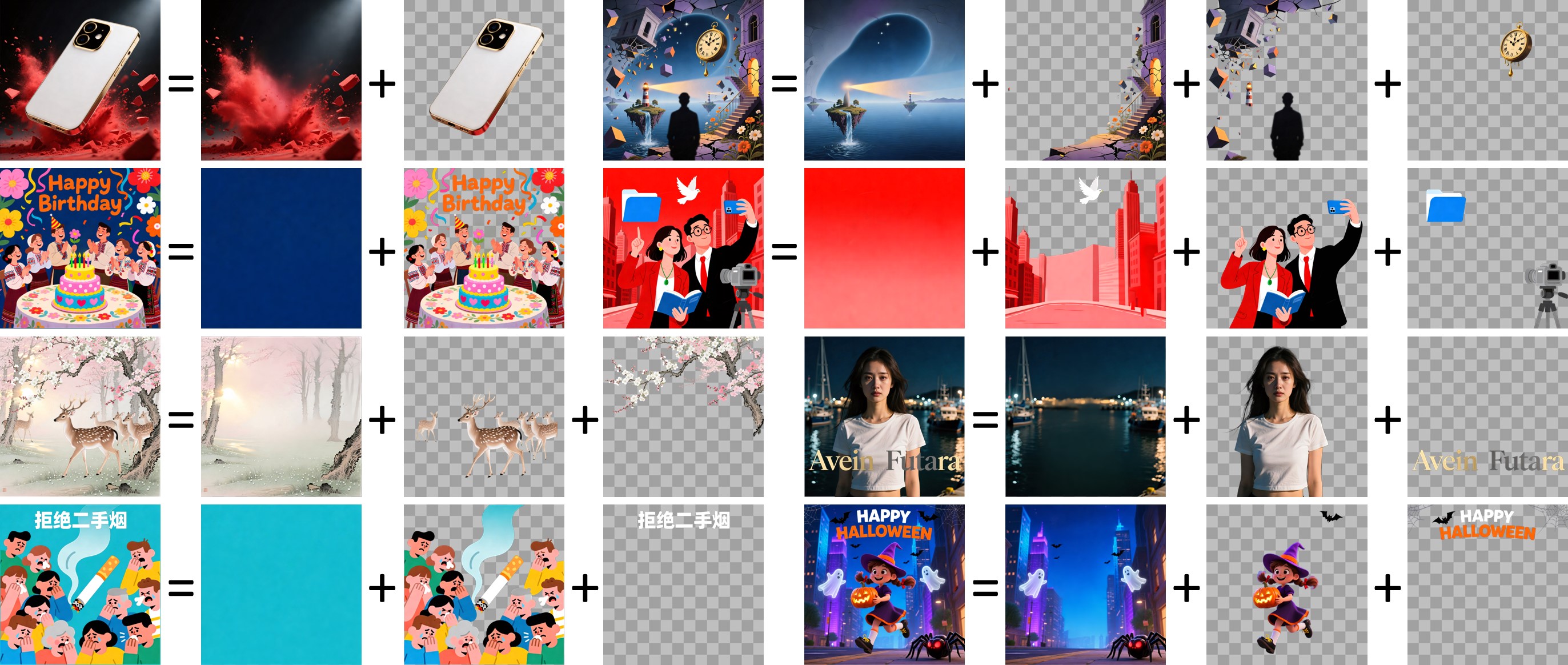
We are excited to introduce Qwen-Image-Layered, a model capable of decomposing an image into multiple RGBA layers. This layered representation unlocks inherent editability: each layer can be independently manipulated without affecting other content. Meanwhile, such a layered representation naturally supports high-fidelity elementary operations-such as resizing, reposition, and recoloring. By physically isolating semantic or structural components into distinct layers, our approach enables high-fidelity and consistent editing.
News
- 2025.12.22: You can try Qwen-Image-Layered on Huggingface Spaces and Modelscope Studio.
- 2025.12.19: We released Qwen-Image-Layered weights! Check at Huggingface and ModelScope!
- 2025.12.19: We released Qwen-Image-Layered! Check our Blog for more details!
- 2025.12.18: We released our Research Paper on Arxiv!
Note
- The text prompt is intended to describe the overall content of the input image—including elements that may be partially occluded (e.g., you may specify the text hidden behind a foreground object). It is not designed to control the semantic content of individual layers explicitly.
- The released weights are specifically fine-tuned for the image-to-multi-RGBA decomposition task. As a result, while the model supports text-conditioned inference, its performance on text-to-multi-RGBA generation is limited.
Quick Start
-
Make sure your transformers>=4.51.3 (Supporting Qwen2.5-VL)
-
Install the latest version of diffusers
pip install git+https://github.com/huggingface/diffusers
pip install python-pptx
pip install psd-tools
from diffusers import QwenImageLayeredPipeline
import torch
from PIL import Image

pipeline = QwenImageLayeredPipeline.from_pretrained("Qwen/Qwen-Image-Layered")
pipeline = pipeline.to("cuda", torch.bfloat16)
pipeline.set_progress_bar_config(disable=None)

image = Image.open("asserts/test_images/1.png").convert("RGBA")
inputs = {
    "image": image,
    "generator": torch.Generator(device='cuda').manual_seed(777),
    "true_cfg_scale": 4.0,
    "negative_prompt": " ",
    "num_inference_steps": 50,
    "num_images_per_prompt": 1,
    "layers": 4,
    "resolution": 640,      # Using different bucket (640, 1024) to determine the resolution. For this version, 640 is recommended
    "cfg_normalize": True,  # Whether enable cfg normalization.
    "use_en_prompt": True,  # Automatic caption language if user does not provide caption
}

with torch.inference_mode():
    output = pipeline(**inputs)
    output_image = output.images[0]

for i, image in enumerate(output_image):
    image.save(f"{i}.png")
Deploy Qwen-Image-Layered
The following scripts will start a Gradio-based web interface where you can decompose an image and export the layers into pptx, zip, and psd files, where you can edit and move these layers flexibly.
After decomposition, you may want to edit specific layers. The following scripts will launch a Gradio-based web interface where you can edit images with transparency using Qwen-Image-Edit.
python src/tool/edit_rgba_image.py
After editing the individual decomposed layers, you can use the following script to combine them into a new image. Remember to upload the layers in order—from the bottom layer to the top.
python src/tool/combine_layers.py
Showcase
Layered Decomposition in Application
Given an image, Qwen-Image-Layered can decompose it into several RGBA layers:

After decomposition, edits are applied exclusively to the target layer, physically isolating it from the rest of the content, and thereby fundamentally ensuring consistency across edits.
For example, we can recolor the first layer and keep all other content untouched:

We can also replace the second layer from a girl to a boy (The target layer is edited using Qwen-Image-Edit):

Here, we revise the text to "Qwen-Image" (The target layer is edited using Qwen-Image-Edit):

Furthermore, the layered structure naturally supports elemetary operations. For example, we can delete unwanted objects cleanly:

We can also resize an object without distortion:

After layer decomposition, we can move objects freely within the canvas:

Flexible and Iterative Decomposition
Qwen-Image-Layered is not limited to a fixed number of layers. The model supports variable-layer decomposition. For example, we can decompose an image into either 3 or 8 layers as needed:

Moreover, decomposition can be applied recursively: any layer can itself be further decomposed, enabling infinite decomposition.

License Agreement
Qwen-Image-Layered is licensed under Apache 2.0.
Citation
We kindly encourage citation of our work if you find it useful.
@misc{yin2025qwenimagelayered,
      title={Qwen-Image-Layered: Towards Inherent Editability via Layer Decomposition},
      author={Shengming Yin, Zekai Zhang, Zecheng Tang, Kaiyuan Gao, Xiao Xu, Kun Yan, Jiahao Li, Yilei Chen, Yuxiang Chen, Heung-Yeung Shum, Lionel M. Ni, Jingren Zhou, Junyang Lin, Chenfei Wu},
      year={2025},
      eprint={2512.15603},
      archivePrefix={arXiv},
      primaryClass={cs.CV},
      url={https://arxiv.org/abs/2512.15603},
}