
OpenBotAuth — The Identity Layer for AI Agents




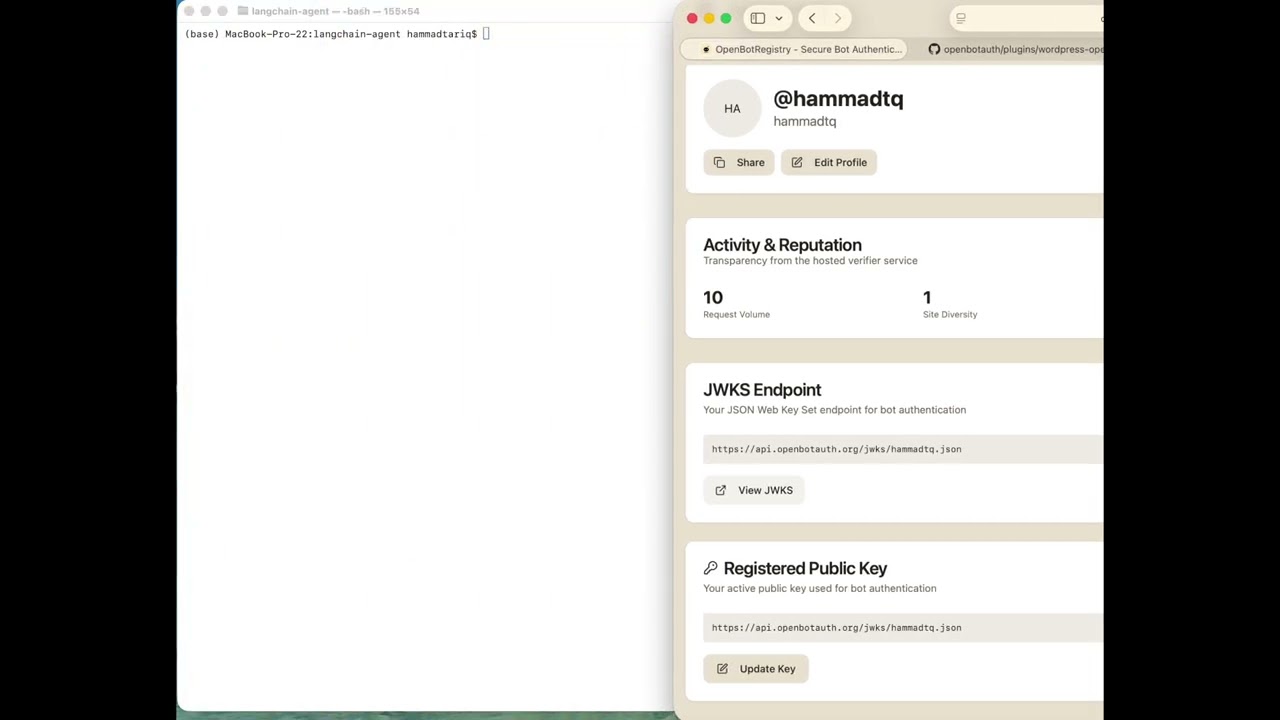
Demo: Register a crawler and sign requests (1 min)

Open source tooling for the IETF Web Bot Auth draft. Verify AI crawlers and agents using RFC 9421 HTTP Message Signatures. No CDN lock-in.
OpenBotAuth is the identity layer for AI agents. Today this repo lets you verify crawlers at your origin. As we track the IETF Web Bot Auth drafts, we'll implement sub-agent identities, delegation chains with x509 certs, and agents that browse on behalf of their owners. Check the open PRs—we'd love collaborators.
Packages
Install via npm/pip
| Package | Description | Install |
|---|---|---|
| @openbotauth/verifier-client | Node.js middleware (Express/Next.js) | npm i @openbotauth/verifier-client |
| @openbotauth/proxy | Zero-code reverse proxy | npx @openbotauth/proxy |
| @openbotauth/registry-signer | Ed25519 keygen + JWKS utilities | npm i @openbotauth/registry-signer |
| @openbotauth/bot-cli | Test crawler + key generation | npm i -g @openbotauth/bot-cli |
| openbotauth-verifier | Python middleware (FastAPI/Flask) | pip install openbotauth-verifier |
WordPress
Or search "OpenBotAuth" in your WordPress admin under Plugins → Add New.
Docker
docker run -p 8080:8080 ghcr.io/openbotauth/proxy
What is this?
Authenticate bots and AI crawlers at your origin using cryptographic signatures (RFC 9421). Publishers can verify who's crawling, enforce policies, and build pay-per-crawl programs.
This monorepo also includes:
- Registry Service — JWKS hosting + agent identity management
- GitHub OAuth Flow — SSO for crawler registration
- MCP Server — Claude Desktop integration (experimental)
- A2A Cards — Agent-to-Agent discovery (experimental)
Quick Start
# Clone repository
git clone https://github.com/OpenBotAuth/openbotauth.git
cd openbotauth

# Install dependencies
pnpm install

# Copy environment file and configure
cp .env.example .env
# Edit .env with your credentials (Neon DB, GitHub OAuth, Redis)

# Build all packages
pnpm build

# Start development services
pnpm dev:service    # Registry service (port 8080)
pnpm dev:portal     # Portal UI (port 5173)
Architecture
openbotauth/
├─ packages/
│  ├─ registry-service/         ✅ JWKS hosting, agent management (Neon-backed)
│  ├─ registry-signer/          ✅ Shared Ed25519 keygen & JWKS utilities
│  ├─ github-connector/         ✅ GitHub OAuth flow for registry
│  ├─ registry-cli/             ✅ CLI for agent/key management
│  ├─ verifier-service/         ✅ RFC 9421 signature verification, nonce cache
│  ├─ verifier-client/          ✅ npm client for Express/Next.js verification
│  ├─ bot-cli/                  ✅ Demo crawler: signs requests, handles 402
│  ├─ mcp-server/               ✅ MCP server (policy/meter/payments tools)
│  └─ a2a-card/                 ✅ Static agent card + A2A stub endpoints
├─ apps/
│  ├─ registry-portal/          ✅ Marketing website + Portal UI
│  └─ test-server/              ✅ Test server for signature verification
├─ plugins/
│  └─ wordpress-openbotauth/    ✅ WP plugin for policy, pricing, analytics
├─ infra/
│  ├─ docker/                   🚧 Dockerfiles, docker-compose.yaml
│  └─ neon/                     ✅ Neon migrations
└─ docs/
   ├─ ARCHITECTURE.md           ✅ System architecture
   ├─ A2A_CARD.md               ✅ A2A discovery documentation
   └─ BREAKING_CHANGES.md       ✅ Behavior changes by PR/release
Transparency & Telemetry
When publishers use the hosted verifier at verifier.openbotauth.org, every verification request provides observability from the origin side:
What You Get for Free
Every verification includes:
- Agent ID (JWKS URL)
- Target origin (e.g., blog.attach.dev)
- Request method and path
From this we derive:
- Last seen timestamps per agent
- Request volume per agent (rough metric)
- Site diversity - which origins an agent is visiting
- Karma score - "popular with publishers" reputation
This gives publishers:
- Real-time transparency on agent behavior
- Bad behavior signals (high traffic but often rejected)
- Agent reputation without centralized authority
Privacy & Self-Hosting
If you self-host the verifier, you can:
- Keep all metrics local
- Opt-in to send anonymized stats back to OpenBotAuth (analytics "ping")
- Maintain full control over your data
Karma scores are displayed publicly on agent profile pages as a transparency feature.
See docs/TELEMETRY.md for detailed documentation.
Components
🔐 Registry Service
JWKS hosting and agent identity management.
Features:
- User-level and agent-level JWKS endpoints
- GitHub OAuth authentication
- Ed25519 key management
- Activity logging
- Session management
Endpoints:
GET /jwks/{username}.json— User JWKSPOST /auth/github— GitHub OAuth loginGET /agents— List user agentsPOST /keys— Register public key
Tech: Node.js, Express, Neon Postgres
✅ Verifier Service
RFC 9421 HTTP Message Signature verification.
Features:
- Ed25519 signature verification
- JWKS resolution and caching (Redis)
- Nonce replay protection
- Clock skew validation
- Directory trust validation
Endpoints:
POST /verify— Verify signed requestPOST /authorize— Check signature + policyGET /health— Health check
Tech: Node.js, Express, Redis, node-jose
🤖 Bot CLI
Demo crawler that signs HTTP requests per RFC 9421.
Features:
- Ed25519 keypair generation
- RFC 9421 request signing
- 402 Payment Required handling
- JWKS reference
- Local key storage
Usage:
# Generate keypair
oba-bot keygen

# Fetch signed request
oba-bot fetch https://example.com/protected -v
Tech: Node.js, Commander.js
🌐 WordPress Plugin
Install from WordPress.org → | 📖 Full Documentation →
Policy engine and content gating for WordPress.
Features:
- ✅ RFC 9421 signature verification
- ✅ Granular policy engine (allow/deny/teaser)
- ✅ 402 payment flow
- ✅ Content teaser/gating
- ✅ Rate limiting per agent
- ✅ Whitelist/blacklist support
- ✅ Per-post policy overrides
- ✅ Admin UI for policy management
- ✅ Bot analytics dashboard
- ✅ AI-ready endpoints (llms.txt, JSON feed, markdown)
Installation:
- Search "OpenBotAuth" in WordPress Admin → Plugins → Add New
- Click Install, then Activate
- Go to Settings → OpenBotAuth to configure
Configuration:
- Check "Use hosted OpenBotAuth verifier" for quick setup, OR
- Enter your self-hosted verifier URL (e.g.,
http://localhost:8081/verify)
Tech: PHP, WordPress API
🤖 MCP Server
Model Context Protocol server for AI agent integration.
Tools:
policy_apply— Evaluate access policiespayments_create_intent— Create payment intentsmeter_ingest— Track usage events
Integration:
cd packages/mcp-server
pnpm install && pnpm build

# Add to Claude Desktop config
# See packages/mcp-server/README.md for details
Features:
- ✅ Policy evaluation (whitelist/blacklist/rate limits)
- ✅ Payment intent creation
- ✅ Usage metering and analytics
- ✅ Claude Desktop integration
- ✅ Real-time counters (Redis)
- ✅ Historical data (PostgreSQL)
Tech: Node.js, Express, MCP SDK
🔍 A2A Card (Experimental)
📖 Full Documentation → | A2A Overview →
Discovery layer for agent-to-agent interoperability.
Status: Discovery-only, experimental
Features:
- 🔍 Static agent card at
/.well-known/agent-card.json - 🚫 Stubbed A2A endpoints (501 by default)
- 🔄 CORS-aware (card: allow, stubs: deny)
- ⚡ Cached with ETag support
- 🛡️ Rate-limited endpoints
- 📦 Portable (mount or serve standalone)
Setup:
# A2A is disabled by default
# Agent card is served automatically by registry

# To enable experimental A2A endpoints:
export ENABLE_A2A=true
Why experimental? The A2A protocol is still evolving. This package reserves URLs and provides discovery without over-promising protocol semantics. Use MCP for real interop today.
Tech: Node.js, Express
🎨 Registry Portal
Location: apps/registry-portal/
Unified application serving:
- Marketing website (openbotauth.org) - Public pages for publishers and crawlers
- Portal UI - Authenticated agent and key management
Runs on http://localhost:5173 in development.
Marketing Pages:
/- Home page with hero section/publishers- Intent-based pricing for publishers/crawlers- Open registration for crawlers/contact- Contact information
Portal Features:
- GitHub OAuth login
- Ed25519 keypair generation
- Public key registration
- Agent management
- Profile viewing
- Key history
Tech: React, Vite, TypeScript, shadcn/ui, react-helmet-async
🎬 Demos
Interactive demos proving the OpenBotAuth concept: unsigned agents get teaser/402 content, while signed agents get full access.
Available Demos
1. Python LangChain Agent (examples/langchain-agent/)
Command-line demo comparing unsigned vs signed HTTP requests:
# Unsigned request → teaser or 402
python demo_agent.py --mode unsigned

# Signed request → full content with X-OBA-Decision: allow
python demo_agent.py --mode signed
Features:
- RFC 9421 HTTP Message Signatures in Python
- Ed25519 signing with cryptography library
- Clear terminal output showing header and content differences
- Optional LangChain integration
2. Web Widget (apps/widget-backend/ + apps/widget-frontend/)
Interactive browser-based demo with visual signature diff:
pnpm install
pnpm dev:widget-backend  # Terminal 1
pnpm dev:widget-frontend # Terminal 2
Features:
- Toggle between unsigned/signed modes
- Visual diff of signature headers
- Real-time fetch with status and response preview
- Built with React + TypeScript
3. TAP Voice Agents — Full Documentation → | Demo Video →
Autonomous agent-to-merchant payments using cryptographic identity and consent proofs:
pnpm install
pnpm dev:tap-voice-backend  # Terminal 1
pnpm dev:tap-voice-frontend # Terminal 2
Features:
- User-owned AI agents (Pete for shopping, Penny for payments)
- Triple-layer signing: RFC 9421 + consent proof + payment request
- Live 15-step sequence diagram showing cryptographic handshake
- ElevenLabs voice integration with manual fallback controls
- Origin-first verification (no CDN/proxy required)
What it demonstrates: How commerce works when users have their own AI agents that shop and pay on their behalf using cryptographic signatures to prove identity and consent to merchants.
Quick Start with Demos
# Clone the demos repository
git clone https://github.com/OpenBotAuth/openbotauth-demos.git
cd openbotauth-demos

# Get your keys from the registry portal
# Visit https://registry.openbotauth.org and generate keys

# Auto-configure with key parser (recommended)
node scripts/parse-keys.js ~/Downloads/openbotauth-keys-username.txt

# Run Python agent
cd examples/langchain-agent
python3 -m venv .venv && source .venv/bin/activate
pip install -r requirements.txt
python demo_agent.py --mode signed

# Or run web widget
pnpm install
pnpm dev:widget-backend  # Terminal 1
pnpm dev:widget-frontend # Terminal 2
Test URL: https://blog.attach.dev/?p=6 (WordPress with OpenBotAuth plugin)
What you'll see:
- Unsigned: Teaser content or 402 response
- Signed: Full content with
X-OBA-Decision: allowheader
Tech Stack (Demos)
- Python: httpx, cryptography, python-dotenv
- TypeScript: Node.js Web Crypto API, Express, React
- Standards: RFC 9421, Ed25519, JWKS
Development
# Install dependencies
pnpm install

# Build all packages
pnpm build

# Run linter
pnpm lint

# Clean build artifacts
pnpm clean

# Start development servers
pnpm dev:service    # Registry service (port 8080)
pnpm dev:portal     # Portal UI (port 5173)
Running Services
Registry Service:
cd packages/registry-service
pnpm dev
# Runs on http://localhost:8080
Verifier Service:
cd packages/verifier-service
pnpm dev
# Runs on http://localhost:8081
Portal UI:
cd apps/registry-portal
pnpm dev
# Runs on http://localhost:5173
MCP Server:
cd packages/mcp-server
pnpm dev
# Runs on http://localhost:8082
Testing
End-to-End Flow
-
Start services:
# Terminal 1: Registry
cd packages/registry-service && pnpm dev

# Terminal 2: Verifier
cd packages/verifier-service && pnpm dev

# Terminal 3: Test server
cd apps/test-server && pnpm dev
-
Register keys via portal:
# Terminal 4: Portal
cd apps/registry-portal && pnpm dev
# Open http://localhost:5173
# Login with GitHub
# Generate and register keys
-
Test with Bot CLI:
# Configure bot with your keys
cd packages/bot-cli
pnpm dev fetch http://localhost:3000/protected -v
Documentation
- docs/ARCHITECTURE.md — System architecture
- docs/A2A_CARD.md — A2A discovery documentation
- packages/mcp-server/README.md — MCP server guide
- plugins/wordpress-openbotauth/README.md — WordPress plugin guide
- packages/a2a-card/README.md — A2A card documentation
Standards & Protocols
- RFC 9421 — HTTP Message Signatures
- RFC 7517 — JSON Web Key (JWK)
- RFC 7515 — JSON Web Signature (JWS)
- MCP — Model Context Protocol
- Ed25519 — EdDSA signature scheme
Tech Stack
- Runtime: Node.js 20+
- Language: TypeScript 5.7
- Database: Neon Postgres (serverless)
- Cache: Redis 7
- Frontend: React 18 + Vite 5
- UI: shadcn/ui + Tailwind CSS
- Package Manager: pnpm 8+
- Cryptography: Ed25519 (via Web Crypto API)
Contributing
Contributions are welcome! Please:
- Fork the repository
- Create a feature branch (
git checkout -b feature/amazing-feature) - Commit your changes (
git commit -m 'Add amazing feature') - Push to the branch (
git push origin feature/amazing-feature) - Open a Pull Request
License
Apache-2.0 - see LICENSE for details.
Acknowledgments
- Built with RFC 9421 HTTP Message Signatures
- Inspired by Web-Bot-Auth
- Uses Neon for serverless Postgres
- MCP integration via @modelcontextprotocol/sdk
Made with ❤️ for the agent economy