This project was vibe coded in a weekend from my phone. It works better than you might expect but use it at your own risk. I make no guarantees about this code -- I haven't even read it.
What it is
This repo contains the code for a CLI tool "like kubectl" and an MCP server for controlling Factorio via RCON. Designed for AI agents (like Claude) to play Factorio autonomously.
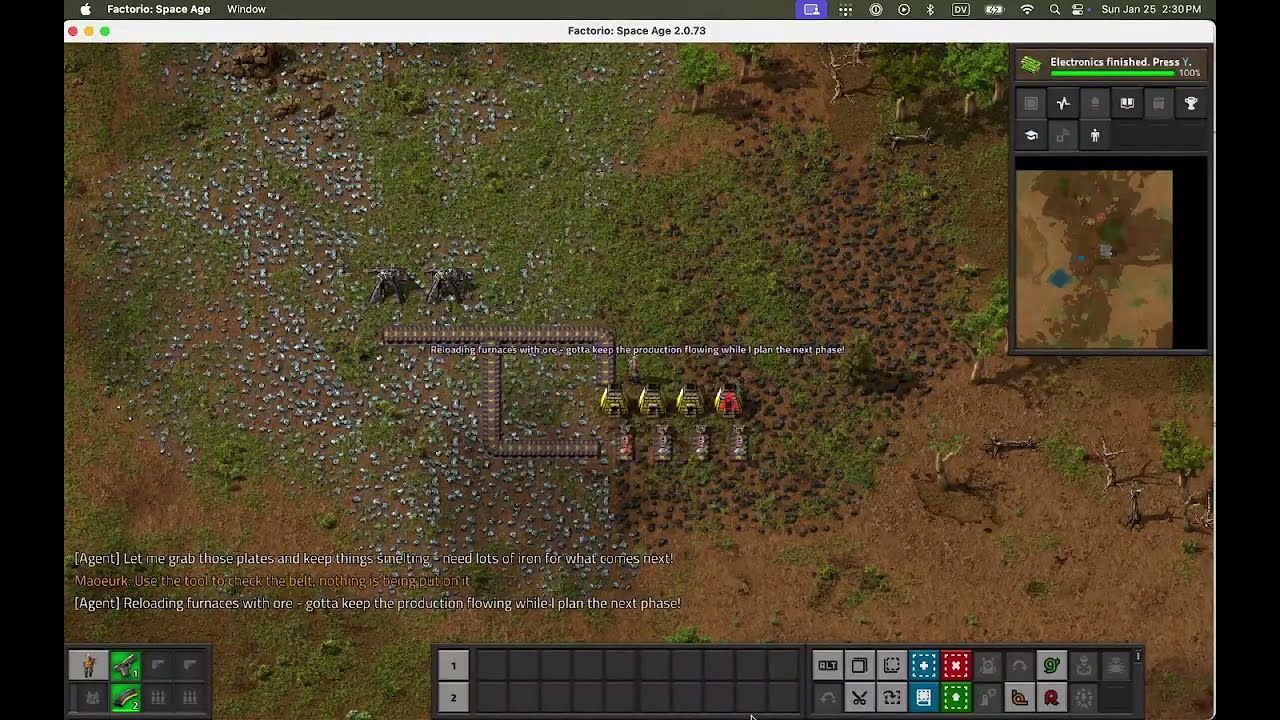
Background
After reading Ramp's RCT agent article, I wanted to give it a try too. I thought some problems they described would be more easily solvable. The stuff about the ASCII map stood out to me. I thought relying more on the tool and graphs would have a lot of tangible gains. The problem, I thought, was relying too much on the LLM agent. But the truth is that spatial layout is just a major pain point. I made a lot of focused effort to add more tools to help here, and they did help, but it's just fundamentally very difficult to get LLMs to solve these problems.
Also big shout out to rberg27/doom-coding which is how I vibe coded this on my phone and what got me interested in trying out vibe coding for real.
Lessons Learned
Examples and hand-holding go a long way. Left to its own devices, Claude will happily destroy your code and break your correct unit tests with the belief that it's fixing things. Getting into the game and laying things out (i.e. NESW all orientations of drills with belts at their drop zones) lets Claude have a solid baseline from which it can debug and fix everything. If I were doing this again, I'd build from the ground up with exhaustive examples of all foundational behaviors from the very start, have them committed and running as test cases.
For gameplay, speed is key. Claude Sonnet makes worse decisions but it's more entertaining to watch play. Gameplay involves thousands of decisions and even more tool calls. The faster those happen, the better. This may be solvable in the agent loop itself; I didn't get to sub-agents or having an async task orchestration system for the gameplay but I think that's a worthwhile thing to investigate here. So at least for a single LLM sending commands, speed is more important than making good decisions.
Creativity is heavily rewarded with vibe coding. There's often little correlation between effort and reward for features I added. If you can suggest the right idea, Claude can have it implemented in minutes and it can have a huge impact. Other ideas take a long time to get working and have much less impact. There's an art to finding this balance.
LLMs are pretty clever: the more generic and multi-use a tool is, the more it will be used in surprising ways.
Offloading tasks from the LLM is the key. This was the guiding idea for this project and I think, despite the issues, I've validated this idea. Just like humans want to use a calculator to do arithmetic, your LLM wants to use tools to solve hard problems. Don't make your LLM do path finding. It will take forever and be bad at it, just give it A*. Finding the right layer to make these "calculators" for the LLM at is where all the leverage is.
CLAUDE.md and prompts are critical. Mixing CLAUDE.md rules for both coding and playing the game is a mistake. The prompting and rules have a huge impact in how the agent will play the game. In some ways the agent shown in the YouTube video is more entertaining than what's in the repo at the time of writing. I think there are huge gains to be made here by refocusing on what's most important.
Claude likes MCP a lot more than CLI tools but iterating with MCP is annoying, you have to constantly restart claude. MCP seemed to help make Claude play the game much more actively and responsively (though I did make multiple changes when adding MCP so I may be misattributing the gains to that).
Claude code has a very limited understanding of planning in space. When playing the game, the agents have no real understanding of why anything is where it is. They typically either ignore it or assume it's perfect and that it can't be touched. That's why I experimented with adding the concept of zones to let the agent reserve areas of the map for a purpose. Otherwise it will simply place objects down wherever it happens to be standing in a way that makes no sense. Any notion of planning ahead in physical space is not something Claude will do on its own. A plan to Claude Code seems to really just be a sequences of steps without a lot of the context that you might expect given how intuitively we operate in physical space. For example, it can't really remember that it was intending to do X at location Y. Or correct obviously bad decisions related to spaghettification. It has no real native sense that a non-reified (or even semi-reified) concept like an ore patch should be used for mining and that covering it in assemblers is a waste.
Vibe coding has diminishing returns. As the project went on, it seemed like the agent's gains really slowed down. This may be the vibe coded system starting to collapse under its own weight, the limits of Claude Code to play a game with the types of interfaces (and prompts) provided, or perhaps it was just that my suggestions just got worse as the code base grew; because despite never reading any of the code, I still gave a lot of advice about it. That said:
Vibe coding is very fun. Claude Code is the best game you'll play in 2026. It's unbelievably fun to make something from nothing from your phone while going out for a walk or doing something else. If you have a lot of ideas I strongly recommend dumping them on an AI agent rather than letting them be forgotten. You won't get anything too useful out of it, at least not yet, but you will get something -- and you'll have a great time!
Quick Start
Set things up:
# Create a save file (simple, seeded world with no enemies)
python3 scripts/create_map.py --name some_name
# Start the server. This will run until you run the cleanup script
SAVE_PATH=saves/some_name.zip ./tests/setup.sh
# Configure connection
export FACTORIO_RCON_HOST=localhost
export FACTORIO_RCON_PORT=27015
export FACTORIO_RCON_PASSWORD=yourpassword

# Or save to config file
factorioctl config set --host localhost --port 27015 --password yourpassword

# Check connection
factorioctl character status
MCP Server
The MCP server exposes Factorio control as tools for AI agents.
# Run the MCP server
cargo run --bin mcp

# Or build and run directly
cargo build --release
./target/release/mcp
MCP Tools
Movement & Actions:
walk_to- Pathfind to a positionplace_entity- Place entity from inventorymine_at- Mine entities/resources at a positioncraft- Craft itemsinsert_items/extract_items- Move items into/from entitiesset_recipe- Set recipe on assemblersremove_entity- Remove an entityclear_area- Clear trees and rocks
Belt Routing:
route_belt- A* pathfinding for belt placement (supports underground belts, zone awareness)get_machine_belt_positions- Get correct belt/inserter positions for machines
Queries:
get_entities- Get entities in an areaget_resources/find_nearest_resource- Find resource patchesget_character/get_inventory- Character staterender_map- ASCII map visualizationget_tick- Game time
Research:
get_research_status/get_available_research- Research infostart_research- Queue research
Power:
get_power_status/get_power_networks- Power grid infofind_power_issues- Find unpowered entities
Belt Analysis:
analyze_belt_reach/analyze_belt_networks/analyze_belt_gapsget_belt_lane_contents/detect_sushi_belts/trace_belt_sourcesanalyze_inserters
Factory Organization:
create_zone/list_zones/get_zone/update_zone/delete_zone- Zone managementscan_resources/get_protected_resources- Protect ore patchescheck_placement/find_build_area- Smart placementget_blank_slate- View constraints without existing buildings
Other:
get_alerts- Check for problems (empty drills, no fuel, enemies)broadcast_thought- In-game TTS/console messagesexecute_lua- Raw Lua execution
CLI Commands
The CLI mirrors MCP functionality for manual use:
# Movement and building
factorioctl walk-to --to 50,-30
factorioctl place --entity transport-belt --at 5,5 --direction east
factorioctl mine --at 5,5 --count 3
factorioctl craft --recipe iron-gear-wheel --count 10

# High-level building
factorioctl belt line --from 0,0 --to 10,0
factorioctl build drill-array --count 4 --resource iron-ore --near 50,-30
factorioctl build smelter-line --count 4 --at 45,-30
factorioctl power line --from 0,0 --to 20,0

# Queries
factorioctl get entities --area 0,0,100,100
factorioctl get resources --area 0,0,50,50 --type iron-ore
factorioctl character inventory
factorioctl map --x 0 --y 0 --radius 20

# Analysis
factorioctl analyze belt-reach --at 50,-30
factorioctl analyze belt-networks --area 0,0,100,100
factorioctl research status

# Raw Lua
factorioctl exec "rcon.print(game.tick)"
Architecture
┌──────────────┐     ┌──────────────┐     ┌──────────────────┐
│   Claude     │────▶│  MCP Server  │────▶│  FactorioClient  │
│   (Agent)    │     │  (stdio)     │     └────────┬─────────┘
└──────────────┘     └──────────────┘              │ RCON
                                                   ▼
┌──────────────┐                          ┌────────────────┐
│     CLI      │─────────────────────────▶│   Factorio     │
│  (human use) │                          │   (headless)   │
└──────────────┘                          └────────────────┘
Design Principles
Lua-over-RCON: All game interaction happens by sending Lua commands over Factorio's RCON interface. The FactorioClient wraps this with typed Rust functions, but under the hood it's constructing Lua snippets and parsing JSON responses.
Stateless queries, stateful actions: Query tools (get_entities, get_resources, etc.) read game state without side effects. Action tools (place_entity, walk_to, etc.) modify the world. The agent memory system (zones, protected resources) lives in a JSON file alongside the game, not in Factorio itself.
High-level tools for common patterns: Rather than making the agent figure out belt routing from scratch, route_belt uses A* pathfinding with collision detection. get_machine_belt_positions knows where drills/furnaces actually output items. These encode Factorio-specific knowledge the agent would otherwise learn slowly through trial and error.
Key Components
Pathfinding (world/pathfind.rs): A* implementation for belt routing and character movement. Builds a collision map from entity queries, then finds paths that avoid obstacles. Supports underground belts and zone-aware routing.
Belt Analysis (analyze/): Tools for understanding belt networks - tracing item flow, finding gaps, detecting sushi belts (mixed items on same lane). Helps the agent debug logistics issues.
Zone System (memory/): Persistent spatial organization. The agent can reserve areas for smelting, assembly, etc., and tools like check_placement and route_belt respect these boundaries. Stored in .agent_memory.json.
Resource Protection: scan_resources marks ore patches as protected. Subsequent check_placement calls warn before building non-mining structures on ore. Prevents the classic mistake of building over your iron patch.
MCP Integration
The MCP server (src/bin/mcp.rs) exposes tools via the Model Context Protocol. Each tool is a Rust async function with typed parameters, marshaled to/from JSON. The agent sees tool descriptions and calls them by name.
Tools are designed to be:
- Self-documenting: Descriptions explain not just what the tool does, but when to use it
- Failure-tolerant: Return errors as data rather than crashing
- Composable: Low-level tools for flexibility, high-level tools for common workflows
Development
cargo build          # Build
cargo test           # Run tests
cargo build --release  # Release build
License
MIT