Demo Video
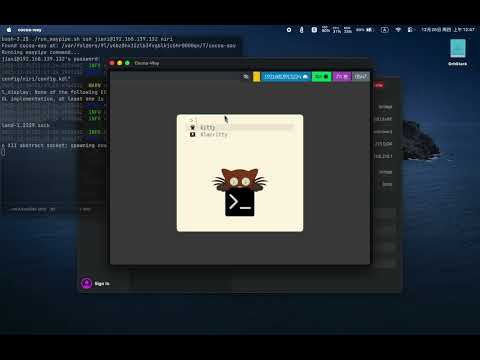
True protocol portability: Cocoa-Way rendering Linux apps from OrbStack via Unix sockets.
Due to the use of HIDPI, there is significant lag when remotely connecting to Linux, making it temporarily unable to replace VNC. I will improve it in the future, offering two selectable display modes.
Features
| Feature | Description |
|---|---|
| Native macOS | OpenGL rendering |
| Compositor Zero VM Overhead | Direct Wayland protocol via socket, no virtualization |
| HiDPI Ready | Optimized for Retina displays with proper scaling |
| Polished UI | Server-side decorations with shadows and focus indicators |
| Hardware Accelerated | Efficient OpenGL rendering pipeline |
Installation
Homebrew (Recommended)
brew tap J-x-Z/tap
brew install cocoa-way waypipe-darwin
Download Binary
Download the latest .dmg or .zip from Releases.
Build from Source
# Install dependencies
brew install libxkbcommon pixman pkg-config

# Clone and build
git clone https://github.com/J-x-Z/cocoa-way.git
cd cocoa-way
cargo build --release
Quick Start
⚠️ Required: You must install waypipe-darwin to connect Linux apps.brew tap J-x-Z/tap && brew install waypipe-darwin
-
Start the compositor:
-
Connect Linux apps via SSH:
./run_waypipe.sh ssh user@linux-host firefox
Architecture
graph LR
    subgraph macOS
        CW[Cocoa-Way<br/>Compositor]
        WP1[waypipe<br/>client]
    end

    subgraph Linux VM/Container
        WP2[waypipe<br/>server]
        APP[Linux App<br/>Firefox, etc]
    end

    APP -->|Wayland Protocol| WP2
    WP2 <-->|SSH/Socket| WP1
    WP1 -->|Wayland Protocol| CW
    CW -->|Metal/OpenGL| Display[macOS Display]
Comparison
| Solution | Latency | HiDPI | Native Integration | Setup Complexity |
|---|---|---|---|---|
| Cocoa-Way | ⚡ Low | ✅ | ✅ Native windows | 🟢 Easy |
| XQuartz | 🐢 High | 🟡 Medium | ||
| VNC | 🐢 High | ❌ | ❌ Full screen | 🟡 Medium |
| VM GUI | 🐢 High | ❌ Separate window | 🔴 Complex |
Roadmap
- macOS backend (OpenGL)
- Waypipe integration
- HiDPI scaling
- 🚧 Windows backend (win-way)
- 📱 Android NDK backend (planned)
- Multi-monitor support
- Clipboard sync
Troubleshooting
SSH: "remote port forwarding failed"
A stale socket file exists on the remote host. Our run_waypipe.sh script handles this automatically with -o StreamLocalBindUnlink=yes.
If running manually:
waypipe ssh -o StreamLocalBindUnlink=yes user@host ...
Contributing
Contributions welcome! Please open an issue first to discuss major changes.
📄 License
GPL-3.0 - Copyright (c) 2024-2025 J-x-Z