
amp up your command line.
assign variables to output from common commands
a great complement to tab completion
No longer will you find yourself copy-pasting long paths into git add, or tab-completing deep directory structures.
npm -g install ampline
show not tell
A simple example:
$ ls
1 amp
2 node_modules
3 package.json
4 readme.md
5 screenshots

$ cat 4
# executes cat readme.md
TODO write a readme. Lorem ipsum dolor sit amet, consectetur adipisicing elit,
sed do eiusmod.

$ echo "hi" >> `amp 4`
# executes echo "hi" >> readme.md

$ gs # this is an alias that uses `amp`
1  M readme.md

$ ga readme.md
1 M  readme.md

$ git commit -m 'added hi to my readme.'
A more complicated example:
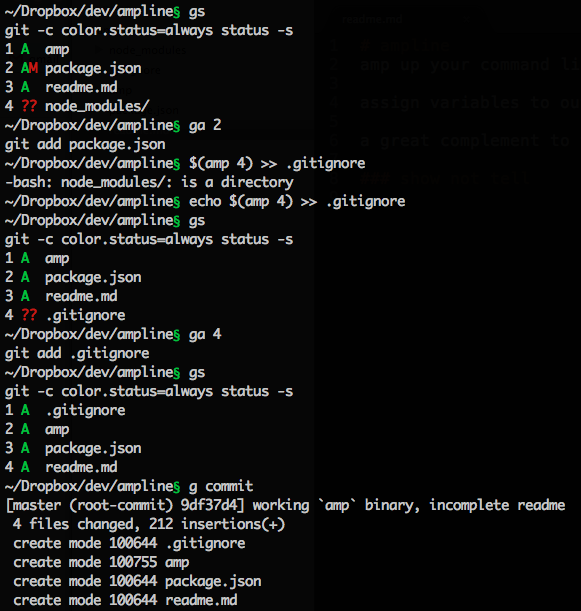
basic actions
- list the variables you have saved
- expand the variables you have saved
- run a command (step 1: expand variables, step 2: run command, step 3: each line
that matches the
-pregex will be saved to a variable)
    $ amp -p "(.*)" ls -1
    1 amp
    2 node_modules
    3 package.json
    4 readme.md
    5 screenshots

    # let's view what the current variables are set to
    $ amp
    1 = amp
    2 = node_modules
    3 = package.json
    4 = readme.md
    5 = screenshots
suggested aliases
Because you don't want to type amp all over the place.
These are the aliases I use. Based on these it shouldn't be too hard write/customize your own set of aliases.
For more useful dotfiles, check out github.com/dtrejo/dotfiles
# give me variable saving!
alias gs='amp -p "...(.*)$" git status -s'
alias gbr='amp -p " ? (?:remotes\\/)?(?:origin\\/)?(.*)$" git branch --sort=-committerdate | head -n 10' # supports -a, -r flags

alias l='CLICOLOR_FORCE=1 amp -p "(.*)" ls -1'
alias find='amp -p "(.*)" find'
alias gdiffstat='amp -p " ((?:\\/[\\w\\.\\-]+)+)" git diff --stat'

# give me variable expansion!
alias subl='amp code'
alias code='amp code'
alias ga='amp git add'
alias gap='amp git add -p'
alias grm='amp git rm'
alias gmv='amp git mv'
alias gco='amp git checkout'
alias gd='amp git diff'
alias gdh='amp git diff --staged'
alias gds='amp git diff --staged'
alias gunstage='amp git unstage' # get alias from github.com/dtrejo/dotfiles/dot-gitconfig
alias gblame='amp git blame'
alias gup='amp git up' # my rebase helper script, see github.com/dtrejo/dotfiles/bin/git-up
alias gf='git fetch'
alias npx='amp npx'
alias x='amp npx'
alias cat='amp cat'
alias less='amp less'

alias gc='git commit'
alias gp='amp git push'
alias gpu='amp git push -u origin `gb`' # get "gb" alias from github.com/dtrejo/dotfiles/dot-profile

# less typing
alias gamend='git amend'
alias gci="git commit"
alias guncommit='git uncommit'
Enjoy! I hope you like it :) - @DTrejo