🦆 DuckDB for VS Code


An unofficial DuckDB extension for Visual Studio Code. Query CSV, Parquet and JSON files directly. Connect to
.duckdb, S3, Postgres, Google Sheets and more.
Overview
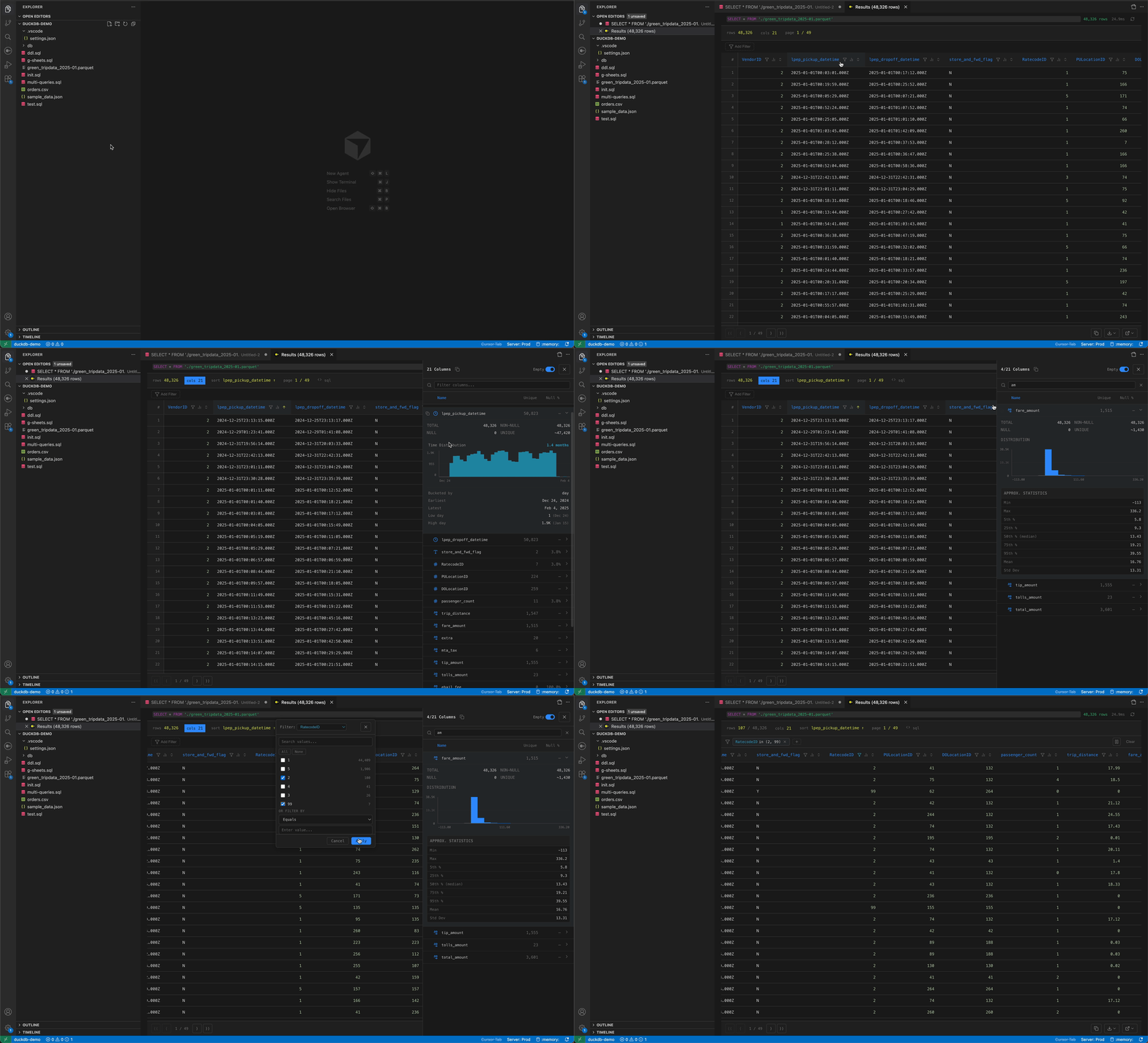
This extension brings DuckDB directly into VS Code with a focus on creating a productive "DuckDB workspace". Write and execute SQL queries, view results with column statistics, explore database schemas, and manage multiple database connections.
How It Works
All queries execute using the DuckDB Node API embedded in VS Code. By default, queries run against an in-memory database that resets when VS Code closes. You can attach persistent .duckdb files or connect to remote sources like Postgres, S3, or Google Sheets.
Performance Note: When you execute a query, the extension creates a temporary table to enable pagination, sorting, filtering, and exporting. For large datasets, DuckDB will spill to disk automatically — see Memory & Performance settings if you run into limits.
Features
SQL Execution
- Execute queries —
Cmd+Enter(Mac) /Ctrl+Enter(Windows/Linux) - Run individual statements — CodeLens "Run" buttons above each SQL statement
- SQL autocomplete — Table names, columns, functions, and keywords. Can be disabled in settings.
- SQL formatting — Format Document and Format Selection support with configurable keyword casing, indentation style, and logical operator placement
- Inline diagnostics — Success confirmations with execution time and error messages shown inline after each statement
File Integration
- Auto-open data files —
.parquetand.csv/.tsvfiles open directly in the DuckDB results view with full pagination, sorting, filtering, and export. No more "binary file" errors for Parquet! - JSON/JSONL support —
.json,.jsonl, and.ndjsonavailable via right-click → Open With… → DuckDB Data Viewer - Configurable — Each file type can be toggled via
duckdb.fileViewer.*settings - Right-click to query — Select files in Explorer → "DuckDB: Query File" to open a SQL editor with
SELECT * FROM '{file}' - Summarize files — Quick data profiling with SUMMARIZE
Results Table
- Server-side pagination — Handle millions of rows efficiently via cached temp tables
- Quick Column sorting — Click headers to sort ASC/DESC
- Quick Column filtering — Filter by values, ranges, or patterns
- Cell selection — Click, Shift+click for ranges, copy to clipboard
- Cell expansion — Double-click to view full values (JSON syntax highlighted)
- Export options — CSV, Parquet, JSON, JSONL, or open in new tab
Column Statistics
- Top values — Most frequent values for string columns
- Descriptive stats — Min, max, mean, percentiles, null counts
- Distribution histograms — Visual distribution for numeric columns
Database Explorer
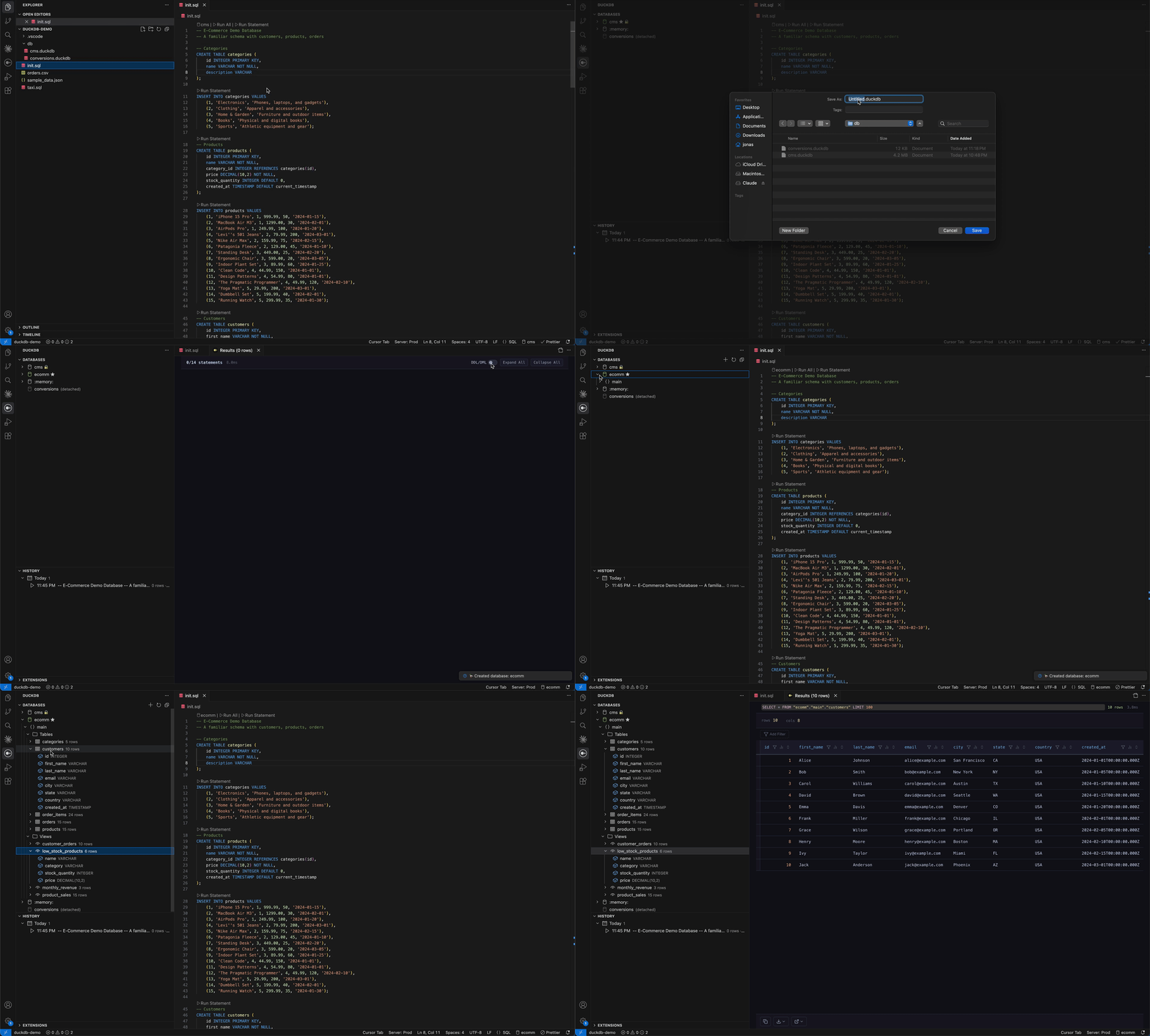
- Manage databases — Create, attach, and switch between databases
- Status bar selector — Quick database switching
- Schema browser — Databases → Schemas → Tables/Views → Columns
- Quick actions — Select Top Rows, DESCRIBE, SUMMARIZE, View Definition, Drop Table
Inline Peek Results
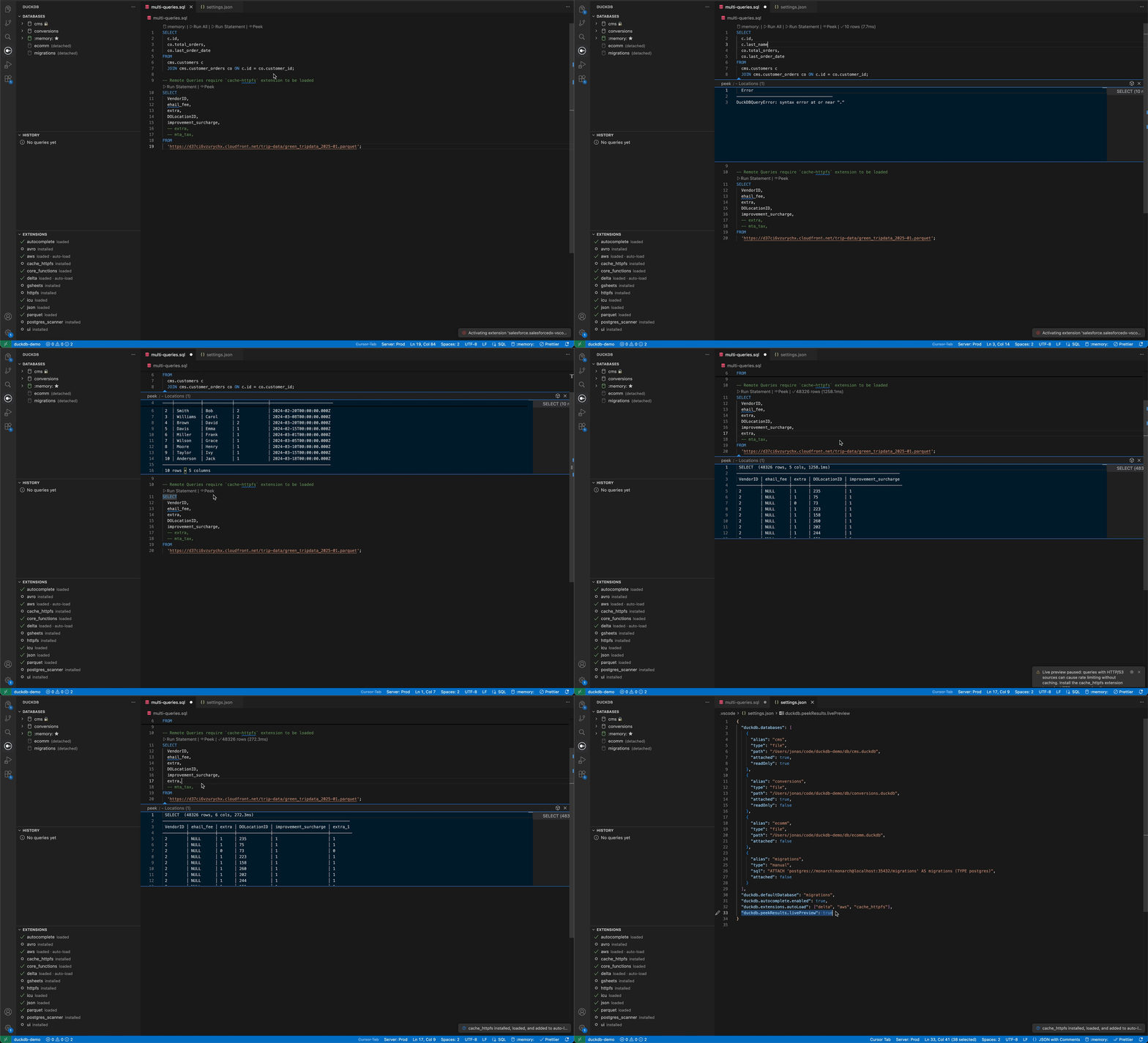
- Peek results — CodeLens "Peek" button above each statement opens an inline preview without leaving the editor
- Execute on demand — Peek runs the query automatically if no cached results exist
- Live preview mode — Optionally auto-refreshes results as you type (off by default, enable with
duckdb.peekResults.livePreview)
Important: Remote Data Sources & Live Preview
If your queries reference remote sources (HTTP URLs, S3, GCS, Azure), live preview can cause excessive network requests since it re-executes the query on every keystroke (debounced). This also applies to indirect remote access through views, attached remote databases, or table functions that wrap remote sources — cases the extension cannot always detect automatically.
Strongly recommended: Install the
cache_httpfscommunity extension to cache HTTP responses locally:INSTALL cache_httpfs FROM community; LOAD cache_httpfs;Or add it to your workspace auto-load setting:
{ "duckdb.extensions.autoLoad": ["cache_httpfs"] }The extension will prompt you to install
cache_httpfsif it detects remote URLs in your SQL, but it cannot detect all cases (e.g., views over remote tables, attached remote databases). If you work with remote data, enablecache_httpfsproactively.
Extensions
- Managed extensions — View, install, load, and configure extensions
- Auto-load on startup — Configured extensions install and load automatically
- Context-aware actions — Right-click to load, add/remove from auto-load
Query History
- Automatic tracking — All queries saved with metadata
- Re-run queries — Click to execute again
- Open in editor — Edit and modify past queries
- Optional persistence — Save to
.vscode/duckdb-history.db
Settings
Configure in .vscode/settings.json or VS Code Settings UI:
Database Configuration
duckdb.databases
Databases to auto-attach on startup.
{
  "duckdb.databases": [
    {
      "alias": "analytics",
      "type": "file",
      "path": "./data/analytics.duckdb",
      "readOnly": false,
      "attached": true
    },
    {
      "alias": "s3_data",
      "type": "file",
      "path": "s3://bucket/path/to/data.duckdb",
      "readOnly": true,
      "attached": true
    },
    {
      "alias": "postgres_mirror",
      "type": "manual",
      "sql": "ATTACH 'postgres://user:pass@host/db' AS postgres_mirror (TYPE postgres, READ_ONLY)"
    }
  ]
}| Property | Type | Description |
|---|---|---|
alias |
string | Database name to use in queries |
type |
"memory" | "file" | "manual" |
Database type |
path |
string | Path to .duckdb file (for file type) |
readOnly |
boolean | Open in read-only mode (default: false) |
attached |
boolean | Auto-attach on startup (default: true) |
sql |
string | Raw ATTACH statement (for manual type) |
duckdb.defaultDatabase
Database to USE after attaching (default: "memory").
duckdb.extensions.autoLoad
Extensions to automatically install and load on startup.
{
  "duckdb.extensions.autoLoad": ["httpfs", "parquet", "json", "postgres"]
}
Inline Preview
duckdb.peekResults.livePreview
Enable live preview mode (default: false). When enabled, peeking a statement will auto-refresh results as you type. See the warning above about remote data sources.
duckdb.peekResults.maxRows
Maximum rows in the peek preview (default: 50, range: 5–500).
duckdb.peekResults.debounceMs
Debounce delay in ms for live preview (default: 600, range: 200–5000). Higher values reduce query frequency.
Data File Viewer
duckdb.fileViewer.parquet
Automatically open .parquet files with the DuckDB data viewer (default: true).
duckdb.fileViewer.csv
Automatically open .csv and .tsv files with the DuckDB data viewer (default: true).
duckdb.fileViewer.json
Automatically open .jsonl and .ndjson files with the DuckDB data viewer (default: false). Plain .json files are always available via Open With… but are never auto-opened to avoid disrupting config files.
Results Display
duckdb.resultsLocation
Where to open query results (default: "active").
| Value | Description |
|---|---|
beside |
Open in a new editor group beside the SQL file |
active |
Open in the same editor group as the SQL file |
Tip: To open results below your SQL file instead of beside it, set VS Code's workbench.editor.openSideBySideDirection to "down".
duckdb.pageSize
Rows per page in results table (default: 1000, range: 100–10,000).
duckdb.maxCopyRows
Maximum rows for copy/export operations (default: 50000, range: 1,000–1,000,000).
Memory & Performance
The extension runs DuckDB inside VS Code's extension host process, which has a limited memory budget (~1.5 GB). To avoid crashing the extension when querying large files, DuckDB is configured to spill to disk when memory is exhausted.
duckdb.memoryLimit
Maximum memory DuckDB can use before spilling to disk (default: "1.5GB").
Warning: The VS Code extension host has a hard heap limit of approximately 1.5 GB. Setting this significantly higher (e.g.
"3GB") will crash the entire extension with no error message — VS Code simply kills the process. If you experience silent crashes, check this setting first.
duckdb.maxTempDirectorySize
Maximum disk space for DuckDB temp/spill files (default: "15GB").
When DuckDB exceeds memoryLimit, it spills data to temporary files on disk. If those spill files exceed this limit, you'll see an error like:
DuckDB IO Error: failed to offload data block of size 256.0 KiB (5.8 GiB/5.8 GiB used).
This limit was set by the 'max_temp_directory_size' setting.
Increase this if you work with very large datasets:
{ "duckdb.maxTempDirectorySize": "50GB" }duckdb.tempDirectory
Directory for DuckDB temp/spill files (default: OS temp directory, e.g. /tmp/duckdb-vscode on macOS/Linux).
Leave empty to use the OS temp directory, which is automatically cleaned up on reboot. Override this if the default location doesn't have enough disk space or isn't writable:
{ "duckdb.tempDirectory": "/path/to/large/disk/duckdb-temp" }Database Explorer
duckdb.explorer.defaultRowLimit
Default row limit for Select Top Rows and Select Distinct Values in the database explorer (default: 1000, range: 1–100,000).
duckdb.explorer.ignoredSchemas
Schema names to hide from the database explorer tree (default: []). Schemas can also be hidden via right-click → "Hide Schema" in the explorer.
Autocomplete
duckdb.autocomplete.enabled
Enable SQL autocomplete suggestions (default: true).
SQL Formatting
duckdb.format.keywordCase
Keyword casing style (default: "upper").
| Value | Description |
|---|---|
upper |
Uppercase keywords (SELECT, FROM, WHERE) |
lower |
Lowercase keywords (select, from, where) |
preserve |
Preserve original keyword casing |
duckdb.format.indentStyle
Indentation style (default: "standard").
| Value | Description |
|---|---|
standard |
Standard indentation |
tabularLeft |
Tabular style, keywords left-aligned |
tabularRight |
Tabular style, keywords right-aligned |
duckdb.format.logicalOperatorNewline
Where to place logical operators relative to newlines (default: "before").
| Value | Description |
|---|---|
before |
Place AND/OR before the newline |
after |
Place AND/OR after the newline |
Query History
duckdb.history.persist
Save query history to .vscode/duckdb-history.db (default: false).
duckdb.history.maxEntries
Maximum history entries to keep (default: 1000).
Commands
| Command | Keybinding | Description |
|---|---|---|
| DuckDB: Execute Query | Cmd+Enter / Ctrl+Enter |
Run all SQL in active editor |
| DuckDB: Run Statement | — | Run a single statement (via CodeLens) |
| DuckDB: Run at Cursor | Cmd+Shift+Enter / Ctrl+Shift+Enter |
Run the statement under the cursor |
| DuckDB: Select Database | — | Switch active database |
| DuckDB: Manage Extensions | — | Install/remove extensions |
| DuckDB: Query File | — | Query a data file (right-click) |
| DuckDB: Summarize File | — | Profile a data file |
| DuckDB: Copy Query | — | Copy SELECT statement for file |
| Go to Source File | — | Navigate from results to source SQL |
Requirements
- VS Code 1.85.0 or later
- macOS, Linux, or Windows
License
MIT
Not affiliated with DuckDB Labs. DuckDB is a trademark of DuckDB Labs.