
Switches between the dark and light theme of Windows at scheduled times.

Features • Download • Release Notes • Wiki • Telegram Group • Website
Tired of looking at dark content while the sun is shining brightly? But at night everything is suddenly too bright? Auto Dark Mode is the solution for you!
Android, iOS and MacOS already offer the possibility of changing the system design based on the time of the day. We're bringing this feature to Windows on a larger scale.
Auto Dark Mode helps you to be more productive. Because you shouldn't care about changing Windows settings several times a day. As soon as the sun goes down, we'll take care of your eyes.
Because a simple design change would be too boring, Auto Dark Mode is packed with useful functions. For example, we can also change your desktop wallpaper or run custom scripts.
Features

- Compatible with Windows 10* and Windows 11.
- Theme switch based on sunrise and sunset.
- Theme switch based on ambient light sensor.
- Postpone or delay the next switch as you like.
- Desktop wallpaper switch.
- Mouse cursor switch.
- Accent color switch.
- Support for turning on/off accent color on the Taskbar and title bars.
- Touch keyboard switch.
- Windows .theme file switch.
- Keyboard shortcuts.
- Auto Dark Mode can enable the grayscale color filter of Windows.
- Suitable for gamers: Doesn't switch while playing games to avoid stuttering.
- Additional features for battery powered devices, like enabling dark mode on battery.
- Run custom scripts.
- Automatic updates.
- Lightweight with clean uninstall. No admin rights needed.
* Windows 10 versions older than 22H2 are not supported
Download
Download from Microsoft Store

Download from GitHub
Click here to download the newest version of Auto Dark Mode!
Download from WinGet
winget install autodarkmode
Even more download options
Click to expand
Via Chocolatey
Download Auto Dark Mode from Chocolatey (unofficial entry).
choco install auto-dark-mode
Via Scoop
Download Auto Dark Mode from Scoop (unofficial entry).
- Via portable
scoop bucket add dorado https://github.com/chawyehsu/dorado
scoop install autodarkmode
- Via non-portable
scoop bucket add nonportable
scoop install auto-dark-mode-np
Installation
Installation is pretty easy, as you only need to run the setup file provided as .exe. If you want to deploy Auto Dark Mode on multiple machines, you can use the argument /allusers /verysilent to skip the installer window. Beware that the integrated updater doesn't support system-wide installations.
Translations
We use Weblate's cool free Libre plan that supports open source software projects!
You can find our project here: https://hosted.weblate.org/projects/auto-dark-mode/app/
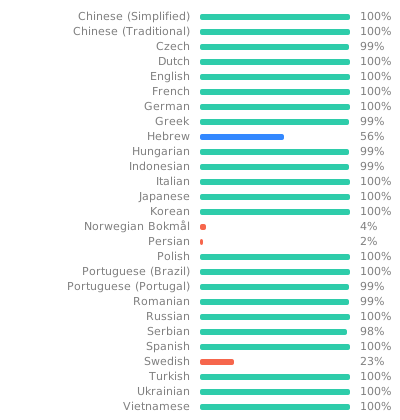
Alternatively, you can manually edit the translation files in AutoDarkModeApp\Strings.
Awards

More information
Still have open questions? Check out our wiki!