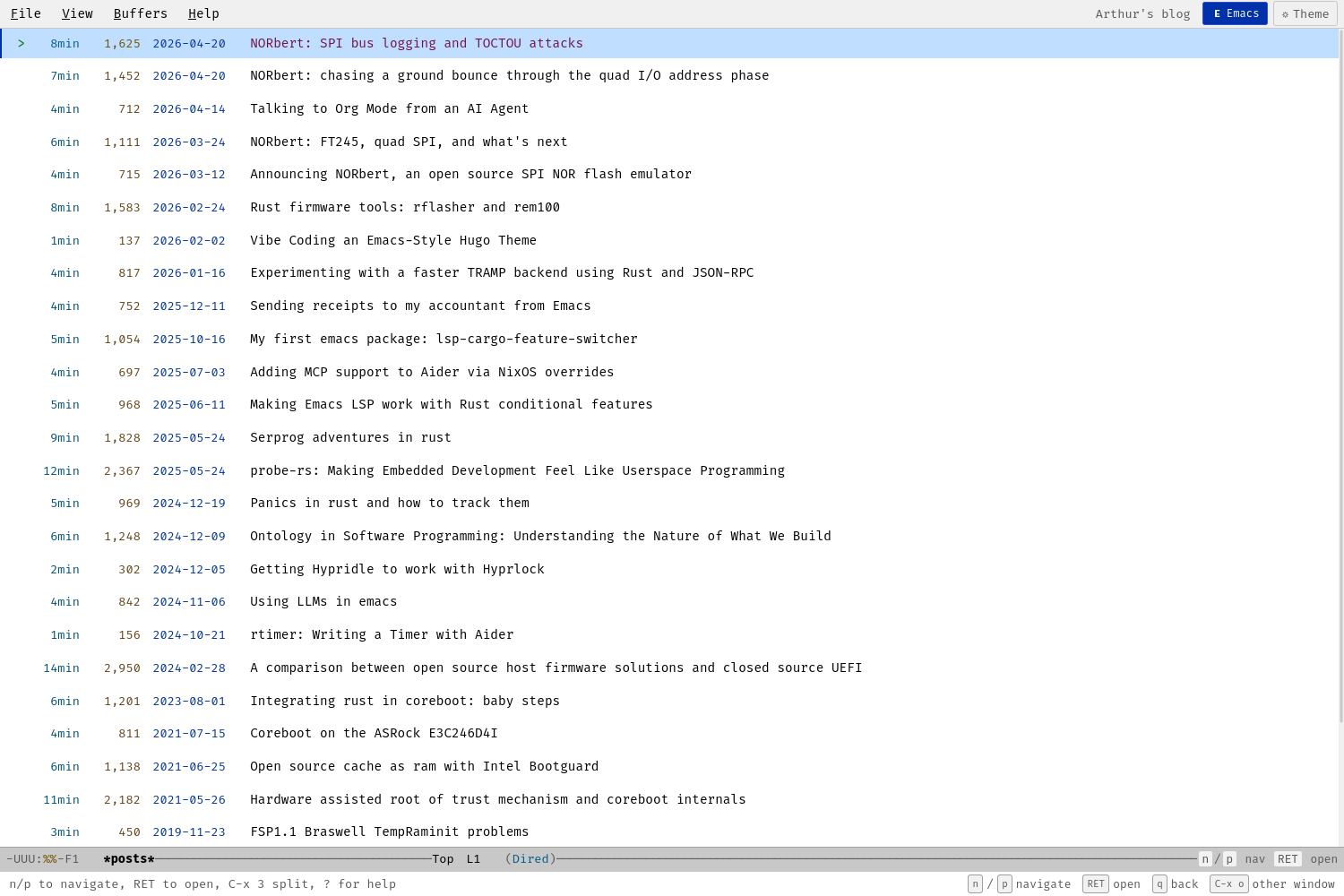
A Hugo theme that transforms your blog into an Emacs-like experience with buffer management, keyboard navigation, and authentic styling.
Features
- Full-screen buffer view - Article list and content displayed like Emacs buffers
- Window splitting - Side-by-side (C-x 3) or stacked (C-x 2) layouts
- Emacs keybindings - Navigate with n/p, open with RET, quit with q
- Dired-style article list - Shows reading time, word count, date
- Modus themes - Vivendi (dark) and Operandi (light) with
tto toggle - Emacs modeline - Buffer name, scroll position, major mode indicator
- Menu bar - File, View, Buffers, Help dropdowns
- Echo area - Shows keyboard hints and messages
- Mobile responsive - Adapts to single-buffer view on small screens
Installation
- Clone or copy this theme to your Hugo site's
themes/directory:
cd your-hugo-site
git submodule add https://github.com/ArthurHeymans/hugo-emacs-theme themes/emacs- Update your
config.toml:
theme = "emacs"

[markup.highlight]
noClasses = false
- Run Hugo:
Keyboard Shortcuts
Navigation (List Buffer)
| Key | Action |
|---|---|
n / ↓ |
Next article |
p / ↑ |
Previous article |
RET / o |
Open article |
< |
Beginning of list |
> |
End of list |
Navigation (Content Buffer)
| Key | Action |
|---|---|
n / p |
Scroll down/up (split mode) or next/prev article (single mode) |
↓ / ↑ |
Scroll down/up |
PgDn / PgUp |
Page down/up |
SPC / S-SPC |
Page down/up |
C-v / M-v |
Page down/up (Emacs style) |
< / > |
Beginning/end of article |
q |
Go back to list |
Window Management
| Key | Action |
|---|---|
C-x 3 |
Split horizontal (side by side) |
C-x 2 |
Split vertical (stacked) |
C-x 0 |
Close current window |
C-x 1 |
Close other windows |
C-x o / Tab |
Switch to other window |
View
| Key | Action |
|---|---|
t |
Toggle dark/light theme |
+ |
Increase font size |
- |
Decrease font size |
? |
Show help overlay |
C-g / Esc |
Quit/cancel |
Theme Customization
Colors
The theme uses Modus Vivendi (dark) and Modus Operandi (light) color schemes. Colors are defined as CSS custom properties in assets/css/themes.css.
Fonts
The theme uses Fira Code as the monospace font. Font files are included in static/fonts/. To use a different font, update the @font-face declarations in assets/css/main.css.
File Structure
themes/emacs/
├── assets/
│   ├── css/
│   │   ├── echo-area.css    # Echo area styling
│   │   ├── main.css         # Core layout, typography
│   │   ├── menu-bar.css     # Menu bar dropdowns
│   │   ├── mobile.css       # Responsive design
│   │   ├── modeline.css     # Emacs modeline
│   │   ├── syntax.css       # Code highlighting
│   │   ├── themes.css       # Modus color schemes
│   │   └── windows.css      # Buffer/window styling
│   └── js/
│       ├── keyboard.js      # Keyboard navigation
│       ├── menu.js          # Menu interactions
│       └── windows.js       # Window management
├── layouts/
│   ├── _default/
│   │   ├── baseof.html      # Base template
│   │   ├── list.html        # List pages
│   │   ├── single.html      # Article pages
│   │   └── terms.html       # Taxonomy pages
│   ├── partials/
│   │   ├── echo-area.html   # Echo area partial
│   │   ├── head.html        # HTML head
│   │   ├── help-overlay.html# Help modal
│   │   ├── menu-bar.html    # Menu bar
│   │   └── modeline.html    # Modeline partial
│   ├── 404.html             # Error page
│   └── index.html           # Homepage
├── static/
│   └── fonts/               # Fira Code font files
├── theme.toml               # Theme metadata
└── README.md
Browser Support
- Modern browsers (Chrome, Firefox, Safari, Edge)
- Keyboard navigation requires JavaScript
- Graceful degradation for older browsers
Vibe Coded
This theme was fully vibe coded with Claude (Anthropic's AI assistant). The entire theme - HTML templates, CSS styling, JavaScript interactions, and documentation - was created through conversational AI-assisted development.
Credits
- Color schemes based on Modus Themes by Protesilaos Stavrou
- Font: Fira Code by Nikita Prokopov
- Inspired by GNU Emacs
License
Dual-licensed under MIT or Apache 2.0, at your option.