Ask your assistant things like "what are my top queries this month?" or "is this page indexed yet?", and it pulls the numbers straight from the Search Console API. No opening the dashboard, no fiddling with date ranges.
The server runs on your own machine and only ever reads. It uses Google's read-only scope, so your assistant can see your data but cannot change anything in your account. One service-account key covers every property you own.
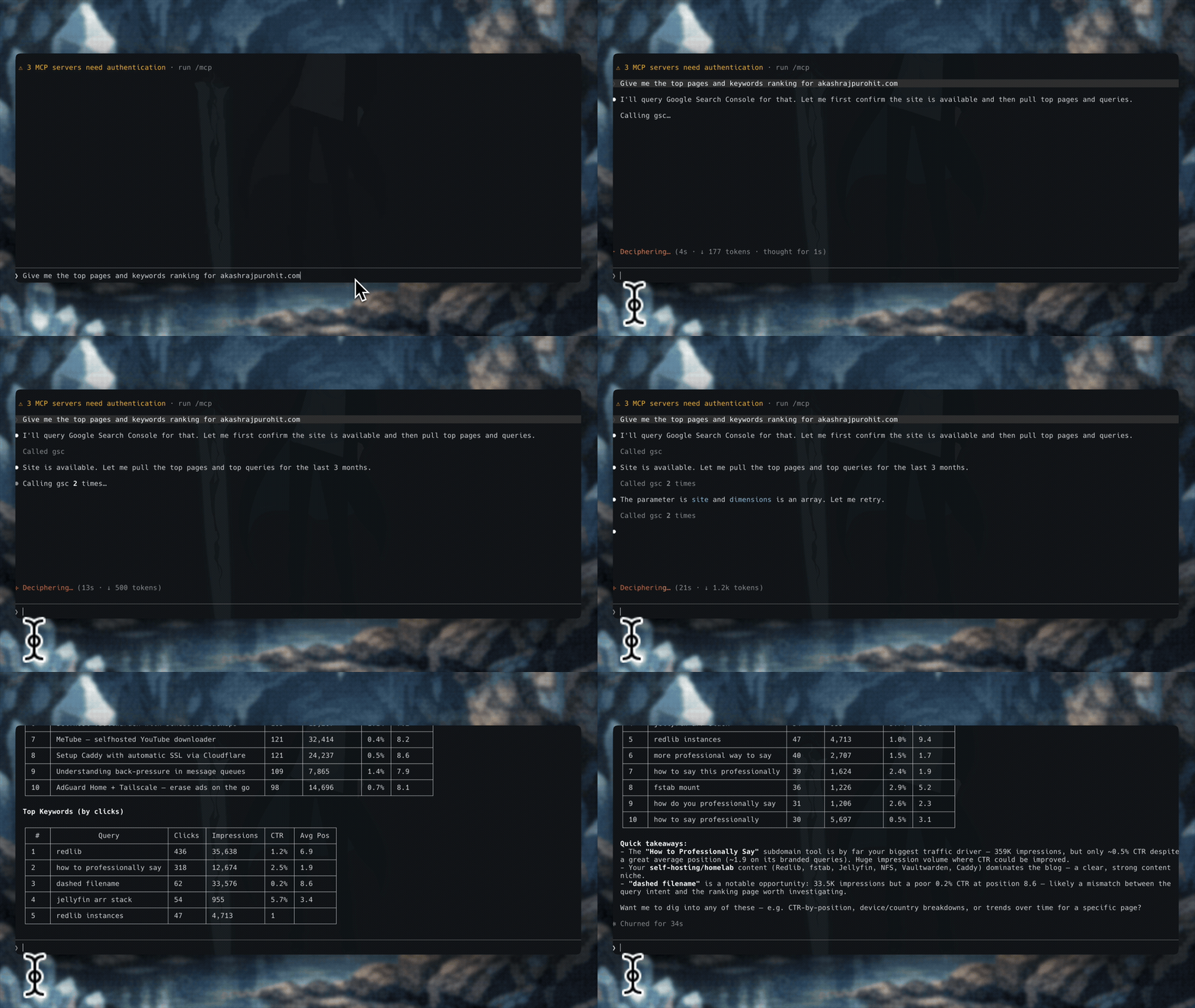
What you can ask
- "List all my Search Console properties."
- "What are my top 20 queries for example.com in the last 28 days?"
- "Which queries get lots of impressions but a low CTR?"
- "Show me the top pages for example.com on mobile."
- "Which pages lost the most clicks this month compared to last month?"
- "Is
https://example.com/blog/my-post/indexed by Google?" - "How many URLs did my sitemap submit versus get indexed?"
Setup
You need Node.js 22.5 or newer and a Google service-account key that can read your properties. Three steps: create a key, grant it access, add the server to your client.
1. Create a service-account key
Create a service account in any Google Cloud project, save its JSON key to ~/.config/gsc-mcp/key.json, and enable the Search Console API. The Cloud project you pick does not matter; the key works for any property you grant it on.
Commands (gcloud)
gcloud config set project YOUR_PROJECT_ID
gcloud services enable searchconsole.googleapis.com
gcloud iam service-accounts create gsc-reader --display-name="GSC Reader"

mkdir -p ~/.config/gsc-mcp
gcloud iam service-accounts keys create ~/.config/gsc-mcp/key.json \
  --iam-account=gsc-reader@YOUR_PROJECT_ID.iam.gserviceaccount.com
The key is a credential, not config, so keep it private. This repo's .gitignore blocks *key*.json so you cannot commit it by accident.
2. Grant it access to each property
In Search Console, open each property, go to Settings → Users and permissions → Add user, and add the service account's email (gsc-reader@YOUR_PROJECT_ID.iam.gserviceaccount.com) with the Restricted (read) role. Adding a new site later is just one more grant here.
3. Add gsc-mcp to your client
Claude Code:
claude mcp add gsc --scope user -- npx -y @akashrajpurohit/gsc-mcp
Claude Desktop, Cursor, Windsurf, VS Code, and others
Claude Desktop: open Settings → Developer → Edit Config and add:
{
  "mcpServers": {
    "gsc": {
      "command": "npx",
      "args": ["-y", "@akashrajpurohit/gsc-mcp"]
    }
  }
}
Cursor (~/.cursor/mcp.json) and Windsurf (~/.codeium/windsurf/mcp_config.json): add the same gsc entry under mcpServers.
VS Code (GitHub Copilot) (.vscode/mcp.json): use the same entry under servers instead of mcpServers.
Any other client: register a stdio server whose command is npx -y @akashrajpurohit/gsc-mcp.
Running from source instead of npm? Clone the repo, run npm install, and use node /absolute/path/to/gsc-mcp/bin/gsc-mcp.mjs as the command.
If your key is not at the default path, add "env": { "GSC_KEY_PATH": "/path/to/key.json" } to the entry (or set it in your shell for the CLI).
4. Check it works
npx @akashrajpurohit/gsc-mcp doctor
This checks your Node version, credentials, Google authentication, and how many properties you can read. If everything is green, start a new session in your client and ask it to list your Search Console sites.
Tools
| Tool | What it does |
|---|---|
gsc_list_sites |
Lists the properties you can read and their exact siteUrl values. |
gsc_search_analytics |
Clicks, impressions, CTR, and position, grouped by query, page, date, country, device, or search appearance. Supports filters, date ranges, and pagination. |
compare_search_performance |
Compares two date periods and reports the change in clicks, impressions, CTR, and position. Can group by page, query, country, or device to find the biggest movers. |
find_seo_opportunities |
Finds quick wins: striking-distance queries (ranking just off page 1) or page-1 queries and pages with low CTR. Computed in code and ranked by impressions. |
gsc_inspect_url |
Index status of a single URL (indexed or not, last crawl, canonical, coverage). |
gsc_inspect_urls |
Batch index-status check for many URLs at once, with bounded concurrency. |
gsc_list_sitemaps |
Submitted versus indexed counts per sitemap, with any errors. |
Data comes straight from Search Console, so you see the same window Google shows everyone (about 16 months of history, with its usual sampling).
gsc_search_analytics request and response
You give it a clean request and get back the rows plus metadata about the query. You never write Google's raw API format.
Request:
{
  "siteUrl": "sc-domain:example.com",
  "startDate": "2026-06-01",
  "endDate": "2026-06-30",
  "dimensions": ["query", "page"],
  "filters": [
    { "dimension": "country", "operator": "equals", "expression": "ind" }
  ],
  "searchType": "web",
  "rowLimit": 5000
}
Response:
{
  "siteUrl": "sc-domain:example.com",
  "period": { "startDate": "2026-06-01", "endDate": "2026-06-30" },
  "dimensions": ["query", "page"],
  "rowCount": 842,
  "hasMore": false,
  "rows": [],
  "warnings": []
}
It also supports dataState (final or all), aggregationType (auto, byProperty, byPage), and automatic pagination past the API's 25,000-rows-per-request limit, capped by maxRows. Filter operators are equals, notEquals, contains, notContains, includingRegex, and excludingRegex, and multiple filters are combined with AND. site and siteUrl both work.
For a quick date range you can pass datePreset instead of computing dates: last_7_days, last_28_days, last_3_months, last_6_months, last_12_months, or last_16_months (each a rolling window ending yesterday). It works the same on compare_search_performance.
compare_search_performance response
Give it a current period (or days), and optionally a previous one. Without a previous period it uses the equal-length window right before the current one. The change is worked out in code, so the numbers are always consistent.
{
  "current": { "startDate": "2026-06-01", "endDate": "2026-06-30" },
  "previous": { "startDate": "2026-05-02", "endDate": "2026-05-31" },
  "summary": {
    "clicks": { "current": 1840, "previous": 2160, "change": -320, "changePercent": -14.81 }
  },
  "groupBy": "page",
  "largestDeclines": [
    {
      "page": "https://example.com/docs",
      "currentClicks": 210,
      "previousClicks": 390,
      "change": -180,
      "changePercent": -46.15
    }
  ],
  "largestGains": []
}
summary also covers impressions, CTR, and position. With groupBy (page, query, country, or device) you get largestDeclines and largestGains, ranked by clicks change. For position, lower is better, so a positive change means the average rank got worse.
find_seo_opportunities response
The default striking_distance type surfaces queries (or pages) ranking just off page 1, where a small ranking gain could win clicks. Set type to low_ctr to instead find page-1 queries and pages that get few clicks for their impressions.
Request:
{
  "siteUrl": "sc-domain:example.com",
  "type": "striking_distance",
  "datePreset": "last_28_days",
  "minImpressions": 200,
  "limit": 5
}
Response:
{
  "type": "striking_distance",
  "dimension": "query",
  "criteria": { "minPosition": 11, "maxPosition": 20, "minImpressions": 200 },
  "count": 4,
  "opportunities": [
    { "query": "immich photo alternative", "clicks": 0, "impressions": 1620, "ctr": 0, "position": 17.7 }
  ]
}
Tune it with minImpressions, minPosition / maxPosition (striking-distance), maxCtr (low-CTR), dimension (query or page), and limit. Everything is computed in code and ranked by impressions.
Command line
The gsc-mcp command works on its own too, handy for a quick check without a client:
npx @akashrajpurohit/gsc-mcp sites
npx @akashrajpurohit/gsc-mcp queries "sc-domain:example.com"
npx @akashrajpurohit/gsc-mcp inspect "sc-domain:example.com" "https://example.com/blog/my-post/"
Run gsc-mcp --help for the full list. Domain properties look like sc-domain:example.com; URL-prefix properties look like https://example.com/.
Configuration
| Variable | Default | Description |
|---|---|---|
GSC_KEY_PATH |
~/.config/gsc-mcp/key.json |
Path to the service-account JSON key. |
GSC_TIMEOUT_MS |
30000 |
Per-request timeout in milliseconds. 0 disables it. |
GSC_MAX_RETRIES |
3 |
How many times to retry transient failures (429, 5xx, dropped connections). 0 disables retries. |
GSC_RETRY_BASE_MS |
500 |
Base delay for the exponential backoff between retries. |
Stability
As of 1.0.0 the tool names and their input and output shapes are stable and follow semantic versioning. Breaking changes to a tool's inputs or outputs will only land in a future major release. New optional inputs and additive fields may arrive in minor releases. The server stays read-only.
Security & privacy
The server is read-only, runs locally, and collects no telemetry. Your key is read from disk and sent only to Google, never anywhere else, and errors are sanitized so key material never lands in logs or transcripts. Full details and how to report a vulnerability are in SECURITY.md.
Troubleshooting
Run npx @akashrajpurohit/gsc-mcp doctor first, since it catches most problems. When a tool call fails, the error also carries a short hint on how to fix it. Common ones:
sitesreturns an empty list: the service account is not granted on any property yet. The email you added in Search Console must match the key'sclient_emailexactly.- Auth or "file not found" errors: the key is not where the server expects it. Check the path or set
GSC_KEY_PATH. - One property returns 403: that property has not been shared with the service account. Add it under Users and permissions.
- "Search Console API is disabled": enable it with
gcloud services enable searchconsole.googleapis.com.
Contributing
Contributions are welcome. The project is small and has no build step. See CONTRIBUTING.md for the full guide and ROADMAP.md for what is and is not planned.
git clone https://github.com/AkashRajpurohit/gsc-mcp.git
cd gsc-mcp
npm install
npm test
Tests use Node's built-in runner and are fully offline: no network and no real credentials needed. CI runs them on every push and pull request.
Project layout and release process
| Path | Responsibility |
|---|---|
bin/gsc-mcp.mjs |
Executable entry point (server plus doctor, --help, --version, and read commands). |
lib/server.mjs |
MCP server bootstrap. |
lib/tools.mjs |
Tool definitions and the request dispatcher. |
lib/analytics.mjs |
Search Analytics query logic. |
lib/compare.mjs |
Period-over-period comparison logic. |
lib/gsc.mjs |
Google API client: credential loading and read-only Search Console calls. |
lib/doctor.mjs |
The gsc-mcp doctor diagnostic. |
lib/util/ |
Shared helpers: constants, date math, input validation, and error handling. |
test/ |
Offline test suite. |
Releases are cut by pushing a v* tag, which runs the publish workflow (.github/workflows/release.yml). Publishing uses npm trusted publishing (OIDC), so no npm token is stored and provenance is attached automatically. Changes are tracked in CHANGELOG.md.
License
MIT. See LICENSE.
This project is not affiliated with, endorsed by, or associated with Google. It is an independent tool that talks to Google's public Search Console API using credentials you create and control. "Google Search Console" is a trademark of Google LLC, used here only to describe what the tool works with. The tool is provided as-is, with no warranty.