



The only Google Sheets AI with multi-step workflows, conversation memory, and output control.
Website • Install Extension • Demo • Features • Installation • API
🚀 Quick Start

Ready in 30 seconds • Free tier included • Your keys, your data
- Install the add-on from Google Workspace Marketplace
- Open any Google Sheet and find AISheeter in the Extensions menu
- Connect your API key (OpenAI, Anthropic, Google, or Groq)
- Start using AI with conversation memory and multi-step workflows
Demo
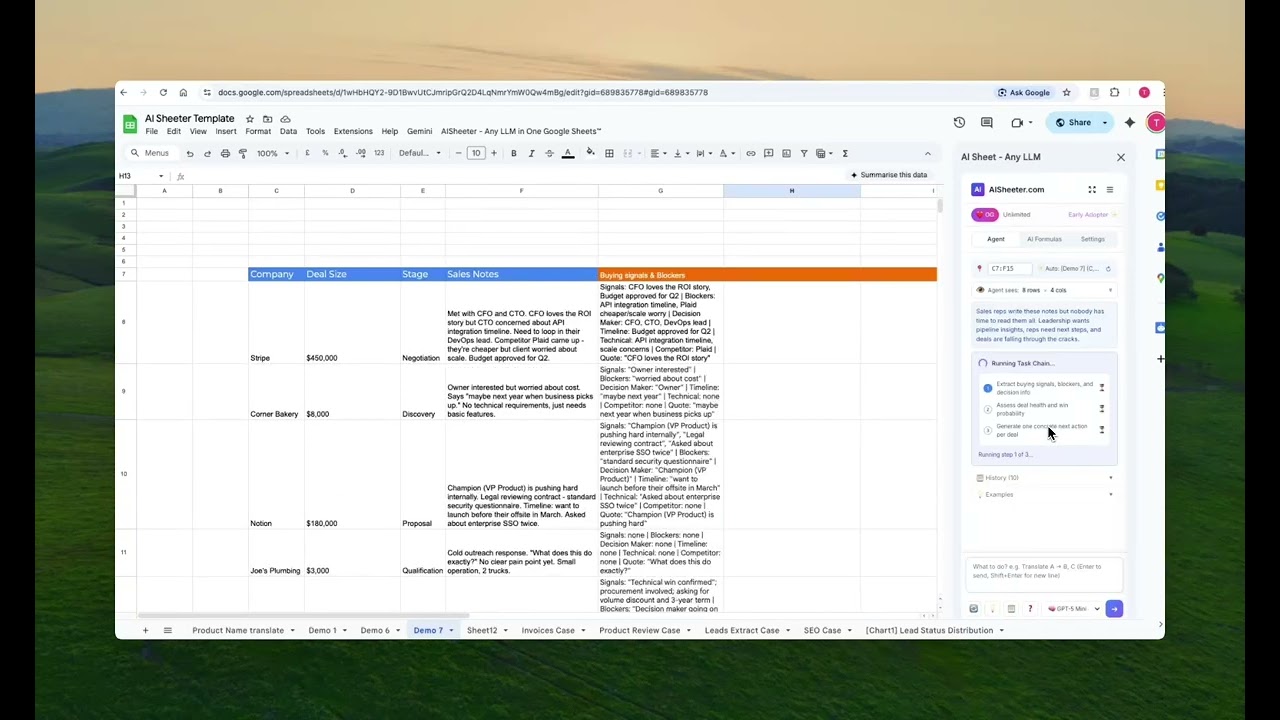
Click to watch the demo video
See how AISheeter transforms messy CRM notes into actionable insights with a 3-step workflow
Why AISheeter?
Most AI spreadsheet tools are just fancy formulas. AISheeter is different — it's a true intelligent agent that:
| Feature | AISheeter | Others |
|---|---|---|
| Multi-Step Task Chains | ✅ Execute complex workflows with one command | ❌ Single operations only |
| Conversation Memory | ✅ Remembers context across queries | ❌ Stateless |
| Output Format Control | ✅ JSON, lists, scores, custom formats | ❌ Plain text only |
| Proactive Suggestions | ✅ AI recommends next steps | ❌ Passive |
| 5+ AI Models | ✅ GPT-5, Claude, Gemini, Llama, DeepSeek |
Features
🔗 Multi-Step Task Chains
Execute complex workflows with a single command:
"Analyze these sales notes → Extract buying signals → Score deal priority → Recommend actions"
💬 Conversation Persistence
Build on previous commands without repeating context:
User: "Analyze sentiment for column B"
Agent: Done! Found 45% positive, 30% neutral, 25% negative.

User: "Now categorize the negative ones by topic"
Agent: [Remembers context, processes only negative rows]
🎯 Output Format Control
Get results exactly how you need them:
- JSON objects for structured data
- Lists/Arrays for multiple items
- Score + Reason for evaluations
- Yes/No + Confidence for decisions
- Custom formats for specific needs
🤖 Proactive Suggestions
After each task, the agent suggests relevant follow-up actions based on your data and workflow.
Tech Stack
| Component | Version | Notes |
|---|---|---|
| Next.js | 16.1.1 | Turbopack, App Router |
| React | 19.2.3 | Latest stable |
| Tailwind CSS | 4.1.18 | CSS-native config |
| Vercel AI SDK | 6.0.26 | Unified multi-provider |
| TypeScript | 5.x | Strict mode |
| Supabase | - | Database & Auth |
| Stripe | - | Payments |
Installation
Prerequisites
- Node.js 18+
- npm or yarn
- Supabase account
- API keys for AI providers (OpenAI, Anthropic, etc.)
Setup
# Clone the repository
git clone https://github.com/Ai-Quill/ai-sheeter.git
cd ai-sheeter

# Install dependencies
npm install

# Copy environment variables
cp .env.example .env.local

# Run development server
npm run dev
Environment Variables
# Supabase (REQUIRED)
SUPABASE_URL=your_supabase_url
SUPABASE_SERVICE_ROLE_KEY=your_service_role_key

# Encryption
ENCRYPTION_SALT=your_encryption_salt

# AWS S3 (for images)
AWS_ACCESS_KEY_ID=xxx
AWS_SECRET_ACCESS_KEY=xxx
AWS_REGION=ap-southeast-1
S3_BUCKET_NAME=xxx

# Stripe (optional)
STRIPE_SECRET_KEY=sk_xxx
STRIPE_WEBHOOK_SECRET=whsec_xxx

# Cron
CRON_SECRET=xxx
NEXT_PUBLIC_APP_URL=https://your-domain.com
API Reference
Core AI Endpoints
| Endpoint | Method | Description |
|---|---|---|
/api/query |
POST | Main AI query endpoint with multi-model support |
/api/generate-image |
POST | DALL-E / Imagen image generation |
/api/models |
GET | List available AI models |
User Management
| Endpoint | Method | Description |
|---|---|---|
/api/get-or-create-user |
POST | Get or create user by email |
/api/get-user-settings |
GET | Fetch user settings |
/api/save-all-settings |
POST | Save all user settings |
/api/save-api-key |
POST | Save individual API key |
/api/save-default-model |
POST | Set default model |
Async Jobs (Bulk Processing)
| Endpoint | Method | Description |
|---|---|---|
/api/jobs |
POST | Create bulk job |
/api/jobs |
GET | List/get job status |
/api/jobs |
DELETE | Cancel job |
/api/jobs/worker |
POST | Background worker (Cron) |
Payments
| Endpoint | Method | Description |
|---|---|---|
/api/stripe/checkout |
POST | Create checkout session |
/api/stripe/webhook |
POST | Handle Stripe webhooks |
/api/stripe/portal |
POST | Customer portal link |
Project Structure
src/
├── app/
│   ├── api/                    # API routes (18 endpoints)
│   │   ├── query/              # Main AI query
│   │   ├── jobs/               # Async job queue
│   │   ├── stripe/             # Payment integration
│   │   └── ...
│   ├── globals.css             # Tailwind v4 theme
│   └── layout.tsx              # Root layout
├── lib/
│   ├── ai/
│   │   └── models.ts           # Unified AI model factory
│   ├── auth/
│   │   └── gating.ts           # Feature gating, credits
│   ├── cache/
│   │   └── index.ts            # Response caching
│   ├── prompts/
│   │   └── index.ts            # System prompts
│   ├── stripe/
│   │   └── index.ts            # Stripe client & pricing
│   └── supabase.ts             # Database client
├── components/                 # React components
└── pages/                      # Pages (legacy)
Use Cases
📊 Sales Pipeline Intelligence
Turn messy CRM notes into actionable insights:
- Extract buying signals and blockers
- Score deal priority (Hot/Warm/Cold)
- Generate personalized follow-up recommendations
💬 Customer Feedback Mining
Analyze feedback at scale:
- Sentiment analysis (Positive/Neutral/Negative)
- Theme extraction and categorization
- Priority scoring for product roadmap
🌍 Content Localization
Streamline translation workflows:
- Translate content to multiple languages
- Adapt for cultural context
- Quality assurance checks
Contributing
We welcome contributions! Please see our Contributing Guide for details.
- Fork the repository
- Create your feature branch (
git checkout -b feature/amazing-feature) - Commit your changes (
git commit -m 'Add amazing feature') - Push to the branch (
git push origin feature/amazing-feature) - Open a Pull Request
Support
- Website: aisheeter.com
- Install Extension: Google Workspace Marketplace
- Documentation: GitHub
- Issues: GitHub Issues
- Twitter: @tuantruong
License
This project is licensed under the MIT License - see the LICENSE file for details.
Made with ❤️ by Ai-Quill