

Your entire AEO/GEO/AI Visibility, technical SEO + web analytics stack. Agent-first. Self-hosted. Local.
Think PostHog, for AI search visibility. Canonry tracks what ChatGPT, Claude, Gemini, and Perplexity say about you, joins it with your search, server side traffic data and paid media, and gives your agent the tools + skills to fix what it finds.
npm install -g @canonry/canonry
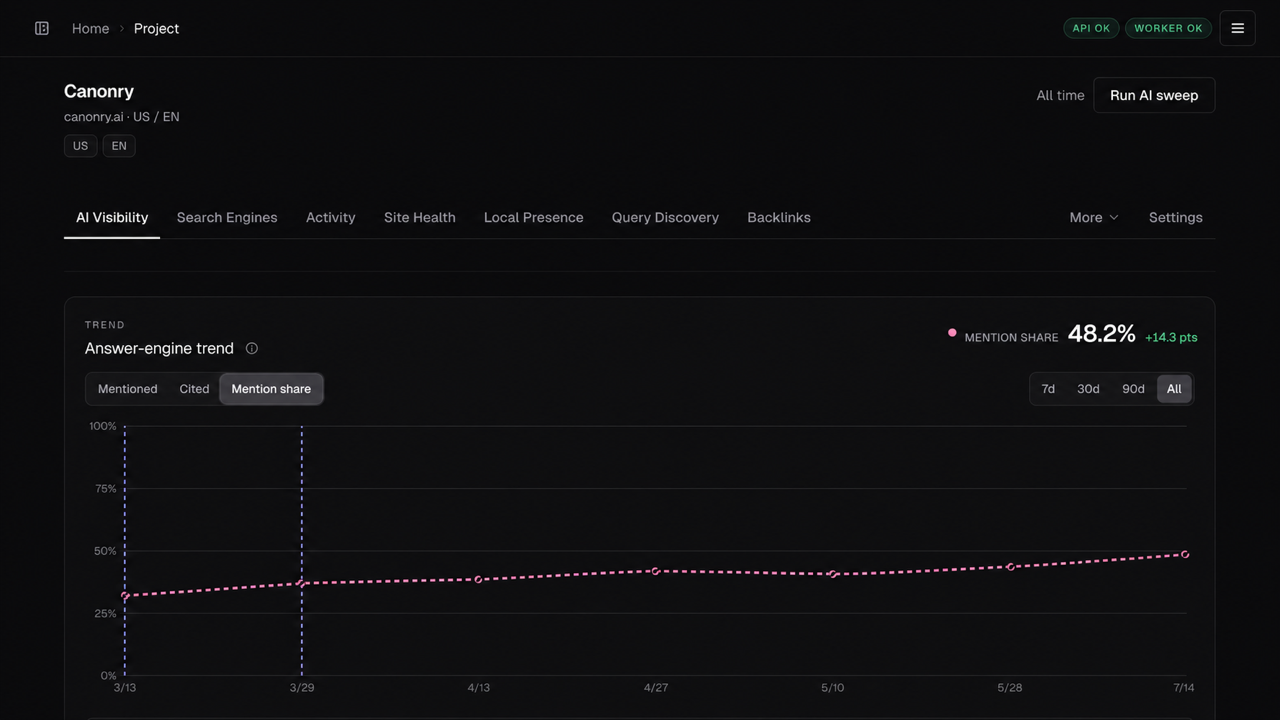
Track your share of answer-engine brand mentions over time.
Measure → diagnose → approve action → measure change
| Phase | What Canonry does |
|---|---|
| Measure | Track mentions and citations across Gemini, ChatGPT, Claude, Perplexity, and local models. Join them with GSC, GA4, Bing, server side traffic, Business Profile, and backlink data. |
| Diagnose | Crawl the site, score Page Health, inspect evidence, compare competitors, and explain regressions. |
| Act | Give your agent the context + skills to make surgical on-site technical SEO changes and coordinate content, indexing, analytics, and paid media. |
| Operate | Create automation workflows, schedule checks, sync data, send webhooks, and generate client-ready reports. |
Built-in integrations and workflows
- Answer engines: Canonry measures Gemini, ChatGPT, Claude, Perplexity, and OpenAI-compatible local models.
- Agent workflows: Use the MCP adapter, Agent Plugin, external webhooks, or built-in Aero.
- Search and analytics: Connect Google Search Console, Google Analytics 4, and Bing Webmaster Tools.
- Server traffic: Capture events from Cloudflare, Cloud Run, Vercel, and WordPress.
- Backlinks: Query Common Crawl hyperlink releases locally with DuckDB, and sync new releases on a schedule.
- Paid media: Connect OpenAI Ads Manager for account, conversion, campaign, and performance workflows.
- Conversion measurement: Audit Google Ads and Google Tag Manager with read-only snapshots and declared conversion contracts.
- Local presence: Connect Google Business Profile for search terms, performance, lodging data, and booking actions.
- Publishing and indexing: Publish through WordPress, generate JSON-LD, and submit sitemaps or URLs for indexing.
- Client reporting: Automate scheduled checks and data syncs, send webhook alerts, and generate client-ready HTML reports.
The dashboard, CLI, and agent tools share the same project API.
Get a Page Health baseline
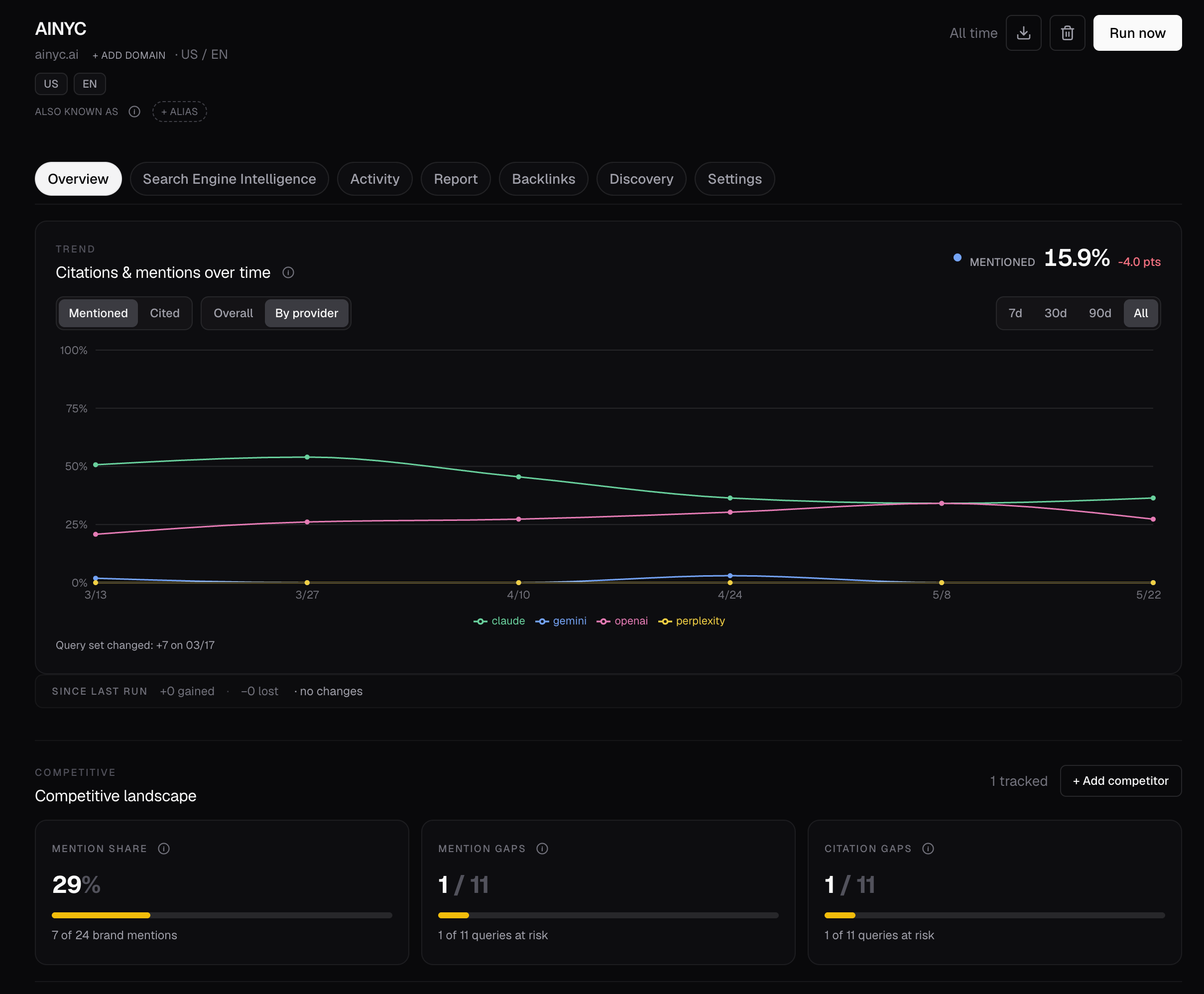
Map crawlable pages and the internal links connecting them.
-
Install Canonry.
npm install -g @canonry/canonry
-
Create the local configuration, SQLite database, and full-instance API key.
Keep the output private. Provider credentials are optional. Bootstrap imports supported variables that are already in your environment.
-
Start Canonry.
-
Open http://127.0.0.1:4100/setup. If prompted, create a dashboard password.
-
Enter your domain and approve the public-site crawl. This crawl creates a persisted Page Health baseline. AI Visibility is optional.
-
To use the terminal instead, keep
cnry serverunning. Open a second terminal and run:cnry project create my-site --domain example.com --country US --language en cnry technical-aeo run my-site --max-pages 100 --wait --format json
-
Read the run ID and status from the output. If the status is
completedorpartial, read evidence from that run:cnry technical-aeo score my-site --run-id <run-id> --format json cnry technical-aeo pages my-site --run-id <run-id> --sort score-asc --limit 10 --format jsonl
--waitpolls for up to 15 minutes. If the scan remains active, use the progress command below. If it fails or is cancelled, inspect it withcnry run show <run-id> --format json.
Or use any shell-capable coding agent
If your client supports the Agent Plugin or MCP adapter, use that integration. Otherwise, paste this request into any shell-capable agent.
Copy the Site Health-first setup request
Help me set up Canonry for my public site.

Use the official Canonry docs:
- Agent quickstart: https://github.com/Canonry/canonry#or-use-any-shell-capable-coding-agent
- CLI reference: https://github.com/Canonry/canonry/blob/main/skills/canonry/references/canonry-cli.md
- Plugin setup: https://github.com/Canonry/canonry/blob/main/docs/plugins.md
- MCP setup: https://github.com/Canonry/canonry/blob/main/docs/mcp.md

If a Canonry installation or connected plugin/MCP is available, use it. Do not create a duplicate. Choose the connected tools or the shell path, not both. The `cnry` and `canonry` commands are interchangeable.

1. Ask for my public domain, country, and language. Do not create or scan anything yet.
2. If connected tools are available, use them for the remaining steps. For the shell path, make sure that `cnry` is on PATH. Then run `cnry --version`. If Canonry is missing, propose `npm install -g @canonry/canonry` and wait for approval. If configuration is missing, tell me to run `cnry bootstrap` in my private terminal and wait. Never ask me to paste passwords, API keys, OAuth credentials, or command output.
3. Make sure that the API or connected tool is reachable. If the shell API is unavailable, propose `cnry start`. Wait for approval. List the projects with the connected project tool or `cnry project list --format json`. Reuse a project with the same domain. Make sure that the proposed name is not assigned to a different domain. If no match exists, show the exact create operation and wait for approval.
4. Propose a bounded Site Health scan. Include `--max-pages` and the state of dead-link checking. Show the connected operation or exact `cnry technical-aeo run ... --wait --format json` command. Wait for separate approval before scanning.
5. If the run status is `completed` or `partial`, read its score and worst pages with run-pinned connected tools. For the shell path, use `cnry technical-aeo score <project> --run-id <run-id> --format json` and `cnry technical-aeo pages <project> --run-id <run-id> --sort score-asc --limit 10 --format jsonl`. If the run failed or was cancelled, inspect the run error and stop. Summarize completed evidence and propose AI Visibility setup.
6. Ask before you add queries, connect providers, start a provider-backed or quota-consuming run, edit files, or publish.
Add AI Visibility when you need it
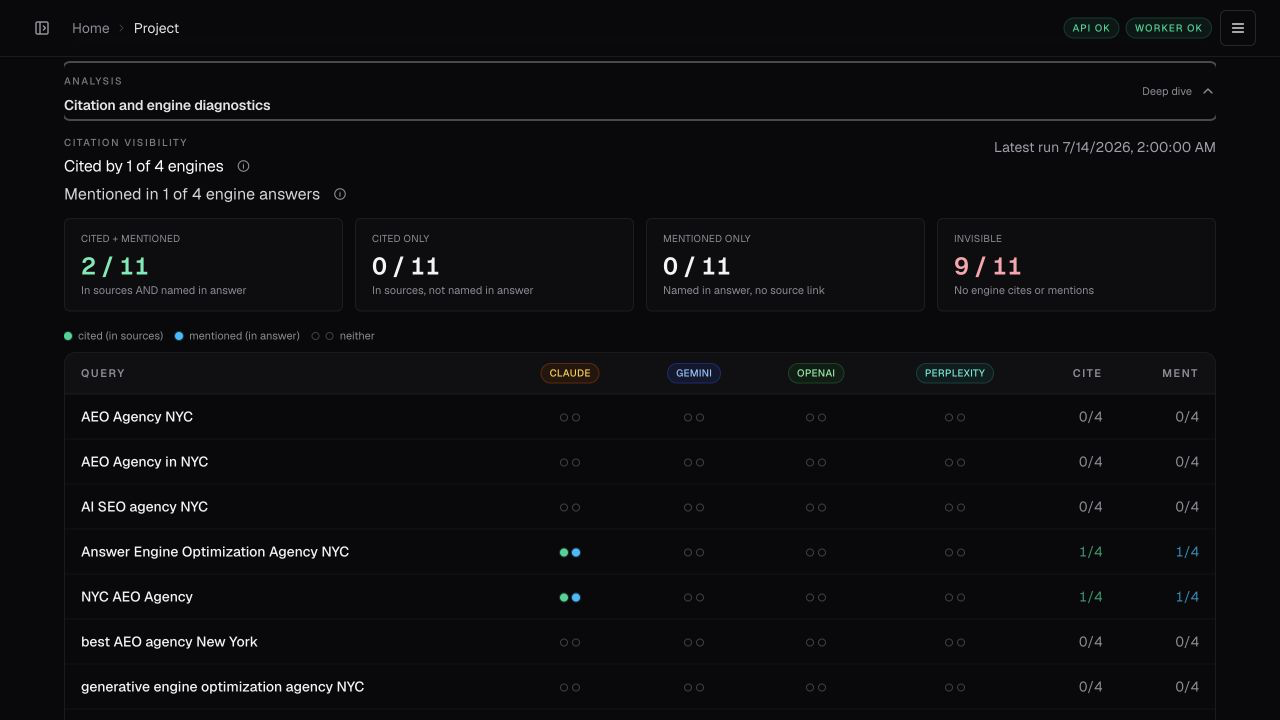
Map citation and answer-mention coverage across every tracked query and engine.
| Provider | Key source | Environment variable |
|---|---|---|
| Gemini | Google AI Studio | GEMINI_API_KEY |
| OpenAI | OpenAI Platform | OPENAI_API_KEY |
| Claude | Anthropic Console | ANTHROPIC_API_KEY |
| Perplexity | Perplexity settings | PERPLEXITY_API_KEY |
| Local model | Any OpenAI-compatible endpoint | LOCAL_BASE_URL |
Then add the queries that matter and run a measured sweep:
cnry query add my-site "your first query" "your second query"
cnry run my-site --wait
cnry visibility-stats my-site --by-provider
Technical surface
| Surface | Use it for |
|---|---|
| CLI and REST API | Script project measurements, diagnoses, actions, reports, and schedules. OpenAPI is available at GET /api/v1/openapi.json. |
| MCP and Agent Plugin | Give Codex, Claude, Cursor, or a custom agent a typed, task-shaped tool surface. |
| Aero | When enabled and configured, use the built-in analyst that reviews evidence and wakes after completed runs. |
| Dashboard | Approve work, inspect evidence, and observe the same project record used by agents. |
Deployment and trust boundary
Canonry is self-hosted and single-tenant. Run one instance for one operator or team, and isolate unrelated teams on separate instances.
See the deployment guide for reverse proxies, daemon mode, Docker, systemd, and Tailscale.
If you get stuck
| Problem | Fix |
|---|---|
| Site scan is still running | Read exact counters with cnry technical-aeo progress <project> --run-id <id> --format json. |
| Site scan failed | Read the error with cnry run show <run-id> --format json. Read the last phase and counters with the progress command above. |
| No visibility results | Inspect existing work with cnry runs <project> --format json, then cnry run show <run-id> --format json. This does not start another paid run. |
| Need more query candidates | Run cnry discover run <project> --icp "...". This does not change the basket. Preview a completed session with cnry discover promote preview <project> <session-id>. Promote only after approval. |
| Need one-off research | Run cnry research run <project> "query one" "query two" --wait. Research does not change the tracked basket. |
npm install fails on node-gyp |
Install build tools for better-sqlite3 (guide). |
Documentation
| Architecture & data model | docs/architecture.md · docs/data-model.md |
| Aero — built-in agent | skills/aero/SKILL.md |
| Agent Plugin — portable core + Codex / Claude adapters | docs/plugins.md |
| MCP — Claude Desktop / Cursor / Codex | docs/mcp.md |
| Integrations | GSC · GA4 · Google Ads + GTM · Bing · Google Business Profile · WordPress · Server-side traffic (Cloudflare direct push or Queue pull, Cloud Run, Vercel, WordPress) |
| Deployment — reverse proxies, Docker, systemd, Tailscale | docs/deployment.md |
| API | GET /api/v1/openapi.json |
| Standalone skills bundle for Claude Code / Codex | cnry skills install (details) |
| All docs | docs/README.md |
Contributing
git clone https://github.com/Canonry/canonry.git && cd canonry
pnpm install && pnpm run typecheck && pnpm run test && pnpm run lint
See CONTRIBUTING.md.
License
FSL-1.1-ALv2. Free to use, modify, and self-host. Each version converts to Apache 2.0 after two years.