a blazingly fast slack tui
$curl -fsSL
          https://getslk.sh/install.sh | sh
why slk
Full-featured, TUI-based Slack desktop client, minus the 1.5GB of Chromium.
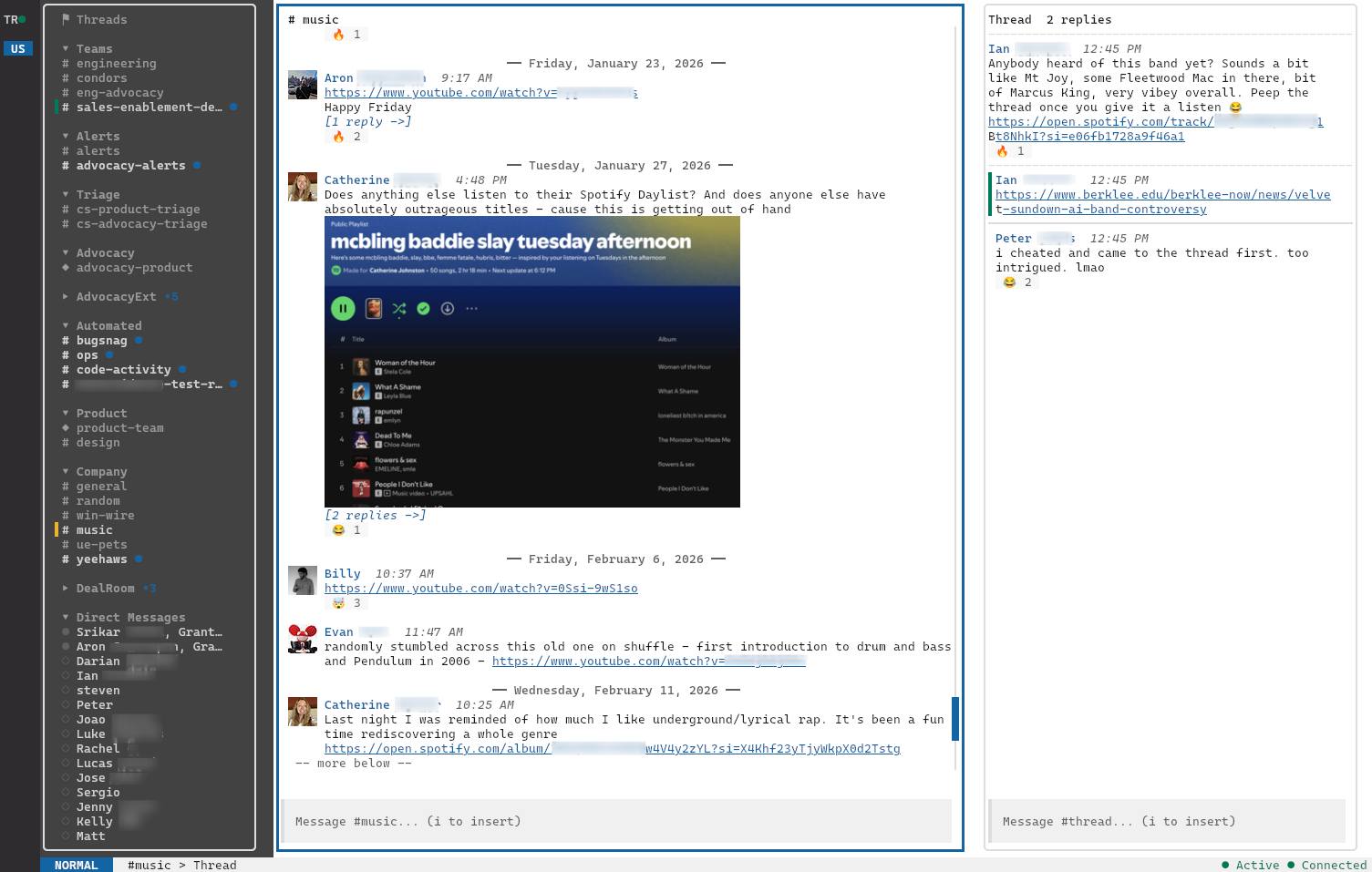
slk is an open-source, daily-driver TUI Slack client built in Go. One static binary, no Electron, no node_modules. It cold-starts in milliseconds and keeps every workspace connected in parallel.
what you get
All the Slack you need, none of the bloat.
/// realtime
Live messages over WebSocket
Reactions, edits, deletes, and typing indicators stream in over WebSocket. Optimistic UI for your own actions, SQLite-backed scrollback for everything else.
/// edit, delete, unread
Own every message you sent
E to edit (your in-progress draft is stashed and restored), D to delete with a centered confirmation, U to roll the read watermark back to any message — threads included, synced live with other Slack clients.
/// markdown compose
Type Markdown, send rich text
Type **bold**, ~~strike~~,
[label](url), - bullets,
1. numbered, or fenced
```code blocks```. slk converts on send to Slack's
mrkdwn + rich_text — already-mrkdwn syntax
(*bold*, _italic_) passes through
unchanged.
/// smart paste
Paste images, files, or text
Hit Ctrl+V to paste a clipboard image as an attachment, a copied file path as an attached file, or fall through to text. Multiple attachments + a caption send in one shot via Slack's V2 upload API.
/// threads
A real thread panel
Side-panel threads on Enter, plus a dedicated ⚑ Threads view at the top of the sidebar. Every thread you authored, replied to, or were @-mentioned in, unread first, re-ranking live as replies arrive.
/// images
Inline images, in a terminal
Attachments render where they belong: kitty graphics on capable
terminals, sixel on foot/mlterm, half-block (▀)
everywhere else. Click the image or hit
O for a full-screen preview,
Enter to hand off to your OS viewer.
Lazy-loaded into a 200 MB LRU cache.
/// notifications
Native desktop notifications
OS-level toasts on DMs, mentions, and any keyword you configure. Auto-suppressed when you're focused on the channel, and silenced entirely while you're in DND or snooze.
/// copy
Drag to copy, OSC 52 to clipboard
Drag the mouse across messages to highlight them; release to copy plain text straight to the system clipboard via OSC 52, even over SSH.
/// sidebar
Your real Slack sidebar, live
slk reads your sidebar sections directly from Slack — names, emoji, order, channel membership — and keeps them in sync over WebSocket. Reorder or rename in the official client; slk catches up in seconds. Falls back to glob-based config sections when you'd rather configure your own.
/// finder
Fuzzy channel finder
Ctrl+t / Ctrl+p to jump to any channel or DM by name. Collapsible sections with aggregate unread counts; the finder auto-expands a collapsed section when you open a channel inside it, and ranks 1:1 DMs above group DMs.
/// reactions
Search-first reaction picker
Hit r to search, R to toggle existing reactions. Pill-style display, optimistic and deduped.
/// workspaces
All workspaces, in parallel
Every workspace stays connected. Press 1–9 to jump between them with live unread badges.
/// status + dnd
Set status without leaving the terminal
Hit Ctrl+S to set Active, Away, or snooze. Standard durations (20m / 1h / 4h / until tomorrow) or a custom minute count. Status bar shows a live countdown, and reflects external changes in real time.
/// themes
35 built-in themes
Live-switch with Ctrl+y. Drop your own
TOML in ~/.config/slk/themes/ to add more.
/// keyboard
Vim-modal, all the way
j/k to move, i to insert, Esc to leave. Bracketed paste, OSC 52 clipboard, no mouse required.
keybindings
Vim-modal, all the way.
Every action is a keystroke or two away. Esc for normal mode, i to insert and compose a message. No menus, no mouse, no modifiers required for the most common actions.
Movement
- j k
- move down / up in lists and messages
- h l
- switch focus between sidebar, messages, threads
- Tab Shift+Tab
- cycle focus forward / back
- Ctrl+u Ctrl+d
- half-page up / down
- gg G
- jump to top / bottom
Sidebar & channels
- Enter
- open selected channel, or toggle a section header
- Space
- collapse / expand the selected section
- Ctrl+b
- toggle sidebar
- Ctrl+]
- toggle thread panel
- Ctrl+t Ctrl+p
- fuzzy channel finder
- Ctrl+w
- workspace picker
- 1–9
- jump to workspace N
Compose
- i
- enter insert mode
- Esc
- return to normal mode
- Enter
- send message
- Shift+Enter
- newline
- ↑ ↓
- line nav; on first/last line jumps to start/end
- Ctrl+v
- smart paste — image / file path / text
- Ctrl+u
- clear compose (text + pending attachments)
Messages
- Enter
- open thread
- r
- open reaction picker (search-first)
- R
- quick-toggle existing reactions
- E
- edit your own message
- D
- delete your own message (with confirmation)
- U
- mark selected message and everything newer as unread
- Y C
- copy message permalink
- O v
- open inline image full-screen
Image preview
- Esc q
- close preview
- Enter
- open in OS image viewer
- h ←
- previous image (multi-image messages)
- l →
- next image
- Click
- open full-screen preview from any image in the pane
Status, theme, quit
- Ctrl+s
- set status / DND / snooze
- Ctrl+y
- switch theme live
- q
- quit (with confirmation)
- Q
- quit immediately
- Ctrl+c
- quit (with confirmation)
install
Get it now.
One static binary. Pick your platform.
curl -fsSL https://getslk.sh/install.sh | sh
Auto-detects Linux/macOS & x86_64/arm64. Installs to
/usr/local/bin (override with
INSTALL_DIR=…). Read the script first if you'd
rather: install.sh.
Need help authenticating? See the setup guide →