Instant access, anywhere
Rest your pointer on the screen edge or hit the global shortcut. The panel is over your work before you finish the thought — no window management, no app switch.
· Flyout
 Flyout macOS
Capture a thought without leaving your work. Notes, tasks and reminders slide in from the edge of your screen, then tuck away when you’re done.
For macOS 14 Sonoma and later. iPhone app included. No account, no subscription.
Your notes, at the screen edge
See it in action
Features
Rest your pointer on the screen edge or hit the global shortcut. The panel is over your work before you finish the thought — no window management, no app switch.
Slash commands, headings, task lists, syntax-highlighted code blocks, inline images, colour and highlight. Your notes keep the structure your work has. Every note is stored as plain Markdown on disk.
Overdue
Reply to the notarization ticket9:40 AM
Today
Cut 1.0.1 with the keychain fix6:00 PM
Standup notesTue 9:00 AM
Completed
Ship the edge triggerYesterday
Launch plan
Move token refresh out of AppDelegate — it races the keychain unlock on cold start.
Gate refresh behind keychain unlock
ReminderGate refresh behind keychain unlock
10 minutes1 hourTomorrow
Set a reminder on a note — or on the exact sentence you selected. Overdue, today, upcoming and completed group into their own tab. Repeat daily or weekly, snooze straight from the notification, and click through to land back on the highlighted line.
Sprint2/6Notes
In the note- [in-progress] Write the migration note
Type /todo for a list whose lines carry a stage — backlog, in progress, in review, done — each with its own colour and icon. Click the icon to move a line along. Add statuses of your own in Settings, and they follow you to iPhone. The stage is stored in the note itself as plain text, so it travels with the file.
Search
client
Acme kickoffScope, timeline, who owns what2 hours agoclientdemo
Demo scriptOpen with the screen edgeYesterdayclient
Tag a note as you write, with autocomplete against the tags you already use so “meeting” doesn’t quietly become three. Filter by one tag or several at once — the list flattens across every folder, and each tag can carry a colour.
This Mac
Launch plan
Gate refresh behind keychain unlock
Reproduce on cold start
MacBook Air
Launch plan
Gate refresh behind keychain unlock
Reproduce on cold start
iCloud keeps every note, folder and reminder in sync across your Macs — through your own iCloud account. Nothing passes through our servers, and it all still works offline.
Weekly review
Ship the export fix, then look at2 min ago
Bank
Unlock to readYesterday
Some notes shouldn’t be readable by whoever opens your Mac. Lock one and its text, tags and attachments are encrypted with a key derived from your password — the plain text is deleted from disk, not just hidden from the list. Touch ID reopens it in a second; the vault closes again when your screen locks or after a few idle minutes.
Appearance
Fifteen named themes alongside Light and Dark — seven dark and eight light. Pick one from the theme icon in the panel header or in Settings; the theme you pick does not change when macOS switches.
Note color
Give a note its own paper colour: thirty-eight to choose from plus a custom one, independent of the theme, so a yellow note stays yellow in dark mode.
Why Flyout
You already have somewhere to put a note. The problem is what happens to it there.
Rich enough — in another app, behind your editor, in a window you have to go find. By the time you dig it out, the thought’s gone.
Instant — and flat. The task list is just dashes, the screenshot never fit in the first place, the code loses its highlighting.
Flyout
As fast as a scratchpad, with an editor that holds task lists, images, reminders and real code blocks — one gesture away from any app.
Mobile app
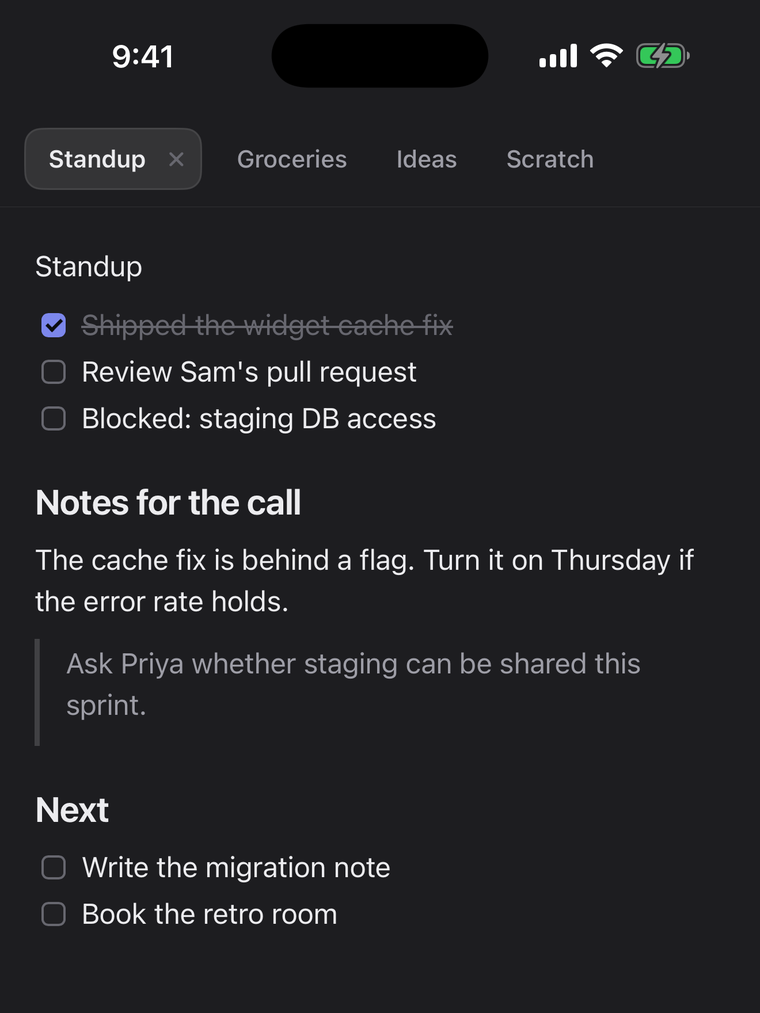
A note you write on the Mac opens on your iPhone, and a line you catch on the phone comes back to the Mac — same iCloud account, same editor. The iPhone app is included when you buy Flyout here.

Pricing
Mac + iPhone lifetime license
Launch pricing ends 30 September 2026 — the list price is $24.
No renewal fee and no card on file — new versions arrive through the built-in updater.