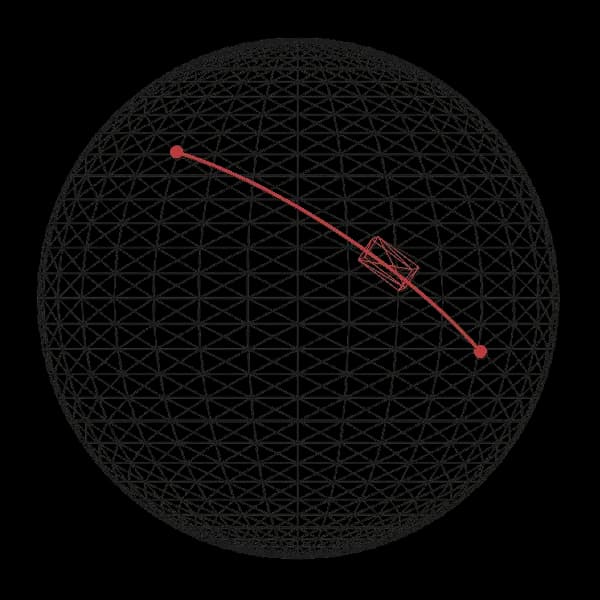
Animate a mesh across a sphere's surface
Planted:
Tended:
Status: seed
Intended Audience: Creative coders, Front-end developers
Tech: three.js, GSAP
How to animate a mesh across the surface of a sphere using three.js and GSAP.
Point on a sphere
We first need to define two positions on the surface to animate between.
A convenient way to do this is by using longitude and latitude as a coordinate system.
These values act as an intuitive UI (user interface) for selecting any point on the sphere.
We can then convert them to 3D coordinates using latLongToVector3.
function latLongToVector3({
latitude,
longitude,
center = new THREE.Vector3(...config.meshes.sphere.position),
radius = config.meshes.sphere.radius
}) {
const { sin, cos, PI } = Math;
const phi = (90 - latitude) * (PI / 180);
const theta = (longitude + 180) * (PI / 180);
const x = -radius * sin(phi) * cos(theta);
const y = radius * cos(phi);
const z = radius * sin(phi) * sin(theta);
return new THREE.Vector3(x, y, z).add(center);
}
function moveMarker({ marker, latitude, longitude }) {
const pos = latLongToVector3({ latitude, longitude });
marker.position.copy(pos);
}
Path
Next we need to create a path between the two positions.
This is done by calculating a series of points between them, using calcPathPoints.
I'm rendering a line (using createPath) only for visualizing purposes — the animation will only require the points.
function calcPathPoints({
start,
end,
center = new THREE.Vector3(...config.meshes.sphere.position),
radius = config.meshes.sphere.radius,
segments = 64
}) {
const points = [];
const startLocal = start.clone().sub(center);
const endLocal = end.clone().sub(center);
const startNorm = startLocal.normalize();
const endNorm = endLocal.normalize();
const quaternion = new THREE.Quaternion().setFromUnitVectors(
startNorm,
endNorm
);
for (let i = 0; i <= segments; i++) {
const t = i / segments;
const stepQuat = new THREE.Quaternion().slerpQuaternions(
new THREE.Quaternion(),
quaternion,
t
);
const pointLocal = startNorm
.clone()
.applyQuaternion(stepQuat)
.multiplyScalar(radius);
const pointWorld = pointLocal.add(center);
points.push(pointWorld);
}
return points;
}
function createPath({ start, end }) {
const { width, color } = config.meshes.path;
const points = calcPathPoints({ start, end });
const mesh = new Line2(
new LineGeometry().setFromPoints(points),
new LineMaterial({
color,
linewidth: width,
resolution: new THREE.Vector2(
config.viewport.width,
config.viewport.height
),
dashed: false
})
);
mesh.computeLineDistances();
return mesh;
}
Animate
Finally we add a mesh, called box, that travels along surface.
It's animated by first creating a spline using our path points.
A spline is a smooth curve that passes through or near a set of points.
Next, we use GSAP to interpolate (gradually change) a value, t, from 0 to 1.
t represents the animation's progress and what point on the spline box should be positioned at:
- ▪
t=0: start of animation and the first point on the spline. - ▪
t=0.5: middle of animation and the middle point on the spline. - ▪
t=1: end of animation and the last point on the spline.
function animateMeshAlongPath({ mesh, path, points }) {
const spline = new THREE.CatmullRomCurve3(points);
const startPoint = points[0];
const endPoint = points[points.length - 1];
const startQuat = calcMeshQuaterionAlongPath({
point: startPoint,
t: 0,
spline
});
const endQuat = calcMeshQuaterionAlongPath({ point: endPoint, t: 1, spline });
const startMatrix = new THREE.Matrix4().compose(
startPoint,
startQuat,
new THREE.Vector3(1, 1, 1)
);
const endMatrix = new THREE.Matrix4().compose(
endPoint,
endQuat,
new THREE.Vector3(1, 1, 1)
);
const interpolateMatrix = createSphereSpaceInterpolator({
startWorldMatrix: startMatrix,
endWorldMatrix: endMatrix
});
const tweenTarget = { t: 0 };
gsap.to(tweenTarget, {
t: 1,
duration: 5,
ease: "power1.inOut",
onUpdate: () => {
const t = tweenTarget.t;
const matrix = interpolateMatrix(t);
mesh.matrix.copy(matrix);
mesh.matrixAutoUpdate = false;
},
repeat: -1,
yoyo: true
});
}
Mesh rotation
In addition to moving the mesh, we need to rotate it so it:
- ▪ faces forward along the spline (make the +Z axis point in the direction of movement) and
- ▪ sits upright on the surface of the sphere (make the +Y axis points away from the sphere's center).
calcMeshQuaterionAlongPath returns the correct orientation at any point along the path.
function calcMeshQuaterionAlongPath({
spline,
point,
t,
sphereCenter = new THREE.Vector3(...config.meshes.sphere.position)
}) {
const forward = spline.getTangent(t).normalize();
const up = point.clone().sub(sphereCenter).normalize();
const right = new THREE.Vector3().crossVectors(up, forward).normalize();
const correctedForward = new THREE.Vector3()
.crossVectors(right, up)
.normalize();
const rotationMatrix = new THREE.Matrix4().makeBasis(
right,
up,
correctedForward
);
return new THREE.Quaternion().setFromRotationMatrix(rotationMatrix);
}
matrix4 transformation
A Matrix4 transformation is a mathematical representation of an object's position, rotation, and scale in 3D space.
animateMeshAlongPath calculates the mesh's matrix at the start and end of the path.
It then uses createSphereSpaceInterpolator to interpolate between these two.
At any point along the path, it returns a matrix, which, when applied to the mesh, positions it on the path and orients it to face the right direction.
function createSphereSpaceInterpolator({
startWorldMatrix,
endWorldMatrix,
sphereCenter = new THREE.Vector3(...config.meshes.sphere.position)
}) {
const startPos = new THREE.Vector3()
.setFromMatrixPosition(startWorldMatrix)
.sub(sphereCenter);
const endPos = new THREE.Vector3()
.setFromMatrixPosition(endWorldMatrix)
.sub(sphereCenter);
const startQuat = new THREE.Quaternion().setFromRotationMatrix(
startWorldMatrix
);
const endQuat = new THREE.Quaternion().setFromRotationMatrix(endWorldMatrix);
const arcQuat = new THREE.Quaternion().setFromUnitVectors(
startPos.clone().normalize(),
endPos.clone().normalize()
);
return (t) => {
const stepQuat = new THREE.Quaternion().slerpQuaternions(
new THREE.Quaternion(),
arcQuat,
t
);
const interpPos = startPos
.clone()
.applyQuaternion(stepQuat)
.add(sphereCenter);
const interpQuat = new THREE.Quaternion().slerpQuaternions(
startQuat,
endQuat,
t
);
return new THREE.Matrix4().compose(
interpPos,
interpQuat,
new THREE.Vector3(1, 1, 1)
);
};
}
Geometry origin
By default, a mesh's origin (pivot point) is at (0, 0, 0) in local space, which is usually the center of its geometry.
As a result, when box moves along the path, it passes through the surface of the sphere instead of resting on top of it.
To fix this, we shift box's geometry up so the bottom aligns with the mesh's local y = 0 position.
function setOriginYBottom(geometry) {
geometry.computeBoundingBox();
const yOffset = -geometry.boundingBox.min.y;
geometry.translate(0, yOffset, 0);
}
Feedback
Have any feedback about this note or just want to comment on the state of the economy?
Where to next?
YOU ARE HERE
