Sync cards between boards and workspaces in just a few clicks!

Trusted by teams around the world:
What is a mirrored card?
A mirror card is a Trello card that is connected to other Trello cards! Any changes to one card are automatically copied to the others. Change the due date on one mirror card? All the connected cards will have their due date in sync as well.
Mirror cards enable new kinds of workflows for Trello users. You can share only part of your board with others, you can let team members have their own private boards, and more! The GIF at the top of this page has an example of two synced cards in action.
Our mirror card functionality for Trello is offered as a plugin on the Trello app store (in Trello, apps and plugins are called “powerups”). You can read our listing on the Trello marketplace here.
Our powerup is easy to use:

Step 1: Add the “2-Way Card Mirror and Card Sync” powerup to your Trello board. Here’s a direct link to add it.
Step 2: Authorize the card mirror powerup by clicking on any card and following the instructions.


Step 3: Click the card that you want to create a mirror card from. This is the card that will be duplicated and mirrored over time.
Step 4: Select the target board & list where the new mirror card will be created. That new card will be synchronized with the current card you’re on.


Step 5: That’s it! You now have 2 mirror cards: the original card and the new card on the target board and list. Any edits to one card will be synced to the other card.
Everything on a card is synced:
- Card members
- Labels
- Custom fields
- Checklists
- Attachments
- Comments
- Card dates
- …Everything!
What can you do with card mirrors?
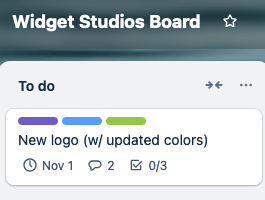
Create individual boards for each team member
With the FullZinc powerup, you can create mirror cards from a “master” board and send them to each team member’s individual board, letting you see everything in one place.

Share cards with external collaborators
Use the FullZinc card sync powerup to create mirrors of specific cards and share them to an external board, all while still hiding the original source board.

Keep an overview of all the cards in your workspace
Create card mirrors from each individual board you own to a central “master” board where you can see everything at once & update in one go.
Interested? Try the card mirror & sync powerup!
Save your team hours of time:
Your first FIVE mirror cards are free, no credit card required!
Starter
$15/mo
- 30 mirror cards
- Full card sync
- Includes 5 free mirrors
Business
$49/mo
- 150 mirror cards
- Full card sync
- Includes 5 free mirrors
Enterprise
$129/mo
- 300 mirror cards
- Full card sync
- Includes 5 free mirrors
Questions? Email us at support@fullzinc.com