Latest News
 FreeFileSync 14.6 has been released!
Download the new FreeFileSync version 14.6 from the official homepage:
 https://freefilesync.org/
Latest changes:
- Write sync statistics to stdout as JSON for .ffs_batch
- Removed precompiled 32-bit bundle (Linux)
- Avoid redundant window centering before finishing layout
- GTK3-based build (Linux)
- Dark mode support with GTK3 (Linux)
- Stream errors to stderr instead of stdout (Linux)
- Installer supports dark mode (Windows)
- Added "New Window" dock menu item (macOS)
Reselling FreeFileSync [Business]
FreeFileSync [Business] now supports reselling. It is possible to specify a different end user as the licensee, separate from the purchasing company.
To purchase a license as a reseller, go to:
 https://freefilesync.org/business
Then click the "Reseller" checkbox. This will reveal an "End customer" input field:
![FreeFileSync [Business] checkout form](https://freefilesync.org/images/resale.png)
As a reseller, you will receive an email containing the invoice and two URLs:
1. Customer URL – to be forwarded to your end customer. It contains the software download links.
2. Reseller URL – for your use only. This allows you to manage license extensions or purchase additional device licenses in the future. Do not share this link with your customer.
Note: At this time, company-specific payment terms are not offered. The standard self-service licensing model applies to all business users.
FreeFileSync [Business] License Extension
Device licenses for the FreeFileSync Business Edition can now be extended and the number of devices increased or decreased as needed.
To do this press the "Extend" button on the device overview page (reachable by the link that was sent via email) and follow the instructions.
The device extension pricing will consider your previous purchases and automatically apply a rebate to account for any remaining update period.
https://freefilesync.org/business
FreeFileSync [Business] Edition
While FreeFileSync is free to use, its target audience are private individuals who would use the software at home.
This changes with FreeFileSync 13: Businesses are now also allowed to use FreeFileSync commercially, by licensing the FreeFileSync [Business] Edition.
For more info about how this works go to:
https://freefilesync.org/business
New Sync Concept and Multi-File-Rename
FreeFileSync 13 generalizes the way sync directions are set up:
Previously they were based on the "differences" found after comparison: left only, right only, left newer, right newer.
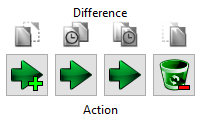
In addition to "differences" it is now possible to set sync directions based on "changes":
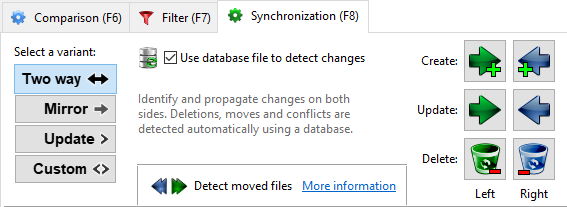
Before FreeFileSync 13,
the "Update" synchronization variant wasn't as fundamental and useful as the other two, "Two way", and "Mirror".
Since "Update" was making decisions
based on "differences", it was unable to distinguish whether
a new file was created on the source, or if an old file was deleted on the target.
These two cases, however, should get different treatment!
The most common "Update" case is
copying photos from a smartphone to some backup location. When photos on the smartphone
are deleted, they should not also be deleted on the backup drive:
The user is making free space for new photos.
On the other hand, deleting photos from the backup, should not get
them copied over again during the next sync: The user is cleaning up unwanted photos.
Unfortunately this is exactly what the old differences-based "Update" did.
Additionally, when a file on the source side was renamed,
this change couldn't be detected without a database, and
a duplicate file was copied to the backup location instead of renaming the existing one.
The solution: The new "Update" variant will determine sync directions based on "changes" compared to the last sync, in the exact same way that "Two way" operates: by using a database file.
But FreeFileSync doesn't stop there. Specific decisions can be made for each individual change
(create, update, delete) similarly to how it is possible with the "differences" categories.
All three, "Two way", "Mirror", and "Update" can be expressed in these new terms.
One might be tempted to go further and assume "changes" is the more
fundamental concept, and get rid of the old "differences" categories altogether.
If it wasn't for the requirement of sync.ffs_db files:
"Mirror" can be expressed both via "differences" and via "changes",
but doesn't need a database file in the first case.
"Mirror without database" is a frequent requirement and kept as the default.
Therefore FreeFileSync now supports two fundamentally different ways to set up sync directions. The "changes"-based settings have always been hidden inside "Two way" but are now exposed. This opens up for new possibilities (like a proper "Update"), and hopefully other kinds of sync scenarios, that are not immediately obvious (e.g. a "changes"-based "mirror" that "does nothing" if the changes are occurring on the target side? That's not quite the "conflict" that some users would like to see, but better than nothing).
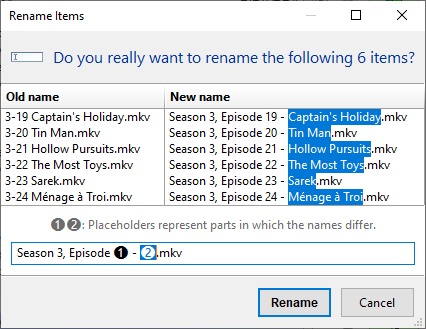
FreeFileSync 13 supports manual file renaming for multiple files at once!
Most file renaming tools are complex beasts, overflowing with options.
FreeFileSync's renaming tool strips the complexity down to its core:
All file names can be changed via a simple text input field.
The file name differences are represented as blocks
that can be copied or moved, while the commonalities are shown as editable text.
The result is a straight-forward and intuitive way to handle multi-file renames:
FreeFileSync with support for multi file renaming and the enhanced sync concept can be obtained via the official website: https://freefilesync.org
Email notifications
With FreeFileSync version 10.20 donors to the project can now
get their synchronization logs sent to them
as a nicely-formatted email  .
.
This is implemented by integrating professional transactional
email services (Mailgun, Amazon) which means that no complicated
configuration is needed, e.g. for an SMTP server login.
Just enter your email address in the synchronization settings and
be done.
The FreeFileSync Donation Edition with support for email notifications can be obtained via the official website: https://freefilesync.org
Synchronize files with Google Drive
FreeFileSync version 10.8 adds support for
 Google Drive
as a new option to synchronize cloud storage besides
SFTP and FTP.
Google Drive
as a new option to synchronize cloud storage besides
SFTP and FTP.
FreeFileSync directly accesses the files online, without the need to install additional synchronization software such as Google Backup & Sync.
This saves the hard drive space that is usually needed for a full local copy of all Google Drive files, and enables further performance improvements with
FreeFileSync's ability to copy multiple files in parallel.
The result of directory listings is buffered by FreeFileSync, which allows for future accesses to complete instantaneously. Changes that happen outside of FreeFileSync are synchronized automatically by only transferring the small delta of differences.
Google generously has granted high quotas for FreeFileSync's users, so even the most-demanding sync scenarios are covered.
FreeFileSync with Google Drive support can be downloaded from the official website: https://freefilesync.org
Parallel file copy and ad-free installer
FreeFileSync version 10 has added support for copying multiple files in parallel. It is now possible to specify the number of parallel file operations for each device inside the settings. During synchronization FreeFileSync will then spawn several tasks accordingly instead of processing only one file after another.
This new design offers huge performance improvements for all scenarios that are dominated by latency, like synchronization against network shares or cloud devices including SFTP and FTP(S). The idle time after issuing each file I/O request while waiting for the network response is not the limiting factor anymore: The number of parallel operations can be set as high as needed until the bandwidth is saturated and the network card is operating at full speed.
The new parallel file operations architecture is not limited to the synchronization step, but used throughout the application. Folder comparison will issue multiple requests at a time even when traversing only a single folder, by dynamically managing the workload while recursively reading the folder tree. Binary-comparison also processes all files in parallel.
The FreeFileSync installer is now ad-free! Before version 10, FreeFileSync had shown a single advertisement during installation to help fund the project. Beginning with version 10, the project is fully relying on donations from users to finance its ongoing expenses in software development and support. A huge thanks to everyone who is contributing to make this possible!
– Zenju [project lead] –
Official website: https://freefilesync.org
FreeFileSync Video Tutorials available
FreeFileSync.org has released video tutorials that help you get up to speed quickly with the most important synchronization scenarios:
https://freefilesync.org/tutorials.php
- Mirror Synchronization
- Two Way Synchronization
- Folder Comparison
- External Applications
- Batch Jobs
- Task Scheduling
- RealTimeSync
- Tips and Tricks
FreeFileSync adds Support for FTP and FTPS
Cross-Platform File and Folder Synchronization Software adds Support for FTP and FTPS
FreeFileSync (https://freefilesync.org) has released version 9.1 of its free open source file synchronization utility for Windows, Linux, and macOS.
The new version supports synchronization via FTP (File Transfer Protocol) and the encrypted variant FTPS (SSL/TLS). This further enhances FreeFileSync's capabilities to not only work with local drives and network shares but also synchronize mobile and cloud storage.
FreeFileSync eliminates the tedious and error-prone task of manually identifying files that have changed on the source folder and copying them to the target folder, no matter what protocol is used to access files. Users can set up mirror, two-way, or custom synchronization rules, and then create batch jobs that run the sync without requiring manual interaction. Batch jobs can be started with a simple mouse double-click or triggered automatically by a task scheduler.
FreeFileSync detects moved files and reproduces the move on the target drive. This avoids time consuming file copy and delete operations and instead completes the task with a single hard drive access. This even works in mirror synchronization scenarios where the target file system does not support file IDs (e.g. FTP/SFTP) or has unstable file IDs (e.g. FAT).
FreeFileSync includes features that are normally found only in the premium versions of commercial applications. It can copy locked files using the Volume Shadow Copy Service, compare file content in binary mode, handle symbolic links and run real two-way synchronizations including detecting conflicts and propagating deletions. FreeFileSync fully supports long file paths with more than 260 characters, copies NTFS extended attributes, security permissions and alternate data streams. The application takes advantage of 64-bit and multiple CPU cores if available and is fully Unicode compatible.
FreeFileSync supports MTP (Media Transfer Protocol), making it easy for users to synchronize files and folders between their PCs and their iPad, iPhone, Android smartphone, tablet, digital camera, digital audio players, or other MTP devices. The tool is fully integrated with Windows Explorer and allows users to jump to their MTP files in Explorer, open them directly with their default application, or to drag and drop MTP folders from Explorer into FreeFileSync. FreeFileSync supports FTP, FTPS, SFTP, enabling web developers to publish changes to their local website copy by running a FreeFileSync batch job - with only a double-click of the mouse.
The software has been optimized for usability and performance. It can scan a hard drive with hundreds of thousands of files in a few seconds, while scanning multiple folders in parallel. The synchronization steps are laid out in the optimal order that minimizes peaks in disk space consumption and FreeFileSync's fail-safe file copy algorithm prevents data corruption when the synchronization process is terminated unexpectedly, e.g. due to power loss. Graphs and detailed messages give relevant feedback and provide structure on multiple visual and textual levels: getting an overview of a hard drive's space distribution can be quickly accomplished by navigating a directory tree showing file count and sizes below each node.
Pricing and Availability
FreeFileSync is available without cost. FreeFileSync runs on Windows XP/Vista/7/8/8.1/10, Mac OS X 10.8 and newer, and all major distributions of Linux.
Links
Official website: https://freefilesync.org
Download: https://freefilesync.org/download.php
Contact Information
Contact person: Zenju
Company: FreeFileSync.org
Email: press [AT] freefilesync [DOT] org
# # #
 Subscribe for latest FreeFileSync News