Preface
It is no secret that in recent years, various companies have quite often decided to migrate a working information system from Firebird to PostgreSQL.
A typical situation looks like this:
The project has been running for several years. The customer believes that the problems of the project (every software has some problems) are caused by DBMS. Firebird is a "bad" DBMS.
Instead of
-
engaging external companies as consultants
-
training and certifying your own employees
-
improving their professional level
it is much easier to convince yourself that the root cause of the problems is Firebird, and decide to migrate to another DBMS.
This problem is not related to a specific DBMS and is purely management.
Don’t believe me? The highlighted line (Firebird is a "bad" DBMS.) is a verbatim quote from one of the talks devoted to PostgreSQL DBMS, with one change - in the original, PostgreSQL was written instead of Firebird.
The situation is made worse because decision-makers often don’t understand the problems and difficulties of this process.
This decision will cause serious problems for the company’s IT system. Normally, people follow the simple rule "if something works well, leave it alone." This rule would have stopped such big changes. But instead, people believed in the false idea of a "silver bullet" - one perfect solution that can magically fix everything.
Who should read this article
This document is for technical managers and CTOs who are responsible for database migration projects. Migration projects create serious risks for technical leaders because they often get blamed when costs go much higher than planned (sometimes 2-3 times more expensive), when projects take much longer than expected, and when the final results do not work as well as promised. Technical leaders should know that migration projects often fail, and project managers usually get held responsible when budgets grow too large, schedules run too late, and the new system does not perform as well as the old one.
Remember that migration difficulty depends on how complex your database is and how much you use special Firebird features. The time and money needed for migration changes based on several things: how much code your project has and how good that code is, how big your database is, whether you need to make the system faster, and other issues that come up during the work.
This article does not blame PostgreSQL! It is about migration and its consequences
PostgreSQL is a wonderful database system with many useful features, but it is different, and your system behavior will change right after migration, and at first - it will get worse.
When you move from Firebird to PostgreSQL, you will not get any benefits from PostgreSQL features that Firebird does not have during the migration, but you will definitely have problems from missing Firebird features or features that work differently in PostgreSQL.
Queries that work well in Firebird with the same data will not work well in PostgreSQL. The opposite is also true, but when moving from Firebird to PostgreSQL, you will first experience the problems from the first part of this statement.
Let’s look quickly at what problems you can face during this migration.
1. Differences in MVCC implementation
Probably the most unpleasant and unexpected thing for those who are used to Firebird, or rather to the way Firebird implements data versioning.
Although it would be more correct to talk about the specific implementation of MVCC in PostgreSQL: here the version control mechanism is fundamentally different from Firebird, MS SQL, ORACLE.
In short, the classic approach to implementing MVCC is to implement some “optimistic” algorithm, which assumes that transactions will complete successfully, and old versions will not be used. Therefore, the new version of the record is written over the old one, and either the delta or the entire old record is written to the undo log, so that the old version can be pulled out when needed, which should rarely occur. That is, the conventional classic implementation of MVCC is to store diffs and resurrect the old version of the data by subtracting diffs from the current/last version. It is how it works in Firebird.
It’s not that the PostgreSQL implementation of MVCC is bad — it’s just fundamentally different. The idea here is "copy-on-write", which creates record versions (complete copies of records with system information) very quickly and in large numbers.
The implementation of MVCC in PostgreSQL does not imply updating a record at all; if an update is necessary, deletion and insertion are performed.
Each version of a record in PostgreSQL (tuple) is a complete copy of the record with some service fields.
For example: the XMIN field — it contains the Id of the transaction that created the record, which allows you to understand which transactions are supposed to see this record. Or the XMAX field — it contains the Id of the transaction that deleted the record.
What happens when you update a record:
First, we fill in the XMAX field in the current version of the record - where we write the Id of the updating transaction, then we create a new row, in which we write the Id of the updating transaction in XMIN. And a link to the new one is added to the old version of the record.
That is, in implementation - literally - DELETE AND INSERT.
When you update one column of one row, the entire row is copied to the new version, probably on a new page. (PostgreSQL will try to place the new version onto the same page where the old one was, but this is far from always possible), and the old row is also changed with a pointer to the new version. Index records follow the same pattern: since there is a completely new copy, all indexes must be updated to point to the new page location. All indexes - even those that are not related to the column being changed, are updated only because the entire row is moved.
Later, an operation to clean up old tuples (VACUUM) will be required. Another consequence of this approach is a large volume of WAL generation (Redo log), because many blocks are affected when a tuple is moved to another location.
The consequence is a higher disk load when performing updates, higher intensity during replication.
Perhaps the reason for the difference in the implementation of MVCC is that PostgreSQL began and developed as an academic project, so the implementation of MVCC is honestly academic. In other systems, the implementation at the time of creation was focused on efficiency, especially since the performance of computers at that time was significantly lower than now.
Here you need to change your mind. After working with Firebird, you expect that updating a record costs much less than "delete and insert", but remember the old saying: "reality has a way of crushing expectations", and PostgreSQL follows its own rules, not yours.
To illustrate all of the above, using tests, we will create a table of the following structure:
DAT Test Table (Syntax shortened for readability)
-- fields
CREATE TABLE DAT (
    ID BIGINT NOT NULL,
    I1..I8 BIGINT,
    N1..N8 DOUBLE PRECISION,
    D1..D8 TIMESTAMP,
    S1..S8 VARCHAR(100),
    T1..T8 VARCHAR(1000)
);

PK$DAT PRIMARY KEY (ID);

-- indices
X_I1 ON DAT (I1); X_I23 ON DAT (I2, I3); X_I456 ON DAT (I4, I5, I6);
X_N1 ON DAT (N1); X_N23 ON DAT (N2, N3); X_N456 ON DAT (N4, N5, N6);
X_D1 ON DAT (D1); X_D23 ON DAT (D2, D3); X_D456 ON DAT (D4, D5, D6);
X_S1 ON DAT (S1); X_S23 ON DAT (S2, S3); X_S456 ON DAT (S4, S5, S6);
X_F1 ON DAT (F1); X_F23 ON DAT (F2, F3); X_F456 ON DAT (F4, F5, F6);
X_T1 ON DAT (T1);
The table contains 10 million records, the first field of the group is always filled, the remaining fields of the group (No. 2-No. 8) are filled with NULL with 50% probability.
The data table is identical in Firebird 5.0.2 and PostgreSQL 17.4 databases.
The database servers are running on Linux Mint 22.1 (SSD, 32Gb RAM).
Basic configuration of the database servers has been performed.
1.1. Test 1
When updating an indexed table field in Firebird, only those indexes that are built on this field should be rebuilt; when updating in PostgreSQL, all indexes should be rebuilt, regardless of whether the UPDATE query updates the fields on which these indexes are built or not.
Let’s check this:
| 10 million records updated | Firebird 5 | PostgreSQL 17 |
|---|---|---|
|
by non-indexed field |
5 minutes 3 seconds |
1 hour 27 minutes 23 seconds |
|
by indexed field |
8 minutes 16 seconds |
1 hour 27 minutes 42 seconds |
|
by group of indexed fields |
23 minutes 16 seconds |
1 hour 26 minutes 29 seconds |
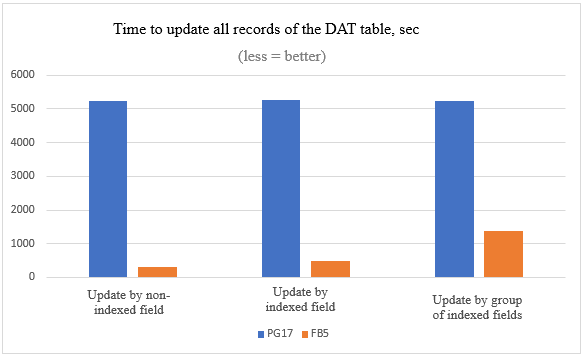
We see that the practical results fully correlate with the theoretical part: The update time in PostgreSQL does not depend on how many fields we update and whether they are indexed, in Firebird it does.
The difference in the execution time of such mass updates in Firebird and PostgreSQL is very significant.
1.2. Test 2
Let’s also compare the speed of inserting and deleting records:
Deleting 1 million records out of 10 million
delete from dat where id between 3000000 and 3999999| Firebird 5.0.2 | PostgreSQL 17.4 |
|---|---|
|
2.4 seconds |
2.2 seconds |
The average data for a series of 50 measurements are presented; the difference is expectedly insignificant.
INSERT 1 million records
insert into dat (id, i1, i2, i3, i4, i5, i6, i7, i8, f1, f2, f3, f4, f5, f6, f7, f8, n1, n2, n3, n4, n5, n6, n7, n8, d1, d2, d3, d4, d5, d6, d7, d8, s1, s2, s3, s4, s5, s6, s7, s8, t1, t2, t3, t4, t5, t6, t7, t8)
select id+10000000, i1, i2, i3, i4, i5, i6, i7, i8, f1, f2, f3, f4, f5, f6, f7, f8, n1, n2, n3, n4, n5, n6, n7, n8, d1, d2, d3, d4, d5, d6, d7, d8, s1, s2, s3, s4, s5, s6, s7, s8, t1, t2, t3, t4, t5, t6, t7, t8 from dat where id between 1000000 and 1999999| Firebird 5.0.2 | PostgreSQL 17.4 |
|---|---|
|
10 minutes 36 seconds |
4 minutes 38 seconds |
Here the result is noticeably better for PostgreSQL.
Conclusion: You need to analyze your information system in order to identify data processing patterns with similar functionality before migration, decide whether they are needed, whether they can be replaced somehow or completely abandoned.
Additionally, you need to consider that in PostgreSQL you will start using twice as much disk space for some time after such an update and before garbage collection, which in Firebird will also have a much smaller negative effect — after all, the space required to create a delta when updating a specific field is significantly less than to create a full copy of a record.
2. SUSPEND and RETURN NEXT
Working with Firebird, we are accustomed to the fact that when executing a procedure that returns a very large number of rows to a client application, the Firebird server will give this client application some portion of this data and stop until it receives a command from the client application about the need to issue a new portion. Support for such behavior is explicitly implemented in the code of the client and server parts of Firebird. In stored procedures, this behavior is supported using the SUSPEND operator.
In PostgreSQL, this is not the case
The current implementation of
RETURN NEXTandRETURN QUERYstores the entire result set before returning from the function, as discussed above. That means that if a PL/pgSQL function produces a very large result set, performance might be poor: data will be written to disk to avoid memory exhaustion, but the function itself will not return until the entire result set has been generated. A future version of PL/pgSQL might allow users to define set-returning functions that do not have this limitation. Currently, the point at which data begins being written to disk is controlled by the work_mem configuration variable. Administrators who have sufficient memory to store larger result sets in memory should consider increasing this parameter.
Be prepared for the fact that if your system has procedures that are not currently fully fetched according to the business logic of the application, then after migration to PostgreSQL — they will begin. This can lead to degradation of system performance.
3. Using Autonomous Transactions
The main (but not the only) area of use of autonomous transactions is auditing that cannot be rolled back.
Here is an example of using an autonomous transaction for Firebird in a trigger on a database connection event to log all connection attempts, including unsuccessful ones (Taken from the source Firebird 5.0 SQL Language Reference).
CREATE TRIGGER TR_CONNECT ON CONNECT AS
BEGIN
  -- All attempts to connect to the database are saved in the log
  IN AUTONOMOUS TRANSACTION DO
    INSERT INTO LOG(MSG) VALUES ('USER ' || CURRENT_USER || ' CONNECTS.');
  IF (CURRENT_USER IN (SELECT USERNAME FROM BLOCKED_USERS)) THEN
  BEGIN
    -- save in the log that the attempt to connect to the database was unsuccessful
    IN AUTONOMOUS TRANSACTION DO
    BEGIN
      INSERT INTO LOG(MSG) VALUES ('USER ' || CURRENT_USER || ' REFUSED.');
      POST_EVENT 'CONNECTION ATTEMPT' || ' BY BLOCKED USER!';
    END
    -- now throw an exception
    EXCEPTION EX_BADUSER;
  END
END
Vanilla PostgreSQL doesn’t have autonomous transactions at all. They can be simulated by starting a new connection using dblink or pg_background, but this results in overhead, affects performance, and is simply inconvenient, but it is doable. Here is an example of implementing some logging function using the dblink extension:
CREATE FUNCTION log_dblink(msg text) RETURNS void LANGUAGE sql
AS $function$
  select dblink('host=/var/run/postgresql port=5432 user=postgres dbname=postgres',
                format('insert into log select %L, %L', msg, clock_timestamp()::text))
$function$
Only Postgres Pro (commercial version of PostgreSQL), Enterprise Edition (not even Standard!) has full support for autonomous transactions with execution of an autonomous transaction within the same server process.
Only the last solution avoids performance degradation, because it is the only approach that executes an autonomous transaction within the same server process.
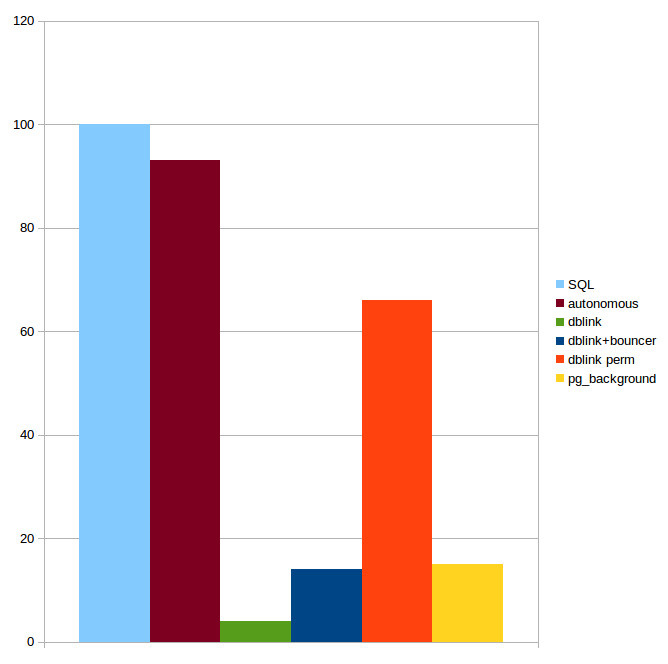
The diagram shows the performance of a regular SQL query (corresponds to 100% on the diagram), a query in an autonomous transaction of the Postgres Pro Enterprise version and using various extensions (From the Postgres Pro materials).
If you actively use autonomous transactions in your Firebird project for auditing, take this into account.
4. Limited functionality of anonymous PSQL block in PostgreSQL
— PostgreSQL documentation [(44.4. Anonymous Code Blocks)]
Of course, the problem with input parameters can be somehow solved using some macros and replacing them with values before executing the function, the resulting set can be inserted into temporary or unlogged tables, but firstly, this is inconvenient, and secondly, it requires significant changes to the code and logic of the function.
EXECUTE BLOCK from Firebird does not have such restrictions, here is an example of this syntactic construction, calculating the geometric mean of two numbers and returning it to the user:
EXECUTE BLOCK(x DOUBLE PRECISION=?, y DOUBLE PRECISION=?)
RETURNS (gmean DOUBLE PRECISION)
AS
BEGIN
  gmean = sqrt(x*y);
  SUSPEND;
END
As you can see, the stored procedure can be executed via this construct with minimal modifications to the source code. If the EXECUTE BLOCK syntax construct is used quite frequently in your system, then reworking all such code during migration may become a problem.
5. Processes and Threads
PostgreSQL creates one new process (not thread) for each connection. Without proper tuning and a suitable server, unplanned bursts of usage can quickly overload the database.
PostgreSQL has used the process model since the beginning of the project due to its simplicity, and there have been ongoing discussions about switching to threads.
The current model has a number of drawbacks: statically allocated shared memory does not allow for on-the-fly resizing of structures such as the buffer cache; parallel algorithms are difficult to implement and less efficient than they could be; sessions are tightly bound to processes. Using threads looks promising, although it is fraught with difficulties in isolation, compatibility with operating systems, resource management. Not to mention the fact that the transition would require radical changes in the code and years of work. So far, the conservative view is winning, and no changes are expected in the near future.
The Linux implementation of multitasking is much more conducive to this behavior, and is probably the main reason why PostgreSQL experts recommend, strongly recommend, force using PostgreSQL on Linux. Postgres Pro (commercial distribution), for example, has completely abandoned Windows support in recent versions.
Firebird is not particularly sensitive to a large number of inactive connections, based on my own many years of experience in operating an information system under Firebird (and in the Classic Server architecture, which is closest to the PostgreSQL architecture), I can say that neither 500, nor 1000, nor 1500 open connections caused any noticeable performance problems. The Classic architecture is precisely “process”. The architectures that provide work with streams in Firebird are SuperClassic and SuperServer (this architecture is recommended in modern Firebird versions).
Changing the operating system under which your DBMS operates means replacing or retraining your staff, so if your Firebird server is currently running Windows, it is important to plan this in advance.
If you are a manufacturer of distributed software, your customers will have to make a similar transition, and they are unlikely to be thrilled about it.
Also note that regardless of the operating system, PostgreSQL "does not like" a large number of simultaneously open connections. Hence the separate pgbouncer package (strongly recommended for use) for managing the connection pool and the default value of the max_connections=100 parameter.
However, when using pgbouncer or similar connection poolers, connection-level context variables will not work properly, which may require major changes to your solutions that depend on this feature. For example, in Firebird you can set a connection variable with the current user’s ID, which lets you avoid passing the user parameter to every procedure, but in PostgreSQL you will need to use a different approach.
It will also become impossible to use temporary connection-level tables.
6. Transaction counter
The PostgreSQL kernel has a 32-bit transaction counter, which means it can’t count more than 4 billion. This leads to problems that are solved by "freezing" - a special routine maintenance procedure called VACUUM FREEZE
This is an aggressive "freezing" of tuples. It should be run from time to time for all records located far in the past, and set a flag that this record is “frozen”, that is, visible to all transactions and has a special FrozenTransactionId (minus infinity).
The system understands that this row was created a long time ago and the transaction number that created it no longer matters. This means that this transaction number can be reused. Frozen transaction numbers can be reused.
However, if the counter overflows too often, or if frozen transactions prevent the freeze from being performed in a timely manner, the costs of this procedure are very high and may even result in the impossibility of writing anything to the database.
However, if you can afford to stop your DB cluster at any time, start it in single-user mode to execute the VACUUM FREEZE command and wait a few hours, then this problem does not concern you.
64-bit transaction counters are a fundamental reworking of the DBMS kernel, and are also needed only for heavily loaded systems, but for them it is not just desirable. It is necessary.
This is why ALL commercial versions of PostgreSQL now implement a 64-bit transaction counter.
The most famous and successful implementation is from Postgres Pro, who were the first in the world to offer a solution.
There are 4 reasons why this solution is not in the vanilla version:
-
Refactoring a large amount of code — all other PostgreSQL code expects the counter to be a 32-bit number
-
Each row version has a header. If the counter is 64 bits, there will be too much service information for each row version.
-
Making such a change will require reworking many PostgreSQL extensions, which must understand that the transaction number is now 64-bit
-
“Inertia” of the community. The Postgres Professional solution was rejected by the community due to its size and complexity. The current status is mysterious… “Returned with feedback”.
As for Firebird, when the transaction counter is “exhausted”, a full DB maintenance will be required, but transaction counters in Firebird since version 3.0 (released in 2016) are 48-bit and the problem described is more theoretical than related to real life.
7. Working with storage systems
The data storage systems (aka SAN) market shows steady growth, where the main investments are observed from the corporate segment. Digital transformation programs and new online services require constant infrastructure upgrades, which increases the demand for high-performance systems.
If your system has queries that must be executed very quickly (tens of milliseconds), but very often, then you will face a noticeable increase in the total execution time of such queries after migration if the database is located on the SDS.
The reason is that the PostgreSQL database can contain hundreds of thousands of files, and for each file, when transferring information between the server and the SAN, additional costs will arise for transferring data about the file name, service information, etc.
Very roughly, this can be compared to the situation when you copy one 10 GB file over the network or 1000 files of 10 MB. I hope everyone knows the time difference between these operations.
You can read more about this situation here.
8. Backup differences
In PostgreSQL, backups work completely differently than in other databases — so differently that it requires a complete mental shift and abandoning everything you learned about backups from working with other database systems.
8.1. Gbak & pg_dump
There is an analogue of gbak for full backup in PostgreSQL: pg_dump/pg_restore, and here everything seems to be approximately the same:
-
Backup of one database
-
You can select the required tables
-
Multi-threaded (in PostgreSQL — with restrictions on the format of the output file)
-
no increment
-
Possibility of obtaining a compressed copy
Getting a backup copy using the example of a database with a DAT table:
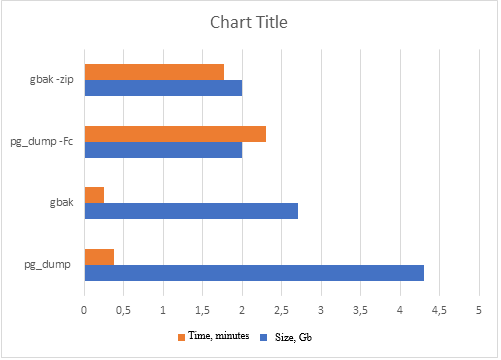
But pg_dump is not suitable for creating real-time backups of large databases, as it may require significant resources and execution time, which may negatively affect system performance. With gbak, such a problem has not been observed since Firebird 2.5.
8.2. Nbackup & pg_basebackup
To create real-time backups, Firebird has nbackup, and PostgreSQL has pg_basebackup
And here, everything is really different:
pg_basebackup always dumps the entire cluster, when restoring one database, your entire PostgreSQL cluster will be restored, which will contain only one database. The files of all your other databases will be zero size.
Disadvantages: limited capabilities when working in multi-threaded mode, limited in creating incremental backups, less flexibility compared to pg_dump in choosing individual objects for backup, low copy speed.
pg_probackup from Postgres Professional has many advantages compared to pg_basebackup, but most of them are in the commercial version of this utility.
In fact, it is quite typical — who would think of writing a commercial version of Firebird nbackup? It works perfectly!
To make fast and reliable backups in PostgreSQL, you need to understand the main thing: the term “database” in PostgreSQL backup is a deception. Call it whatever you like, but work only with a cluster. Split large databases into separate clusters on other ports. Believe me, it’s a lesser evil (if you take into account memory consumption) than keeping all “bases” in one cluster.
Even cold backup\restore is not that simple, and online backup\restore via pg_basebackup is even more difficult, since it is essentially raising a replica.
Nbackup in Firebird is simpler, more understandable and most importantly — more convenient.
9. Code migration issues involving temporary tables
There is a problem in PostgreSQL that we encounter quite often. Unfortunately, the implementation of temporary table logic in it has a number of shortcomings that negatively affect the system’s performance.
This fact is well known, as is the fact that the question “We used temporary tables in the <SOME> SQL database, and there were no problems. Why does this happen in PostgreSQL?” is quite common in forums.
-
Active creation, modification and deletion of temporary tables (including work with indexes) can lead to significant performance degradation
-
AUTOVACUUM does not see temporary tables — the corresponding cleaning and analysis operations must be performed manually
-
A typical pattern of working with temporary tables leads to an overflow of the OS cache with garbage
-
pg_class (and other system tables) grow during operation
-
Prohibition of writing to temporary tables in a ReadOnly replica (when building reports)
Considering the widespread use of temporary tables in modern solutions, this can become a problem.
Possible solutions:
-
Placing temporary tables on a RAM disk
-
Using unlogged (UNLOGGED) tables instead of temporary ones
-
Use commercial versions of PostgreSQL, where the mechanism of temporary tables has been significantly redesigned
-
Limit/avoid usage of temporary tables in your applications
In Firebird:
-
Temporary tables are created outside the database in temporary files
-
Forced Writes mode is always OFF for them
-
They are cleaned up instantly
There are no problems with working with temporary tables, which means that during system migration there may be difficulties caused by the above-mentioned specifics of PostgreSQL. Be careful!
We note once again that if `pg_bouncer` is used, then the code that previously used connection-level GTT may stop working.
10. Query optimizer behavior
PostgreSQL has a relatively simple, but fast query planning algorithm. However, this algorithm has one big problem. It builds a plan, and then sticks to it, even if it turns out to be wrong. In the worst case, a situation may arise when PostgreSQL expects 1-2 records in intermediate calculations, but in fact there are thousands of times more. As a result, executing a Nested Loop leads to enormous complexity of the algorithm, which leads to a process hang with a large CPU load. Unfortunately, by default, vanilla PostgreSQL does not have the ability to specify hints, as in some other DBMS.
For the sake of objectivity, we will point out the existence of special extensions to solve this problem — for example, pg_hint_plan.
The argument is that “you need to write correct queries, not correct them”. Well, you may have to rewrite such problematic queries as “correct” from the point of view of the PostgreSQL planner during migration.
Those of you who have migrated from one version of Firebird to another know that the behavior of the query planner can change — not to mention changing query plans when changing DBMS.
11. Data sizes
PostgreSQL does not have page level compression. Only TOAST data is compressed. If the database has many records with relatively small text fields, then compression could reduce the size of the database several times, which would not only save on disks, but also increase the performance of the DBMS. Analytical queries that read a lot of data from the disk and do not change it too often can be accelerated especially effectively by reducing input/output operations.
In addition, we must not forget that on large production databases, the transaction archive for the day can exceed the database size several times.
The PostgreSQL community suggests using file systems with compression support for compression. But this is not always convenient and possible. Again, prepare to pay several thousands of USD per core for commercial versions which has page compression!
To test this thesis, a table of combined reference books was taken from a Firebird 5 database from a certain transport and logistics company. It contained about 700,000 rows and many fields. This table was converted to a PostgreSQL 17 database. The table contained the following types of data: strings, dates, flags, integers and real numbers, uuids. The string encoding is utf8.
The size of the table data was measured before and after the conversion.
Result: after the conversion, the size occupied by the data of this table in the database increased exactly one and a half times.
Note that before the release of Firebird 5, packing text data with utf8 encoding in Firebird was noticeably less efficient than it is now.
It should also be remembered that due to the implementation of MVCC, when completely updating one field in the entire table, PostgreSQL will require disk space equal to the size of the entire table for some time to perform the operation.
12. Consequences of stuck transactions. VACUUM FULL and GFIX -sweep
Some problems in PostgreSQL that arise due to hanging transactions (table and index bloat) are fixed only by VACUUM FULL, and it:
-
takes much longer to execute than
VACUUM -
requests an exclusive table lock
-
requires disk space (writes a new copy of the table and does not release the old one until the operation is completed)
The Firebird’s command gfix -sweep fixes similar problems, typical for multi-version architecture, in online mode and is a multi-threaded and fast solution.
It is worth noting the pg_repack extension from commercial Postgres Pro that performs table reorganization without an exclusive lock.
13. One transaction per connection
Firebird supports multiple transactions per connection. If your information system running under Firebird uses this functionality, it should be rewritten — PostgreSQL does not have this feature.
Such functionality allows you to run multiple transactions with different isolation levels within a single connection.
The most common application is reading data in a long read-only transaction, and changing this data in short write transactions. This behavior has always been supported by popular Firebird access components, both outdated (FibPlus) and modern (FireDac, UniDac). Do not forget about this point when migrating your application from Firebird to PostgreSQL.
14. No package implementation
Packages… How convenient they are during development. The ability to combine procedures and functions by business logic or type, the ability to update the entire package, rather than updating a set of procedures and functions… For example, we have a document “Order to Supplier” in our system. We implement all the functions and procedures that work with this document inside the package.
Updating the system after making changes is easy — we update this entire package in the target DB, and not a set of procedures and functions that we changed when releasing a new version.
You will have to abandon packages after migration — they are not available in the vanilla version of PostgreSQL, in commercial versions they are implemented through schemes and are not so convenient. If you do not use packages in Firebird — it’s a pity, because it is really very convenient. If you use them and are going to migrate to PostgreSQL — it’s also a pity, not only will you have to rewrite everything, but you will also have to forget about packages.
15. Modifying tables
If you want to add a field to a table after migration, no problem! But only at the end of the table. If you want the fields in the table to be in a certain order (i.e. insert a field somewhere in the middle of the table), then this can only be achieved by recreating and completely re-uploading the table. In fact, in Firebird, at the format level, fields are also added to the end of the table. It’s just that the system tables have an additional field that is responsible for the order of field output in the IDE or when executing a SELECT query with *. It seems to be a small improvement for the DBMS. But PostgreSQL does not have it.
16. Checking dependencies when compiling procedures
If you are used to checking dependencies and metadata when compiling stored procedures and triggers, get out of the habit. In PostgreSQL, you will find out that you made a mistake in the table name in the procedure code only when it is executed. Not very pleasant in production.
You simply have to accept this reality when you move to PostgreSQL. For example, if queries to specific tables only run under certain business conditions, the more complex your procedure or function code becomes, the higher the chance it contains an error in a table or view name. You will only discover this error when that exact (and probably very rare) code path gets executed.
17. SQL code migration
Even if you don’t need to rewrite a lot of stored procedures, UDFs or UDRs, you will encounter incompatibility of SQL syntax between Firebird and PostgreSQL. Moreover, at the migration stage, you will not enjoy the syntactic sugar that PostgreSQL has but Firebird doesn’t, but will encounter difficulties because PostgreSQL lacks some Firebird goodies or the presence of some Firebird-specific syntax constructs in queries (for example, SELECT FIRST … SKIP).
What I miss most is the very convenient Firebird syntax construct UPDATE OR INSERT, the implementation of which in PostgreSQL via on conflict… is, in my opinion, far from convenient.
Implementation of UPSERT in PostgreSQL:
INSERT INTO director
  (id, name, fd1, fd2, fd3, fd4, fd5)
  VALUES (1, 'director Name',1,2,3,4,5)
ON CONFLICT (id)
DO UPDATE
SET name = EXCLUDED.name
  , fd1 = EXCLUDED.fd1
  , fd2 = EXCLUDED.fd2
  , fd3 = EXCLUDED.fd3
  , fd4 = EXCLUDED.fd4
  , fd5 = EXCLUDED.fd5;
Compare with the Firebird implementation:
update or insert
into director (id, name, fd1, fd2, fd3, fd4, fd5)
VALUES (1, 'director Name',1,2,3,4,5)
matching (Id)
By adding the clause returning old.id, new.id into :old_id, :new_id to the specified construction in the procedure, we will be able to determine whether the next row was inserted or updated.
18. Type mismatch
Postgres has significantly more data types, but this is of little help during migration. But the presence of Firebird types, which in Postgres will need to be declared differently (BLOB, DECIMAL, INT128, DECFLOAT …) can cause some difficulties.
Particularly worth noting is the DECFLOAT type, which is a numeric type from the SQL:2016 standard and accurately stores floating-point numbers. Unlike DECFLOAT, the FLOAT or DOUBLE PRECISION types provide a binary approximation of the expected precision. As far as I know, only Firebird and DB2 have an implementation of this type.
19. Different trigger implementations
A trigger in PostgreSQL consists of two components: a condition that determines when the trigger should fire, and an action (trigger function) that should be performed when the trigger fires. In Firebird, this is a single component-function. The implementation of triggers in PostgreSQL is broader and more functional, but during migration, it is a code rework. If your system has a large number of triggers, then their reworking taking into account the specifics of PostgreSQL may take some time.
CREATE TABLE orders (
  order_id bigint, name VARCHAR(100),
  quantity INT, updated_at TIMESTAMP
);
Trigger in Firebird:
CREATE OR ALTER TRIGGER ORDERS_TBI FOR ORDERS
ACTIVE BEFORE INSERT POSITION 0 AS
begin
  new.updated_at = localTimestamp;
end
Trigger in PostgreSQL:
CREATE OR REPLACE FUNCTION set_updated_at()
RETURNS TRIGGER AS $$
BEGIN
    NEW.updated_at := NOW();
    RETURN NEW;
END;
$$ LANGUAGE plpgsql;

CREATE TRIGGER before_update_orders
BEFORE UPDATE ON orders
FOR EACH ROW
  EXECUTE FUNCTION set_updated_at();
If you need a manager for working with PostgreSQL, focused on developing and debugging stored procedures, then your choice: “EMS SQL Manager for Postgres SQL”, “Postgres SQL Maestro” or “Navicat Premium”. All of them are much inferior to the tools we are used to when working with Firebird.
21. More complex administration
Be prepared for the fact that you will need additional human resources for the administration and support of your databases after migration. PostgreSQL is more difficult to administer than Firebird and it very quickly becomes overgrown with various utilities and add-ons — pgbouncer, pgpool, patroni and dozens of others that also need “supervision”.
As a result, the monthly budget for the development and maintenance of the system can increase significantly.
22. Habit is second nature
Unlike Firebird, in the code of PostgreSQL procedures and functions, input-output parameters are not marked with ":". When ambiguity occurs, this leads to the error "column is ambiguous" and at first causes a slight stupor and discomfort - how to deal with it?
How to overcome this discomfort can be found in this article.
Getting used to the fact that every IF requires an END IF will also take time. At first, you constantly forget about it, and the fact that this error is detected anywhere, but not where you forgot to put this END IF, does not help much.
23. Conclusion
Important Notice: This article is not meant to criticize PostgreSQL. PostgreSQL is an excellent database management system with many advanced features that Firebird does not have (as well as Firebird is very nice and has a lot of features which PostgreSQL does not have).
When your information system was designed and developed in the Firebird environment, it becomes part of that ecosystem. Think of it like a plant that grows in a specific climate. If you suddenly move that plant to a completely different climate, it will face serious challenges to survive.
The same thing happens with database migration. Your system has adapted to work with Firebird’s specific features, behaviors, and characteristics. A sudden change to PostgreSQL (or any other DBMS) will definitely cause problems and complications.
23.1. Key questions to ask yourself before migration
Before you start any migration project, you must have clear and strong reasons. Ask yourself these important questions:
1. What is the Real Problem?
-
Are you facing actual technical limitations with Firebird? Create a list of the limitations and verify it against documentation. Find out if other companies or developers faced the same limitations and how they have resolved it.
-
Is your current database failing to meet business requirements? Determine what exactly is failing.
-
Are you experiencing performance issues that cannot be solved in Firebird? Make sure you have narrowed issues to the Firebird level, exclude hardware, VM, and OS settings.
2. What are your expected benefits?
-
Will the migration solve your current problems?
-
What new capabilities will you gain?
-
How will this improve your business operations?
-
Can you measure the expected return on investment to migration?
3. Have you considered all alternatives?
-
Can you upgrade your current Firebird version?
-
Are there Firebird-based solutions for your problems?
-
Have you optimized your current database design?
-
Could third-party tools help without migration?
-
Did you ask for professional help?
Please feel free to contact Alexey Kovyazin with all questions: [email protected].
If you are considering database migration from Firebird to PostgreSQL or other database, please share with us your concerns and questions.