Blog December 11, 2024
Make giving Christmas gifts in a large group stress-free!
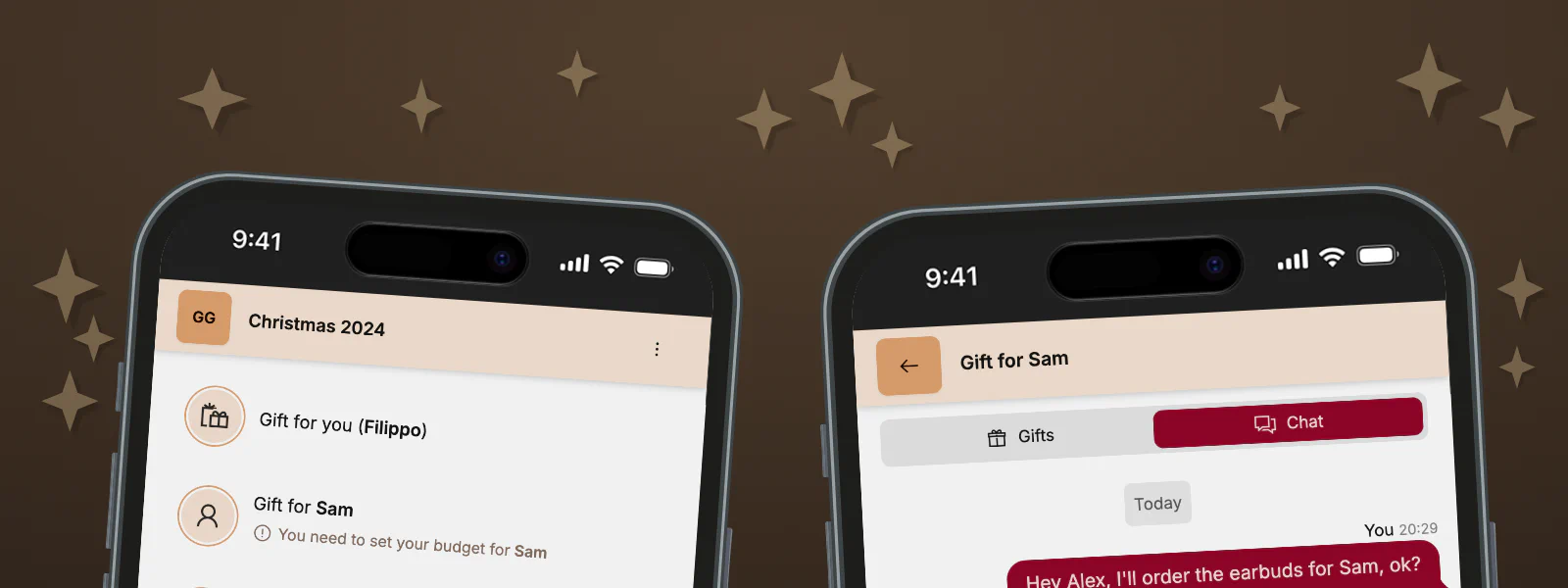
Every Christmas, my extended family gets together. Gathering around the Christmas tree with 10 people is great, but getting gifts for so many people is really stressful!
To make things simpler, we decided to do a form of Secret Santa that is fair.

In this example, Alex is responsible for Sam. Even though her budget is only 5€, she can buy gifts using the full 30€ budget. This means that everyone gets gifts for roughly the same value, no matter if their patron is a school kid or has deep pockets. The pooled budget allows you to buy a single, more expensive but useful gift instead of many small gifts.
# Group Gifts
This year, instead of organizing Secret Santa manually, I created a web app.
It works like this:
- Create a group and invite all your family members or friends
- Write your wishlist and set your budget for everyone
- Chat about other people’s wishes
- Everyone only buys gifts for the person they were assigned to


# Tech Stack
If you’re interested, here’s the tech stack I used to create group gifts
Continue reading to find out about the challenges I faced while developing this app.
# Challenges
I started developing group gifts in November of 2024. After just 8 days, the first version was ready to deploy and test. In the following days, I added more features (like German translations), improved the UX, and squashed many bugs.
It wasn’t always easy, so I want to share what I learned.
# Balance Calculation
At first glance, I thought calculating the balance couldn’t be that hard. After all, the data was already there. I would tally up the expenses and budgets and use that to compute who owes who.
Turns out it’s harder than it looks! The balance should be done for each ‘gifts for member’ separately. I ended up writing dozens of test cases for the balance calculation. The two cases you have to cover are:
If the group overspent for a member:
Members have the ability to mark their budget as flexible, which means they will cover any overspend. If multiple members have flexible budgets, the overspend is split between them. If no one has a flexible budget, the overspend is covered by the patron (the member who is responsible for this member).If the group underspent for a member:
The underspend is split between everyone. However, it has to be distributed proportionally to the budget. So, let’s say the underspend is 100€, member A had a budget of 990€, and member B of 10€. Member A should “get back” 99 of the 100€ underspend.
If the expenses match the budget exactly, it’s easy! Calculate each member’s balance and create ’transactions’ by moving money between unbalanced members until everyone is even. I had some floating point calculation issues in the beginning, so what I did is operate on full cents: cents = Math.round(100 * balance). Of course, this is not a banking system, so losing a few cents because of rounding is not that bad.

There’s an xkcd for everything. In the previous year, I used Excel to calculate the budget. Calculating everything took me the better part of an evening, but the dozens of hours I poured into this project will likely never pay off. That’s okay though, I spent time on this project because it’s fun.
# Responsive Design
As always, I started by thinking through what steps and components there are in this system. Then, I drew some very rough sketches. I use my Remarkable 2 to draw – it’s great for stuff like this because you can select lines and move them around as needed.

Now, you might say these look absolutely awful. That’s right, but that’s intended! When designing the concept for a user interface, I don’t mind drawing small boxes with crooked lines. It helps me ignore detail early on and I’ve learned it from this great article:
I’ve always preferred sketching UIs with an as-thick-as-I-can-find Sharpie over a thin ballpoint pen or finely sharpened pencil.
— Jason Fried, Sketching with a sharpie
As you can see, my sketches focus on the mobile view, because I knew that most people would use this on their phones. But I wanted to make sure that everything looks great on desktop, too.
Try and spot all the layout changes as the window is resized. I frequently used Tailwind’s media query syntax, for example to switch from a flex-column on small displays to a flex-row for larger screens.
# Real-time chat
When my family first tried this version of Secret Santa, we created one WhatsApp group for each family member to discuss and coordinate the gifts we’d buy. Of course, Bob isn’t in the group “Gifts for Bob”, to keep the secrets. ‘Group Gifts’ automatically creates a chat for each member’s gift. So if you create a group with Bob and Alice, each member sees two other chats, but not their own.
I have quite a bit of experience with WebSockets, from my previous projects (one, two). When the website loads, it opens a WebSocket connection at /api/chat/connect. Authentication works via httpOnly cookies, so the WebSocket server knows which user is trying to connect and stores the handle in a map. When a chat message is sent, the server gets all members in this chat from MongoDB and sends the message to the respective active WebSocket clients.
Check out the WebSocket server and client on GitHub. I use a Pinia store to manage the chat messages state.

Designing the chat was quite easy, thanks to DaisyUI’s components. I used the chat component, with some minor tweaks. Instead of displaying each message’s author name and time, I group messages that were sent within a short time. All major messengers do this because otherwise, it looks weird 😄.
# Notifications
What use is a chat without notifications?
In general, notifications are known for being fickle – and web notifications even more so. Using Firebase Cloud Messaging promises to make it easy to ‘send notifications across platforms’, but – spoiler alert – it’s not as easy as I had hoped.
There are a bunch of npm packages with similar names and purposes. Some have good documentation, others not so much. In the end, it just took a lot of trial and error to figure out what works.

You can also take a look at the code responsible for handling notifications:
- Frontend: useNotifications, service worker
- Backend: receive token, db schema, send notification
# More
- Check out quando events my website for scheduling a time to meet with busy friends, or read how I created it
- Read how I redesigned this website
- Learn more about me, my interests, skills, and projects