Filip Hráček / text /
I wrote a command-line poker game where you play against bots to train real-world skills. This article is about the why and the how.
To save you the hassle of installing the game, you can run it through ssh on my server:
ssh play@poker.filiph.net
This will drop you straight into the game. (You’ll have to type yes the first time to accept my server’s public key fingerprint.) But you can also install the game via brew or pub, or by downloading a standalone executable. More in the GitHub repo.

If you've been following me, you probably know I’m all about non-immersive games. The short of it is that:
- Play has always been humanity’s greatest learning tool. It’s fantastic at teaching methods, concepts, ways to think. (I've written about this previously.)
- BUT, like with everything, our natural fascination with games can be hijacked. A bunch of us spend time playing games that don’t actually give us all that much. Some of my fellow gamers will furiously disagree, but sinking significant amounts of time into any one game is a net negative. (But because some games are so damn optimized for engagement and addiction, it’s hard to resist.)
I say it’s more important than ever to build games that are honest, and don’t hoard your attention past their usefulness.
So far, I've built a text-based D&D simulator, a few web-based experiments, and these past few years I've been working on a 2D tactical mech simulator. I have a list of similar projects for the future.
The non-immersive game that’s the subject of this article, pokerd, has just been a short, welcome distraction from my regular contract work, and the aforementioned giant robot game.
Why command line?
This is not my first attempt at a modern command line game, and probably won’t be the last. Terminals are obviously never going to be mainstream, and they have severe performance and fidelity issues, but they have their advantages, too:
- A significant audience of players use CLI every day. And they happen to be some of the smartest players out there.
- A terminal game, just by being played in the terminal, can teach valuable skills and familiarity with one of the most powerful tools in existence: the command line.
- The terminal imposes constraints that can be welcomed by some players. When playing a terminal game, you know that it won’t be taxing your computer all that much, that you can expect a relatively calm experience, and that you probably won’t need a mouse (so you can comfortably play on a laptop).
- For some games, the ability to scroll up to see what happened previously is really useful.
- Let’s face it, a terminal game makes it much easier for you to conceal the fact that you’re playing a game when in a meeting (unlike a 3D FPS, for example).
Why poker?
Despite its constraints, the terminal can support a variety of game genres. Strategy games, RPGs, arcades, puzzles, adventure games — you’ll find great examples of CLI games of any genre. So why poker?
- Card games are familiar. You only need to show 10♣ or Q♥ and people get it.
- Poker, in particular, is one of the most universally known card games.
- The Texas Hold ’em variant of poker is the most popular for a reason. My favorite book on game design, Designing Games by Tynan Sylvester, spends a whole section on how brilliantly balanced Texas Hold ’em is — despite the book being primarily about video games.
- In poker, the player only has about 5 verbs (that’s game designer lingo for “available actions”, roughly): check, call, raise, fold, all-in. This translates well to a keyboard-only interface (contrast and compare with chess, for example). And yet, even with this short list, the tactical decisions are almost infinitely rich.
- Before you can play poker on any decent level, you have to learn some basics. The rules around betting, the hand rankings, the feel for what makes a strong hand and what makes a weak one. This, to me, calls for a “trainer”-type game, where you play on a computer to get some familiarity, but then really play with friends, in person. That’s the real goal of my project.
The TUI
Modern terminals can do a lot. Thousands of colors, Unicode characters and fast full screen refreshes can combine into an almost desktop-game-like experience. You could imagine a version of pokerd that shows large cards, animations, maybe even opponent faces.
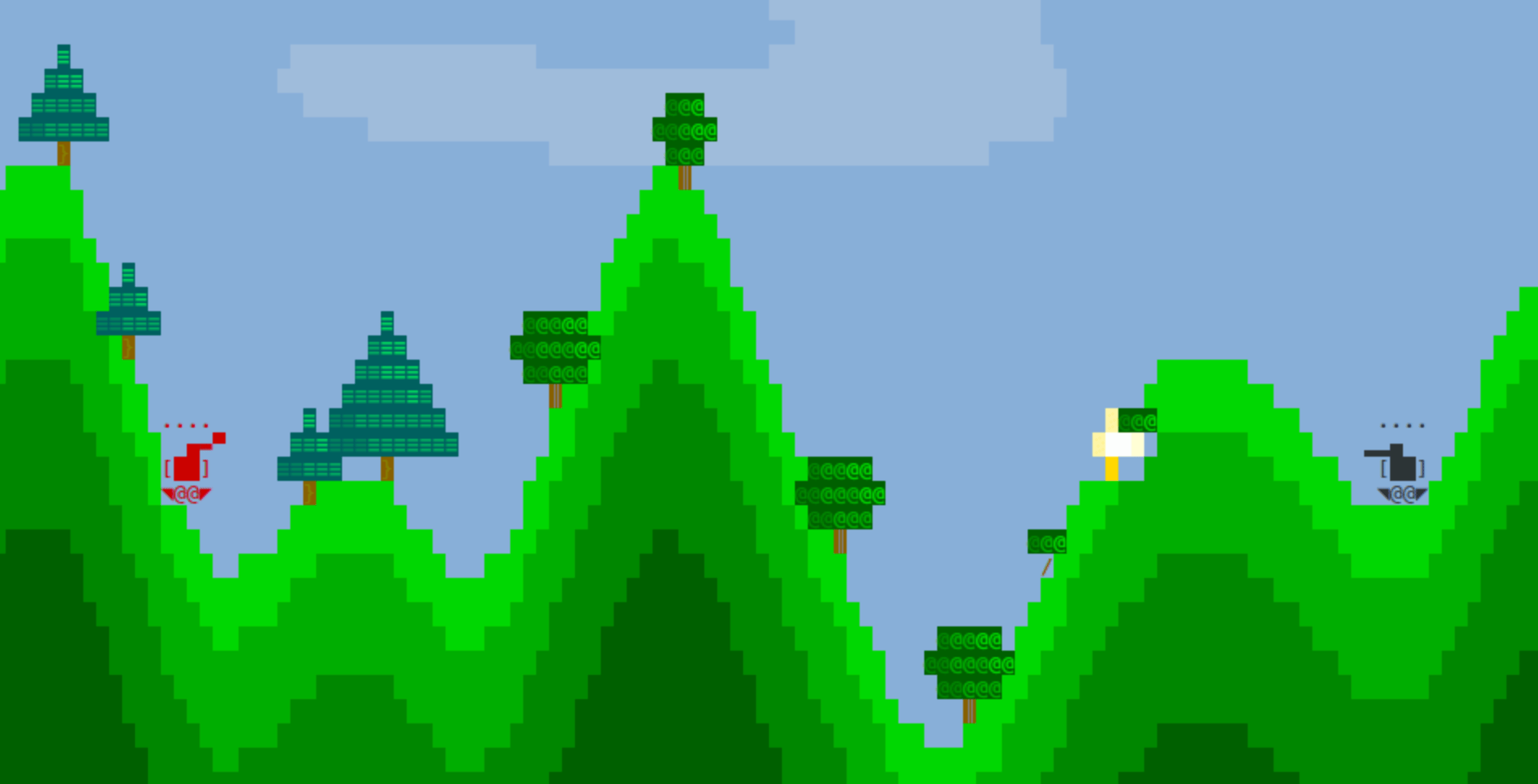
But that’s not the direction I wanted to take. While it would be an interesting technical challenge, it would also clearly be using the wrong tool for the job.
Instead, I opted for a program that mostly just adds lines of text, without ever clearing the screen, so that you can scroll up to see the game’s history. I do use ANSI to rewrite stuff, but only for tiny menus (2 lines max).
I also mostly stay away from color. I tried using color to make cards stand out, and to differentiate suits (hearts, clubs, spades, diamonds) but the TUI felt too busy and somehow less appealing. I may come back to color but I don’t think it’s an automatic win.
The only “animation” I have is the gradual “write on” effect. It helps with pacing and adds interest to the TUI, but it’s really a very small thing. (That doesn’t mean it was easy to get right. The speed varies for different parts of the TUI, and tweaking the exact setting took me a while.)
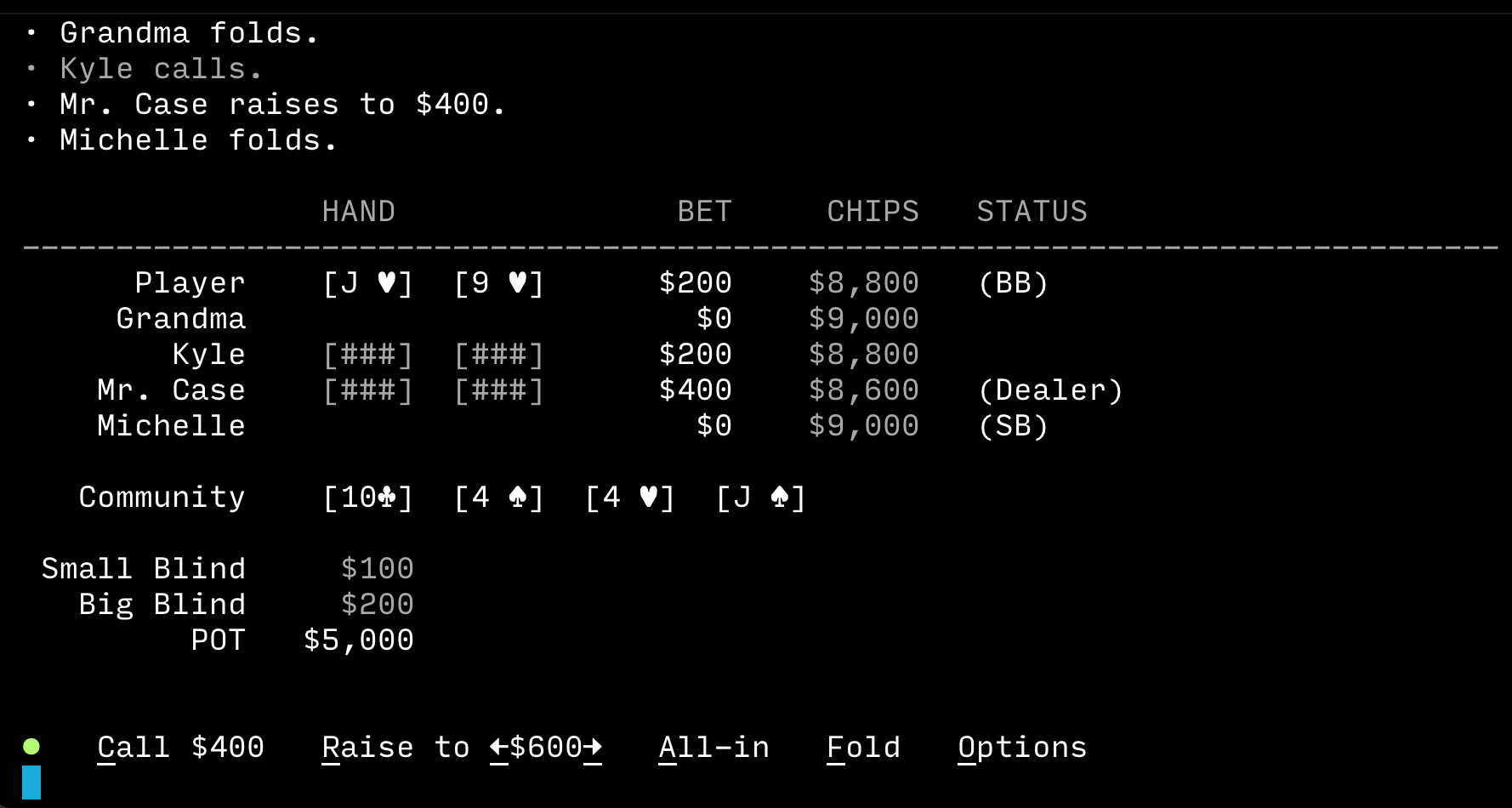
The “table” view is heavily inspired by a CLI poker game by qelery (also open source on GitHub). It looks very busy at first but once one gets used to it, it has all the information you need at a glance.
The mechanics
This is a straight implementation of Texas Hold ’em poker. You enter a tournament, which you can leave after each round, and which ends when one player takes all the money and wins the whole thing.
You can obviously check, call, bet, raise, fold, or go all-in. I also added a little table of hand rankings for reference, and I hope to add more tutorial content for the folks who need it.
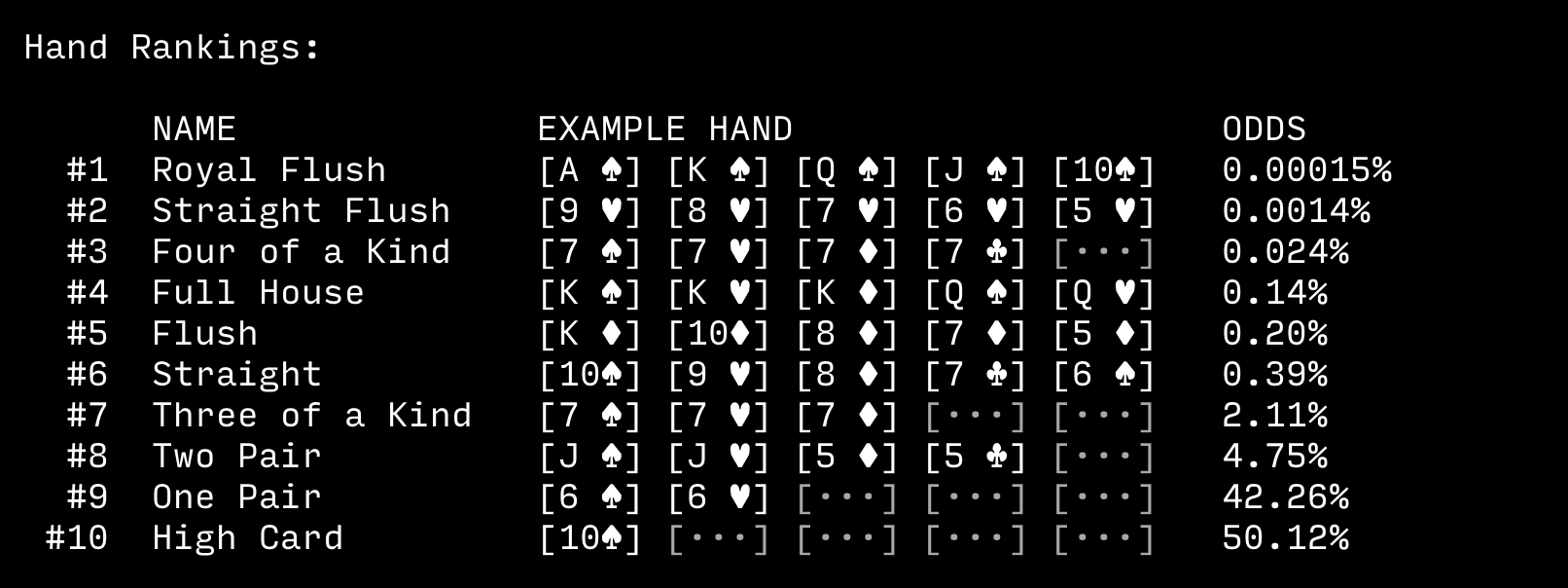
I considered implementing telltales for the NPC players (verbal tics, timing hesitation, etc.) but decided against it. Reading of opponents is an important part of real poker but it doesn’t translate well to a video game, and I’d rather that people playing my game learn the basics at a computer and then, when ready, go play with actual other people.
In the end, the NPC players in my game don’t even have barks (little fragments of dialog, like “look who’s feeling lucky!”). It felt too much. I opted to keep the game focused on hard facts.
The AI
What I did want for my game was a constant cast of NPC players. You always play against the same four computer opponents, and each one has their own play style. This is in contrast to many other computer poker games where you play randomized AIs - basically just the same NPC but with varying error rates. My approach of having distinct player archetypes is not that sophisticated but it does play a role, in a way that teaches the player a bit (not only) about poker.
There is no difficulty setting. I’m pretty sure most people will be able to win some tournaments as soon as they understand the basics of Texas Hold ’em strategy. But you can always strive for more consistency in winning, and try more advanced strategies like the rule of 4 and 2.
Nevertheless, it was important for me to tune the NPC player strategies so that they have their personality but also are almost equally strong. This meant tuning the various weight and thresholds until the tournaments played out the way I wanted them. For this reason, I implemented a self_play tool which pits the NPCs against each other in tens of tournaments, hundreds of rounds, and gathers a bunch of stats. For this, I implemented a stream of GameEvents which is ignored during normal play, but is listened to by self_play. I also save these events as a JSONL file that can be analyzed later, possibly with the help of an LLM.
{“event”:“action”,“player”:“Mr. Case”,“move”:“raised”,“playerCards”:“Kd Ad”,“communityCards”:“Jd Tc Ks 6s Js”,“winProb”:0.808,“pot”:8800,“lastBet”:400,“callAmount”:200,“bet”:600}
{“event”:“action”,“player”:“Kyle”,“move”:“raised”,“playerCards”:“Jh 9d”,“communityCards”:“Jd Tc Ks 6s Js”,“winProb”:0.91,“pot”:9200,“lastBet”:600,“callAmount”:200,“bet”:800}
{“event”:“action”,“player”:“Mr. Case”,“move”:“called”,“playerCards”:“Kd Ad”,“communityCards”:“Jd Tc Ks 6s Js”,“winProb”:0.854,“pot”:9600,“lastBet”:800,“callAmount”:200,“bet”:800}
{“event”:“win”,“player”:“Kyle”,“playerCards”:“Jh 9d”,“communityCards”:“Jd Tc Ks 6s Js”,“hand”:“Ks Jh Jd Js Tc”,“handRank”:“Three of a Kind”,“pot”:9800}
Since the program uses the Monte Carlo method to estimate probabilities of winning (given the limited information each player has at that time), it actually takes a while to produce this data. Running 50 AI-against-AI tournaments takes about an hour. (I could always opt for a much faster approach, or parallelize what I have, and get the result in a fraction of the time — but this hasn’t been worth the effort.)
The SSH server
Part of the fun of implementing this was in figuring out how to make the game accessible to people. It’s one thing to put a repository on GitHub (here), or even to add a CI/CD script for building binary executable releases (here), but how many people actually go about cloning random people’s repos, let alone downloading executables? Just to play a game?
I still sometimes think about Minecraft’s original approach. In the beginning, anyone was able to play the game by simply going to its website. There was a Java applet right there on the web page which you could click and be in the game almost instantly. No installation, no account, nothing. I’m convinced that this was an important reason for Minecraft’s later success (I think it’s still the most successful game of all time, at least by units sold). The creator was able to put the game — which was pretty innovative and “indie” for its time — in front of a massive amount of people. Many bounced, but the net was cast wide enough to quickly build a dedicated audience of early players. And having lots of dedicated early adopters is a massive advantage for any project.
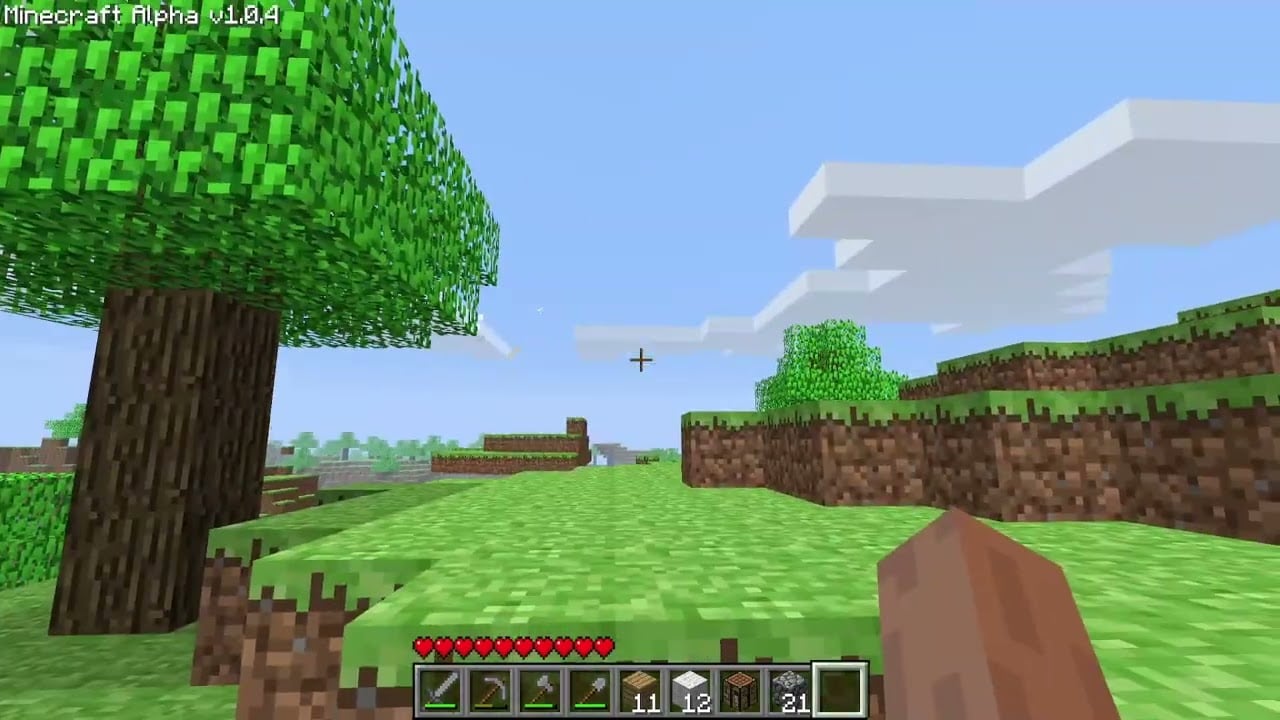
Anyway, the question of how to make a command line game accessible crossed my mind. You can put the game on package repos like brew or pub but that’s still installation and is gated on having the package manager on your device. Some package managers are more popular than others (e.g. apt), but then putting a package there is often nigh impossible (this is by design and for a good reason, of course).
Then I remembered about telnet. Until a few years ago, it was still possible to open a terminal, run telnet towel.blinkenlights.nl and see an ASCII art rendition of Star Wars. That felt magical. And, at some point, telnet was installed on almost every computer.
Well, not anymore — but now we have ssh. Not that pokerd needs any cryptography — it’s a single-player affair with no state except the current game — but the added security doesn’t get in the way either. ssh without a password is functionally equivalent to telnet. You just have to say yes to the fingerprint but that’s a small price to pay, in my opinion.
The question was: how does one set up a public ssh “server”? This, I didn't know, but — let’s be honest — this is a great use case for modern LLMs. I’m not a backend person but it turns out this is not that hard if you have a server somewhere and if you keep asking stupid questions.
In the end, I've implemented the following (much of this is new to me but will probably be laughably basic to most readers):
- The VPS server I rent is configured using
ansible, so that there’s a single (almost) idempotent configuration. That means that when I upgrade, or move providers, or simply bork the server, I can run a single command,ansible-playbook, and the server is set up for me. This includes firewall, docker, swap file, but also the various dances one needs to do to allow password-lesssshconnections. - I use Kamal to wrangle services and the tiny websites that run on the VPS. This project, made by the folks from 37signals, automates deployment to “non-cloud”. (Sorry, I don’t have the right terminology here. It’s like
firebase deployoraws s3 syncbut for when you serve the project from your own physical server or a rented VPS, not from a big cloud provider’s datacenter.) Kamal builds a container, uploads it to a registry, connects to your server, provisions SSL, does no-downtime updates, etc. - At its core, the
ssh“service” is just a Docker container that contains thepokerdexecutable (compiled Dart binary) whosesshd_configfile stipulates that theplayuser (the play inplay@poker.filiph.net) runspokerdas their shell. So if you connect to the server asplay, your shell ispokerd(instead of something likebash), and when you quitpokerd, the SSH session ends.
There are, of course, many details on top of the above, but that’s the gist.
Where are the CLI games?
Several times in the past, I've looked for interesting CLI games, and it’s strange to me how few of them there are, at least seemingly. Of course there’s nethack and inform7. You’ll also find a billion CLI Tetrises, I’m sure. But what other games do nerdy developers like myself play in the terminal? Is it a dead genre?
I remember learning about Taipan! (wikipedia) a few years back. It’s a CLI game from 1979 that is a bit like Sid Meier’s Pirates! — in fact I would be very surprised if Sid Meier didn't add the exclamation mark to his game as a nod to Taipan!. The BASIC code for Taipan! is available (here). It’s still fun to play, although, hey, it’s a BASIC game from 47 years ago. So don’t get your hopes up. But I had a refreshing little game session with this absolute ancient relic of a game.
I’m pretty sure I’m missing some important CLI games — contemporary or otherwise. I don’t have a comment system here but please feel free to reach out to me by email, or via Mastodon or Discord (links here).
And of course I’d be interested to get feedback on pokerd. Play via ssh play@poker.filiph.net or install it.
— Filip Hráček
June 2026