esm.sh allows you to import JavaScript modules from http URLs, no installation/build steps needed.
import * as mod from "https://esm.sh/PKG[@SEMVER][/PATH]";
With import maps, you can even use bare import specifiers instead of URLs:
<script type="importmap">
  {
    "imports": {
      "react": "https://esm.sh/react@19.2.0",
      "react-dom/": "https://esm.sh/react-dom@19.2.0/"
    }
  }
</script>
<script type="module">
  import React from "react"; // → https://esm.sh/react@19.2.0
  import { render } from "react-dom/client"; // → https://esm.sh/react-dom@19.2.0/client
</script>
More usages about import maps can be found in the Using Import Maps section.
Supported Registries
- NPM:
// Examples import React from "https://esm.sh/react"; // latest import React from "https://esm.sh/react@18"; // 18.3.1 import React from "https://esm.sh/react@beta"; // latest beta import { renderToString } from "https://esm.sh/react-dom/server"; // sub-modules - JSR (starts with
/jsr/):// Examples import { encodeBase64 } from "https://esm.sh/jsr/@std/encoding@1.0.0/base64"; import { Hono } from "https://esm.sh/jsr/@hono/hono@4"; - GitHub (starts with
/gh/):// Examples import tslib from "https://esm.sh/gh/microsoft/tslib"; // latest import tslib from "https://esm.sh/gh/microsoft/tslib@d72d6f7"; // with commit hash import tslib from "https://esm.sh/gh/microsoft/tslib@v2.8.0"; // with tag - pkg.pr.new (starts with
/pr/or/pkg.pr.new/):// Examples import { Bench } from "https://esm.sh/pr/tinylibs/tinybench/tinybench@a832a55"; import { Bench } from "https://esm.sh/pr/tinybench@a832a55"; // --compact
Transforming .ts(x)/.vue/.svelte on the Fly
esm.sh allows you to import .ts(x), .vue, and .svelte files directly in the browser without any build steps.
import { Airplay } from "https://esm.sh/gh/phosphor-icons/react@v2.1.5/src/csr/Airplay.tsx?deps=react@19.2.0";
import IconAirplay from "https://esm.sh/gh/phosphor-icons/vue@v2.2.0/src/icons/PhAirplay.vue?deps=vue@3.5.8";
Specifying Dependencies
By default, esm.sh rewrites import specifiers based on the package dependencies. To specify the version of these
dependencies, you can add ?deps=PACKAGE@VERSION to the import URL. To specify multiple dependencies, separate them with commas, like this: ?deps=react@18.3.1,react-dom@18.3.1.
import React from "https://esm.sh/react@18.3.1";
import useSWR from "https://esm.sh/swr?deps=react@18.3.1";
Aliasing Dependencies
You can also alias dependencies by adding ?alias=PACKAGE:ALIAS to the import URL. This is useful when you want to use a different package for a dependency.
import useSWR from "https://esm.sh/swr?alias=react:preact/compat";
in combination with ?deps:
import useSWR from "https://esm.sh/swr?alias=react:preact/compat&deps=preact@10.5.14";
Bundling Strategy
By default, esm.sh bundles sub-modules of a package that are not shared by entry modules defined in the exports field of package.json.
Bundling sub-modules can reduce the number of network requests, improving performance. However, it may result in repeated bundling of shared modules. In extreme cases, this can break package side effects or alter the import.meta.url semantics. To prevent this, you can disable the default bundling behavior by adding ?bundle=false:
import "https://esm.sh/svelte?bundle=false";
For package authors, it is recommended to define the exports field in package.json. This specifies the entry modules of the package, allowing esm.sh to accurately analyze the dependency tree and bundle the modules without duplication.
{
  "name": "foo",
  "exports": {
    ".": {
      "import": "./index.js",
      "require": "./index.cjs",
      "types": "./index.d.ts"
    },
    "./submodule": {
      "import": "./submodule.js",
      "require": "./submodule.cjs",
      "types": "./submodule.d.ts"
    }
  }
}
Or you can override the bundling strategy by adding the esm.sh field to your package.json:
{
  "name": "foo",
  "esm.sh": {
    "bundle": false // disables the default bundling behavior
  }
}
You can also add the ?standalone flag to bundle the module along with all its external dependencies (excluding those in peerDependencies) into a single JavaScript file.
import { Button } from "https://esm.sh/antd?standalone";
You can disable the default transforming/bundling behavior by adding ?raw query to the import URL.
import { render } from "https://esm.sh/preact?raw";
The
?rawquery is useful when you want to import the raw JavaScript source code of a package, as-is, without transformation into ES modules.
Tree Shaking
By default, esm.sh exports a module with all its exported members. However, if you want to import only a specific set of
members, you can specify them by adding a ?exports=foo,bar query to the import statement.
import { __await, __rest } from "https://esm.sh/tslib"; // 7.3KB
import { __await, __rest } from "https://esm.sh/tslib?exports=__await,__rest"; // 489B
By using this feature, you can take advantage of tree shaking with esbuild and achieve a smaller bundle size. Note, this feature doesn't work with CommonJS modules.
Development Build
import React from "https://esm.sh/react?dev";
With the ?dev query, esm.sh builds a module with process.env.NODE_ENV set to "development" or based on the
condition development in the exports field. This is useful for libraries that have different behavior in development
and production. For example, React uses a different warning message in development mode.
ESBuild Options
By default, esm.sh checks the User-Agent header to determine the build target. You can also specify the target by
adding ?target, available targets are: es2015 - es2024, esnext, deno, denonext, and node.
import React from "https://esm.sh/react?target=es2022";
Other supported options of esbuild:
- Conditions
import foo from "https://esm.sh/foo?conditions=custom1,custom2"; - Keep names
import foo from "https://esm.sh/foo?keep-names"; - Ignore annotations
import foo from "https://esm.sh/foo?ignore-annotations";
CSS-In-JS
esm.sh supports importing CSS files in JS directly:
<link rel="stylesheet" href="https://esm.sh/monaco-editor?css">
This only works when the package imports CSS files in JS directly.
Web Worker
esm.sh supports ?worker query to load the module as a web worker:
import createWorker from "https://esm.sh/monaco-editor/esm/vs/editor/editor.worker?worker";

// create a worker
const worker = createWorker();
// rename the worker by adding the `name` option for debugging
const worker = createWorker({ name: "editor.worker" });
// inject code into the worker
const worker = createWorker({ inject: "self.onmessage = (e) => self.postMessage(e.data)" });
You can import any module as a worker from esm.sh with the ?worker query. Plus, you can access the module's exports in the
inject code. For example, use the xxhash-wasm to hash strings in a worker:
import createWorker from "https://esm.sh/xxhash-wasm@1.0.2?worker";

// variable '$module' is the imported 'xxhash-wasm' module
const inject = `
const { default: xxhash } = $module
self.onmessage = async (e) => {
  const hasher = await xxhash()
  self.postMessage(hasher.h64ToString(e.data))
}
`;
const worker = createWorker({ inject });
worker.onmessage = (e) => console.log("hash is", e.data);
worker.postMessage("The string that is being hashed");
The
injectparameter must be a valid JavaScript code, and it will be executed in the worker context.
Escape Hatch: Raw Source Files
By default, esm.sh transforms (and bundles if necessary) the JavaScript source code. However, in rare cases, you may want to request JS source files from packages, as-is, without transformation into ES modules. To do so, you need to add a ?raw query to the request URL.
The raw mode works just like other CDN services, unpkg.com(https://unpkg.com/), jsdelivr.net(https://www.jsdelivr.net/), etc.
<script src="https://esm.sh/p5/lib/p5.min.js?raw"></script>
[!TIP] You may alternatively use
https://raw.esm.sh/<PATH>, which is equivalent tohttps://esm.sh/<PATH>?raw, that transitive references in the raw assets will also be raw requests.
Deno Compatibility
esm.sh is a Deno-friendly CDN that resolves Node's built-in modules (such as fs, os, net, etc.), making it compatible with Deno.
import express from "https://esm.sh/express";

const app = express();
app.get("/", (req, res) => {
  res.send("Hello World");
});
app.listen(3000);
Deno supports type definitions for modules with a types field in their package.json file through the
X-TypeScript-Types header. This makes it possible to have type checking and auto-completion when using those modules
in Deno. (link).
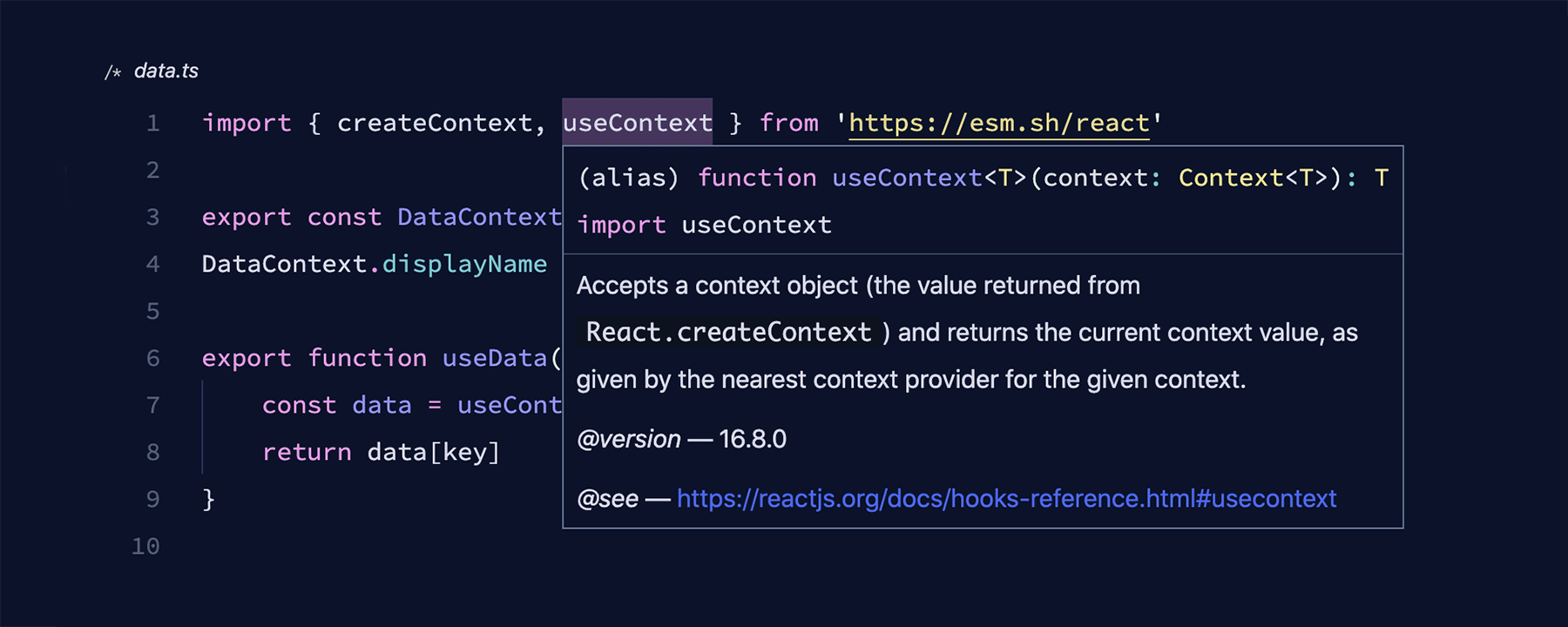
In case the type definitions provided by the X-TypeScript-Types header is incorrect, you can disable it by adding the
?no-dts query to the module import URL:
import unescape from "https://esm.sh/lodash/unescape?no-dts";
This will prevent the X-TypeScript-Types header from being included in the network request, and you can manually
specify the types for the imported module.