Summon, type, done
Ctrl+Alt+Return slides Envy in over whatever you are doing. Type, press Return, and the note is open. Change the Omarchy theme and the window retints in place.
A real capture on the Omarchy desktop: summon, search, open, then omarchy theme set three times. Nothing retouched.
Install Envy
One pacman repository, hosted on GitHub, for x86_64 and aarch64. Add it once and omarchy update brings every new version along with the rest of your system.
From the pacman repository
Add the repository to /etc/pacman.conf. Pick the Server line for your machine; uname -m says which.
[envynote]
SigLevel = Optional TrustAll
# x86_64
Server = https://github.com/skuthus/Envy-Universal/releases/download/repo
# aarch64 (Apple silicon)
Server = https://github.com/skuthus/Envy-Universal/releases/download/repo-aarch64
sudo pacman -Sy envynote
Then launch Envy and flip one switch in Settings for the summon key. Prefer a file? The AppImage and tarball are on GitHub for both architectures.
Or just tell your agent
The README has everything an agent needs: the repository, the package, the Hyprland bind, and the envy skill it installs for later.
Works with Claude Code, Codex, and whatever Omarchy set up as your default agent. Prefer to build it? git clone https://github.com/skuthus/Envy-Universal && cd Envy-Universal/linux && makepkg -si
Follows your theme, even the custom ones
Envy reads the live theme from ~/.local/state/omarchy/current/theme/colors.toml and the font from omarchy font set. Pick one and this page wears it too. Or press T to flip through them.
$ omarchy theme set tokyo-night
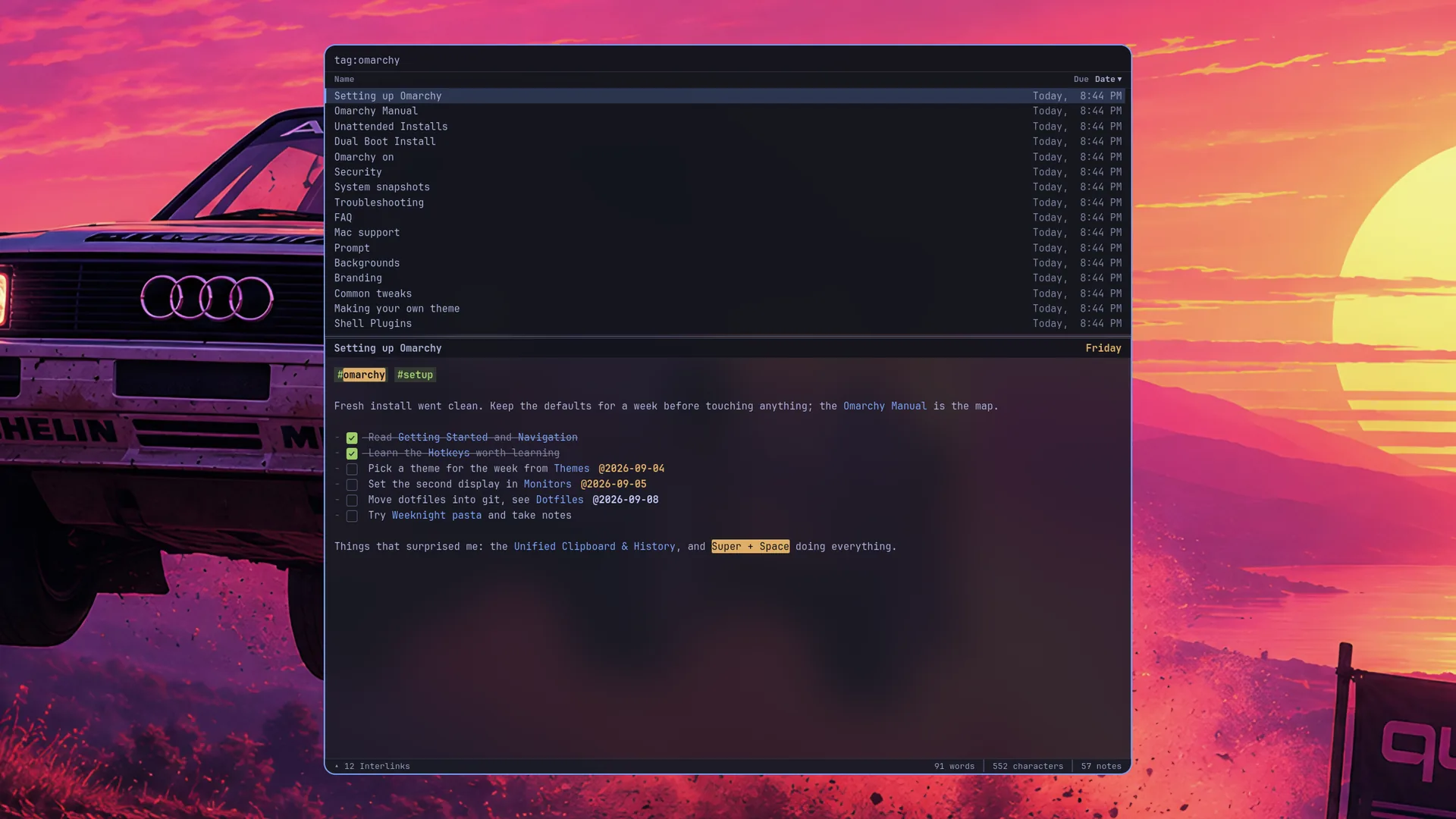
Envy in Tokyo Night. Real captures, one per theme. Prefer a fixed look? Settings → Appearance pins Envious light or dark and any font you name.
Native to Omarchy
Not a port that tolerates Hyprland. Envy is built for the way Omarchy works: a scratchpad, a bar widget, blur, and an agent skill in the package.
Summon
Ctrl+Alt+Return is a Hyprland bind. Envy lives on the special:envy scratchpad, floating and centred, and slides in over whatever you're doing. Press it again and it's gone. Not running yet? The same chord launches it.
An eye in the bar
The Mac's menu bar eye is an Omarchy bar widget here, installed on first launch. Open while the window is on screen, closed while hidden. Click it to summon, right-click for the menu. Move it with omarchy bar move.
Hyprland blur
Surfaces are translucent, so Hyprland's blur does the rest. Envy overrides the default window opacity so text stays as sharp as an opaque terminal.
Agent-ready
The package installs an envy skill for your coding agent: every setting, every shortcut, every colour token, and envynote config check to validate an edit. Ask your agent to make Envy match a theme and it knows how.
One codebase with Windows
Linux and Windows build from the same tree, Envy-Universal: the same Rust envy-core, the same editor, the same config file. The Mac original is its own app. One vault, three platforms.
Nothing phones home
No account. No sync service. No telemetry. No network calls at all. Airgap-friendly by construction, not by promise.
Notes the Notational way
Inspired by the legendary Notational Velocity: one input that searches, creates, and opens. Everything else stays in the text, so it survives without Envy.
One box
Type to filter as you type. Return opens the top match, or creates a note from what you just typed. Operators narrow it: tag:, inbox:, @friday.
Flat files
Every note is plain Markdown, UTF-8, in ~/Documents/Envy or any folder you point it at. Readable by anything, forever. Sync it with whatever you already trust.
Two panes
Ctrl+\ splits the editor in two, side by side or stacked, with a divider you can drag. Right-click a note → Send to Split Pane. The same note open in both panes mirrors every edit.
Wiki-links and embeds
[[Note]] links. ![[Note]] pulls another note's live content inline. Rename a note and every link to it is rewritten across the vault.
Tasks and dates
[ ] anywhere on a line is a checkbox. @2026-09-05 or @monday is a due date. Both live in the text itself, so both survive without Envy.
Your font, your colours
Omarchy's theme and font by default. Or pin Envious light or dark, name any installed font, and edit every colour token in ~/.config/envy/config.md. The Settings panel writes the same file.
Setup is one switch
Wayland has no app-registered global hotkeys, so the summon is a Hyprland bind, and the package ships it.
In Settings
Launch Envy, open Settings → System, and turn on Bind Ctrl+Alt+Return in Hyprland. That adds one guarded line to ~/.config/hypr/bindings.lua and reloads Hyprland. Turn it off and the line goes away. A line you wrote yourself is never touched.
Every setting, including this one, lives in ~/.config/envy/config.md. The Settings panel writes the same file your agent can edit.
Or by hand
It is the same line. The file it loads floats the main window as a centred panel, drops Omarchy's default opacity so text stays sharp, and binds the summon to envynote --toggle.
-- ~/.config/hypr/bindings.lua
pcall(dofile, "/usr/share/envy/hyprland-envy.lua")
Ctrl+Alt+C centres the window after you have dragged it about.
Specifications, complete
Everything you would check before installing, in one place.
- Version
- 1.1.1
- Requires
- Omarchy 3+, or Arch with Hyprland
- Architectures
- x86_64, aarch64
- Runtime
- webkit2gtk-4.1, gtk3
- Packages
- pacman repo, AppImage, tarball
- License
- MIT, source on GitHub
- File format
- Markdown, UTF-8
- Storage
- One folder, chosen by you
- Network
- None